
PowerLocus B086WP3HBD
PowerLocus Kids Bluetooth Headphones User Manual
Brand: PowerLocus
Model: B086WP3HBD
Introduction
Thank you for choosing PowerLocus Kids Bluetooth Headphones. These headphones are designed with children in mind, offering a safe and enjoyable audio experience with features like volume limitation, comfortable fit, and versatile connectivity. This manual provides detailed instructions for setup, operation, maintenance, and troubleshooting to ensure optimal performance and longevity of your headphones.
What's in the Box

Image: Contents of the PowerLocus Kids Bluetooth Headphones box. This includes the pink headphones, a micro USB charging cable, an Aux audio cable with microphone, and a carrying pouch.
- PowerLocus Kids Bluetooth Headphones
- Micro USB Charging Cable
- Aux Audio Cable with Microphone
- Carrying Pouch
Product Features
- Bluetooth 5.3 Connectivity: Ensures a stable wireless connection with a range of up to 39 feet (12 meters).
- 85dB Volume Limitation: Designed to protect children's hearing by limiting the maximum volume output.
- Multi-Mode Operation: Supports wireless Bluetooth, wired (via Aux cable), and Micro SD card playback.
- Long Battery Life: Provides over 10 hours of continuous playback on a single charge.
- Built-in Microphone: Allows for crystal clear calls in both wireless and wired modes.
- Foldable and Extendable Design: Offers portability and adjustable fit for various head sizes.
- LED Lights: Integrated LED lights on the earcups can be turned on or off.
- Comfortable Design: Features super soft protein foam leatherette earmuffs and a padded headband for extended comfort.
- Universal Compatibility: Works with smartphones, tablets, laptops, MP3 players, PCs, and TVs.

Image: Close-up view of the headphones, emphasizing the soft memory foam earmuffs, padded headband, and adjustable sizing for comfort.

Image: The headphones folded compactly, illustrating their portability and ease of storage in a backpack.
Setup
Bluetooth Pairing
- Ensure the headphones are charged.
- Press and hold the Power button (usually the multi-function button) on the headphones until the LED indicator flashes, indicating pairing mode.
- On your device (smartphone, tablet, laptop), go to Bluetooth settings and turn Bluetooth on.
- Search for "PowerLocus Buddy" or a similar name in the list of available devices.
- Select the headphones to connect. Once connected, the LED indicator will typically show a solid blue light.
Wired Connection
- Locate the 3.5mm AUX port on the headphones.
- Insert one end of the provided Aux audio cable into the headphone's AUX port.
- Insert the other end of the Aux cable into the 3.5mm audio jack of your device.
- The headphones will automatically switch to wired mode.
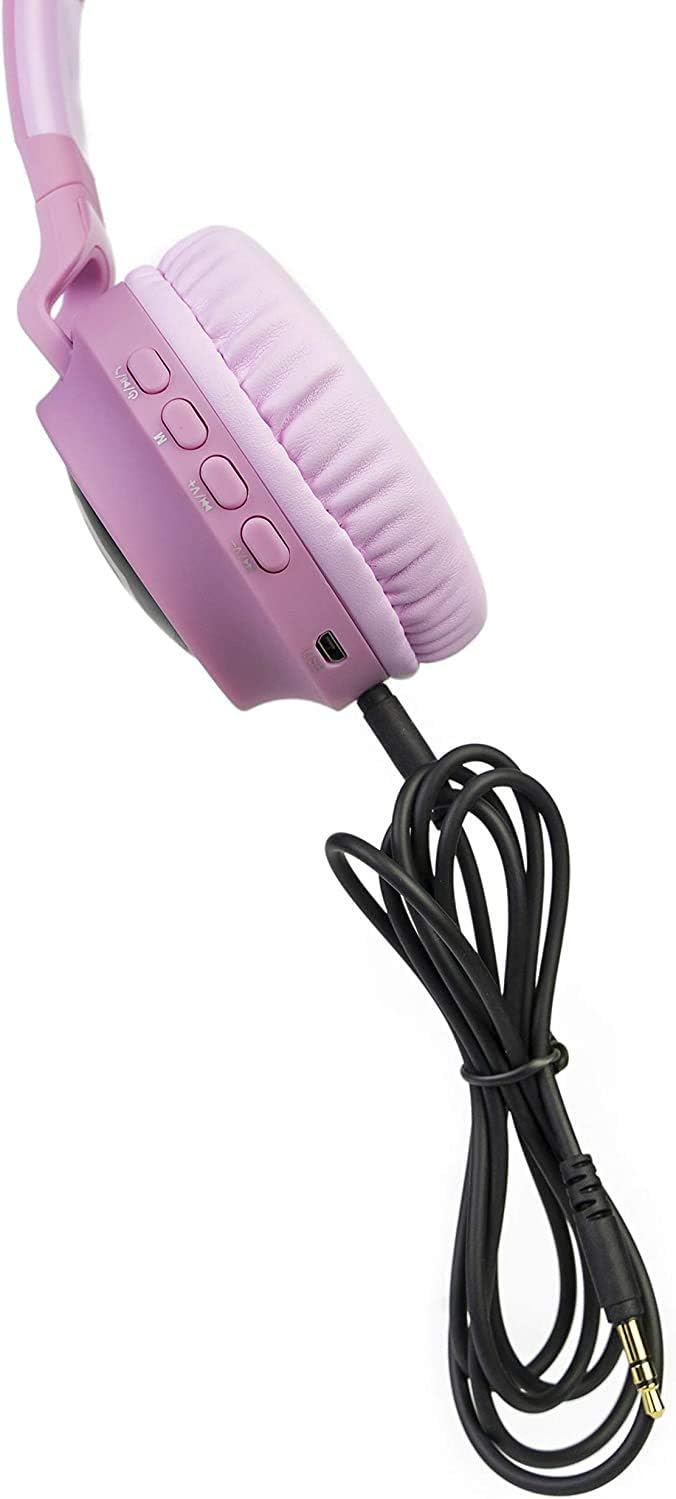
Image: The headphones connected using the auxiliary cable, demonstrating the wired listening option.
Operating Instructions
Controls Overview

Image: A close-up of the headphone earcup, labeling all control buttons and ports for easy identification and use.
- Power On/Off: Press and hold the multi-function button.
- Play/Pause: Short press the multi-function button.
- Volume Up/Next Track: Short press '+' for volume up, long press '+' for next track.
- Volume Down/Previous Track: Short press '-' for volume down, long press '-' for previous track.
- Answer/End Call: Short press the multi-function button during an incoming call.
- Reject Call: Long press the multi-function button during an incoming call.
- LED Lights Control: Press the dedicated LED light button to cycle through modes or turn off the lights.
- Micro SD Card Mode: Insert a Micro SD card (up to 32GB) into the designated slot. The headphones will automatically switch to Micro SD playback.
Battery Charging
Connect the Micro USB charging cable to the USB charging port on the headphones and to a USB power source. The LED indicator will show charging status (e.g., red while charging, off when fully charged). Charging time is approximately 2.5 hours.
Video: A demonstration of the PowerLocus Kids Headphones, highlighting the 85dB volume limit and various features. This video shows the product's design and functionality, including the charging port and LED lights.
Maintenance
- Cleaning: Use a soft, dry cloth to clean the headphones. Do not use abrasive cleaners or solvents.
- Storage: When not in use, store the headphones in the provided carrying pouch to protect them from dust and damage. Store in a cool, dry place.
- Battery Care: To prolong battery life, avoid fully discharging the headphones frequently. Charge them regularly, even if not in constant use.
- Avoid Water: These headphones are not water resistant. Avoid exposure to water or excessive moisture.
Troubleshooting
| Problem | Solution |
|---|---|
| Headphones do not power on. | Ensure the headphones are fully charged. Connect to a power source and try again. |
| Cannot pair with Bluetooth device. |
|
| No sound or low volume. |
|
| LED lights are not working. | Press the dedicated LED light button to activate them. Ensure the headphones have sufficient battery. |
Specifications
| Feature | Detail |
|---|---|
| Brand | PowerLocus |
| Model | B086WP3HBD |
| Connectivity Technology | Wireless (Bluetooth), Wired (3.5 mm Jack) |
| Wireless Communication Technology | Bluetooth 5.3 |
| Bluetooth Range | 98 Feet (approx. 30 meters) |
| Ear Placement | Over Ear |
| Material | Protein Foam Leatherette |
| Battery Life | 10 Hours |
| Charging Time | 2.5 Hours |
| Item Weight | 5.8 ounces (approx. 164 grams) |
| Frequency Range | 20 Hz - 20,000 Hz |
| Noise Control | Sound Isolation |
| Water Resistance Level | Not Water Resistant |
Warranty and Support
PowerLocus stands behind the quality of their headphones, offering a 24-month hassle-free warranty. For any inquiries or support, please contact PowerLocus customer service. They provide 24/7 customer support and guarantee to repair or replace products within 24 hours if you are not satisfied with the performance.
For further assistance, you may also contact the seller, Sampell, through the platform where the purchase was made.
Related documentsB086WP3HBD


Ask a question about this manual
Ask about setup, troubleshooting, compatibility, parts, safety, or missing instructions. Manuals+ will review the question and use this page’s manual context to help answer it.