
Ingco CJSLI18651-SS
Ingco Brushless Impact Driver User Manual
Model: CJSLI18651-SS
Introduction
This user manual provides essential information for the safe and efficient operation, maintenance, and troubleshooting of your Ingco Brushless Impact Driver. Please read this manual thoroughly before using the tool and retain it for future reference.
Safety Information
WARNING: Read all safety warnings, instructions, illustrations, and specifications provided with this power tool. Failure to follow all instructions listed below may result in electric shock, fire, and/or serious injury.
- Always wear appropriate personal protective equipment, including eye protection, hearing protection, and gloves.
- Keep the work area clean and well-lit. Cluttered or dark areas invite accidents.
- Do not operate power tools in explosive atmospheres, such as in the presence of flammable liquids, gases, or dust.
- Ensure the battery pack is fully charged before use and only use the charger specified by the manufacturer.
- Avoid unintentional starting. Ensure the switch is in the off-position before connecting to battery pack, picking up or carrying the tool.
- Do not force the power tool. Use the correct power tool for your application.
- Disconnect the battery pack from the power tool before making any adjustments, changing accessories, or storing power tools.
- Maintain power tools and accessories. Check for misalignment or binding of moving parts, breakage of parts, and any other condition that may affect the power tool’s operation.
- Keep handles and grasping surfaces dry, clean, and free from oil and grease.
Package Contents
Verify that all items are present and in good condition upon opening the package:
- 1 x Ingco Brushless Impact Driver (Model: CJSLI18651-SS)
- 2 x 2.0Ah Li-Ion Batteries
- 1 x Battery Charger
- 2 x Screwdriver Bits (65mm)
- 3 x Nut Holders
- 1 x Canvas Bag
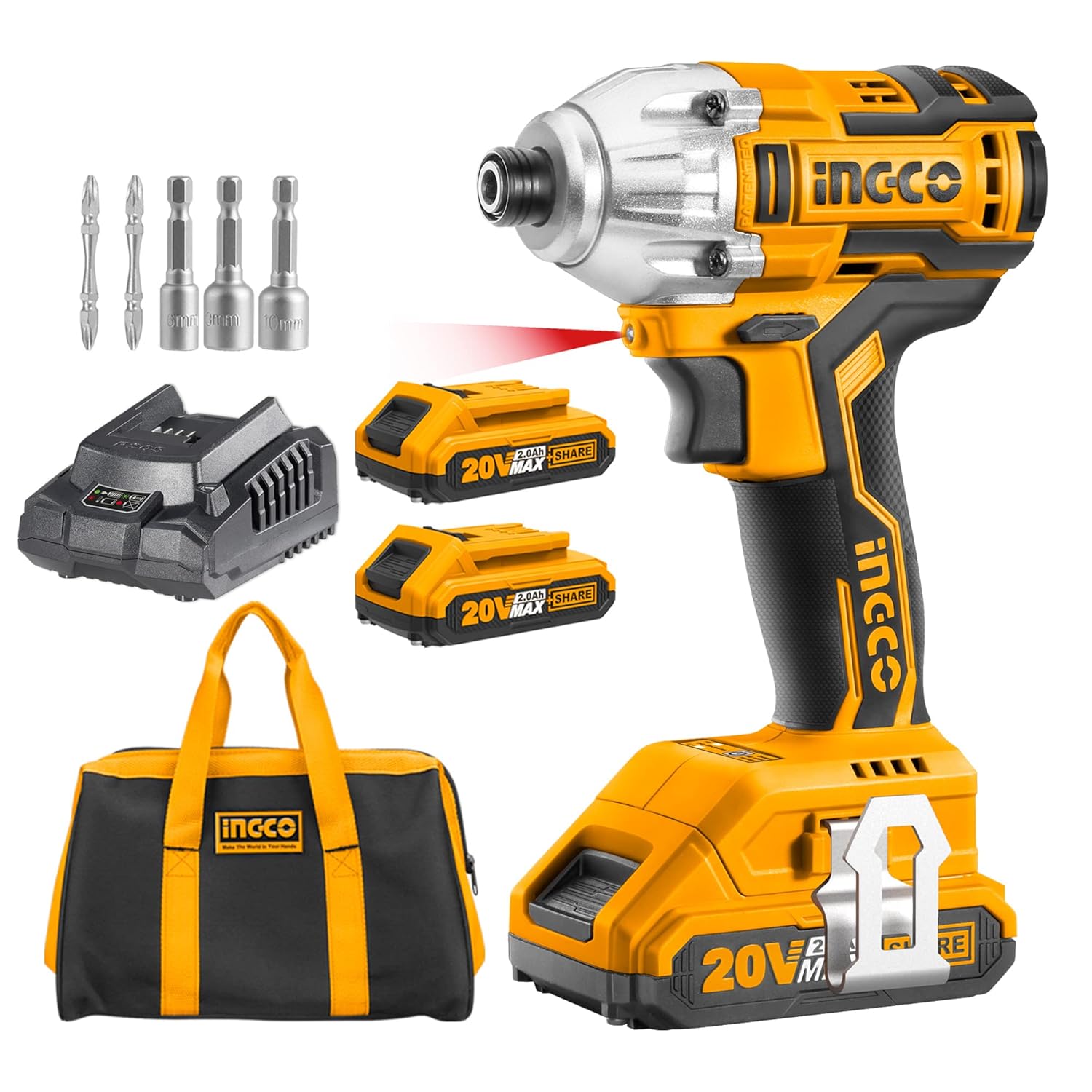
Image: Complete Ingco Brushless Impact Driver kit, including the driver, two batteries, a charger, various bits, and a canvas carrying bag.
Product Overview and Components
Familiarize yourself with the various parts of your Ingco Brushless Impact Driver:

Image: Detailed diagram highlighting key components such as the metal head shell, brushless motor, LED work light, forward/reverse switch, ventilation holes, comfortable grip handle, two-speed regulation, metal hook, charge display, and 2.0Ah Lithium-ion battery.
- Brushless Motor: Provides increased power, efficiency, and a longer tool lifespan compared to brushed motors.
- Metal Head Shell: Durable construction for enhanced tool longevity and heat dissipation.
- LED Work Light: Illuminates the work area for improved visibility in low-light conditions.
- Forward/Reverse Switch: Controls the direction of rotation for driving and removing fasteners.
- Two-Speed Regulation: Allows selection of appropriate speed for different applications.
- Quick Release Chuck: Enables fast and easy bit changes.
- Charge Display: Indicates the remaining battery charge level.

Image: Close-up views demonstrating the 1/4 inch (6.35mm) hex shank chuck, the brushless motor for extended lifetime, the 170Nm maximum torque capability, and the speed control switch with high/low settings and a warning about changing speed while running.
Setup
- Charging the Battery:
- Connect the charger to a standard power outlet (220V-240V~50/60Hz).
- Slide the battery pack onto the charger until it clicks into place.
- The charger indicator light will show the charging status. A full charge typically takes 1 hour.
- Once fully charged, remove the battery from the charger.
- Installing the Battery:
- Align the charged battery pack with the base of the impact driver.
- Slide the battery into the tool until it locks securely into place. Ensure it is fully seated to prevent accidental disconnection during operation.
- Installing/Changing Bits:
- Pull the quick-release chuck collar forward.
- Insert the desired 1/4 inch (6.35mm) hex shank screwdriver bit or nut holder into the chuck.
- Release the collar to secure the bit. Tug lightly on the bit to ensure it is firmly seated.
Operating Instructions
- Powering On/Off:
- To turn on the tool, press the trigger switch. The LED work light will illuminate.
- To turn off the tool, release the trigger switch.
- Adjusting Speed:
- The tool features two-speed regulation. Use the speed selector switch (typically located near the top of the handle) to choose between high and low speeds.
- The trigger switch also provides variable speed control; pressing it further increases the speed.
- Setting Forward/Reverse Rotation:
- The forward/reverse switch is located above the trigger.
- Push the switch to the left for forward (clockwise) rotation to drive fasteners.
- Push the switch to the right for reverse (counter-clockwise) rotation to remove fasteners.
- Center the switch to lock the trigger and prevent accidental operation.

Image: Visual representation of the forward and reverse switch positions, indicating how to select the desired rotation direction for the impact driver.
- Using the Impact Driver:
- Select the appropriate bit for your fastener.
- Position the bit firmly on the fastener head.
- Apply steady pressure to the tool and slowly press the trigger to start. Gradually increase speed as needed.
- The impact mechanism will engage automatically when resistance is met, providing high torque for driving or loosening tough fasteners.

Image: A person wearing safety gear, including a hard hat and gloves, operating the Ingco Brushless Impact Driver to secure a fastener on a metal structure at a construction site.
Maintenance
- Cleaning: Regularly clean the tool's ventilation openings to prevent overheating. Use a soft, damp cloth to wipe down the exterior. Do not use harsh chemicals or abrasive cleaners.
- Battery Care: Store batteries in a cool, dry place away from direct sunlight. Do not store fully discharged batteries for extended periods. Charge them periodically if not in use.
- Bit Maintenance: Keep screwdriver bits and nut holders clean and free of debris. Replace worn or damaged bits to ensure optimal performance and prevent fastener damage.
- Storage: When not in use, store the impact driver, batteries, and charger in the provided canvas bag in a dry, secure location out of reach of children.
Troubleshooting
| Problem | Possible Cause | Solution |
|---|---|---|
| Tool does not start | Battery not charged Battery not properly inserted Forward/reverse switch in center (locked) position | Charge the battery Re-insert battery until it clicks Move switch to forward or reverse position |
| Reduced power/torque | Low battery charge Incorrect speed setting Worn or incorrect bit | Recharge battery Adjust speed setting Replace bit or use appropriate bit for task |
| Tool overheats | Blocked ventilation holes Continuous heavy use | Clean ventilation holes Allow tool to cool down; avoid prolonged heavy use |
| Bit falls out of chuck | Bit not fully inserted Chuck collar not fully released | Ensure bit is fully inserted Ensure chuck collar snaps back into place |
Specifications
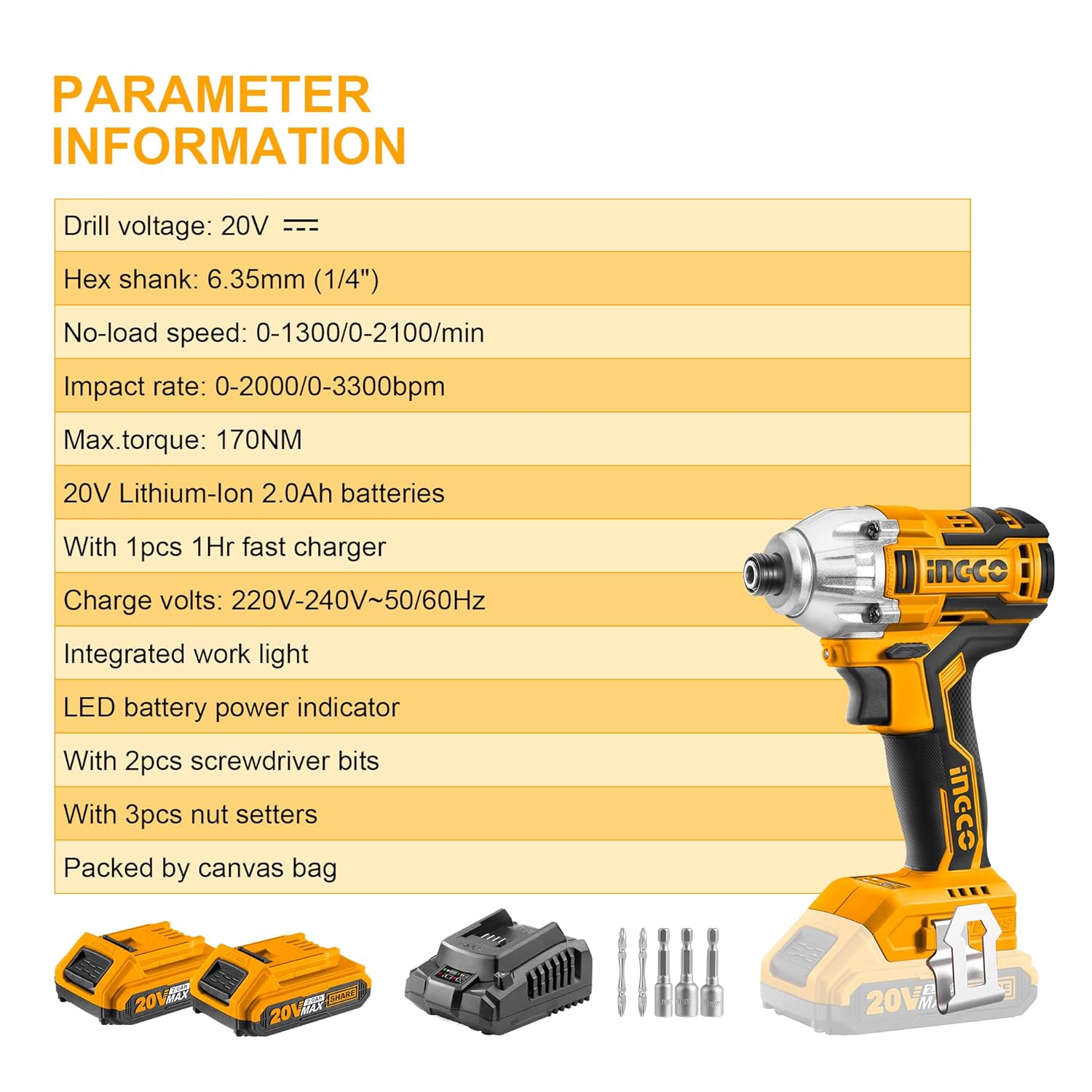
Image: Detailed parameter information for the Ingco Brushless Impact Driver, including voltage, hex shank size, no-load speed, impact rate, max torque, battery type, charger details, and included accessories.
| Feature | Specification |
|---|---|
| Model Number | CJSLI18651-SS |
| Voltage | 20 Volts |
| Power Source | Battery Powered |
| Battery Type | Li-Ion 2.0Ah |
| Maximum Rotational Speed | 900 RPM (Low), 2100 RPM (High) |
| Impact Rate | 0-2000/0-3300 bpm |
| Maximum Torque | 170 Newton Meters |
| Chuck Size | 1/4 Inch (6.35mm) Hex Shank |
| Charger Input | 220V-240V~50/60Hz |
| Charging Time | Approx. 1 hour |
| Item Weight | 1.25 Kilograms |
| Product Dimensions | 38L x 24W x 3.8H Centimeters |
| Material | Metal |
| Special Feature | Reverse Rotation, LED Work Light, Brushless Motor |
Warranty and Support
Ingco products are manufactured to high-quality standards and are guaranteed against manufacturing defects. For specific warranty terms and conditions, please refer to the warranty card included with your product or visit the official Ingco website.
For technical support, spare parts, or service inquiries, please contact Ingco customer service through their official channels. Keep your purchase receipt as proof of purchase for warranty claims.
You can find more information and contact details on the Ingco Store on Amazon.
Ask a question about this manual
Ask about setup, troubleshooting, compatibility, parts, safety, or missing instructions. Manuals+ will review the question and use this page’s manual context to help answer it.