
G-MARK EW100uk
G-MARK EW100 Dual UHF Wireless Microphone System User Manual
Professional Dual UHF Cordless Dynamic Mic Handheld Microphone System
1. Introduction
Thank you for choosing the G-MARK EW100 Dual UHF Wireless Microphone System. This system is designed to provide clear, reliable audio transmission for various applications including karaoke, singing, meetings, parties, church events, DJ performances, weddings, and home KTV setups. It features dual UHF technology with adjustable frequencies, anti-interference capabilities, and a robust design for consistent performance.
Package Contents:

The G-MARK EW100 system comes with all necessary components for immediate use. The image displays the complete package contents, ensuring you have everything required for setup and operation.
- 1 x Wireless Receiver
- 2 x UHF Wireless Handheld Microphones
- 1 x 6.35 mm Audio Cable
- 1 x Power Adapter
- 2 x Antennas
- 2 x Roll Rings (anti-slip)
- 1 x User Manual
2. Product Overview
The G-MARK EW100 system consists of a receiver unit and two handheld wireless microphones. Understanding each component is crucial for proper setup and operation.
Receiver Unit:

This image illustrates the front and back panels of the receiver unit, highlighting key controls and connection ports. The front panel includes the power switch, volume controls for each channel, and an FM button. The back panel features the DC power input, XLR outputs for balanced audio, a 1/4" mix out jack, and antenna jacks.
- Front Panel: Power On/Off button, Volume Control knobs (for each microphone), FM Button, Digital Display for frequency and signal strength.
- Rear Panel: DC 9V-12V Power Input, Balanced XLR Outputs (A and B), Mix Out 1/4" Output Jack, Antenna Jacks (A and B).
Handheld Microphones:

This diagram provides an exploded view of the handheld microphone, detailing its internal structure. It shows the red cotton mesh head, dynamic microphone core, battery compartment, link key, and high-quality tailpipe. This helps in understanding the microphone's construction and for maintenance purposes like battery replacement.
- Microphone Head: Features a red cotton mesh head and a dynamic microphone core with a cardioid pickup pattern.
- Body: Contains the battery compartment and a 'Link key' button for pairing.
- Display: Shows current frequency and battery status.
3. Setup Guide
Follow these steps to set up your G-MARK EW100 Wireless Microphone System.
- Connect Antennas: Screw the two included antennas into the 'ANT-A' and 'ANT-B' jacks on the rear of the receiver unit. Ensure they are securely tightened and positioned upright for optimal signal reception.
- Connect Audio Output: Connect the receiver to your audio mixer, amplifier, or PA system. Use the provided 6.35 mm audio cable for the 'MIX OUT' jack, or XLR cables (not included) for the 'BALANCED OUT A' and 'BALANCED OUT B' jacks for individual channel output. Important: Plug the receiver into the MIC jack only on your audio device, not the AUX jack, to ensure proper signal processing.
- Connect Power: Plug the power adapter into the 'DC 9V-12V' input on the receiver and then into a suitable power outlet.
- Install Microphone Batteries: Unscrew the bottom part of each handheld microphone to access the battery compartment. Insert two AA batteries into each microphone, ensuring correct polarity.
- Power On: Turn on the receiver unit using the power button on the front panel. Then, turn on each handheld microphone. The system is designed for automatic pairing. The receiver will automatically synchronize its frequency with the wireless microphones.
4. Operating Instructions
Learn how to effectively use your G-MARK EW100 system for optimal audio performance.
Frequency Adjustment and Anti-Interference:
The system operates within a selectable frequency range of 520 MHz to 580 MHz. It features an auto-scan function to search for the least interference channel, ensuring clear transmission. Two antennas per channel enhance anti-interference ability.
- Auto Scan: The receiver can automatically find and set the best available frequency. Refer to the receiver's display for current frequency information.
- Manual Frequency Selection: Use the 'Up/Down Selection Keys' on the receiver to manually adjust frequencies if needed.
Sound Quality and Pickup:
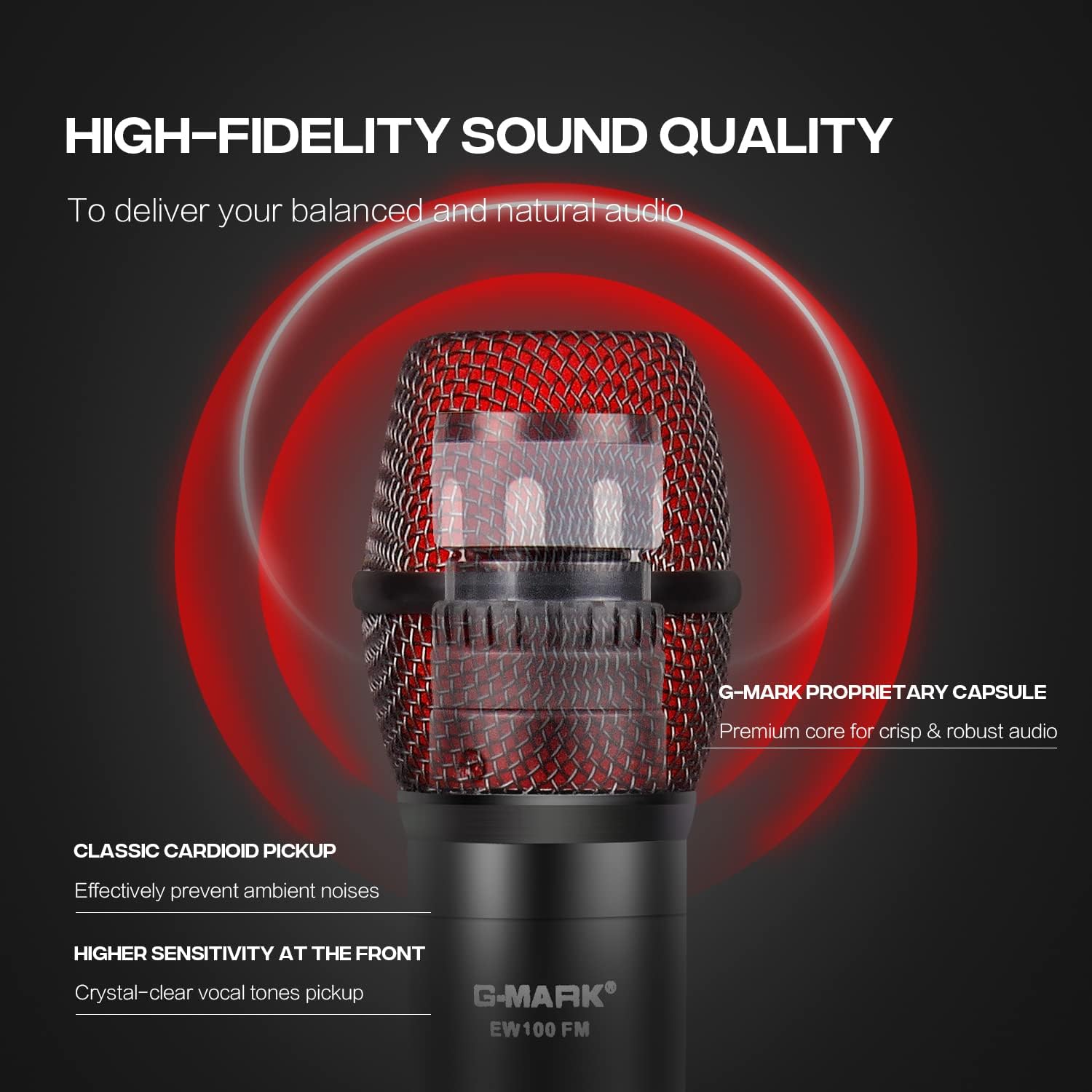
This image focuses on the microphone's head, illustrating the G-MARK proprietary capsule and its cardioid pickup pattern. This design is engineered to deliver balanced and natural audio, effectively preventing ambient noises and providing higher sensitivity at the front for crystal-clear vocal tone pickup.
The dynamic karaoke microphones feature a cardioid pickup pattern, which effectively limits feedback and interference by focusing on sound directly in front of the microphone. This design ensures smooth sound pickup and clear transmission.
- Volume Control: Adjust the individual volume knobs on the receiver for each microphone to achieve the desired audio level.
- Operating Range: The system offers a long operating range of up to 200ft line of sight, suitable for various indoor and outdoor environments.
Compatibility:
This visual guide demonstrates the multiple compatibility options for the G-MARK EW100 system. It shows how the receiver can connect to various audio equipment using its 6.35mm (1/4") MIC input and XLR output ports, making it suitable for integration with karaoke machines, outdoor speakers, power amplifiers, PCs/laptops, active speakers, and mixers.
The system is compatible with a wide range of audio equipment, including amplifiers, audio mixers, karaoke machines, laptops, and personal computers, via Auxiliary, UHF, and XLR connectivity.
5. Maintenance
Proper maintenance ensures the longevity and optimal performance of your G-MARK EW100 system.
- Cleaning: Use a soft, dry cloth to clean the receiver and microphones. Avoid using liquid cleaners or solvents, which can damage the components.
- Battery Replacement: Replace microphone batteries when the battery indicator on the microphone display shows low power. Always use fresh AA batteries. Remove batteries if the microphones will not be used for an extended period to prevent leakage.
- Storage: Store the system in a cool, dry place away from direct sunlight, extreme temperatures, and high humidity.
- Antenna Care: Handle antennas carefully to avoid bending or breaking. Ensure they are fully extended during operation for best signal.
6. Troubleshooting
If you encounter issues with your G-MARK EW100 system, refer to the following common problems and solutions.
- No Sound Output:
- Ensure the receiver is powered on and connected correctly to your audio device's MIC input.
- Check that the microphones are powered on and have fresh batteries.
- Verify that the volume knobs on the receiver and your audio device are turned up.
- Confirm that the microphones are paired with the receiver (see re-pairing instructions below).
- Interference or Poor Sound Quality:
- Ensure antennas are fully extended and positioned correctly.
- Use the auto-scan function on the receiver to find a clear frequency.
- Move the receiver away from other electronic devices that may cause interference (e.g., Wi-Fi routers, cordless phones).
- Ensure the operating distance is within the specified range (up to 200ft line of sight).
- Microphone Not Pairing / Losing Connection:
- Re-pairing Procedure:
- Turn off the affected microphone.
- Open the battery compartment of the microphone.
- Press and hold the small round 'Link key' button inside the battery compartment while simultaneously turning on the microphone.
- Continue holding the button until the microphone's display starts flashing. You can then release the button.
- On the receiver unit, for the corresponding channel (A or B), press and hold the 'Up' and 'Down' selection keys simultaneously.
- Hold these buttons until 'PAIR' appears on the receiver's display and the current frequency of the microphone is shown. The microphone should now be re-paired.
- Check microphone batteries and replace if low.
- Re-pairing Procedure:
7. Specifications
Detailed technical specifications for the G-MARK EW100 Wireless Microphone System.
| Feature | Specification |
|---|---|
| Brand | G-MARK |
| Model Name | EW100us (EW100uk) |
| Microphone Form Factor | Handheld |
| Connectivity Technology | Auxiliary, UHF, XLR |
| Wireless Microphone Frequency | 520 MHz - 580 MHz |
| Number of Channels | 2 |
| Polar Pattern | Unidirectional (Cardioid) |
| Audio Sensitivity | 40 dB |
| Signal-to-Noise Ratio | 40.00 |
| Noise Level | 60 dB |
| Power Source | Corded Electric (Receiver) |
| Number of Batteries (Microphone) | 2 AA batteries required per microphone |
| Material | ABS engineering plastics |
| Color | Black |
| Item Weight | 3.08 pounds (total package) |
| Product Dimensions (L x W x H) | 15.75 x 12.99 x 2.76 inches |
| Recommended Uses | Karaoke, Singing, Streaming, Video Conference |
| Date First Available | April 8, 2020 |
| UPC | 741416158632 |
8. Warranty and Support
For warranty information and technical support, please refer to the documentation included with your product or contact G-MARK customer service. The user manual provided in the package contains specific details regarding warranty terms and contact information.
Ask a question about this manual
Ask about setup, troubleshooting, compatibility, parts, safety, or missing instructions. Manuals+ will review the question and use this page’s manual context to help answer it.