
Introduction
This manual provides detailed instructions for the assembly, operation, and maintenance of your RFIVER TF3001 TV Floor Stand. Please read these instructions carefully before installation to ensure safe and correct usage. This stand is designed for televisions ranging from 32 to 65 inches, with a maximum VESA pattern of 400x400mm and a weight capacity of up to 35 kg (77 lbs).
Safety Information
- Do not exceed the maximum weight capacity of 35 kg (77 lbs).
- Ensure your TV's VESA pattern is compatible (100x100mm to 400x400mm).
- Always assemble the stand on a soft, clean surface to prevent scratches.
- Verify all screws and bolts are securely tightened before placing the TV on the stand.
- Keep children and pets away during assembly.
- Do not attempt to modify the stand in any way.
Package Contents
Please check that all components are present and undamaged before beginning assembly. If any parts are missing or damaged, contact customer support.
- Main Support Pole
- Tempered Glass Base
- TV Mounting Bracket
- VESA Adapter Plates (if applicable)
- Hardware Kit (screws, washers, spacers, nuts)
- Cable Management Clips
- Assembly Tools (e.g., Allen wrench)
- Instruction Manual
Setup Instructions
Follow these steps carefully for proper assembly.
Step 1: Assemble the Base and Support Pole
Attach the main support pole to the tempered glass base using the provided hardware. Ensure the pole is securely fastened to the base for stability.

Image: The assembled RFIVER TF3001 TV Floor Stand, ready for TV mounting.
Step 2: Determine VESA Pattern and Attach Brackets to TV
Identify your TV's VESA mounting pattern (the distance between the mounting holes on the back of your TV). Select the appropriate screws, washers, and spacers from the hardware kit. Attach the TV mounting brackets to the back of your television. Ensure the brackets are level and securely tightened.

Image: Example of VESA mounting holes on a TV back panel.

Image: VESA compatibility chart and stand dimensions.
Step 3: Mount the TV to the Stand
Carefully lift the TV (with assistance if necessary) and hook the attached brackets onto the mounting plate of the stand. Ensure the TV is centered and level. Secure the TV using the safety lock mechanism to prevent accidental dislodgement.

Image: Detail of the safety lock for securing the TV.
Operating Instructions
Height Adjustment
The TV stand allows for height adjustment between 1000mm and 1300mm. To adjust the height, loosen the securing bolts on the main support pole, carefully raise or lower the TV to the desired position, and then securely tighten the bolts. Always ensure the TV is stable after adjustment.

Image: Illustration of the height adjustment mechanism.
Swivel Function
The TV mounting bracket can swivel 60 degrees (30 degrees left and 30 degrees right) to provide optimal viewing angles. Gently rotate the TV to your preferred position. No tools are required for this adjustment.
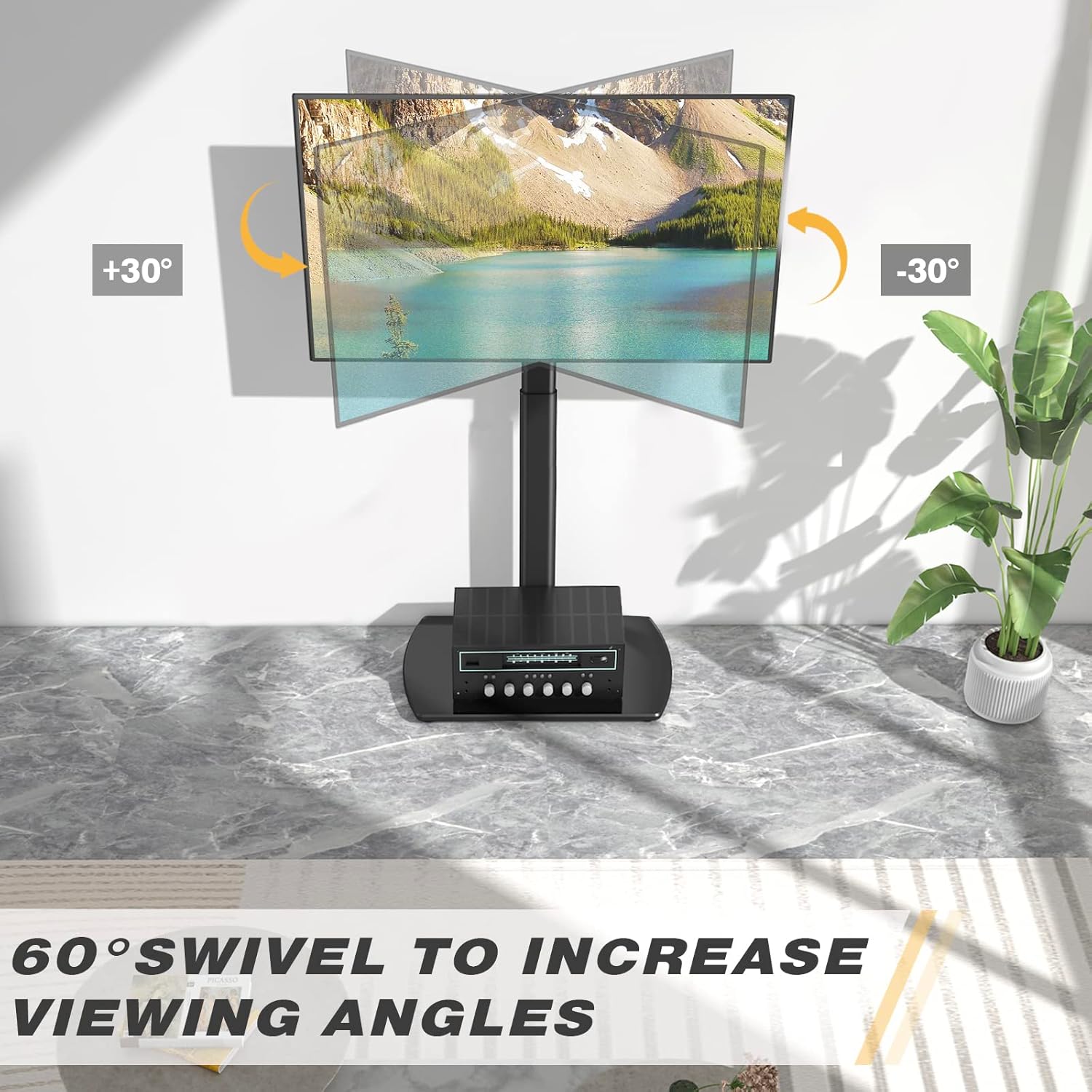
Image: Visual representation of the 60-degree swivel range.

Image: Close-up of the swivel joint.
Cable Management
Utilize the integrated cable management clips on the rear of the main support pole to organize and conceal TV cables. This helps maintain a tidy appearance and prevents cable clutter.

Image: Cable management clips on the stand's pole.
Maintenance
- Cleaning: Wipe the stand with a soft, damp cloth. Avoid abrasive cleaners or solvents that may damage the finish.
- Periodic Checks: Periodically check all screws and bolts to ensure they remain tight. Re-tighten if necessary.
- Glass Base Care: The tempered glass base is durable but can be scratched. Use coasters for items placed on it and avoid dropping heavy objects.
Troubleshooting
| Problem | Possible Cause | Solution |
|---|---|---|
| TV is not level. | Mounting brackets are not aligned or tightened unevenly. | Re-check the alignment of the TV mounting brackets and ensure all screws are tightened evenly. |
| Stand feels unstable. | Loose connections or uneven floor surface. | Verify all assembly bolts are securely tightened. Ensure the stand is placed on a flat, stable surface. Check non-slip feet. |
| TV cannot be mounted. | Incorrect VESA pattern or TV size/weight. | Confirm your TV's VESA pattern and weight are within the stand's specifications (Max VESA 400x400mm, Max 35kg/77lbs). |
Specifications
| Brand: | RFIVER |
| Model: | TF3001 |
| Compatible TV Sizes: | 32 - 65 inches |
| Max VESA Compatibility: | 400x400mm (also supports 100x100, 100x200, 200x100, 200x200, 300x200, 200x300, 300x300, 400x200, 400x300) |
| Max Weight Capacity: | 35 kg (77 lbs) |
| Height Adjustment Range: | 1000mm - 1300mm |
| Swivel Angle: | ±30 degrees (60 degrees total) |
| Material: | Alloy Steel, Tempered Glass |
| Color: | Black |
| Product Dimensions (L x W x H): | 55 x 38 x 130 cm (approximate, at max height) |
| Product Weight: | 8.8 kg |
Warranty and Support
RFIVER products are designed for durability and performance. For any questions, missing parts, or support needs, please contact RFIVER customer service. Please retain your proof of purchase for warranty claims.
For further assistance, please visit the official RFIVER website or contact their customer support channels.


