
Introduction
The BESTEK 500W Pure Sine Wave Power Inverter is designed to provide reliable and clean AC power from your vehicle's DC power source. Its output waveform is identical to the AC power waveform of mains power grids, making it ideal for sensitive electronics. This inverter is perfect for off-grid systems, road trips, camping, and emergency power needs, ensuring your devices receive stable and safe power.
The pure sine wave output minimizes interference with radios, communication, and precision equipment. It is also recommended by most cordless tool manufacturers to ensure long battery life for their products.

Figure 1: BESTEK 500W Pure Sine Wave Power Inverter with included cables.
Product Overview
This inverter converts DC power from your car battery to AC power for various devices within its 500W range. It offers versatile connectivity options and multiple output ports for convenience.
- Pure Sine Wave Output: Provides clean power suitable for sensitive electronics.
- Dual AC Outlets: Operates any 110V device up to 500 watts.
- Dual USB Charging Ports: Detects your device automatically to deliver fastest charge speed up to 2.4 amps per port (4.2 amps max total).
- Durable Construction: Features an aluminum alloy casing with heat-dissipating ripples and unique vents.

Figure 2: Illustration comparing Pure Sine Wave and Modified Wave outputs, highlighting the benefits of pure sine wave for sensitive electronics.
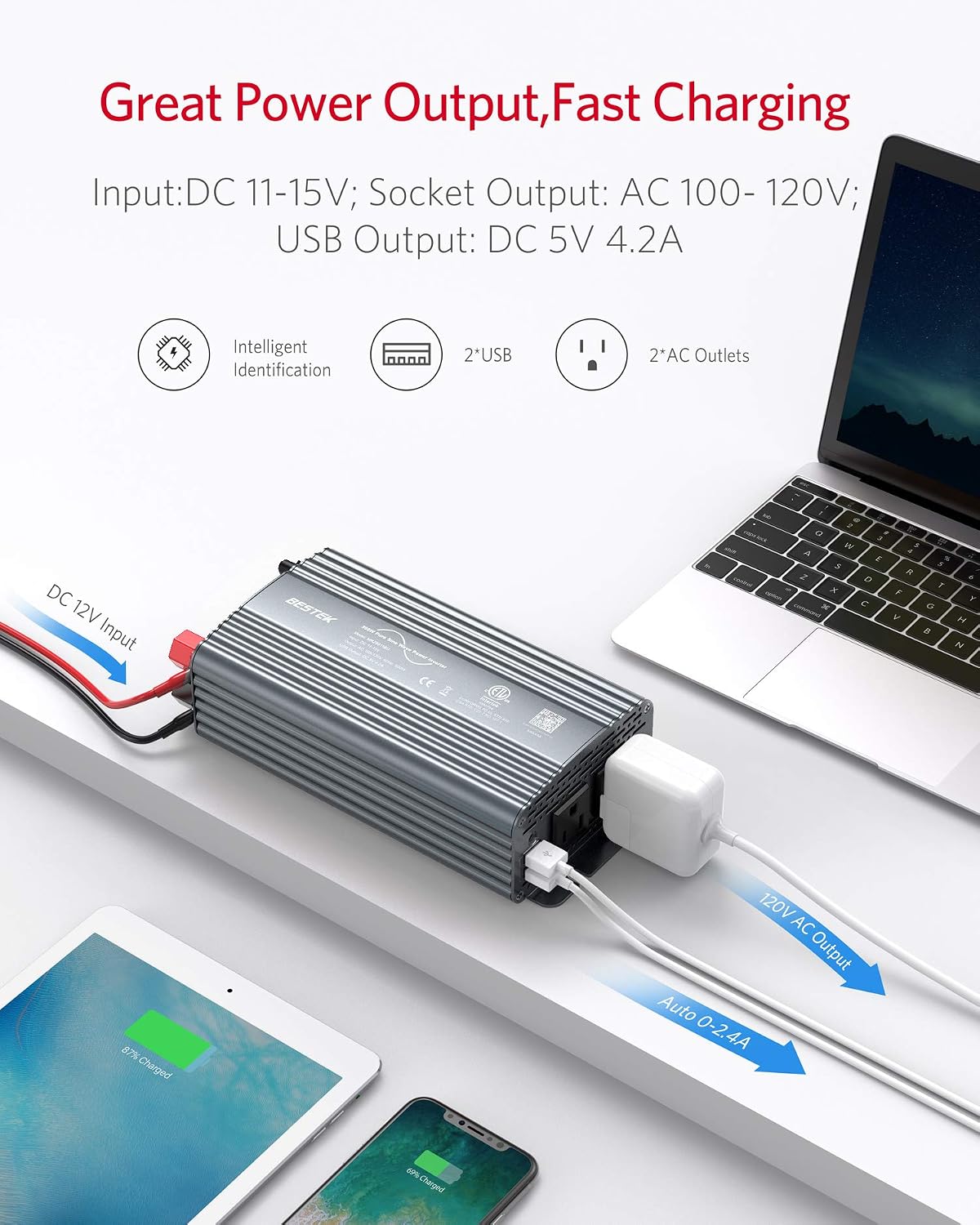
Figure 3: The inverter providing power to a laptop, tablet, and smartphone, demonstrating its great power output and fast charging capabilities.
Setup
The BESTEK 500W Pure Sine Wave Power Inverter offers two primary methods for connecting to a 12V DC power source:
- Using the Car Cigarette Lighter Plug:
For loads under 150 watts, plug the inverter directly into your car's 12V cigarette lighter outlet. Most car cigarette lighter ports are fused at 150W, so exceeding this limit may blow your car's fuse. This method is convenient for charging smaller devices like phones, tablets, or small laptops.
- Using Alligator Battery Clamps:
For loads requiring the full 500 watts, connect the inverter directly to your car battery using the supplied alligator battery clamps. Ensure correct polarity: red clamp to the positive (+) battery terminal and black clamp to the negative (-) battery terminal. This method bypasses the car's cigarette lighter fuse and allows for higher power draw.
Video: Demonstrates how to connect and use the BESTEK 500W Power Inverter in a vehicle, including both cigarette lighter and battery clamp connections.
Operating Instructions
Once connected to a power source, operate the inverter as follows:
- Power On/Off: Use the ON/OFF switch located on the inverter to activate or deactivate the AC outlets. Note that the USB portion is not switched and remains powered as long as the power source is connected.
- Using AC Outlets: Plug your 110V AC devices directly into the two standard AC outlets. Ensure the total wattage of connected devices does not exceed 500 watts.
- Using USB Ports: Connect your USB-powered devices to the dual USB charging ports. The inverter will automatically detect your device and deliver the fastest possible charge speed.
LED Indicator Statuses
The inverter features an LED indicator to communicate its operational status:
| Indicator Status | Meaning |
|---|---|
| Green Lighted | Working normally |
| Flashing Green | Under-voltage or Over-voltage Protection |
| Flashing Red | Overload Protection |
| Red Lighted | Short Circuit Protection |
| Flashing Red & Green Alternately | Over-temperature Protection or Fan Failure |
| Off | Not Switched on, Fuse Blown, or Not Powered |
Video: Demonstrates the compact design and various features of the BESTEK Power Inverter, including its USB and AC outlets.
Safety Features
The BESTEK 500W Pure Sine Wave Power Inverter is equipped with multiple safety mechanisms to protect both the device and your connected electronics:
- Isolated Voltage Protection: Protects your devices from over-voltage, under-voltage, overheat, overload, reverse polarity, and short circuits.
- Under-voltage Protection: Prevents your car battery from draining completely by shutting down if the voltage drops too low.
- Overload Protection: Automatically shuts down AC power when the load exceeds 500W. The flashing red light indicates an overload condition, which can be reset by powering the unit off and then on again.
- Built-in Smart Cooling Fan: The fan has 4 gears of rotating speed that self-adjust based on temperature and power load. It starts running slowly even under no load to ensure normal operation and reduce noise.

Figure 4: Diagram illustrating the internal isolation voltage protection, safeguarding devices from various electrical issues.

Figure 5: Exploded view showing the silent smart cooling fan, designed for efficient heat dissipation and reduced noise.
Maintenance
To ensure optimal performance and longevity of your BESTEK Power Inverter, follow these maintenance guidelines:
- Replaceable Fuses: The inverter has 2 x 40 amp/32V external replaceable fuses for protection when hooked up to your battery. These are readily accessible from the back of the inverter. If connected to the cigarette lighter, it will use the 15 amp fuse designated to your car. Always replace blown fuses with ones of the correct rating.
- Cooling Fan: Periodically check the cooling fan and vents for any obstructions (dust, debris) and clean them to ensure proper airflow and prevent overheating. The fan's operation is self-adjusted by temperature and load.
- Storage: When not in use, store the inverter in a cool, dry place away from direct sunlight and moisture.
Troubleshooting
Refer to the LED Indicator Statuses table in the Operating Instructions section for common issues. If the inverter is not functioning as expected, consider the following:
- No Power (Indicator Off): Ensure the inverter is switched ON, the power source is connected, and no fuses are blown (check both inverter and car fuses if applicable).
- Flashing Green: Indicates under-voltage or over-voltage. Check your 12V power source to ensure it is within the acceptable range (10-15V).
- Flashing Red: Indicates overload protection. Disconnect some devices to reduce the load below 500W, then turn the inverter OFF and ON to reset.
- Red Lighted: Indicates short circuit protection. Disconnect all devices and check for any short circuits in your connections or devices.
- Flashing Red & Green Alternately: Indicates over-temperature protection or fan failure. Ensure the inverter is in a well-ventilated area and the cooling fan is not obstructed. Allow it to cool down.
Specifications
| Specification | Value |
|---|---|
| Brand | BESTEK |
| Model | MRZ5011BU-GY |
| Wattage | 500 watts |
| Input Voltage | DC 12V |
| Output Voltage | 110 Volts AC |
| USB Output | 4.2A (Dual USB) |
| Item Weight | 2.2 pounds |
| Product Dimensions | 8.7 x 4.3 x 2.4 inches |
What's in the Box
- 1x BESTEK 500W Pure Sine Wave Power Inverter
- 1x User Manual
- 2x Battery Clamps Cable
- 1x 12V Cigarette Lighter Plug Cable
- 2x Spare Fuses
Warranty and Support
BESTEK is committed to providing reliable products and excellent customer service. While specific warranty periods may vary, BESTEK has a track record of responsive support. If you encounter any issues with your inverter, please contact BESTEK customer service. They have been known to assist with troubleshooting and provide replacements when necessary, ensuring customer satisfaction.
Video: Provides an overview of the BESTEK Power Inverter, highlighting its features and benefits for various power needs.
Video: Showcases the efficiency and reliability of the BESTEK Power Inverter for maximizing energy use.
Video: Illustrates how the BESTEK Power Inverter can transform your power source for various applications.