
1. Introduction
The Ingco AHM008 Auto-Darkening Welding Helmet is a high-technology product designed to provide optimal eye and face protection during welding operations. It incorporates advanced spectral filtration, photoelectric sensors, and liquid crystal light control technology to automatically adjust the shade level in response to arc light, ensuring continuous protection and clear vision.

Image: Front view of the Ingco AHM008 Auto-Darkening Welding Helmet.
2. Safety Precautions
Always read and understand all safety warnings and instructions before using this welding helmet. Failure to follow these instructions may result in serious personal injury or damage to the equipment.
- Eye Protection: This helmet is designed to protect eyes and face from sparks, spatter, and harmful radiation under normal welding conditions. It is not suitable for laser welding or overhead welding applications.
- Ventilation: Ensure adequate ventilation in the work area to avoid inhalation of welding fumes.
- Inspection: Before each use, inspect the helmet for any damage, cracks, or loose parts. Do not use a damaged helmet.
- Temperature Limits: Do not expose the helmet to extreme temperatures or immerse it in water.
- Lens Care: Do not use abrasive cleaners or solvents on the auto-darkening filter or protective lenses.
3. Product Components
Familiarize yourself with the main components of your Ingco AHM008 welding helmet:
- Helmet Shell: Provides physical protection for the head and face.
- Auto-Darkening Filter (ADF): The electronic lens that automatically darkens upon arc ignition.
- Outer/Inner Protective Lenses: Replaceable clear lenses protecting the ADF from spatter and scratches.
- Headgear: Adjustable assembly for comfortable and secure fit on the head.
- External Controls: Dials for adjusting shade, sensitivity, and delay.

Image: Side view of the Ingco AHM008 Welding Helmet, highlighting external control dials.
4. Setup and Adjustment
4.1. Battery Installation
The auto-darkening filter requires 2 CR2 batteries for operation. Locate the battery compartment, typically on the rear or side of the ADF cartridge. Insert the batteries, ensuring correct polarity (+/-).
4.2. Headgear Adjustment
Adjust the headgear for a snug and comfortable fit. The top strap and rear headband can be adjusted to fit various head sizes. Ensure the helmet sits securely on your head without wobbling.
4.3. External Controls
The AHM008 features external controls for quick adjustments:
- Shade Control: Adjusts the darkness level of the filter. Typically ranges from DIN 9 to DIN 13 for welding. Refer to welding charts for appropriate shade levels based on amperage.
- Sensitivity Control: Adjusts the sensitivity of the sensors to ambient light and welding arc. Set higher for low-amperage welding or TIG, lower for high-amperage or bright environments.
- Delay Control: Adjusts the time the filter remains dark after the welding arc stops. A longer delay is useful for tack welding or to prevent eye fatigue from residual glow.
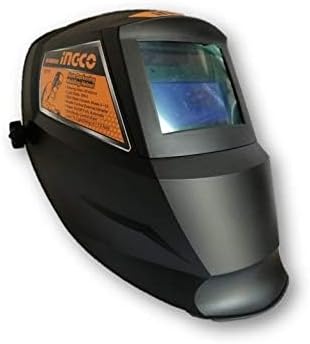
Image: Front view of the Ingco AHM008 Welding Helmet, showing the auto-darkening filter.
5. Operation
5.1. Before Welding
- Ensure the helmet is clean and free of debris.
- Verify the auto-darkening filter is functioning by briefly exposing it to a bright light source (e.g., a lamp) and observing it darken.
- Adjust the shade, sensitivity, and delay settings according to your welding process and personal preference.
- Position the helmet comfortably on your head.
5.2. During Welding
- Lower the helmet into the viewing position.
- Initiate the welding arc. The filter will automatically darken within milliseconds.
- Maintain a safe distance from the arc and ensure proper ventilation.
5.3. After Welding
- Once the arc is extinguished, the filter will return to its light state after the set delay time.
- Raise the helmet when not actively welding.

Image: Front view of the Ingco AHM008 Welding Helmet, showing the clear viewing state.
6. Maintenance
6.1. Cleaning
Clean the helmet shell and protective lenses regularly with a soft, damp cloth. Do not use harsh chemicals, solvents, or abrasive cleaners, as these can damage the helmet or the ADF.
6.2. Lens Replacement
Replace the outer and inner protective lenses when they become scratched, pitted, or too dirty to clean effectively. Refer to the helmet's specific design for instructions on how to remove and replace these lenses.
6.3. Battery Replacement
If the auto-darkening filter fails to darken or flickers, the batteries may need replacement. Open the battery compartment, remove the old batteries, and insert new CR2 batteries, observing polarity.
6.4. Storage
Store the helmet in a clean, dry place away from direct sunlight, extreme temperatures, and corrosive materials. Use the original packaging or a protective bag if available.
7. Troubleshooting
| Problem | Possible Cause | Solution |
|---|---|---|
| Filter does not darken | Dead or low batteries Sensors obstructed Incorrect sensitivity setting | Replace batteries Clean sensors Increase sensitivity setting |
| Filter flickers | Low batteries Sensitivity too high Interference from other light sources | Replace batteries Decrease sensitivity Shield from other light sources |
| Poor visibility | Dirty protective lenses Incorrect shade setting Scratched ADF | Clean or replace lenses Adjust shade setting Replace ADF (if damaged) |
| Helmet feels uncomfortable | Headgear not adjusted properly | Adjust headgear straps and pivot points for a secure and balanced fit |
8. Technical Specifications
| Feature | Specification |
|---|---|
| Manufacturer | INGCO |
| Model Number | AHM008 |
| Product Dimensions (L x W x H) | 25 x 25 x 34 cm |
| Weight | 0.92 grams |
| Battery Type | 2 CR2 batteries (required for ADF) |
| Viewing Area | 92 x 42 mm |
| Date First Available | 9 July 2022 |
9. Warranty and Support
For information regarding warranty coverage, technical support, or replacement parts for your Ingco AHM008 Welding Helmet, please refer to the warranty card included with your purchase or contact Ingco customer service directly. Contact details are typically available on the manufacturer's official website or product packaging.