
Product Overview
The LUDGER 10-inch Rechargeable Fan (Model EL-8210F) is a versatile device designed for portable cooling, illumination, and entertainment. It integrates a fan, LED light, power bank function, and an FM radio into a single unit, making it suitable for various indoor and outdoor applications.
Key features include a 10-inch fan with two-speed settings, four ultra-bright LED lights, a built-in AM/FM radio with speaker and channel scan, and a USB charging port for external devices. The fan is powered by a rechargeable lead-acid battery, offering extended operation times for its various functions. Its compact size and integrated carrying handle ensure easy transport.
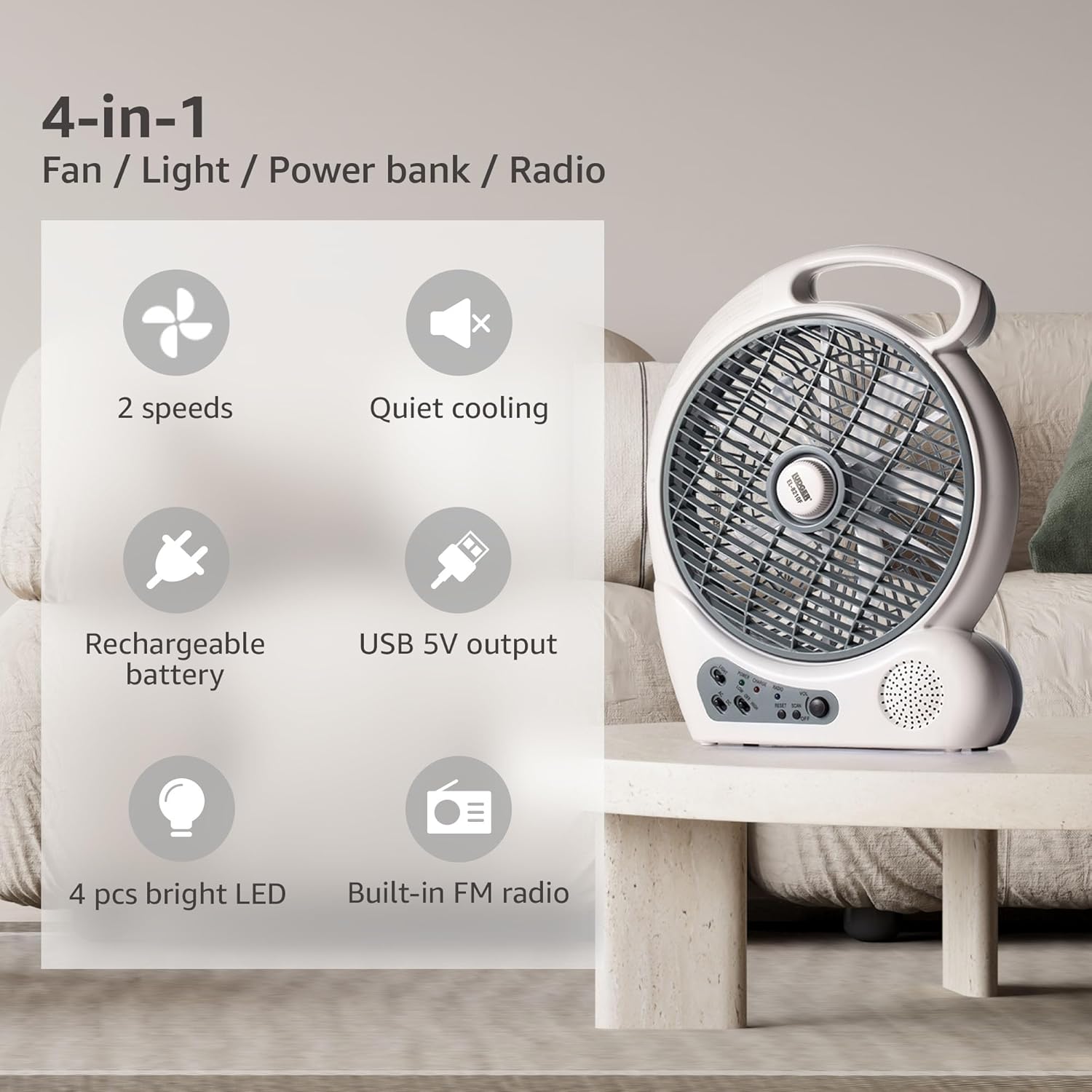
Figure 1: Front view of the LUDGER 10-inch Rechargeable Fan, highlighting its compact design.

Figure 2: Overview of the fan's 4-in-1 functionality: fan, light, power bank, and radio.
Setup
Initial Charging
Before first use, fully charge the fan for 10-15 hours. Connect the fan to a standard 110-240V AC power outlet using the provided power cord. The 'CHARGE' indicator light will illuminate during charging.
Power Source Selection
Locate the AC/DC switch on the control panel. Select 'AC' for operation directly from a wall outlet or 'DC' for battery-powered operation.
Placement
Place the fan on a stable, flat surface to ensure proper operation and prevent tipping. Ensure the fan grill is not obstructed.
Operating Instructions
Fan Operation
- Ensure the fan is charged or connected to an AC power source.
- Turn the fan control knob to select desired speed:
- Low Speed: Provides normal ventilation.
- High Speed: Provides powerful ventilation.
- To turn off the fan, rotate the control knob to the 'OFF' position.

Figure 3: Visual representation of the two fan speed settings: Medium (Normal Ventilation) and High (Powerful Ventilation).
LED Light Operation
- Locate the LED light switch on the control panel.
- Toggle the switch to turn the four ultra-bright LED lights ON or OFF.

Figure 4: The fan's four ultra-bright LED lights providing illumination, suitable for reading or power outages.
USB Charging Port
- Locate the USB 5V output port on the side of the fan.
- Connect your smartphone or other USB-powered device using a compatible USB cable.
- The fan's internal battery will provide power to charge your device.

Figure 5: The fan's built-in USB port actively charging a smartphone, demonstrating its power bank functionality.
AM/FM Radio
- Locate the radio controls on the control panel.
- Turn the 'VOL' knob to power on the radio and adjust the volume.
- Press the 'SCAN' button to automatically search for available radio stations.
- Press the 'RESET' button to clear current station settings and rescan.

Figure 6: Detailed view of the control panel, including the radio's volume, scan, and reset buttons.
Rotatable Grill
The fan features a rotatable grill that allows adjustment of airflow. To change the wind mode, choose to lock or unlock the grill:
- Locked Grill: Provides a focused airflow.
- Unlocked Grill: Allows for a wider air distribution.
Maintenance
Cleaning
To clean the fan blades and grill, ensure the fan is turned off and unplugged. The protective cover can be removed for easier access to the blades. Wipe surfaces with a soft, damp cloth. Do not use abrasive cleaners or immerse the unit in water.

Figure 7: The fan's protective cover, designed for user safety and easy removal for cleaning.
Battery Care
To prolong battery life, fully charge the fan after each use and at least once every three months if stored for extended periods. Avoid completely draining the battery frequently.
Storage
Store the fan in a cool, dry place away from direct sunlight and extreme temperatures. Ensure it is fully charged before storage.
Troubleshooting
- Fan does not turn on: Check if the unit is charged. Ensure the AC/DC switch is in the correct position ('DC' for battery, 'AC' for wall power). Verify the power cord is securely connected if using AC power.
- Weak airflow: Ensure the fan speed is set to 'High'. Check if the rotatable grill is set to 'Locked' for focused airflow or 'Unlocked' for wider distribution. Clean any dust or debris from the fan blades and grill.
- LED lights not working: Ensure the fan is charged or connected to power. Toggle the LED light switch.
- Radio not receiving stations: Ensure the radio is powered on and volume is adjusted. Press the 'SCAN' button to search for stations. Try repositioning the fan for better reception.
- USB charging not working: Ensure the fan has sufficient battery charge. Verify the USB cable and the connected device are functioning correctly.
Specifications
| Feature | Detail |
|---|---|
| Brand | LUDGER |
| Model Number | EL-8210F |
| Product Dimensions | 14.2" W x 5.3" D x 17.4" H |
| Item Weight | 4.7 pounds |
| Power Source | Battery Powered (AC 110-240V, 50/60Hz for charging) |
| Battery Type | 6V 4.5Ah Lead-Acid Battery |
| Charging Time | 10-15 hours |
| Fan Speeds | 2 (Low, High) |
| Fan Run Time | High Speed: 3 hours; Low Speed: 4.5 hours |
| LED Light Duration | 90 hours |
| Radio Duration | 15 hours |
| USB Output | 5V (for charging external devices) |
| Noise Level | 50 dB |
| Material | Polypropylene (Blade Material: Plastic) |
| Included Components | Rechargeable Battery, LED Light, USB Charging Port, AM/FM Radio, Rotatable Grill, Speaker, Control Panel, Manual |
Warranty Information
For specific warranty details regarding your LUDGER 10-inch Rechargeable Fan (Model EL-8210F), please refer to the warranty card included with your purchase or contact the retailer. Warranty terms typically cover manufacturing defects for a specified period from the date of purchase.
Customer Support
Should you require technical assistance, have questions about product operation, or need to report an issue, please contact LUDGER customer support. Contact information can typically be found on the product packaging, the official LUDGER website, or through your retailer.

Figure 8: The fan's integrated carrying handle, designed for easy and convenient transport.