
Introduction
Thank you for choosing the ALLIMITY COV31736202 Remote Control. This remote is a direct replacement designed for seamless operation with LG DVD Player models DP132, DP132NU, and DP132-NU. It offers all essential functions for controlling your DVD player without the need for complex programming.
Setup
The ALLIMITY COV31736202 remote control requires no programming. Simply insert the batteries, and it is ready for use with your compatible LG DVD player.
Battery Installation
- Locate the battery compartment on the back of the remote control.
- Slide the battery compartment cover downwards or in the direction indicated by the arrow to open it.
- Insert two AAA alkaline batteries (not included), ensuring the positive (+) and negative (-) terminals match the diagrams inside the compartment.
- Replace the battery compartment cover by sliding it back into position until it clicks securely.

Image: Rear view of the ALLIMITY COV31736202 remote control, showing the battery compartment.
Once batteries are installed, the remote is ready to operate your LG DVD player. Ensure there are no obstructions between the remote control and the DVD player's infrared receiver.
Operating Instructions
This remote control utilizes infrared technology and has an effective range of up to 10 meters. Point the remote directly at your DVD player for optimal performance. Below is a guide to the main functions:
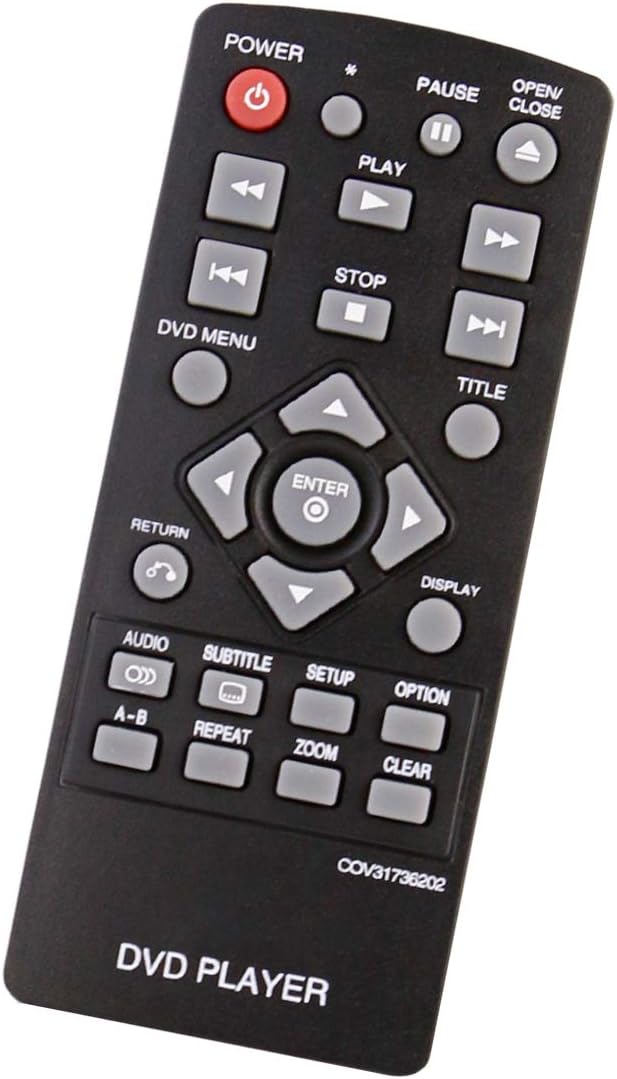
Image: Front view of the ALLIMITY COV31736202 remote control, displaying all buttons and their labels.
- POWER (⑉): Turns the DVD player on or off.
- OPEN/CLOSE (▲): Opens or closes the disc tray.
- PLAY (▶): Starts playback of a disc.
- PAUSE (⏸): Pauses playback. Press again to resume.
- STOP (■): Stops playback.
- PREVIOUS (⏮): Skips to the beginning of the current track/chapter or the previous track/chapter.
- NEXT (⏭): Skips to the next track/chapter.
- FAST REWIND (⏪): Rewinds playback.
- FAST FORWARD (⏩): Fast forwards playback.
- DVD MENU: Accesses the main menu of the DVD.
- TITLE: Accesses the title menu of the DVD.
- NAVIGATION BUTTONS (▲ ▼ ◄ ►): Used to navigate through menus and options.
- ENTER: Confirms a selection in menus.
- RETURN (↶): Returns to the previous menu or screen.
- DISPLAY: Shows on-screen display information.
- AUDIO: Changes the audio track or language.
- SUBTITLE: Toggles or selects subtitle options.
- SETUP: Accesses the DVD player's setup menu.
- OPTION: Displays additional options during playback.
- A-B: Repeats a specific section between point A and point B.
- REPEAT: Repeats the current track, chapter, or disc.
- ZOOM: Zooms in or out on the video.
- CLEAR: Clears an entry or cancels a function.
Maintenance
Proper care will ensure the longevity and reliable performance of your remote control.
Cleaning
- Wipe the remote control with a soft, dry cloth.
- For stubborn dirt, slightly dampen the cloth with water or a mild cleaning solution, then wipe dry immediately.
- Do not use abrasive cleaners, alcohol, or solvents, as these can damage the surface and buttons.
Battery Replacement
Replace batteries when the remote's response becomes sluggish or it stops functioning. Always replace both batteries at the same time with new alkaline batteries of the same type (AAA). Do not mix old and new batteries, or different types of batteries.
Storage
If the remote control will not be used for an extended period, remove the batteries to prevent leakage and potential damage to the device.
Troubleshooting
If you experience issues with your remote control, please refer to the following common solutions:
- Remote not responding:
- Check if the batteries are inserted correctly with the correct polarity.
- Replace the batteries with fresh ones.
- Ensure there are no obstructions between the remote control and the DVD player's infrared sensor.
- Make sure you are within the effective operating range (up to 10 meters) and pointing the remote directly at the DVD player.
- Buttons not working:
- Clean the remote control surface and buttons to remove any dirt or residue that might be interfering with button presses.
- If only specific buttons are not working, it might indicate a hardware issue.
- Intermittent operation:
- This often indicates low battery power. Replace the batteries.
- Ensure consistent line of sight to the DVD player.
Specifications
| Brand | ALLIMITY |
| Model Name | COV31736202 |
| Compatible Devices | LG DVD Player models DP132, DP132NU, DP132-NU |
| Connectivity Technology | Infrared |
| Number of Buttons | 20 |
| Maximum Range | 10 Meters |
| Battery Type | Alkaline (AAA) |
| Special Feature | No programming required |
