
1. Introduction
This manual provides essential information for the correct installation, operation, and maintenance of the BFT PHOBOS AC A50 230 gate motor. Please read this manual carefully before proceeding with any installation or operation to ensure safe and efficient use of the product. Keep this manual in a safe place for future reference.
2. Safety Information
Important Safety Instructions:
- Installation and maintenance must be performed by qualified personnel only.
- Disconnect power before performing any work on the motor or control unit.
- Ensure all electrical connections comply with local regulations and standards.
- Do not allow children to play near the gate or operate the control devices.
- Keep hands and loose clothing clear of moving parts.
- Regularly check the system for signs of wear or damage.
- In case of malfunction, refer to the troubleshooting section or contact qualified technical support.
3. Product Overview
The BFT PHOBOS AC A50 230 is a robust electromechanical operator designed for automating swing gates. It features a durable construction suitable for various residential and light commercial applications. The unit operates on a 230V-50Hz power supply.
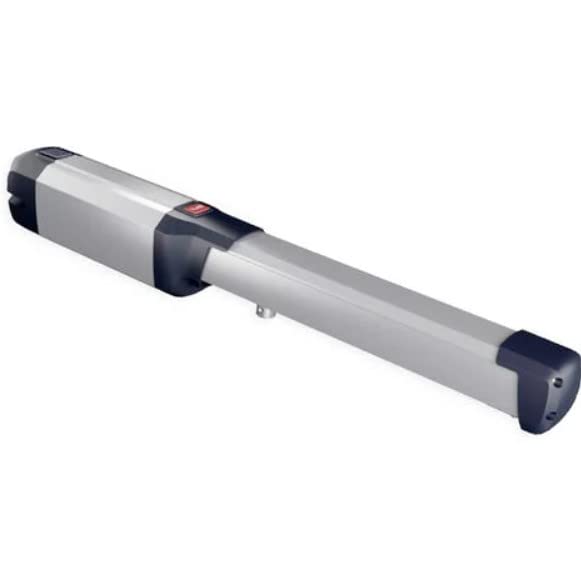
Figure 1: BFT PHOBOS AC A50 230 Gate Motor. This image shows the compact design of the BFT PHOBOS AC A50 230 gate motor, typically used for automating swing gates.
3.1 Components
- Motor Unit: The primary electromechanical component responsible for gate movement.
- Mounting Brackets: For securing the motor to the gate post and gate leaf.
- Control Board (Sold Separately/Integrated): Manages the gate's operation, safety features, and remote control signals.
- Release Mechanism: Allows manual operation of the gate during power outages.
4. Setup and Installation
Note: Installation should only be performed by a qualified technician.
4.1 Pre-installation Checks
- Ensure the gate structure is sound and moves freely without obstruction.
- Verify that the gate hinges are in good working condition.
- Confirm the availability of a stable 230V-50Hz power supply at the installation site.
4.2 Mounting the Motor
- Determine the optimal mounting positions for the motor on the gate post and gate leaf, considering the gate's opening angle and available space.
- Securely attach the rear mounting bracket to the gate post using appropriate fasteners.
- Attach the front mounting bracket to the gate leaf.
- Mount the motor unit onto the brackets, ensuring it is level and aligned correctly with the gate's pivot points.
4.3 Electrical Connections
- Route the power cables and control cables according to local electrical codes, ensuring they are protected from damage.
- Connect the 230V-50Hz power supply to the control board, observing correct polarity and grounding.
- Connect the motor cables to the designated terminals on the control board.
- Connect any safety devices (e.g., photocells, safety edges) and accessories (e.g., remote receivers, keypads) to the control board as per their respective manuals.
4.4 Initial Configuration
- Refer to the control board's specific manual for detailed programming instructions.
- Perform the initial learning cycle to set the gate's opening and closing limits.
- Adjust motor force and speed settings as required.
- Test all safety devices to ensure they function correctly.
5. Operating Instructions
5.1 Automatic Operation
- To open the gate: Press the designated button on your remote control or access device. The gate will open to its programmed limit.
- To close the gate: Press the designated button again. The gate will close to its programmed limit.
- To stop the gate during movement: Press the button once more. The gate will pause. Pressing it again will resume movement in the opposite direction.
5.2 Manual Release
In case of a power failure or malfunction, the gate can be operated manually:
- Locate the manual release mechanism on the motor unit.
- Insert the provided key or operate the lever as instructed by the specific model's design.
- Turn or pull the mechanism to disengage the motor.
- The gate can now be moved by hand.
- To re-engage the motor, reverse the manual release procedure until the mechanism locks into place.
6. Maintenance
Regular maintenance ensures the longevity and safe operation of your BFT PHOBOS AC A50 230 gate motor. It is recommended to have a qualified technician perform annual inspections.
6.1 User Maintenance (Monthly)
- Visual Inspection: Check for any visible damage to the motor unit, cables, and mounting brackets.
- Gate Movement: Ensure the gate moves smoothly and freely without excessive friction or noise.
- Safety Devices: Test photocells and other safety devices to confirm they are functioning correctly.
- Cleanliness: Keep the area around the motor and gate clear of debris, leaves, and obstructions.
6.2 Professional Maintenance (Annually)
- Lubrication of mechanical parts (if applicable, refer to specific motor guidelines).
- Tightening of all fasteners and connections.
- Electrical system check, including voltage and current measurements.
- Verification of safety parameters and force settings.
- Inspection of wear and tear on all components.
7. Troubleshooting
Before contacting technical support, review the following common issues and solutions:
| Problem | Possible Cause | Solution |
|---|---|---|
| Gate does not move. | No power supply. Safety devices activated. Remote control battery low. | Check power connection and circuit breaker. Inspect photocells for obstruction. Replace remote control battery. |
| Gate stops unexpectedly. | Obstruction detected. Motor overheating. Limit switch issue. | Remove any obstructions. Allow motor to cool down. Contact technical support for limit switch adjustment. |
| Gate opens/closes partially. | Limit switch misconfiguration. Mechanical obstruction. | Perform a new learning cycle (refer to control board manual). Check gate path for obstructions. |
| Remote control not working. | Battery flat. Remote not programmed. Interference. | Replace battery. Reprogram remote control (refer to control board manual). Check for sources of radio interference. |
If the problem persists after attempting these solutions, please contact a qualified BFT service technician.
8. Specifications
- Manufacturer: BFT
- Model Number: P935097 00002
- Product Dimensions (L x W x H): 10 x 30 x 30 cm
- Weight: 5 kilograms
- Power Supply: 230V-50Hz
- Quantity of Items: 1
- ASIN: B086NKHD94
- Date First Available on Amazon.com.be: April 1, 2020
9. Warranty and Support
Specific warranty details for the BFT PHOBOS AC A50 230 are not available in the provided product information. Please refer to your purchase documentation or contact your local BFT distributor or reseller for warranty terms and conditions.
For technical support, spare parts, or service inquiries, please contact your authorized BFT service center or the point of purchase. Always provide the model number (P935097 00002) and serial number (if available) when seeking assistance.


