
EZBASICS KD-2328A
EZBASICS 2-in-1 Ion Hair & Facial Steamer User Manual
Model: KD-2328A
1. Product Overview
The EZBASICS 2-in-1 Ion Hair & Facial Steamer is a versatile device designed for personal care use at home. It combines professional-quality hair care and facial steaming functions to enhance beauty and appearance.
Key features include:
- Professional Hair Care: Provides valuable nutrients to hair, prevents breakage and split ends, treats brittle and damaged hair, and moisturizes the scalp to prevent dandruff.
- Soothing Facial Steamer: Moisturizes and enhances skin by opening and cleaning pores, exfoliating dead skin, and removing dirt and excess oil.
- Revolutionary Ion Technology: Advanced PTC ceramic heating element produces ionized water particles up to 10x more effective at penetrating hair and skin.
- Easy to Use & Portable: Designed for convenient use at home, while traveling, or at a salon.
- Safety Features: Includes a beep and auto-turn off function when water levels are low.

Figure 1: EZBASICS 2-in-1 Ion Hair & Facial Steamer and its packaging.
2. Safety Information
Please read all safety instructions carefully before using the device to ensure safe operation and prevent injury or damage.
- Ensure the product is at a safe distance from your face and hair during use.
- Wait for the steamer to cool down completely before handling or storing it.
- The device will emit a beep and automatically turn off when the water level is below the required minimum.
- Only fill the water tank with clean water. DO NOT add other liquids such as aromatherapy essential oil, as this may cause the water tank to rupture or damage the device.
- The body of the machine, especially the buttons, is not waterproof and requires careful handling.
3. Package Contents
Verify that all components are present in the package:
- 1 x Steamer Unit
- 1 x Nozzle (Facial Steamer Arm)
- 1 x Bracket Connector
- 1 x Hair Care Hood
- 1 x User Manual

Figure 2: Included components of the EZBASICS Steamer. Note: The nozzle is packaged on the back of the foam.
4. Setup Instructions
- Fill Water Tank: Fill the water tank with clean, distilled water. Ensure the water level is between the MIN and MAX marks. Do not overfill.

Figure 3: Visible water level indicator on the steamer unit.
- Attach Desired Head:
- For Hair Steaming: Attach the hair care hood to the main unit.
- For Facial Steaming: Attach the nozzle (facial steamer arm) to the main unit. Ensure it is securely connected. The nozzle can rotate 360 degrees for optimal positioning.

Figure 4: The facial steamer's rotating nozzle for adjustable angle.
- Power Connection: Plug the power cord into a suitable electrical outlet.
5. Operating Instructions
- Turn On: Press the "ON/OFF" button for the desired function (Steam or Ozone). The corresponding indicator light will illuminate.

Figure 5: Control panel for selecting Steam or Ozone modes.
- Hair Steaming: For hair treatment, position your head under the hair care hood. The steam will provide nutrients, prevent breakage, and moisturize your scalp.

Figure 6: Hair steaming in progress.
- Facial Steaming: For facial treatment, position your face in front of the facial steamer arm. The steam will open pores, exfoliate dead skin, and remove dirt and excess oil. The deep penetrating ion water particles enhance absorption of skincare products.

Figure 7: Facial steaming in progress, showing micro water ions.
- Aromatherapy Function (Optional): To add aromatherapy, place a few drops of essential oil onto the designated aromatherapy pad located in the facial steamer arm. Do NOT add essential oil directly into the water tank.

Figure 8: Correct method for using the aromatherapy function.
- Duration: Use for a recommended duration, typically 15-20 minutes for optimal results.
- Turn Off: After use, turn off the steamer by pressing the "ON/OFF" button. Unplug the device from the power outlet.
6. Maintenance
Proper maintenance ensures the longevity and optimal performance of your steamer.
- Empty Water Tank: After each use, allow the unit to cool down, then empty any remaining water from the tank.
- Clean Unit: Wipe down the exterior of the unit with a soft, damp cloth. Do not use abrasive cleaners or immerse the unit in water.
- Descaling: If mineral deposits build up (especially if using tap water), descale the unit periodically. Consult the full user manual for detailed descaling instructions.
- Storage: Store the steamer in a cool, dry place away from direct sunlight when not in use.
7. Troubleshooting
If you encounter issues with your EZBASICS steamer, refer to the following common problems and solutions:
| Problem | Possible Cause | Solution |
|---|---|---|
| Steamer beeps continuously or turns off automatically. | Water level is too low. | Refill the water tank to the MAX level. The device has an auto-shutoff safety feature when water is insufficient.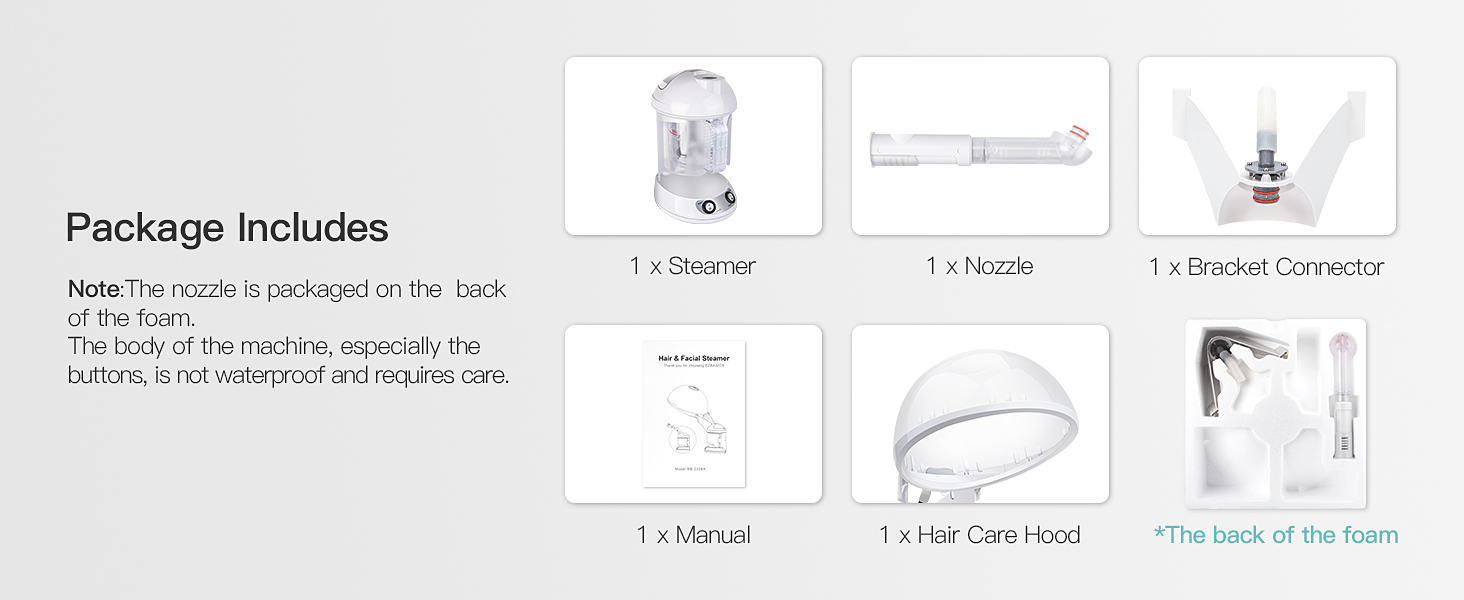 Figure 9: Correct water level to prevent beeping. |
| No steam or very little steam produced. | Insufficient water, unit not heated sufficiently, or mineral buildup. | Ensure water tank is filled. Allow 1-2 minutes for heating. If problem persists, descale the unit. |
| Device does not turn on. | Not plugged in correctly, power outlet issue, or device malfunction. | Check power connection. Try a different outlet. If still not working, contact customer support. |
| Water leaks from the unit. | Water tank or attachments not properly secured. | Ensure all parts are correctly assembled and tightened. Do not overfill the water tank. |
Note: Some customer reviews indicate potential issues with the device ceasing to function or making continuous beeping noises even when water levels are adequate. If troubleshooting steps do not resolve the issue, please contact EZBASICS customer support.
8. Specifications
| Model Number | KD-2328A |
| Brand | EZBASICS |
| Power Source | Battery Powered (Note: Feature bullets state "PTC ceramic heating element vaporizes the clean water and instantly produces a visibly strong steam", which implies AC power. The "Battery Powered" in specifications might be an error or refer to a minor component.) |
| Material | Ceramic |
| Color | Milky White |
| Dimensions | 14.5 x 14 x 10 inches |
| Weight | 5.7 Pounds |
9. Warranty & Support
For detailed warranty information, product support, or to access the full user manual, please refer to the official EZBASICS documentation or contact their customer service.
- Official User Manual (PDF): Download PDF Manual
- Seller: EZBASICS Supply
- Protection Plans: Optional 2-Year and 3-Year protection plans are available for purchase.
Related documentsKD-2328A


Ask a question about this manual
Ask about setup, troubleshooting, compatibility, parts, safety, or missing instructions. Manuals+ will review the question and use this page’s manual context to help answer it.