
Introduction
This manual provides instructions for the UBay RM-YD096 replacement remote control. This remote is designed to be compatible with various Sony KDL series LCD LED HDTV models, including KDL-60R510A, KDL-60R520A, KDL-60R550A, KDL-70R520A, KDL-70R550A, and others listed in the specifications. It functions as a direct substitute for Sony RM-YD094 and RM-YD103 remotes.
No programming is required; simply insert batteries to begin operation.
Setup
1. Installing Batteries
- Locate the battery compartment on the back of the remote control.
- Slide the battery compartment cover downwards or press the latch and lift to open.
- Insert two (2) AA or AAA batteries (not included) according to the polarity indicators (+ and -) inside the compartment. Ensure correct orientation.
- Close the battery compartment cover securely.
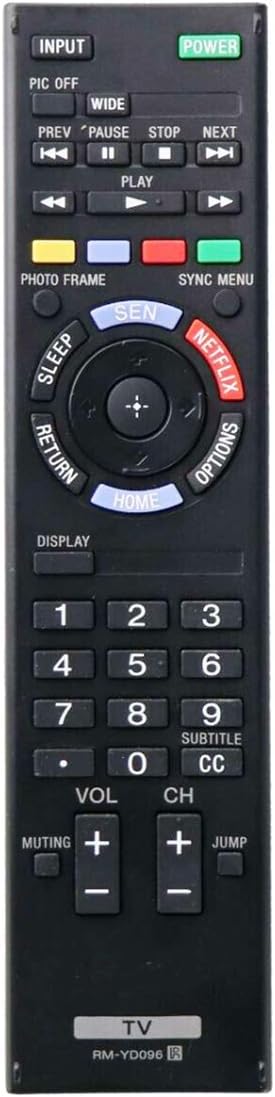
Image: Front view of the UBay RM-YD096 remote control, showing all buttons and layout. The model number "RM-YD096" is visible at the bottom.
2. First Use
After installing the batteries, the remote control is ready for immediate use. Point the remote control directly at your Sony TV and press the POWER button to turn on your television.
Operating Instructions
This remote control provides full functionality for compatible Sony KDL series televisions. Below is a general guide to common button functions.

Image: Angled view of the UBay RM-YD096 remote control, highlighting the ergonomic design and button placement.
- POWER: Turns the TV on or off.
- INPUT: Selects video input sources (e.g., HDMI, AV).
- VOL +/-: Adjusts the volume level.
- CH +/-: Changes TV channels.
- Muting: Mutes or unmutes the TV sound.
- Number Buttons (0-9): Directly selects channels.
- HOME: Accesses the TV's main menu or smart features.
- RETURN: Goes back to the previous screen or menu.
- OPTIONS: Displays context-sensitive options.
- DISPLAY: Shows on-screen information.
- Netflix: Direct access to the Netflix application.
- SEN (Sony Entertainment Network): Direct access to Sony's smart TV platform.
- Navigation Pad (Up/Down/Left/Right/Enter): Navigates through menus and confirms selections.
- Playback Controls (PREV, PLAY, PAUSE, STOP, NEXT, WIDE, PIC OFF): Controls media playback and picture settings.
Maintenance
Cleaning the Remote Control
- Wipe the remote control with a soft, dry cloth.
- For stubborn dirt, slightly dampen the cloth with water or a mild, non-abrasive cleaner.
- Do not use harsh chemicals, solvents, or abrasive cleaning pads, as these can damage the remote's surface or buttons.
Battery Replacement
Replace batteries when the remote control's response becomes sluggish or stops functioning. Always replace both batteries at the same time with new ones of the same type (AA or AAA). Do not mix old and new batteries or different types of batteries.
Storage
If the remote control will not be used for an extended period, remove the batteries to prevent leakage and potential damage to the device.
Troubleshooting
| Problem | Solution |
|---|---|
| Remote control does not work. |
|
| Some buttons do not respond. |
|
| TV responds intermittently. |
|
Specifications
- Model: RM-YD096 (149229111)
- Brand: UBay
- Connectivity Technology: Infrared
- Compatible Devices: Sony KDL series Televisions (e.g., KDL-60R510A, KDL-60R520A, KDL-60R550A, KDL-70R520A, KDL-70R550A, KDL40EX640, KDL46EX640, KDL55EX640, etc.)
- Substitute for: Sony RM-YD094, RM-YD103
- Power Source: 2 x AA or AAA batteries (not included)
- Maximum Range: 10 Meters
- Color: Black
- Special Feature: Ergonomic design
Warranty and Support
For warranty information or technical support, please refer to the retailer's return policy or contact the seller directly. This product is typically covered by a standard return policy, allowing for returns or replacements within a specified period (e.g., 30 days from purchase).
Please retain your proof of purchase for any warranty claims.