
1. Introduction
This manual provides detailed instructions for the setup, operation, and maintenance of your FLYDOG Wireless Call Bell System. Designed for various commercial and institutional environments such as restaurants, izakayas, stores, nursing homes, commercial facilities, hospitals, elderly homes, factories, work sites, parking lots, industrial settings, and reception areas, this system enhances communication and service efficiency.
2. Safety Information
- Do not expose the devices to extreme temperatures, direct sunlight, or high humidity.
- Keep the devices away from water and other liquids. The call buttons are IPX56 rated for splash resistance, but are not fully waterproof and should not be submerged.
- Use only the specified power adapter for the main receiver unit.
- Ensure proper battery installation in the call buttons. Replace batteries with the correct type (12V alkaline) when necessary.
- Do not attempt to disassemble or repair the devices yourself. Contact customer support for assistance.
3. Package Contents
Please verify that all items are present in your package:
- 1 x FLYDOG Wireless Call Bell Receiver (Model: 200D)
- 10 x FLYDOG Wireless Call Buttons (Model: CS-X1)
- 1 x AC Power Adapter for Receiver
- 10 x 12V Alkaline Batteries (pre-installed in call buttons)
- Double-sided adhesive tape for call button mounting
- 1 x Japanese Instruction Manual
4. Product Overview

The complete FLYDOG Wireless Call Bell System, featuring the main receiver unit and ten individual call buttons.

The receiver unit and a call button placed on a counter, demonstrating typical usage in a commercial setting.
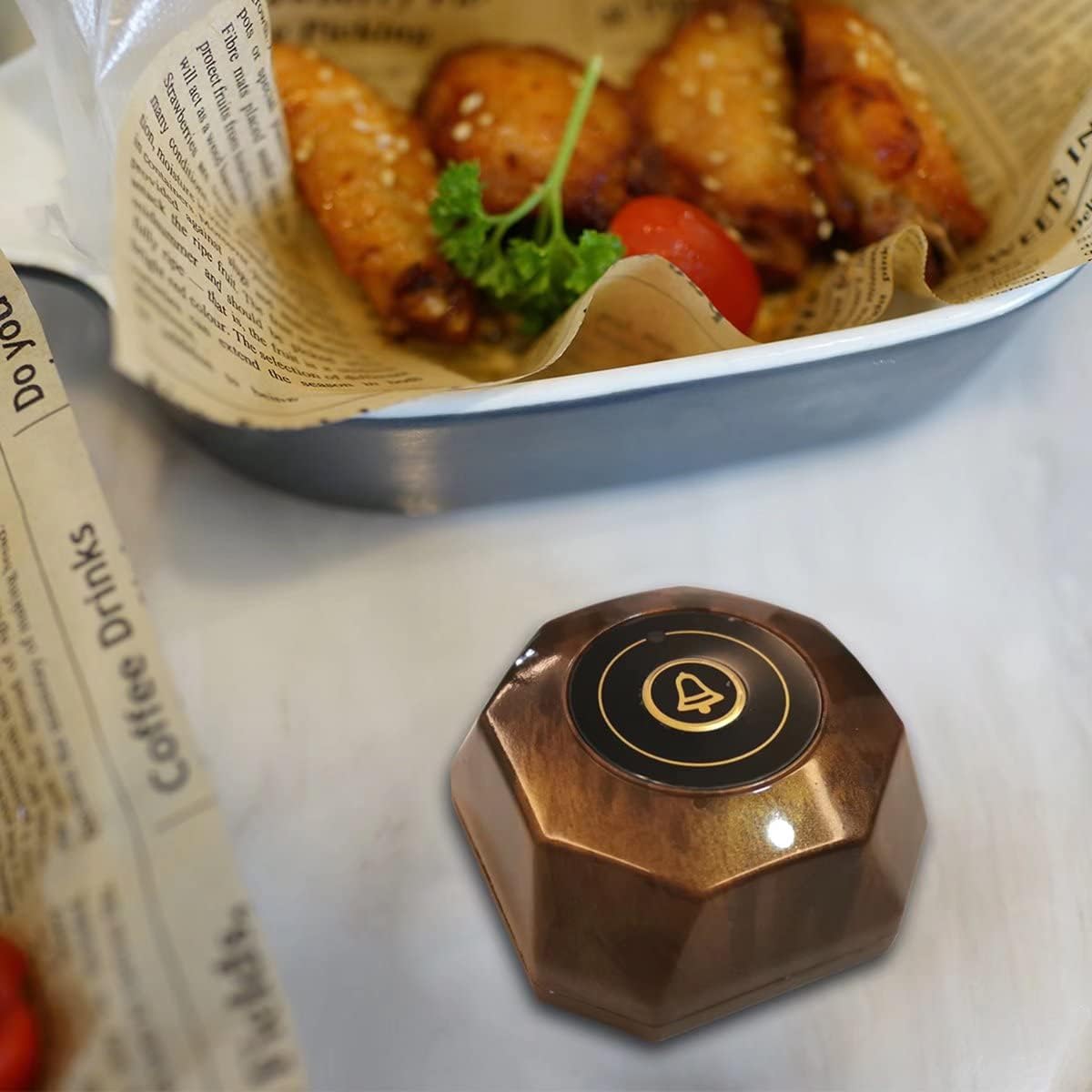
A close-up view of the call button, highlighting its compact design and ease of placement on tables.
Receiver Unit (Model 200D)
The receiver unit features a high-brightness LED display, a touch screen interface, and can be placed on a desktop or mounted on a wall. It displays call numbers and can be configured with various display modes and volume levels.
Call Button (Model CS-X1)
The call buttons are compact, lightweight, and designed for easy placement. They are splash-resistant (IPX56) and come with pre-installed batteries and double-sided adhesive for mounting.
5. Setup
5.1 Initial Setup (No Construction Required)
The FLYDOG Wireless Call Bell System is pre-configured at the factory. This means the call buttons are already paired with the receiver unit, and their numbers are set. You can use the system immediately upon receipt without needing to perform complex pairing or number assignments.

This diagram illustrates the simple four-step process: 1. Customer presses call button, 2. Receiver displays number, 3. Staff receives signal, 4. Service is provided. A repeater can be added to extend range.
5.2 Receiver Unit Placement
- Place the receiver unit in a central location where staff can easily see the display and hear the alerts.
- Ensure the unit is connected to a power outlet using the provided AC adapter.
- The receiver can be placed on a desktop or mounted on a wall using the integrated mounting points.
5.3 Call Button Placement
- Attach the call buttons to desired locations (e.g., tables, patient bedsides) using the included double-sided adhesive tape.
- Ensure the buttons are easily accessible to users.
5.4 Signal Range Considerations
The outdoor receiving range is approximately 400m. Indoors, the effective range is typically 50-100m. This range can vary significantly depending on the environment, including the presence and thickness of walls, and other obstacles. For extended range, a FLYDOG repeater (sold separately) can be added to the system.
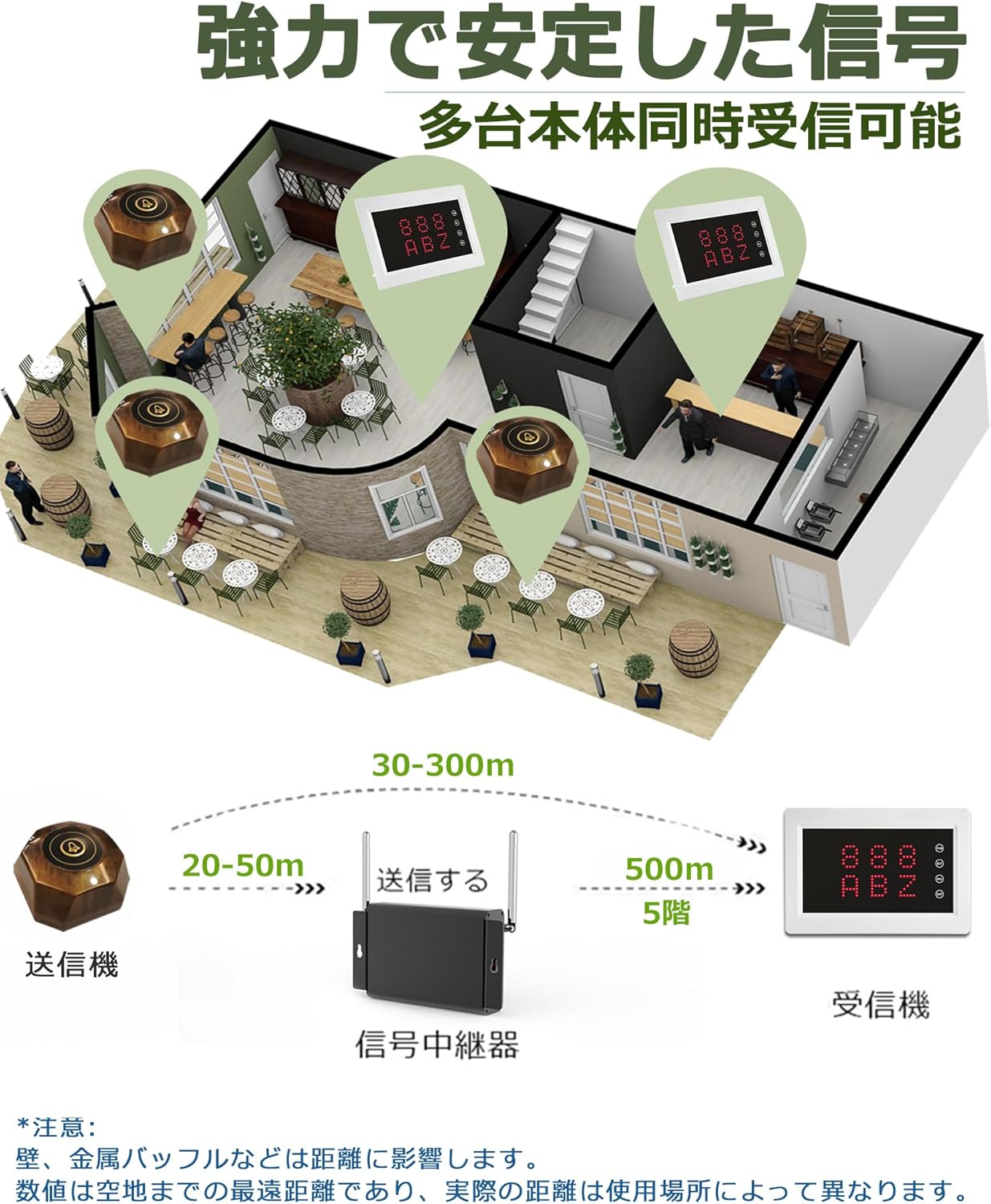
This diagram shows the transmitter (call button), receiver, and an optional signal repeater. It indicates signal ranges of 20-50m from transmitter to repeater, 30-300m from repeater to receiver, and the ability to cover up to 5 floors. Note: Walls and metal obstructions can affect range.
6. Operating Instructions
6.1 Making a Call
To make a call, simply press the bell button on the call unit. The signal will be sent wirelessly to the receiver unit.
6.2 Receiver Display Operation
The receiver unit features a touch screen and side buttons for various functions:

This image details the receiver's touch screen controls and functions: FUN (Function), BIT (Selection), ADJ (Adjustment), ENT (Confirm). It also shows the dimensions of the receiver unit.
- FUN (Function): Press to enter/exit the settings menu. In call display state, it clears all displayed call numbers.
- BIT (Selection): Used to select the digit for editing in settings.
- ADJ (Adjustment): Used to adjust numerical values in settings.
- ENT (Confirm): Used to save settings. In call display state, it clears the oldest call number.
6.3 Display Modes
The receiver supports four display modes for call numbers:
- Mode 1: 1 group of 3 digits (e.g., A01)
- Mode 2: 2 groups of 3 digits (e.g., ABZ)
- Mode 3: 3 groups of 2 digits (e.g., AA 89)
- Mode 4: 4 groups of 2 digits (e.g., AA 89, BB 01)
The system also supports number settings from 001 to ZZZ (using 0-9 and A-Z). In standby mode, the display can show the current time or a black screen with a horizontal line.
6.4 Volume Adjustment and Ringtones
The receiver offers 10 levels of volume adjustment (0-9), where 0 is mute. It supports a broadcast mode with Japanese voice prompts and 7 different ringtones.
7. Maintenance
7.1 Battery Replacement (Call Buttons)
The call buttons use replaceable 12V alkaline batteries, ensuring long-term use. If a call button stops responding, the battery may need replacement.

This image illustrates the battery replacement process for the call button. Simply push the front and back covers to open the back casing and access the 12V23A battery.
To replace the battery:
- Gently push the front and back covers of the call button to open the back casing.
- Remove the old 12V23A battery.
- Insert a new 12V23A alkaline battery, ensuring correct polarity.
- Close the back casing securely.
7.2 Cleaning
Wipe the receiver and call buttons with a soft, dry cloth. Do not use abrasive cleaners or solvents. For the call buttons, avoid submerging them in water, as they are only splash-resistant (IPX56).
8. Troubleshooting
| Problem | Possible Cause | Solution |
|---|---|---|
| Call button not responding. | Low or dead battery in the call button. | Replace the 12V23A battery in the call button. |
| Receiver not displaying calls. | Receiver not powered on or disconnected. | Ensure the receiver is plugged into a power outlet and turned on. |
| Poor signal reception or limited range. | Obstacles (walls, metal structures) blocking the signal; excessive distance. | Relocate the receiver to a more central position. Consider adding a FLYDOG repeater to extend the range. Minimize obstructions between call buttons and receiver. |
| Display shows incorrect numbers or is frozen. | Temporary software glitch. | Restart the receiver unit by unplugging and re-plugging the power adapter. |
| Volume is too low or muted. | Volume setting is too low or set to mute (0). | Adjust the volume using the receiver's controls (ADJ button). |
9. Specifications
| Feature | Specification |
|---|---|
| Brand | BYHUBYENG |
| Receiver Model Number | 200D |
| Call Button Model Number | CS-X1 |
| Mounting Type | Desktop Mount, Wall Mount |
| Sensor Technology | Wireless Sensor |
| UPC | 194998946492 |
| Receiver Dimensions (L x W x H) | 22 x 11 x 33 cm |
| Item Weight | 1.19 Kilograms |
| Call Button Dimensions (L x W x H) | 60 x 60 x 31 mm |
| Call Button Weight | 44g |
| Call Button Waterproof Level | IPX56 (Splash Resistant) |
| Included Batteries | 10 x 12V Alkaline Batteries (for call buttons) |
| Voltage | 12 Volts (DC) |
| Outdoor Receiving Range | Approx. 400m |
| Indoor Receiving Range | 50-100m (environment dependent) |
| Display Modes | 4 types (1-4 groups of digits) |
| Volume Levels | 10 levels (0-9, 0=mute) |
| Ringtones | 7 types + Japanese voice broadcast |
10. Warranty and Support
10.1 Warranty Information
The FLYDOG Wireless Call Bell System comes with a 1-year warranty covering natural defects from the date of purchase. This warranty ensures the quality and durability of the product.
10.2 How to Obtain Support
In the event of a natural defect or if you require assistance with your product, please contact customer support. When contacting support, please provide your Amazon order number for verification. This will help expedite the support process.
For further assistance, please refer to the contact information provided on the product packaging or the official BYHUBYENG website.