
ALIENPRO Alien Plus 240 LED Audio-Rhythmic 30W
Alien Pro Plus 240 LED Audio-Rhythmic Lighting Bar 30W User Manual
Brand: ALIENPRO | Model: Alien Plus 240 LED Audio-Rhythmic 30W
1. Introduction
Thank you for purchasing the Alien Pro Plus 240 LED Audio-Rhythmic Lighting Bar. This high-quality lighting fixture is designed to enhance your audio experience with dynamic, sound-activated illumination. Featuring 240 bright LEDs and a 30W power output, this bar offers vibrant lighting effects that synchronize with music, making it ideal for parties, events, or home entertainment setups. This manual provides essential information for safe operation, setup, maintenance, and troubleshooting.
2. Important Safety Instructions
- Read all instructions: Before operating the device, carefully read and understand all safety and operating instructions.
- Retain instructions: Keep this manual for future reference.
- Heed warnings: Follow all warnings on the product and in the operating instructions.
- Water and moisture: Do not use this apparatus near water (e.g., bathtub, sink, wet basement, swimming pool).
- Ventilation: Ensure proper ventilation. Do not block any ventilation openings. Install in accordance with the manufacturer's instructions.
- Heat: Do not install near any heat sources such as radiators, heat registers, stoves, or other apparatus (including amplifiers) that produce heat.
- Power-cord protection: Protect the power cord from being walked on or pinched, particularly at plugs, convenience receptacles, and the point where they exit from the apparatus.
- Cleaning: Clean only with a dry cloth.
- Servicing: Do not attempt to service this product yourself as opening or removing covers may expose you to dangerous voltage or other hazards. Refer all servicing to qualified service personnel.
- Indoor Use Only: This product is designed for indoor use only. Do not expose to rain or moisture.
3. Package Contents
Please check the package contents carefully upon unboxing. If any items are missing or damaged, contact your retailer immediately.
- Alien Pro Plus 240 LED Audio-Rhythmic Lighting Bar
- Power Cable
- Mounting Brackets (pre-attached or included)
- User Manual (this document)
4. Setup and Installation
4.1 Unpacking
Carefully remove the lighting bar from its packaging. Retain the packaging materials for future storage or transport.
4.2 Mounting
The Alien Pro Plus lighting bar is designed for versatile placement, including rack mounting. Ensure the mounting surface or rack is stable and can support the weight of the unit (approximately 2.08 kg).
- Identify the mounting brackets on each end of the lighting bar. These brackets can be adjusted to different angles.
- For rack mounting, align the holes on the brackets with the corresponding holes on your rack. Secure the unit using appropriate screws (not included).
- For surface mounting (e.g., on a wall or ceiling), mark the desired drilling points using the brackets as a template. Drill pilot holes and secure the unit firmly with appropriate hardware. Ensure the unit is level and securely fastened to prevent accidental falls.
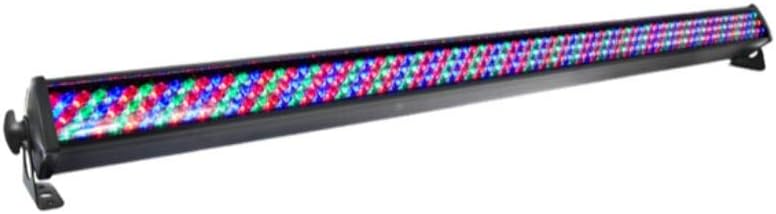
Figure 4.2.1: Overview of the Alien Pro Plus 240 LED Audio-Rhythmic Lighting Bar with mounting brackets visible on each end.
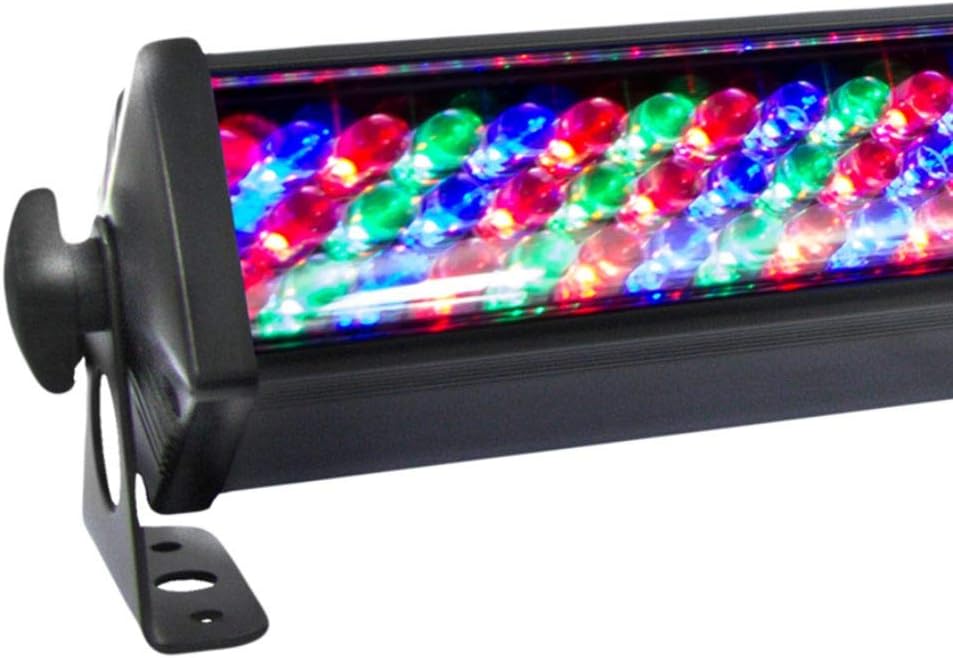
Figure 4.2.2: A detailed view of the LED array and one of the adjustable mounting brackets, showing the robust construction.
4.3 Power Connection
Connect the provided power cable to the power input on the lighting bar and then to a standard electrical outlet. Ensure the outlet provides the correct voltage as specified in the product's technical specifications.
5. Operating Instructions
5.1 Powering On/Off
Once connected to power, the unit will typically power on automatically or via a dedicated power switch (if present on your model). To power off, simply disconnect the power cable from the outlet.
5.2 Audio-Rhythmic Mode
The Alien Pro Plus lighting bar features an audio synchronization capability. This means the lighting effects will react to the sound and rhythm of music played in the vicinity of the unit. Ensure the unit is placed in an area where it can adequately pick up audio signals for optimal performance.
- Placement: For best audio response, position the lighting bar near your audio source or speakers.
- Sensitivity: (If applicable, check unit for controls) Some models may have a sensitivity knob or switch to adjust how strongly the lights react to sound. Adjust as needed for your environment.
5.3 Dimming Feature
This lighting bar is dimmable, allowing you to adjust the intensity of the LED output. The dimming function is typically controlled via a built-in knob or button on the unit itself. Refer to the physical controls on your device to adjust brightness.
6. Maintenance
6.1 Cleaning
Always disconnect the power before cleaning. Use a soft, dry cloth to wipe down the exterior of the lighting bar. Do not use abrasive cleaners, solvents, or harsh chemicals, as these may damage the finish or internal components.
6.2 Storage
When not in use for extended periods, store the lighting bar in a cool, dry place, away from direct sunlight and extreme temperatures. It is recommended to use the original packaging for storage to protect the unit from dust and physical damage.
7. Troubleshooting
| Problem | Possible Cause | Solution |
|---|---|---|
| No power / Lights do not turn on |
|
|
| Lights not reacting to music (Audio-Rhythmic mode) |
|
|
| Lights are dim or flickering |
|
|
8. Specifications
| Brand | ALIENPRO |
| Manufacturer | Alien Pro |
| Model Name | Alien Plus 240 LED Audio-Rhythmic 30W |
| Style | Modern |
| Shape | Rectangular |
| Material | Metal or plastic |
| Number of Lights | 241 |
| Special Features | Dimmable, Audio synchronization |
| Power Source | Electric cable |
| Switch Installation Type | Rack mount |
| Bulb Type | Light Emitting Diode (LED) |
| Wattage | 30 watts |
| Package Dimensions | 105.6 x 10.4 x 9.6 cm |
| Item Weight | 2.08 kg |
9. Warranty and Support
For information regarding warranty coverage, technical support, or service inquiries, please refer to the warranty card included with your product or contact the retailer where you purchased the Alien Pro Plus 240 LED Audio-Rhythmic Lighting Bar. You may also visit the official ALIENPRO website for further assistance and contact information.
Related documentsAlien Plus 240 LED Audio-Rhythmic 30W


Ask a question about this manual
Ask about setup, troubleshooting, compatibility, parts, safety, or missing instructions. Manuals+ will review the question and use this page’s manual context to help answer it.