
1. Introduction
The Harman Kardon Onyx Studio 6 is a sophisticated and refined portable Bluetooth speaker designed to deliver exceptional audio quality with a stylish aesthetic. Featuring a signature round silhouette, premium fabric cover, and an integrated aluminum handle, it offers both elegance and easy portability. Its IPX7 waterproof design ensures durability and versatility for use in various environments, both indoors and outdoors. Enjoy up to 8 hours of playtime on a single charge and the ability to wirelessly connect two Onyx Studio 6 speakers for an enhanced stereo sound experience.

Front view of the Harman Kardon Onyx Studio 6 Bluetooth Speaker, showcasing its fabric cover and integrated handle.
2. What's in the Box
Upon unboxing your Harman Kardon Onyx Studio 6, please ensure all the following components are present:
- 1x Harman Kardon Onyx Studio 6 Bluetooth Speaker
- 1x Power Adaptor
- 1x Quick Start Guide
- 1x Safety Sheet
- 1x Warranty Card

The Harman Kardon Onyx Studio 6 speaker and its packaging, illustrating the included items.
3. Product Features
The Harman Kardon Onyx Studio 6 offers a range of features designed for a superior audio experience:
- Premium Materials: Crafted with a premium fabric cover and an integrated aluminum handle for durability and style.
- Wireless Bluetooth Streaming: Seamlessly connect your devices via Bluetooth for high-quality audio playback.
- Extended Playtime: Enjoy up to 8 hours of continuous music playback on a single charge.
- IPX7 Waterproof: Designed to withstand immersion in water up to 1 meter for 30 minutes, making it suitable for poolside or bathroom use.
- Wireless Dual Sound: Wirelessly connect two Harman Kardon Onyx Studio 6 speakers to create an immersive stereo sound experience.

The integrated handle allows for easy portability of the speaker.
4. Setup
4.1 Initial Charge
Before first use, fully charge your Onyx Studio 6 speaker. Connect the power adaptor to the speaker's power input and then to a wall outlet. The charging indicator light will show the charging status.
4.2 Bluetooth Pairing
- Power on the Onyx Studio 6 by pressing the Power button.
- Press the Bluetooth button on the speaker. The Bluetooth indicator will flash blue, indicating it is in pairing mode.
- On your mobile device, enable Bluetooth and search for available devices.
- Select "Harman Kardon Onyx Studio 6" from the list.
- Once connected, the Bluetooth indicator will turn solid blue.
4.3 Wireless Dual Sound Connection
To connect two Onyx Studio 6 speakers for a stereo experience:
- Ensure both Onyx Studio 6 speakers are powered on and not currently connected to any Bluetooth device.
- On one speaker (this will be your primary speaker), press and hold the Bluetooth button for 5 seconds until you hear an audible prompt.
- On the second speaker, press and hold the Bluetooth button for 5 seconds.
- The two speakers will automatically connect to each other. Once connected, the primary speaker's Bluetooth indicator will remain solid blue, and the secondary speaker's indicator will turn solid white.
- Now, connect your mobile device to the primary speaker via Bluetooth as described in section 4.2.
5. Operating
5.1 Controls Overview
The Onyx Studio 6 features intuitive touch controls located on the top surface of the speaker:
| Button | Function |
|---|---|
| Power Button | Press to power on/off the speaker. |
| Bluetooth Button | Press to enter Bluetooth pairing mode. Hold for 5 seconds for Wireless Dual Sound pairing. |
| Volume Down (-) | Press to decrease volume. |
| Volume Up (+) | Press to increase volume. |
| Play/Pause Button | Press to play or pause music. Double-press for next track. Triple-press for previous track. |
| Phone Button | Press to answer/end a call. Hold to reject a call. |

Rear view of the speaker, showing the AUX, Power, and Service ports.
5.2 Power On/Off
To power on the speaker, press the Power button. To power off, press the Power button again.
5.3 Volume Control
Adjust the volume using the Volume Up (+) and Volume Down (-) buttons on the speaker's top panel.
5.4 Playback Control
Use the Play/Pause button to control music playback:
- Single press: Play/Pause
- Double press: Next track
- Triple press: Previous track
5.5 Answering Calls
When a call comes in while connected via Bluetooth, press the Phone button to answer. Press again to end the call. Hold the Phone button to reject an incoming call.
6. Maintenance
6.1 Cleaning
To clean the speaker, gently wipe the fabric and metal surfaces with a soft, damp cloth. Avoid using harsh chemicals or abrasive cleaners, as these can damage the finish.
6.2 Storage
When not in use for extended periods, store the speaker in a cool, dry place away from direct sunlight and extreme temperatures. It is recommended to fully charge the battery before storing to maintain battery health.
6.3 Waterproofing (IPX7)
The Onyx Studio 6 is IPX7 waterproof, meaning it can be immersed in water up to 1 meter (3 feet) for up to 30 minutes. Ensure all port covers are securely closed before exposing the speaker to water. Do not expose the speaker to salt water or other liquids. After exposure to water, dry the speaker thoroughly before charging.
7. Troubleshooting
If you encounter any issues with your Harman Kardon Onyx Studio 6, please refer to the table below for common problems and solutions:
| Problem | Possible Cause | Solution |
|---|---|---|
| No power | Battery is depleted. | Charge the speaker using the provided power adaptor. |
| Cannot connect via Bluetooth | Speaker is not in pairing mode or already connected to another device. | Press the Bluetooth button to enter pairing mode. Ensure no other devices are connected. Try forgetting the device on your phone and re-pairing. |
| Poor sound quality / Distortion | Volume too high, low battery, or interference. | Reduce volume. Charge the speaker. Move speaker closer to the Bluetooth device and away from sources of interference. |
| Wireless Dual Sound not working | Speakers not properly paired for Wireless Dual Sound. | Ensure both speakers are disconnected from other Bluetooth devices. Follow the Wireless Dual Sound pairing instructions carefully (Section 4.3). |
8. Specifications
Key technical specifications for the Harman Kardon Onyx Studio 6:
| Feature | Detail |
|---|---|
| Model Name | Harman Kardon Onyx Studio 6 - Blue |
| Model Number | HKOS6BLUAM |
| Dimensions (D x W x H) | 7.11" x 12.58" x 12.36" |
| Item Weight | 5.44 pounds (87 Ounces) |
| Speaker Type | Woofer |
| Speaker Size | 120 Millimeters |
| Tweeter Diameter | 25 Millimeters |
| Speaker Maximum Output Power | 50 Watts |
| Connectivity Technology | Bluetooth |
| Wireless Communication Technology | Bluetooth |
| Battery Life | 8 Hours |
| Charging Time | 8 Hours |
| Battery Capacity | 3283 Milliamp Hours |
| Water Resistance Level | IPX7 Waterproof |
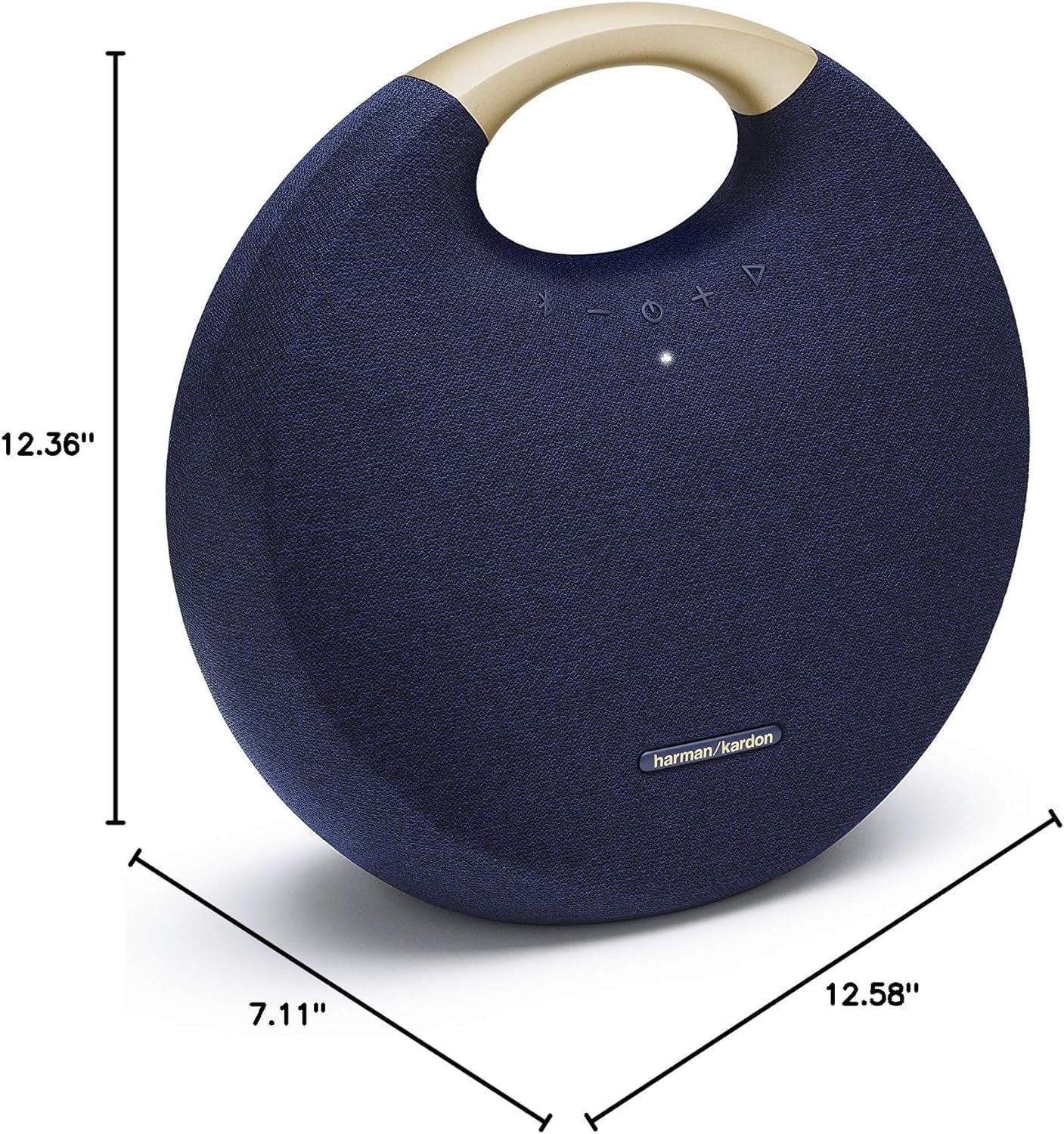
Dimensions of the Harman Kardon Onyx Studio 6 speaker.
9. Warranty and Support
The Harman Kardon Onyx Studio 6 comes with a Limited Warranty. Please refer to the included Warranty Card in your product packaging for detailed terms and conditions, including coverage period and how to make a claim.
For further support, technical assistance, or service inquiries, please visit the official Harman Kardon website or contact their customer service department. Keep your purchase receipt and product serial number handy for faster service.


