
1. Introduction
Thank you for choosing the Kaiser KSW-5004 Rechargeable Bluetooth Speaker. This portable speaker is designed to deliver clear audio with versatile connectivity options, including Bluetooth, USB, Micro SD, and AUX input. It also features an auxiliary RGB light and KSR-Link technology for wireless stereo pairing. This manual provides essential information for safe and efficient use of your speaker.
2. Safety Information
- Read all instructions before using the device.
- Keep the speaker away from water, moisture, and high temperatures.
- Do not attempt to disassemble, repair, or modify the speaker. This will void the warranty.
- Use only the provided charging cable or a certified equivalent.
- Avoid exposing the battery to extreme temperatures or direct sunlight.
- Clean the speaker with a soft, dry cloth. Do not use liquid cleaners or aerosols.
3. Package Contents
Please check the package for the following items:
- Kaiser KSW-5004 Rechargeable Bluetooth Speaker
- USB Charging Cable
- User Manual
4. Product Overview
Front View

Figure 4.1: Front view of the KSW-5004 speaker, showcasing the speaker grille and RGB light ring.
Top Control Panel

Figure 4.2: Top panel controls including buttons for 'LUCES' (Lights), 'MODO LINK' (Mode/Link), Play/Pause, and Volume/Track navigation.
Rear Connection Panel
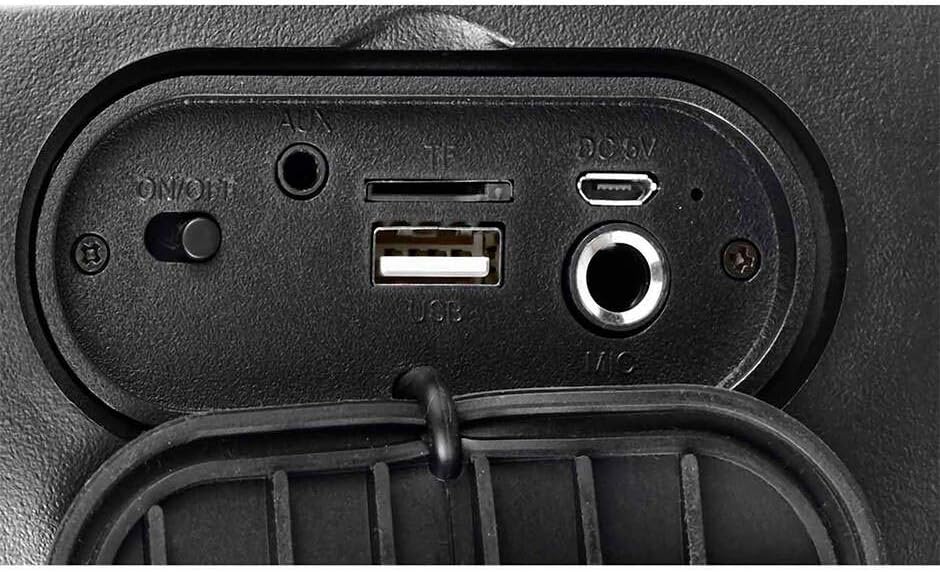
Figure 4.3: Rear connection panel with ON/OFF switch, AUX input, TF (Micro SD) card slot, USB port, DC 5V charging port, and Microphone input.
5. Setup
5.1 Charging the Speaker
Before first use, fully charge the speaker. Connect the provided USB charging cable to the DC 5V port on the speaker and the other end to a USB power adapter (not included) or a computer's USB port. The charging indicator will illuminate during charging and turn off when fully charged.
5.2 Powering On/Off
Locate the ON/OFF switch on the rear connection panel. Slide the switch to the ON position to power on the speaker. Slide it to the OFF position to power off.
6. Operating Instructions
6.1 Bluetooth Pairing
- Turn on the speaker. It will automatically enter Bluetooth pairing mode, indicated by a flashing light or audible prompt.
- Enable Bluetooth on your mobile device (smartphone, tablet, laptop).
- Search for available Bluetooth devices and select "KSW-5004" from the list.
- Once connected, the speaker will emit a confirmation tone, and the light indicator will become solid.
6.2 KSR-Link (True Wireless Stereo - TWS)
To pair two KSW-5004 speakers for a stereo sound experience:
- Ensure both KSW-5004 speakers are powered on and not connected to any Bluetooth device.
- On one of the speakers, press and hold the "MODO LINK" button. The speaker will emit a pairing tone.
- The two speakers will automatically connect to each other. A confirmation tone will sound once connected.
- Now, enable Bluetooth on your device and connect to the primary speaker (the one you pressed the 'MODO LINK' button on). Both speakers will play audio in stereo.
6.3 USB / Micro SD Playback
Insert a USB flash drive or a Micro SD card (TF card) into the corresponding port on the rear connection panel. The speaker will automatically detect the storage device and begin playing audio files. Use the Previous/Volume Down and Next/Volume Up buttons to navigate tracks.
6.4 AUX Input
Connect an external audio device (e.g., MP3 player, laptop) to the AUX port using a 3.5mm audio cable (not included). The speaker will automatically switch to AUX mode. Use the connected device to control playback.
6.5 RGB Light Control
Press the "LUCES" button on the top control panel to cycle through different RGB light modes or to turn the light off.
6.6 Volume and Track Control
- Press the Previous/Volume Down button (K-) to decrease volume. Press and hold to go to the previous track.
- Press the Next/Volume Up button (K+) to increase volume. Press and hold to go to the next track.
- Press the Play/Pause button (||) to play or pause audio.
7. Maintenance
- Wipe the speaker with a soft, dry, lint-free cloth.
- Do not use abrasive cleaners, waxes, or solvents.
- Store the speaker in a cool, dry place when not in use for extended periods.
- Recharge the battery periodically if not used for a long time to maintain battery health.
8. Troubleshooting
| Problem | Possible Cause | Solution |
|---|---|---|
| Speaker does not power on. | Battery is depleted. | Charge the speaker fully. |
| No sound from speaker. | Volume is too low or muted. Incorrect input source. | Increase volume on speaker and connected device. Ensure correct mode (Bluetooth, USB, SD, AUX) is selected. |
| Bluetooth device cannot pair. | Speaker not in pairing mode. Bluetooth is off on device. Device is too far. | Ensure speaker is in pairing mode. Turn on Bluetooth on your device. Move device closer to speaker (within 10m). |
| KSR-Link (TWS) not working. | Speakers already paired to other devices. | Ensure both speakers are unpaired from any other Bluetooth devices before initiating KSR-Link pairing. |
| USB/Micro SD playback issues. | Unsupported file format. Corrupted media. | Ensure audio files are in a supported format (e.g., MP3). Try a different USB drive or Micro SD card. |
9. Specifications
| Feature | Specification |
|---|---|
| Model | KSW-5004 |
| Output Power | 10W RMS |
| Speaker Size | 4 inches |
| Bluetooth Version | 5.0 |
| Bluetooth Range | Up to 10 meters |
| Connectivity | Bluetooth, USB, Micro SD (TF), AUX (3.5mm) |
| Power Source | Battery Powered |
| Battery Life | Up to 10 hours (at moderate volume) |
| Dimensions (L x W x H) | 16.2 x 14.7 x 24.3 cm |
| Weight | 1.16 kg |
| Color | Black |
| Special Features | RGB Light, KSR-Link (TWS), Water Resistant |
| Compatible Devices | Laptop, MP3 Player, Smartphone, Tablet |

Figure 9.1: KSW-5004 speaker with indicated dimensions.
10. Warranty and Support
For warranty information or technical support, please refer to the warranty card included with your product or contact Kaiser customer service directly. Keep your purchase receipt as proof of purchase.


