
Introduction
This manual provides instructions for the proper setup, operation, and maintenance of your INNOREL RT75C Carbon Fiber Tripod with N44 Ball Head. Please read this manual thoroughly before using the product to ensure safe and efficient operation.
Package Contents
Verify that all items listed below are present in your package:
- Tripod Bag x 1
- Tripod Carton x 1
- Tripod & Ballhead x 1 (INNOREL RT75C Tripod with N44 Ball Head)
- Stainless Steel Spike x 3
- Allen Key x 3
- Extra Quick Release Plate x 1
- Ball Head Bag x 1

Figure 1: Package Contents
Setup Instructions
1. Extending the Tripod Legs
- Loosen the twist locks on each leg section.
- Extend the legs to the desired height. The tripod features 4 sections with tube diameters of 29.0mm, 25.6mm, 22.2mm, and 18.8mm.
- Tighten the twist locks firmly to secure the leg sections.

Figure 2: Tripod Leg Tube Details
2. Adjusting Leg Angles
The tripod legs can be adjusted to three different angles (70°, 42°, 12°) for stability on various terrains or for low-angle shooting. Press the leg angle lock button at the top of each leg and adjust to the desired position until it clicks into place.

Figure 3: Adjusting Leg Angles
3. Attaching the Ball Head and Camera
- Ensure the N44 ball head is securely mounted to the tripod's center column.
- Attach the quick release plate to your camera's tripod socket.
- Insert the quick release plate with your camera into the ball head's clamp and tighten the locking knob until secure.

Figure 4: N44 Low Profile Ball Head
Operating Instructions
1. Adjusting Working Height
The tripod offers a maximum height of 172 cm (67.5 in) with the center column extended. The monopod configuration can reach up to 178.5 cm (70.3 in). Adjust leg sections and the center column as needed for your desired shooting height.

Figure 5: Working Height Configurations
2. Converting to Monopod
One of the tripod legs can be detached and combined with the center column to form a monopod.
- Unscrew the hook from the bottom of the center column.
- Unscrew the top plate from the center column.
- Remove one leg by twisting it counter-clockwise from the tripod spider.
- Attach the removed leg to the top plate and then to the center column.
- Alternatively, attach the removed leg directly to the ball head for a shorter monopod.
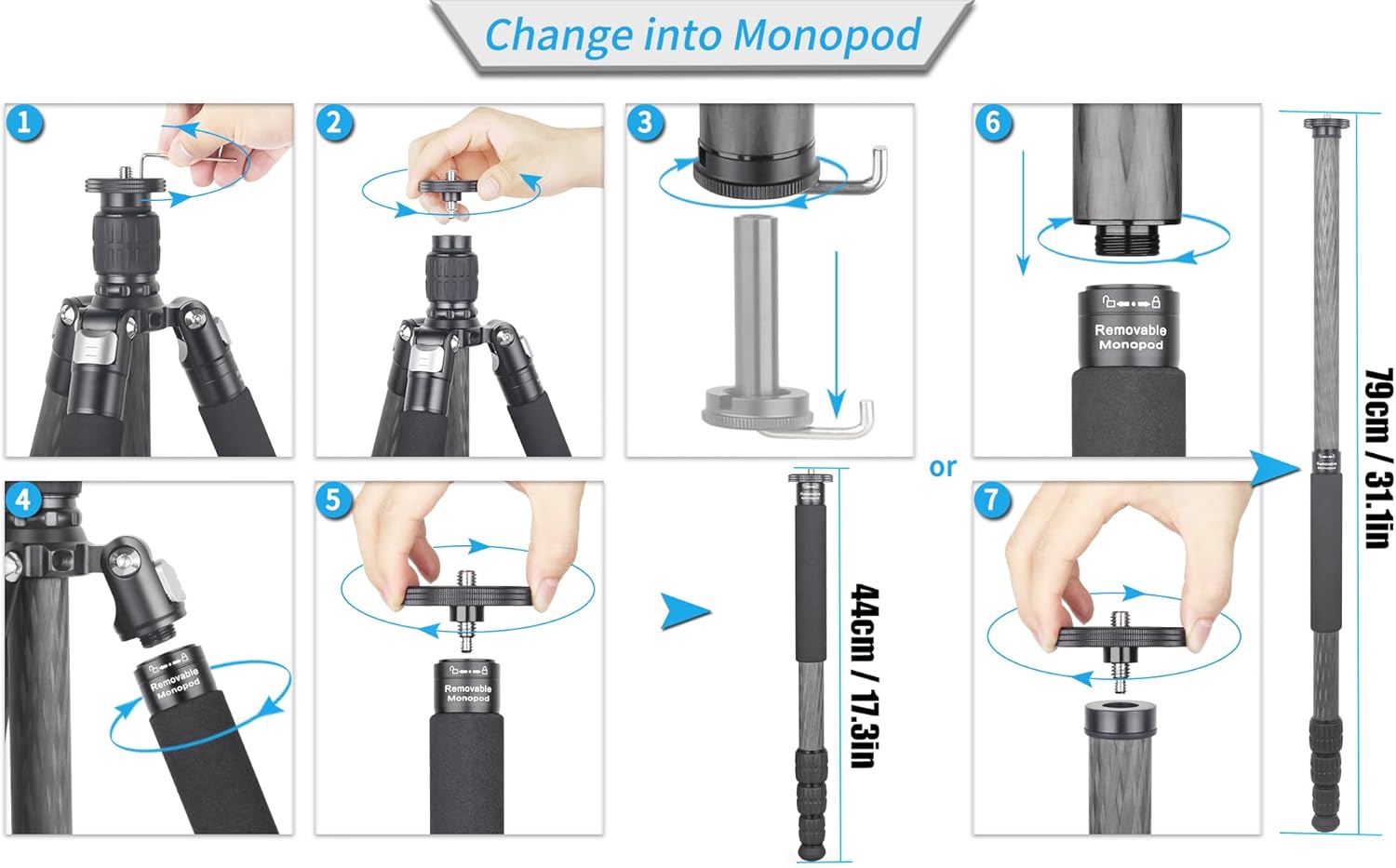
Figure 6: Monopod Conversion Steps
3. Inverting the Center Column for Low-Angle/Macro Shooting
For extremely low-angle shots or macro photography, the center column can be inverted.
- Remove the hook from the bottom of the center column.
- Loosen the center column lock sleeve.
- Remove the center column completely.
- Invert the center column and reinsert it into the tripod spider from below.
- Tighten the lock sleeve to secure the inverted center column.
- Reinstall the hook if desired.

Figure 7: Inverting Center Column
4. Removing the Center Column for Ground Level Shooting
To achieve the lowest possible shooting position, the center column can be entirely removed.
- Loosen the screw on the top plate of the center column.
- Unscrew the top plate.
- Remove the hook from the bottom of the center column.
- Take out the center column.
- Couple the hook and top plate directly to the tripod spider.
- Tighten the lock sleeve to secure the assembly.

Figure 8: Removing Center Column
Maintenance
- Cleaning: Wipe the tripod and ball head with a soft, dry cloth after each use. For stubborn dirt, use a slightly damp cloth and mild soap, then dry thoroughly. Avoid harsh chemicals.
- Lubrication: The moving parts are designed for smooth operation. Do not apply lubricants unless specifically instructed by INNOREL support, as this may attract dust and impair performance.
- Storage: Store the tripod in its bag in a dry, cool place away from direct sunlight and extreme temperatures.
- Spikes: The tripod comes with replaceable stainless steel spikes for enhanced grip on soft or uneven surfaces. To replace, unscrew the rubber feet and screw in the spikes. Use the provided Allen keys for any adjustments.

Figure 9: Replaceable Stainless Steel Spikes
Troubleshooting
| Problem | Possible Cause | Solution |
|---|---|---|
| Tripod legs not extending/retracting smoothly. | Dirt or debris in twist locks; overtightened locks. | Clean leg sections and twist locks. Ensure locks are not overtightened when storing. |
| Ball head not holding camera securely. | Quick release plate not fully seated; locking knob not tightened; camera weight exceeds limit. | Ensure quick release plate is correctly inserted and locking knob is fully tightened. Verify camera weight is within the 20kg (44lb) limit. |
| Tripod unstable. | Leg sections not fully extended or locked; uneven ground; leg angles not properly set. | Ensure all leg sections are fully extended and twist locks are tightened. Adjust leg angles to suit the terrain. |
Specifications
| Feature | Detail |
|---|---|
| Brand | INNOREL |
| Model Name | RT75C+N44 |
| Material | Carbon Fiber (legs), Aluminum (body) |
| Item Weight | 1900 Grams (4.19 lbs) |
| Weight Limit | 20 Kilograms (44 lbs) |
| Maximum Height (Tripod) | 172 Centimeters (67.5 inches) |
| Maximum Height (Monopod) | 178.5 Centimeters (70.3 inches) |
| Minimum Height | 60 Centimeters (23.6 inches) |
| Folded Size | 47 Centimeters (18.5 inches) |
| Leg Sections | 4 |
| Leg Diameter | 29.0mm, 25.6mm, 22.2mm, 18.8mm |
| Tripod Head Type | Ball Head (N44) |
| Ball Head Diameter | 44mm (1.73 inches) |
| Compatible Devices | Camera, DSLR, Camcorder |
| Special Features | Adjustable leg angles, Compact, Lightweight, Monopod conversion, Low gravity center ball head, Hollow ball design, Anti-lost knobs, Invertible/Removable center column, Replaceable spikes. |
Warranty and Support
Warranty Information
For detailed warranty information, please refer to the warranty card included with your product or contact INNOREL customer service directly. Warranty terms may vary by region and retailer.
Customer Support
If you encounter any issues or have questions regarding your INNOREL RT75C Tripod, please contact INNOREL customer support. You can typically find contact information on the official INNOREL website or through your purchase platform.
INNOREL is committed to providing high-quality products and services.

