
Introduction
This manual provides instructions for the UBay RM-YD075 replacement remote control. It is designed to operate various Sony LCD LED HDTV television models without requiring complex programming. Please read this manual thoroughly to ensure proper use and to maximize your remote control's functionality.
Product Overview
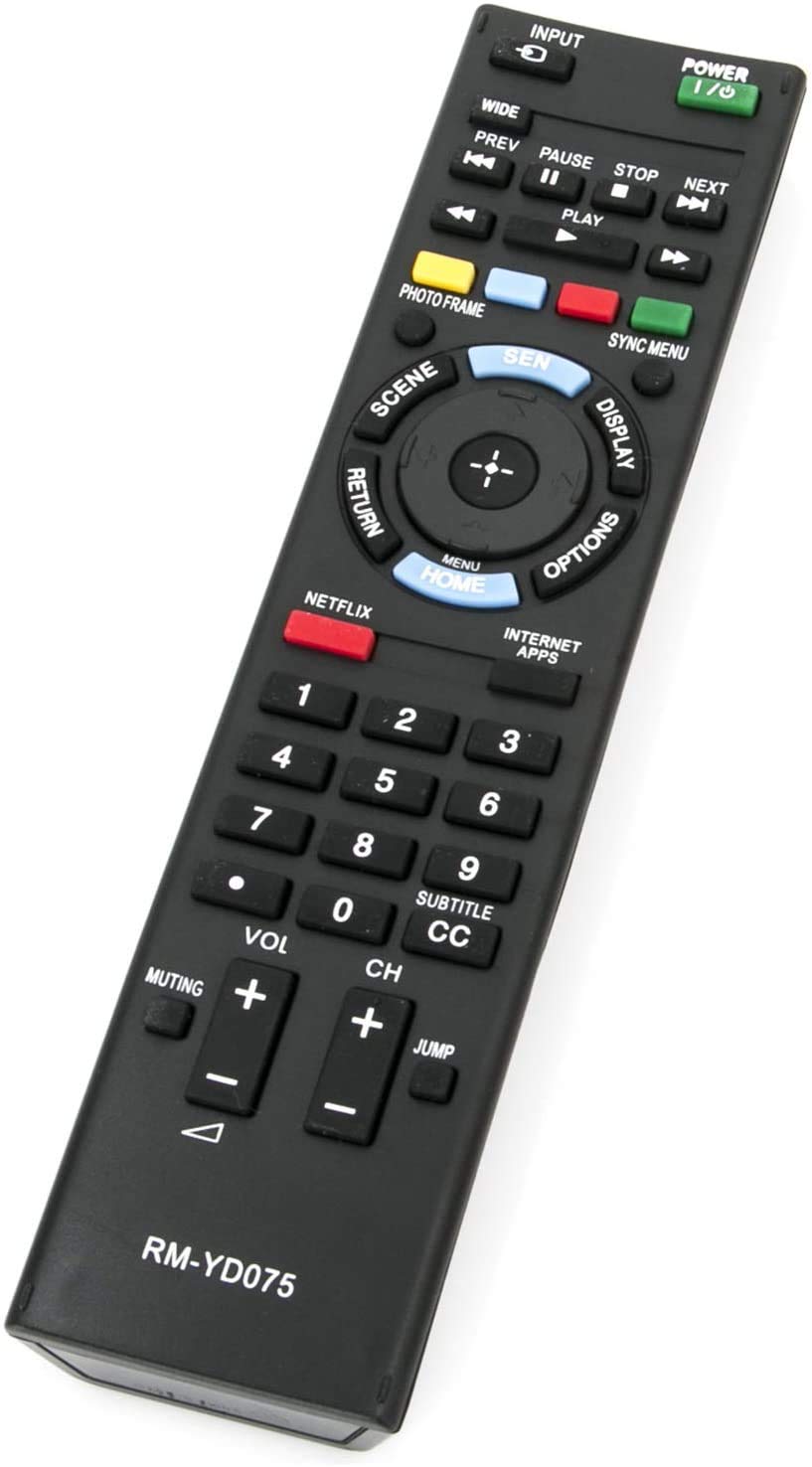
Image: The UBay RM-YD075 remote control, a black rectangular device with various buttons. The top features a green POWER button and an INPUT button. Below are media playback controls (PREV, PAUSE, STOP, NEXT, PLAY). A central navigation pad with a HOME/MENU button is surrounded by SCENE, DISPLAY, RETURN, and OPTIONS buttons. Dedicated NETFLIX and INTERNET APPS buttons are present. A numeric keypad (0-9) is located in the middle, along with SUBTITLE/CC. Volume (VOL) and Channel (CH) controls are at the bottom, along with MUTING and JUMP buttons. The model number RM-YD075 is printed at the bottom.
The UBay RM-YD075 remote control is a direct replacement for original Sony TV remotes, offering a familiar layout and functionality. It features dedicated buttons for common functions, including power, input selection, channel and volume control, media playback, and quick access to streaming services like Netflix and Internet Apps.
Setup
1. Battery Installation
- Locate the battery compartment on the back of the remote control.
- Slide open the battery compartment cover.
- Insert two (2) 1.5V AAA alkaline batteries, ensuring the positive (+) and negative (-) terminals match the diagrams inside the compartment.
- Close the battery compartment cover securely.
Note: This remote control is pre-programmed and does not require any additional setup or pairing. It is ready for use immediately after battery installation.
Operating Instructions
Point the remote control directly at your Sony TV's infrared sensor. Ensure there are no obstructions between the remote and the TV.
- POWER (Green Button): Turns the TV on or off.
- INPUT: Cycles through available input sources (HDMI, AV, Component, etc.).
- Number Buttons (0-9): Selects channels directly or enters numerical values.
- VOL (+/-): Increases or decreases the television's volume.
- CH (+/-): Changes the television channel up or down.
- MUTING: Mutes or unmutes the television's audio.
- Navigation Pad (Up, Down, Left, Right, Enter): Navigates through menus and selects options.
- HOME / MENU: Accesses the TV's main menu or smart TV home screen.
- RETURN: Goes back to the previous screen or menu.
- DISPLAY: Shows on-screen information about the current program or input.
- OPTIONS: Displays context-sensitive options for the current screen.
- NETFLIX: Direct access button for the Netflix application.
- INTERNET APPS: Direct access button for other internet applications.
- Playback Controls (PREV, PAUSE, STOP, NEXT, PLAY): Controls media playback functions for compatible devices or content.
- SUBTITLE / CC: Toggles subtitles or closed captions on/off.
- JUMP: Quickly switches between the current channel and the last channel viewed.
Maintenance
- Battery Replacement: Replace batteries when the remote's range decreases or buttons become unresponsive. Always replace both batteries simultaneously with new ones.
- Cleaning: Wipe the remote control with a soft, dry cloth. Do not use liquid cleaners or abrasive materials.
- Storage: If the remote will not be used for an extended period, remove the batteries to prevent leakage and damage. Store in a cool, dry place.
Troubleshooting
| Problem | Solution |
|---|---|
| Remote is not working. |
|
| Some buttons are unresponsive. |
|
Specifications
- Model: UBay RM-YD075
- Power Supply: 2 x 1.5V AAA Alkaline Batteries (not included)
- Connectivity Technology: Infrared (IR)
- Compatible Devices: Sony LCD LED HDTV Televisions
- Product Dimensions: 8 x 2 x 0.7 inches (approximately)
- Item Weight: 2 ounces (approximately, without batteries)
Compatible Sony TV Models
This remote control is compatible with a wide range of Sony LCD LED HDTV models, including but not limited to:
- KDL-40EX640
- KDL-40EX645
- KDL-46EX640
- KDL-46EX641
- KDL-46EX645
- KDL-50EX645
- KDL-55EX640
- KDL-55EX645
- KDL-60EX645
- KDL-40W590B
- KDL-40W600B
- KDL-48W600B
- KDL-55EX645
- KDL-60EX645
- KDL-70X830B
- KDL-55HX855
- RM-YD075 (original model it replaces)
- RMYD103 (original model it replaces)
Warranty and Support
For any questions regarding the UBay RM-YD075 remote control, or if you encounter issues not covered in this manual, please contact the seller or manufacturer directly through your purchase platform. Please retain your proof of purchase for any warranty claims.