
Go Rhino D64049T
Go Rhino Dominator Xtreme D6 Side Steps
Instruction Manual - Model D64049T
For 2019-2025 Chevrolet Silverado & GMC Sierra 1500, 2500 HD, 3500 HD Crew Cab
Introduction
Thank you for choosing Go Rhino Dominator Xtreme D6 Side Steps. These steps are designed to provide enhanced vehicle access and a rugged aesthetic. Constructed from durable mild steel with a textured black powder coat finish, they offer a secure no-slip grip step area. This manual provides detailed instructions for proper installation and maintenance.
Safety Information
Always exercise caution when installing automotive accessories. Ensure the vehicle is on a stable, level surface. Wear appropriate personal protective equipment, including safety glasses and gloves. If you are unsure about any step of the installation process, it is recommended to seek professional assistance.
Parts List
Please verify that all components are present before beginning installation:
- Dominator Xtreme D6 Side Steps (2)
- Mounting Brackets (Quantity as per vehicle application)
- Hardware Kit (Includes bolts, lock washers, flat washers, and nut plates)
Tools Required
The following tools are recommended for installation:
- Ratchet
- 17mm Socket
- 9/16" Socket
Installation Guide
This section provides a step-by-step guide for installing your Go Rhino Dominator Xtreme D6 Side Steps. For a visual demonstration, please refer to the official installation video below.
Official RealTruck Dominator Series Steps Installation Video (Duration: 6:24). This video provides a comprehensive visual guide for the installation process, demonstrating each step in detail.
Step 1: Install Front Passenger Side Bracket
Begin on the passenger side of the vehicle. Locate the threaded holes on the vehicle's frame, just behind the front tire. If factory plugs are present, remove them to expose the threaded holes. Position the front bracket to align with these holes. Secure it using the provided bolts, lock washers, and flat washers. Hand-tighten for now.
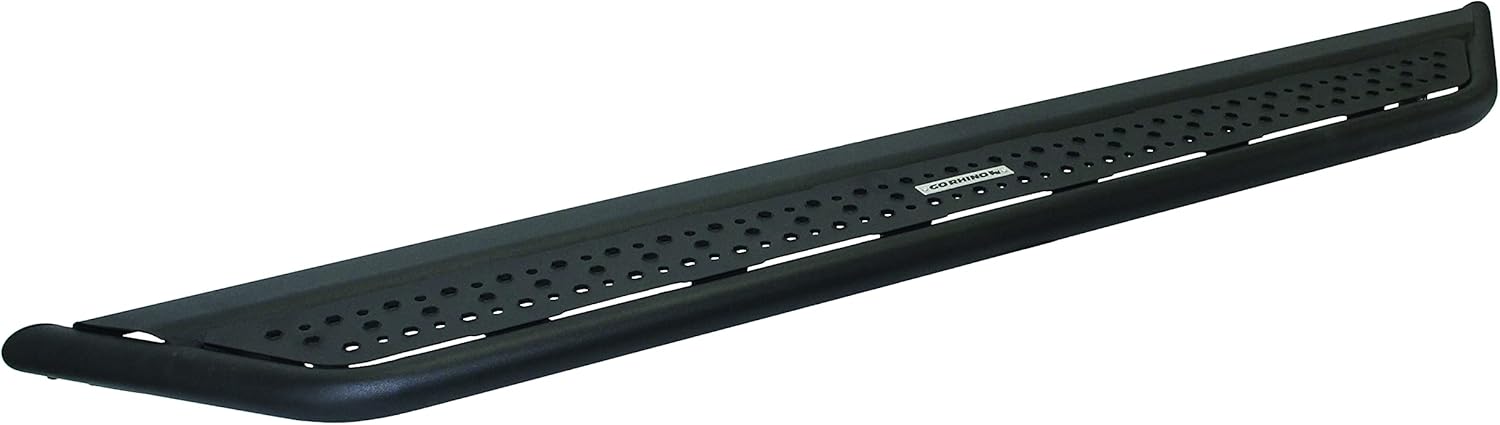
Image: Installation of the front mounting bracket to the vehicle frame.
Step 2: Install Middle and Rear Passenger Side Brackets
Follow the rocker panel towards the rear of the vehicle to locate the middle and rear bracket mounting points. These locations will also have threaded holes. Install the remaining brackets in the same manner as the front bracket, using the provided hardware. Ensure they are hand-tightened to allow for adjustment.

Image: View of the installed side step and its connection points to the vehicle.
Step 3: Prepare Running Board for Installation
Take one of the Dominator Xtreme D6 Side Steps. Identify the open channel along the underside of the step. Slide the provided nut plates into this channel. You will need one nut plate for each bracket location (front, center, and rear) to align with the corresponding holes on the brackets.

Image: The Go Rhino Dominator Xtreme D6 Side Steps, ready for installation.
Step 4: Attach Running Board to Brackets
With assistance, carefully lift the running board and align the nut plates within its channel with the holes on the installed brackets. Insert the remaining bolts, along with their lock and flat washers, through the brackets and into the nut plates. Hand-tighten all bolts. Note that there are two different height options for installation (lower or high and tight) based on your preference.
Step 5: Final Tightening
Once all bolts are hand-tightened, adjust the running board's position front to back to achieve the desired alignment. Then, using a 9/16" socket, fully tighten all bolts connecting the running board to the brackets. Finally, use a 17mm socket to fully tighten all bolts connecting the brackets to the vehicle's frame. Repeat the entire installation process for the driver's side.
Operating Your Side Steps
Your Go Rhino Dominator Xtreme D6 Side Steps are designed for convenient and safe entry and exit from your vehicle. The wide steel step area features a no-slip grip surface, providing secure footing in various conditions. Simply step onto the board when entering or exiting your truck.
Maintenance
To ensure the longevity and performance of your side steps, regular maintenance is recommended:
- Inspection: Periodically inspect all mounting hardware for tightness. Re-tighten any loose bolts to the specified torque.
- Cleaning: Clean the side steps regularly with mild soap and water. Avoid abrasive cleaners or harsh chemicals that could damage the textured powder coat finish.
- Damage Check: Check for any signs of damage, such as bends, cracks, or excessive wear. Address any issues promptly to maintain safety and product integrity.
Troubleshooting
If you encounter any issues with your Go Rhino Dominator Xtreme D6 Side Steps, consider the following common solutions:
- Loose Steps: If the steps feel loose or wobbly, re-check and tighten all mounting hardware, both to the vehicle frame and to the running board itself.
- Difficulty Aligning: Ensure that all factory plugs have been removed from the vehicle's frame and that the nut plates are correctly positioned and sliding freely within the running board's channel.
- Unusual Noises: Inspect all contact points for proper fitment. Loose hardware or improper alignment can cause rattling or squeaking.
Specifications
- Model: D64049T
- Material: Alloy Steel
- Color: Textured Black
- Dimensions (L x W x H): 91 x 12.75 x 9.5 inches
- Item Weight: 86.4 Pounds
- Weight Limit: 300 Pounds
- Vehicle Service Type: Truck
- Fitment: Fits 2019-2025 Chevrolet Silverado & GMC Sierra 1500 Crew Cab (Gasoline Only); 2020-2025 Chevrolet Silverado & GMC Sierra 2500HD, 3500HD Crew Cab (New Body Style); 2022 Chevrolet Silverado & GMC Sierra 1500 Limited Crew Cab Pickup (Gasoline)
Warranty & Support
Go Rhino products are built to last. The Dominator Xtreme D6 Side Steps come with a 5 Year Limited Lifetime Warranty. This product is manufactured in North America, ensuring high quality and durability.
For further assistance or warranty claims, please refer to the official Go Rhino website or contact their customer support directly.
Related documentsD64049T

Ask a question about this manual
Ask about setup, troubleshooting, compatibility, parts, safety, or missing instructions. Manuals+ will review the question and use this page’s manual context to help answer it.