
1. Introduction
This manual provides detailed instructions for the assembly, operation, and maintenance of your ROBOTIME TG404 3D Wooden Puzzle Carousel. This model is a self-assembly wooden puzzle designed to create a functional carousel with a music box mechanism.
Included in the Box:
- 3-D puzzle wooden sheets
- Instruction manual
- Music box mechanism (pre-assembled)
2. Safety Information
WARNING: Not suitable for children under 10 years due to small parts which may present a choking hazard.
- Adult supervision is recommended during assembly.
- Handle wooden pieces carefully to avoid splinters or breakage.
- Keep all parts away from pets and young children.
- Do not expose the product to fire or high temperatures.
3. Assembly Instructions
The ROBOTIME TG404 puzzle consists of 61 pieces and has an estimated assembly time of 1.5 hours. Follow the step-by-step instructions provided in the included manual for proper assembly.
General Assembly Tips:
- Carefully detach pieces from the wooden sheets. Do not force them.
- Use sandpaper (not included, if needed) to smooth any rough edges.
- Refer to the diagrams in the instruction manual for correct orientation and connection of parts.
- Ensure all connections are secure but avoid excessive force to prevent damage.
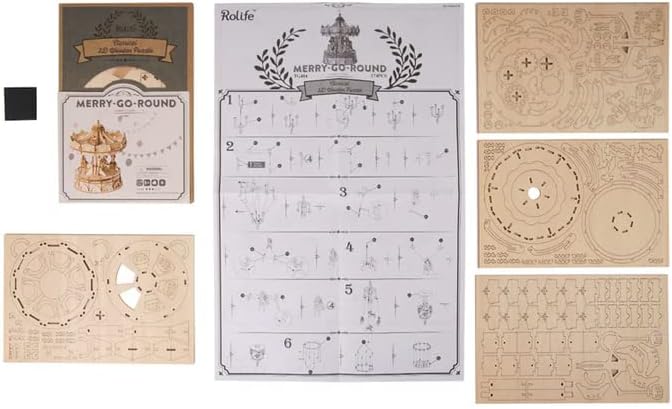
Image 3.1: The included instruction sheet and various wooden puzzle sheets with parts to be detached for assembly.
4. Operation
Once fully assembled, the ROBOTIME TG404 carousel can be operated manually. It features a crank mechanism that, when turned, sets the carousel in motion and activates the integrated music box.
- Locate the crank on the side of the carousel.
- Gently turn the crank clockwise to wind the music box and initiate the carousel's rotation.
- The carousel will rotate, and the music box will play a melody.
- Do not over-wind the music box to prevent damage to the internal mechanism.

Image 4.1: The fully assembled ROBOTIME TG404 carousel, ready for operation.

Image 4.2: A detailed view of the carousel's horses and decorative base, highlighting the intricate wooden design.
5. Maintenance
To ensure the longevity and proper functioning of your wooden puzzle carousel, follow these maintenance guidelines:
- Cleaning: Use a soft, dry cloth to gently wipe away dust. Avoid abrasive cleaners or excessive moisture.
- Storage: Store the carousel in a dry environment, away from direct sunlight and extreme temperature changes, which can cause the wood to warp or crack.
- Handling: Handle the assembled model with care to prevent accidental breakage of delicate parts.
6. Troubleshooting
If you encounter any issues during or after assembly, consider the following:
- Parts not fitting: Double-check the instruction manual for the correct part number and orientation. Some pieces may require gentle pressure to fit.
- Carousel not rotating smoothly: Ensure all moving parts are correctly aligned and not obstructed. Check for any loose or misaligned pieces.
- Music box not playing: Verify that the music box mechanism was installed correctly according to the instructions. Ensure it is wound sufficiently by turning the crank.
- Missing or damaged parts: Review the parts list in your instruction manual. If parts are missing or damaged upon opening, contact customer support.
7. Product Specifications
| Feature | Detail |
|---|---|
| Model Number | TG404 |
| Brand | ROBOTIME |
| Number of Pieces | 61 |
| Approximate Assembly Time | 1.5 Hours |
| Assembled Size | 7.40 × 1.97 × 6.50 inches (18.8 x 5.0 x 16.5 cm) |
| Product Dimensions (Box) | 4.72 x 4.72 x 5.91 inches (12 x 12 x 15 cm) |
| Item Weight | 4.6 ounces (130 grams) |
| Recommended Age | 10 years and up |

Image 7.1: The assembled ROBOTIME TG404 carousel with its approximate dimensions (149mm width, 117mm height) indicated.
8. Warranty and Support
ROBOTIME products are designed for quality and enjoyment. For any inquiries regarding product defects, missing parts, or general support, please contact ROBOTIME customer service.
You can often find support information and contact details on the official ROBOTIME website or through the retailer where the product was purchased.
Visit the ROBOTIME Store on Amazon for more information and support resources.
