
ORIENTEK T15M
Orientek T15M Optical Light Source User Manual
Model: T15M (TLS-25M-RL)
1. Introduction
The Orientek T15M Optical Light Source is a compact and reliable instrument designed for testing singlemode fiber optic networks. It provides stable light output at 1310nm and 1550nm wavelengths, essential for accurate fiber loss measurements when paired with an optical power meter. This manual provides detailed instructions for the proper setup, operation, and maintenance of your T15M device.
2. Safety Information
Please read and understand all safety instructions before operating the device. Failure to follow these instructions may result in injury or damage to the equipment.
- Laser Radiation: This device emits invisible laser radiation. Avoid direct exposure to the laser beam. Do not look directly into the optical output port.
- Battery Safety: Use only specified battery types (2 AAA 1.5V batteries). Do not mix old and new batteries, or different types of batteries. Dispose of batteries according to local regulations.
- Environmental Conditions: Do not operate the device in explosive atmospheres or near flammable materials. Avoid exposure to extreme temperatures, humidity, or dust.
- Cleaning: Only clean the optical connector with approved fiber optic cleaning tools and solutions. Refer to the Maintenance section for details.
3. Package Contents
Verify that all items are present upon unpacking:
- Orientek T15M Optical Light Source Unit
- Silicone Protective Case
- User Manual (this document)
4. Product Overview
The T15M Optical Light Source features an ergonomic design for comfortable one-handed operation. It is equipped with a removable silicone protective case that provides shock-proof and drop-proof capabilities, enhancing durability. The device also includes an LED lighting function for improved visibility in low-light conditions.

Figure 4.1: Orientek T15M Optical Light Source with its protective silicone case.

Figure 4.2: Ergonomic design and dimensions of the T15M device.
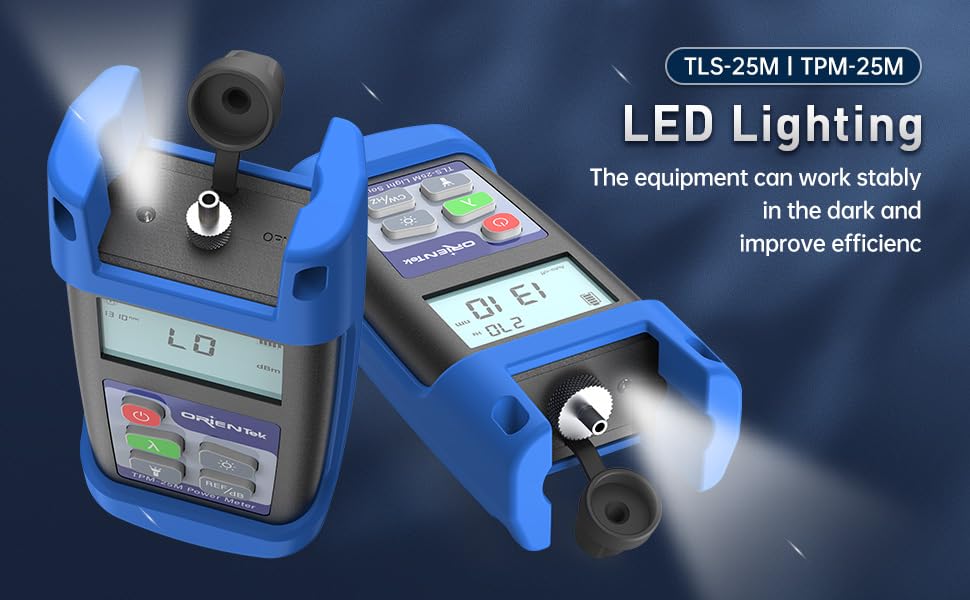
Figure 4.3: The T15M features integrated LED lighting for dark environments.
5. Setup
5.1. Battery Installation
- Locate the battery compartment on the rear of the device.
- Open the battery cover.
- Insert two (2) AAA 1.5V batteries, ensuring correct polarity (+/-).
- Close the battery cover securely.
5.2. Attaching the Protective Case
The silicone protective case is designed to fit snugly around the T15M unit. Carefully slide the device into the case, ensuring all buttons and ports are accessible and aligned.

Figure 5.1: The removable silicone protective case provides enhanced durability.
5.3. Connecting Fiber Optic Cables
The T15M features a 2.5mm universal interface for connecting various fiber optic connectors. Ensure the fiber end-face is clean before connection.

Figure 5.2: The 2.5mm universal interface supports SC, ST, FC, and optional LC connectors.
6. Operating Instructions
6.1. Power On/Off
- To power on the device, press and hold the Power button (
 ) for approximately 2 seconds.
 - To power off, press and hold the Power button again until the display turns off.
6.2. Wavelength Selection
The T15M supports 1310nm and 1550nm wavelengths for singlemode fiber testing.
- Press the Lambda (λ) button () to cycle between 1310nm and 1550nm. The selected wavelength will be displayed on the screen.

Figure 6.1: Wavelength selection for singlemode fiber testing.
6.3. Modulation Carrier Output
The T15M can output a continuous wave (CW) or modulated signals at specific frequencies.
- Press the CW/Hz button () to cycle through the modulation frequencies: Continuous Wave (CW), 270Hz, 1KHz, and 2KHz. The selected modulation frequency will be displayed.
6.4. LED Lighting
- Press the Light button () to turn the integrated LED light on or off.
6.5. Auto-Off Function
The device features an auto-off function to conserve battery life. If no operation is performed for a set period, the device will automatically power off. This status is indicated by "Auto-off" on the display.

Figure 6.2: The T15M Light Source in operation, typically used with an Optical Power Meter.
7. Maintenance
7.1. Cleaning the Optical Connector
A clean optical connector is crucial for accurate measurements and to prevent damage to the fiber. Always clean the connector before use.
- Use a high-quality, lint-free fiber optic cleaning wipe or a specialized fiber optic cleaning stick.
- Apply a small amount of isopropyl alcohol (99% pure) to the cleaning material.
- Gently clean the end-face of the optical connector.
- Allow the connector to dry completely before re-connecting any fiber.
- Always keep the dust cap on the optical port when not in use.
7.2. Device Care
- Keep the device dry. If it gets wet, wipe it immediately with a soft, dry cloth.
- Avoid dropping the device or subjecting it to strong impacts, even with the protective case.
- Store the device in a clean, dry environment when not in use.
- Remove batteries if the device will not be used for an extended period to prevent leakage.
8. Troubleshooting
| Problem | Possible Cause | Solution |
|---|---|---|
| Device does not power on | Low or dead batteries; Incorrect battery installation | Replace batteries with new AAA 1.5V batteries; Check battery polarity. |
| No light output | Device not powered on; Incorrect wavelength selected; Damaged optical port | Ensure device is on; Verify correct wavelength (1310nm/1550nm) is selected; Inspect optical port for damage or contamination. |
| Unstable or incorrect readings (when used with OPM) | Dirty optical connector; Damaged fiber cable; Mismatched wavelength with OPM | Clean optical connector on both OLS and fiber; Replace fiber cable if damaged; Ensure OLS and OPM are set to the same wavelength. |
| Auto-off activates too quickly | Standard feature to save battery | This is normal operation. To prevent auto-off during extended use, periodically press a button. |
9. Specifications
Technical specifications for the Orientek T15M Optical Light Source:

Figure 9.1: Detailed specifications for the T15M Light Source.
| Parameter | Value |
|---|---|
| Wavelength (nm) | 1310/1550 |
| Typical Output Power | -5dBm |
| Optical Connector | 2.5mm universal (SC/FC/ST; LC optional, purchased separately) |
| Power Supply | Alkaline Battery (2 AAA 1.5V batteries) |
| Output Stability | ±0.05dB/15mins; ±0.1dB/8hours |
| Modulation Frequencies | CW, 270Hz, 1KHz, 2KHz |
| Dimensions (mm) | 130 x 65 x 35 |
| Weight | 180g |
| Operating Temperature | -10 to +60(℃) |
| Storage Temperature | -25 to +70(℃) |
10. Warranty Information
Orientek products are typically covered by a limited warranty against defects in materials and workmanship. Please refer to the warranty card included with your product or contact Orientek customer support for specific warranty terms and conditions applicable to your region and purchase date.
11. Customer Support
For technical assistance, troubleshooting beyond this manual, or warranty inquiries, please contact Orientek customer support. Contact information can typically be found on the official Orientek website or on the product packaging.
Website: www.orientek.com (Please verify the official website for the most current contact details.)
Related documentsT15M

Ask a question about this manual
Ask about setup, troubleshooting, compatibility, parts, safety, or missing instructions. Manuals+ will review the question and use this page’s manual context to help answer it.