
HENEX HC-666
HENEX HC-666 Barcode Scanner User Manual
Model: HC-666

Image: The HENEX HC-666 omnidirectional desktop barcode scanner, showcasing its sleek design and USB cable connection.
1. Introduction
The HENEX HC-666 is a high-performance, hands-free 1D and 2D barcode scanner designed for efficiency and ease of use in various commercial environments. Its omnidirectional scanning capability and automatic sensing feature make it ideal for fast-paced operations, reducing manual effort and improving workflow.
This manual provides detailed instructions on setting up, operating, maintaining, and troubleshooting your HC-666 barcode scanner to ensure optimal performance and longevity.
2. Setup and Installation
2.1. Plug and Play Connectivity
The HC-666 barcode scanner features a simple plug-and-play design, requiring no driver installation or complex software setup. Simply connect the scanner to your device using the provided USB cable.

Image: The HC-666 scanner connected to a laptop, illustrating its plug-and-play USB connectivity. Compatible with Windows, Linux, and Mac OS.
Steps:
- Unpack the HENEX HC-666 barcode scanner and its USB cable.
- Connect the USB cable to the scanner's port.
- Plug the other end of the USB cable into an available USB port on your computer or POS system.
- The scanner will be automatically recognized by your operating system (Windows XP/7/8/10, Mac OS, Linux). No additional drivers are needed.
- The scanner is now ready for use.
3. Operating Instructions
3.1. Reading Mode Switching
The HC-666 scanner allows you to switch between 1D-only scanning mode and 1D+2D scanning mode with a single button press, providing flexibility for different barcode types.

Image: A diagram illustrating the top button on the scanner, used to toggle between one-dimensional and one-dimensional plus two-dimensional scanning modes.
Steps:
- Locate the button on the top surface of the scanner.
- Press the button once to switch between the two scanning modes.
- A blue indicator light signifies 1D+2D mode, while a red indicator light signifies 1D-only mode.
3.2. Automatic Sleep and Wake-Up
The scanner features an infrared auto-sensing sensor that intelligently manages power consumption by automatically entering sleep mode when idle and waking up instantly upon detecting a barcode.

Image: Visual representation of the scanner's automatic sleep function when idle and its automatic wake-up when a barcode is presented.
3.3. Adjustable Angle
The HC-666 is designed with an adjustable base, allowing you to tilt the scanner for optimal scanning angles and ergonomic comfort in various setups.

Image: A side view of the scanner demonstrating its adjustable tilt angle, with indications for anteversion (10°) and caster angle (18°).
4. Supported Barcode Types
The HENEX HC-666 scanner boasts strong decoding capabilities, able to read a wide range of 1D and 2D barcodes, including those that are damaged, distorted, or displayed on screens.

Image: A visual guide to the various 1D barcode types (Code39, Code128, Codabar, EAN/JAN-13, UPC A) and 2D barcode types (QR, PDF417, Data Matrix, Micro QR, AZTEC) supported by the scanner.
1D Barcodes: UPC/EAN, Code39, Interleaved 2 of 5, Code93, Code 128, Codabar, Industry25, Matrix25.
2D Barcodes: PDF417, QR Code, Data Matrix.
5. Application Scenarios
The compact and versatile design of the HC-666 makes it suitable for a variety of environments where efficient barcode scanning is required.
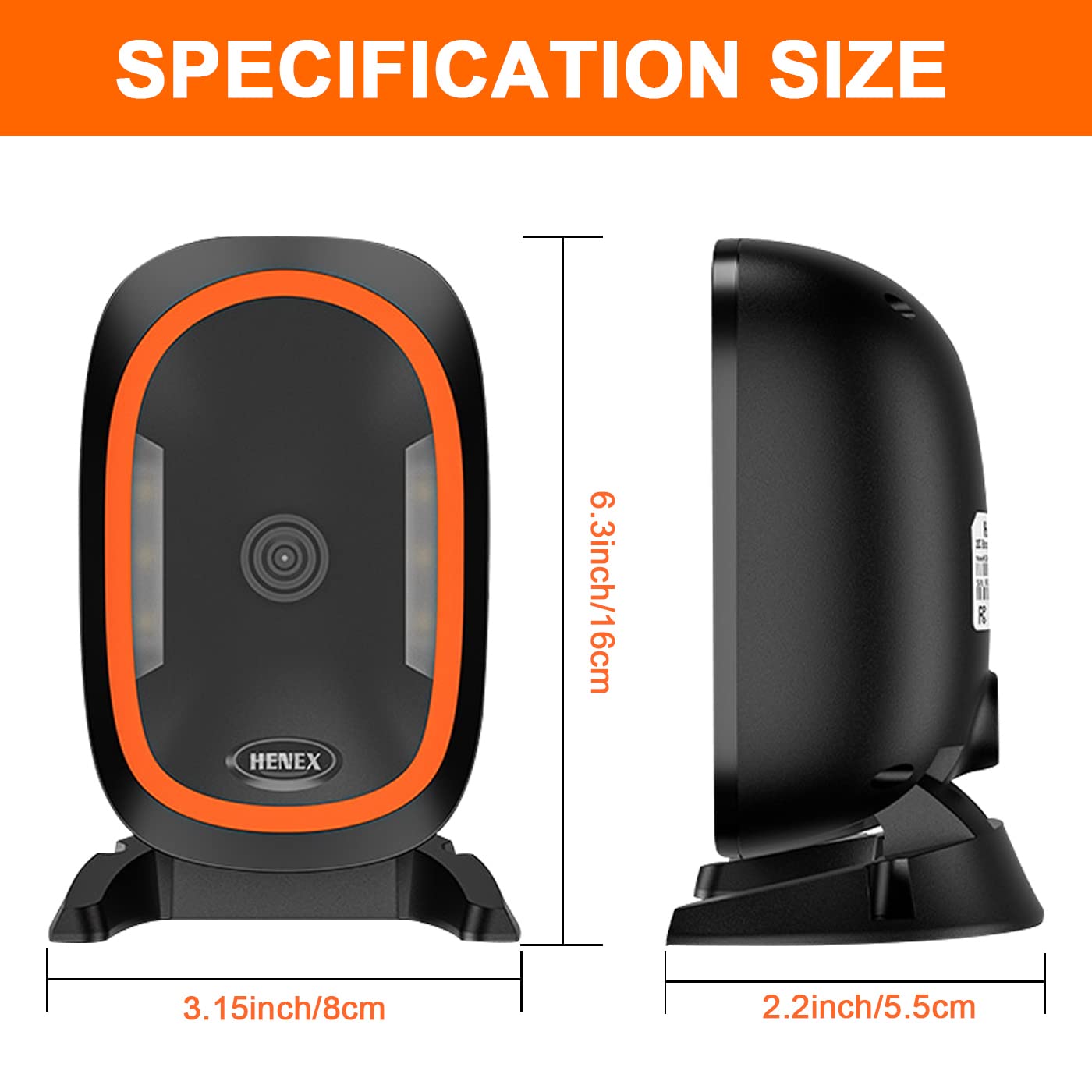
Image: The HC-666 scanner in use, demonstrating its applicability in various settings such as restaurants, pharmacies, and supermarkets.
- Retail Stores: For quick and accurate checkout processes.
- Supermarkets: Hands-free scanning for high-volume transactions.
- Libraries: Efficiently managing book check-ins and check-outs.
- Pharmacies: Scanning prescription barcodes and product information.
- Warehouses: Inventory management and tracking.
6. Specifications
Detailed technical specifications for the HENEX HC-666 barcode scanner.

Image: A diagram illustrating the physical dimensions of the HC-666 scanner: 3.15 inches (8cm) width, 6.3 inches (16cm) height, and 2.2 inches (5.5cm) depth.
| Feature | Specification |
|---|---|
| Brand | HENEX |
| Model | HC-666 |
| Product Dimensions | 0.01 x 0.01 x 0.02 cm; 200 g |
| Operating System Compatibility | Android, Windows, Mac OS, Linux |
| Scan Rate | 2000 fps |
| Connectivity Type | USB Cable (Wired) |
| Special Features | Automatic induction reading and scanning, Hands-free operation, Support 1D/2D/QR barcodes, Support screen scanning, Plug and Play |
| Power Source | Corded Electric |
| Item Weight | 200 g |
7. Maintenance
To ensure the longevity and optimal performance of your HENEX HC-666 barcode scanner, follow these simple maintenance guidelines:
- Cleaning: Regularly wipe the scanning window and the scanner's body with a soft, dry, lint-free cloth. For stubborn smudges, slightly dampen the cloth with water or a mild, non-abrasive cleaner. Avoid using harsh chemicals, solvents, or abrasive materials, as these can damage the scanner's surface and optical components.
- Handling: Handle the scanner with care. Avoid dropping it or subjecting it to strong impacts, which can damage internal components.
- Environment: Operate and store the scanner in a clean, dry environment, away from extreme temperatures, direct sunlight, and excessive dust or moisture.
- Cable Care: Do not bend or twist the USB cable excessively. Ensure the cable is not pinched or placed under heavy objects, as this can lead to internal wire damage.
8. Troubleshooting
If you encounter issues with your HENEX HC-666 barcode scanner, refer to the following common troubleshooting steps:
- Scanner Not Responding:
- Ensure the USB cable is securely connected to both the scanner and the computer/POS system.
- Try plugging the scanner into a different USB port on your device.
- Restart your computer/POS system.
- Unable to Scan Barcodes:
- Check if the scanner is in the correct reading mode (1D-only or 1D+2D) using the top button.
- Ensure the barcode is clean, clear, and not excessively damaged or distorted.
- Verify that the barcode is within the scanner's reading range and properly aligned with the scanning window.
- Clean the scanning window as described in the Maintenance section.
- Incorrect Data Output:
- Ensure your software or application is correctly configured to receive input from the scanner.
- Test the scanner with a known good barcode to rule out issues with the barcode itself.
If the problem persists after attempting these steps, please contact customer support for further assistance.
9. Warranty and Support
HENEX is committed to providing high-quality products and reliable customer support. Your HC-666 barcode scanner comes with a standard warranty. Please refer to the product packaging or your purchase documentation for specific warranty terms and conditions.
9.1. Customer Support
For technical assistance, troubleshooting, or warranty inquiries, please contact our support team:

Image: A customer support representative with contact details for HENEX, including phone numbers, email addresses, and website links.
- Phone (International): +86 13316203488
- Phone (India): +91 9100763594
- Email: support@lenvii.net, support@lenvii.in
- Website: https://www.lenvii.net, https://www.lenvii.in
Related documentsHC-666


Ask a question about this manual
Ask about setup, troubleshooting, compatibility, parts, safety, or missing instructions. Manuals+ will review the question and use this page’s manual context to help answer it.