
Introduction
This manual provides essential information for the safe and efficient use of your Whirlpool AMW 222.2 X 25L Built-in Convection Microwave Oven. Please read these instructions carefully before installation, operation, and maintenance to ensure optimal performance and prevent damage.
The Whirlpool AMW 222.2 X is a versatile appliance featuring microwave, grill, and convection cooking functions, designed for seamless integration into your kitchen cabinetry.
Important Safety Instructions
- Do not attempt to operate this oven with the door open as this can result in harmful exposure to microwave energy.
- Do not place any object between the oven front face and the door, or allow soil or cleaner residue to accumulate on sealing surfaces.
- Do not operate the oven if it is damaged. It is particularly important that the oven door closes properly and that there is no damage to the: (1) door (bent), (2) hinges and latches (broken or loosened), (3) door seals and sealing surfaces.
- The oven should not be adjusted or repaired by anyone except properly qualified service personnel.
- Ensure proper ventilation around the appliance as specified in the installation section.
- Always use oven-safe cookware. Metal containers are not suitable for microwave cooking.
Setup and Installation
The Whirlpool AMW 222.2 X is designed for built-in installation. Proper cabinet dimensions and ventilation are crucial for safe and efficient operation.
Installation Dimensions
Refer to the diagram below for precise cabinet opening and appliance dimensions. Ensure adequate space for air circulation.
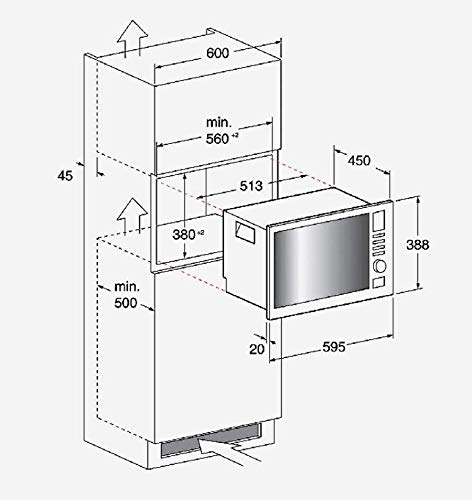
Image Description: This diagram illustrates the required dimensions for installing the Whirlpool AMW 222.2 X built-in microwave oven. The overall width of the cabinet opening should be a minimum of 560 mm, with an external appliance width of 595 mm. The minimum height for the upper cabinet section is 600 mm, and the lower section is 500 mm. The appliance itself has a height of 388 mm and a depth of 450 mm. The internal cavity depth is 513 mm. A minimum clearance of 45 mm is shown at the top for ventilation, and a minimum height of 380 mm is required for the appliance compartment. An air gap of 20 mm is indicated at the bottom front. Arrows indicate airflow for ventilation.
- Cabinet Opening Width: Minimum 560 mm.
- Appliance External Width: 595 mm.
- Appliance External Height: 388 mm.
- Appliance External Depth: 450 mm.
- Ventilation: Ensure clear airflow paths as indicated by arrows in the diagram.
Initial Power-On
After installation, plug the oven into a grounded electrical outlet. The LED digital display will illuminate. Set the clock if prompted, following the instructions in the operating section.
Operating Instructions
Your oven features an Electronic Rotary Control and soft touch buttons for easy operation. The LED digital display provides feedback on settings and cooking progress.
Control Panel Overview
The control panel consists of an electronic rotary knob for selecting settings and soft touch buttons for functions like Start, Stop, and specific cooking modes. The LED display shows time, power level, and selected functions.
Cooking Functions
- Microwave: For rapid heating and cooking. Select desired power level (1-5) using the rotary control.
- Grill: Ideal for browning and toasting. Maximum grill power is 1000 Watts.
- Convection: For baking and roasting, circulating hot air for even cooking.
- Grill + Microwave Combination: Combines microwave speed with grill browning for efficient cooking.
Special Features
- 10 Auto Cooking Functions: Pre-programmed settings for various dishes. Select the desired function using the rotary control and confirm with the start button.
- 5 Power Levels: Adjust microwave power from low to high for different cooking needs.
- Quick Start Function: Allows for immediate cooking at full power for a short duration, typically 30 seconds per press.
- Defrost by Weight/Time: Select the defrost function and input either the weight of the food or the desired defrosting time.
Using the Push to Open Door
To open the oven door, gently press the designated area on the door. The door will spring open. To close, push the door firmly until it latches securely.
Care and Maintenance
Regular cleaning and proper care will ensure the longevity and optimal performance of your oven.
Cleaning the Oven Interior
- Wipe the interior, including the full stainless steel cavity, with a damp cloth and mild detergent after each use.
- For stubborn food splatters, place a bowl of water with lemon juice inside and microwave for a few minutes to loosen residue, then wipe clean.
- Do not use abrasive cleaners, scouring pads, or sharp objects that could scratch the stainless steel surface.
Cleaning the Oven Exterior
- Clean the exterior surfaces with a soft, damp cloth.
- Avoid spraying cleaners directly onto the control panel. Apply cleaner to a cloth first.
Door Seals
Regularly inspect the door seals and sealing surfaces for any damage or food residue. Clean them gently to ensure a proper seal during operation.
Troubleshooting Guide
Before contacting service, review the following common issues and solutions.
| Problem | Possible Cause | Solution |
|---|---|---|
| Oven does not start. | Power cord unplugged; door not closed properly; fuse blown/circuit breaker tripped. | Ensure power cord is securely plugged in. Close the door firmly. Check household fuse/circuit breaker. |
| Food not heating. | Incorrect power level selected; cooking time too short; improper cookware used. | Increase power level or cooking time. Ensure microwave-safe cookware is used. |
| Light inside oven not working. | Bulb needs replacement. | Contact qualified service personnel for bulb replacement. Do not attempt to replace yourself. |
| Display shows an error code. | Internal malfunction. | Note the error code and contact Whirlpool customer service for assistance. |
If the problem persists after attempting these solutions, please contact Whirlpool customer support.
Specifications
| Feature | Detail |
|---|---|
| Model Number | AMW 222.2 X |
| Capacity | 25 Litres |
| Type | Built-in Convection Microwave Oven |
| Cooking Functions | Microwave, Grill, Convection, Grill + Microwave Combination |
| Maximum Grill Power | 1000 Watts |
| Power Levels | 5 |
| Auto Cooking Functions | 10 |
| Defrost System | Defrost by Weight or Time |
| Control Type | Electronic Rotary Control + Soft Touch Buttons |
| Display | LED Digital Display |
| Cavity Material | Full Stainless Steel |
| Door Type | Push to Open |
| Appliance Dimensions (HxWxD) | 388 mm x 595 mm x 450 mm (External, based on diagram) |
| Item Weight | 20 kg |
Warranty and Support
Warranty Information
Your Whirlpool AMW 222.2 X oven is covered by a manufacturer's warranty. Please refer to the warranty card included with your purchase for specific terms, conditions, and duration. Keep your proof of purchase for warranty claims.
Customer Support
For technical assistance, service requests, or inquiries regarding your product, please contact Whirlpool customer support. Contact details can typically be found on the Whirlpool official website or in the documentation provided with your appliance.
When contacting support, please have your model number (AMW 222.2 X) and serial number ready.


