
1. Introduction and Overview
The Tapo C100 is a smart indoor security camera designed to provide crystal-clear 1080P high-definition video, capturing every detail inside your home. It offers advanced features such as instant push notifications for motion, person, or baby crying detection, two-way audio with a built-in siren, and up to 30ft of night vision. This camera is fully compatible with Amazon Alexa and Google Assistant for convenient voice control. Footage can be stored continuously on a microSD card (up to 512 GB, not included) or through a Tapo Care cloud storage subscription.

Figure 1: TP-Link Tapo C100 Indoor Security Camera and its mobile application interface.
2. Setup Guide
Setting up your Tapo C100 camera is a straightforward process. Follow these steps for quick installation:
- Download the Tapo App: Search for "Tapo" in the App Store (iOS) or Google Play Store (Android) and download the official Tapo app.
- Power On the Camera: Plug in your Tapo C100 camera using the provided DC Power Adapter. Wait for the LED indicator to flash red and green, indicating it's ready for setup.
- Follow In-App Instructions: Open the Tapo app, create an account or log in, and tap the "+" icon to add a new device. Select your Tapo C100 model and follow the on-screen prompts to connect it to your 2.4GHz Wi-Fi network.
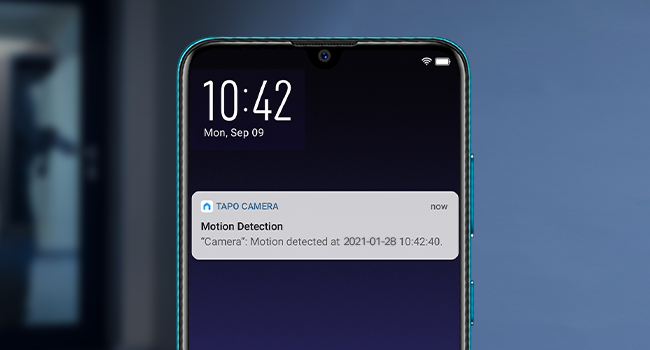
Figure 2: Visual guide for the initial setup process of the Tapo C100 camera.
3. Operating Features
3.1 1080P Full HD Video
The Tapo C100 delivers crystal-clear 1080P Full HD video, ensuring you capture every detail. This high resolution allows for clear identification of objects and individuals, providing enhanced security and monitoring capabilities.

Figure 3: Visual comparison demonstrating the superior clarity of 1080P Full HD video.
3.2 Motion Detection & Instant Notification
Receive instant push notifications on your smartphone when motion, a person, or even baby crying is detected. The camera intelligently discerns important events, reducing false alarms and keeping you informed of relevant activity in your monitored area.

Figure 4: Example of a motion detection alert received on a smartphone.
3.3 2-Way Audio with Built-In Siren
Communicate directly through the camera using the built-in two-way audio feature. This allows you to comfort pets, speak to family members, or deter intruders with the integrated siren, all from your phone app.

Figure 5: Using the two-way audio feature to communicate through the camera.
3.4 Night Vision up to 30 Ft.
Monitor your home day and night with confidence. The integrated IR system provides clear night vision up to 30 feet, ensuring that no activity goes unnoticed even in complete darkness.

Figure 6: Night vision capability of the Tapo C100 camera.
3.5 Works with Alexa & Google Home
Integrate your Tapo C100 with your smart home ecosystem. Use simple voice commands with Amazon Alexa or Google Assistant to view the live stream on compatible devices like Echo Show or Google Chromecast with a screen.

Figure 7: Voice control integration with smart home assistants.
4. Storage Options
The Tapo C100 offers flexible storage solutions for your video footage:
- Local Storage: Store footage continuously on a microSD card up to 512 GB (not included). The camera supports loop recording, overwriting older footage when the card is full.
- Cloud Storage (Tapo Care): Subscribe to Tapo Care for cloud storage, which typically offers a 30-day video history and additional benefits such as motion tracking and baby crying detection.

Figure 8: Overview of available storage and playback options.
5. Maintenance
To ensure the longevity and optimal performance of your Tapo C100 camera, consider the following maintenance tips:
- Regular Cleaning: Gently wipe the camera lens and body with a soft, dry cloth to remove dust and smudges. Avoid using harsh chemicals or abrasive materials.
- Firmware Updates: Periodically check for and install firmware updates through the Tapo app. Updates often include performance improvements, new features, and security enhancements.
- Optimal Placement: Ensure the camera is placed in a location with stable Wi-Fi connectivity and away from direct heat sources or extreme temperatures.
6. Troubleshooting
If you encounter any issues with your Tapo C100 camera, try the following common troubleshooting steps:
- Connectivity Issues: Ensure your camera is within range of your 2.4GHz Wi-Fi router. Try restarting both the camera and your router.
- App Not Responding: Close and reopen the Tapo app. If the issue persists, try reinstalling the app.
- No Notifications: Check your app settings to ensure notifications are enabled for motion detection and other alerts. Also, verify your phone's notification settings.
- Poor Video Quality: Ensure your Wi-Fi signal is strong. If using a microSD card, check its health and ensure it's compatible.
- Reset Camera: If all else fails, use the reset button on the camera (refer to Figure 9 for location) to restore factory settings. You will need to set up the camera again after a reset.
For more detailed troubleshooting, please refer to the official User Guide (PDF).

Figure 9: Location of the microSD card slot and reset button on the Tapo C100.
7. Technical Specifications
| Feature | Specification |
|---|---|
| Model Name | Tapo C100 |
| Video Capture Resolution | 1080p Full HD |
| Connectivity Technology | Wireless (Wi-Fi) |
| Night Vision Range | Up to 30 Feet |
| Two-Way Audio | Yes |
| Motion Detection | Yes (Motion/Person/Pet) |
| Local Storage | microSD Card (up to 512 GB) |
| Cloud Storage | Tapo Care Subscription |
| Compatible Devices | Tablet, Smartphone |
| Controller Type | Google Assistant, Amazon Alexa, Android |
| Power Source | Corded Electric |
| Dimensions (L x W x H) | 2.66 x 2.15 x 3.89 inches |
| Item Weight | 8.8 ounces |
8. Warranty and Support
Your TP-Link Tapo C100 camera comes with a 2-year manufacturer's warranty, ensuring peace of mind regarding product quality and performance.
For further assistance, detailed instructions, or technical support, please utilize the following resources:
- Official User Guide: Access the complete user guide in PDF format for in-depth information and detailed diagrams: User Guide (PDF).
- TP-Link Support Website: Visit the official TP-Link support website for FAQs, troubleshooting, and contact options.


