
Product Overview
The Go Rhino RB20 Running Boards & Brackets (Model: 69451687T) are designed to provide a durable and stylish stepping surface for your vehicle. Constructed from galvanized steel with a protective bedliner coating, these running boards offer enhanced accessibility and a rugged appearance. This manual provides detailed instructions for installation, operation, and maintenance.
Installation Guide
What's in the Box:
- Running Boards (2)
- Brackets (Set)
- Hardware (Set)
Tools Required:
- Ratchet
- 17mm Socket
- 1/2" Socket
Installation Difficulty:
Level 1: Quick & Easy
Step-by-Step Installation:
- Step 1: Prepare Vehicle and Identify Mounting Points
Begin by working underneath the truck. Locate the rocker panel. Near the front tire, you will find a body mount bolt. Along the rocker panel, identify two threaded holes. If your vehicle has factory plugs in these holes, remove them. These holes will be used for mounting the brackets.

Image: Underside view of the vehicle, highlighting the rocker panel and threaded mounting holes.
- Step 2: Install Front Brackets
Take the passenger side front bracket. This bracket has two tabs that will align with the two threaded holes on the rocker panel. Ensure the tabs are facing towards the rear of the vehicle and the foot of the bracket is bent towards the front. Use the included bolts with lock washers and flat washers to attach the bracket. Hand-tighten for now to allow for adjustments.

Image: Go Rhino RB20 Running Boards and their accompanying mounting brackets and hardware.
- Step 3: Install Center and Rear Brackets
Move along the rocker panel to the center and rear sections of the cab. You will find similar threaded holes for the remaining brackets. The center and rear brackets are identical and not side-specific. Align them with the corresponding holes and hand-tighten them using the same hardware as the front brackets.
- Step 4: Mount Running Boards
Carefully lift the running board and set it on top of the installed brackets. Ensure the "REALTRUCK" logo on the board faces the rear of the vehicle. The channel on the running board should be open and lined up with the holes in the brackets. Insert the U-channel nut plates into the running board's channel, turning them sideways to align the threaded holes with the bracket holes. Use the provided 5/16" bolts with attached washers to hand-tighten the board to the brackets. Keep them loose enough for final adjustments.
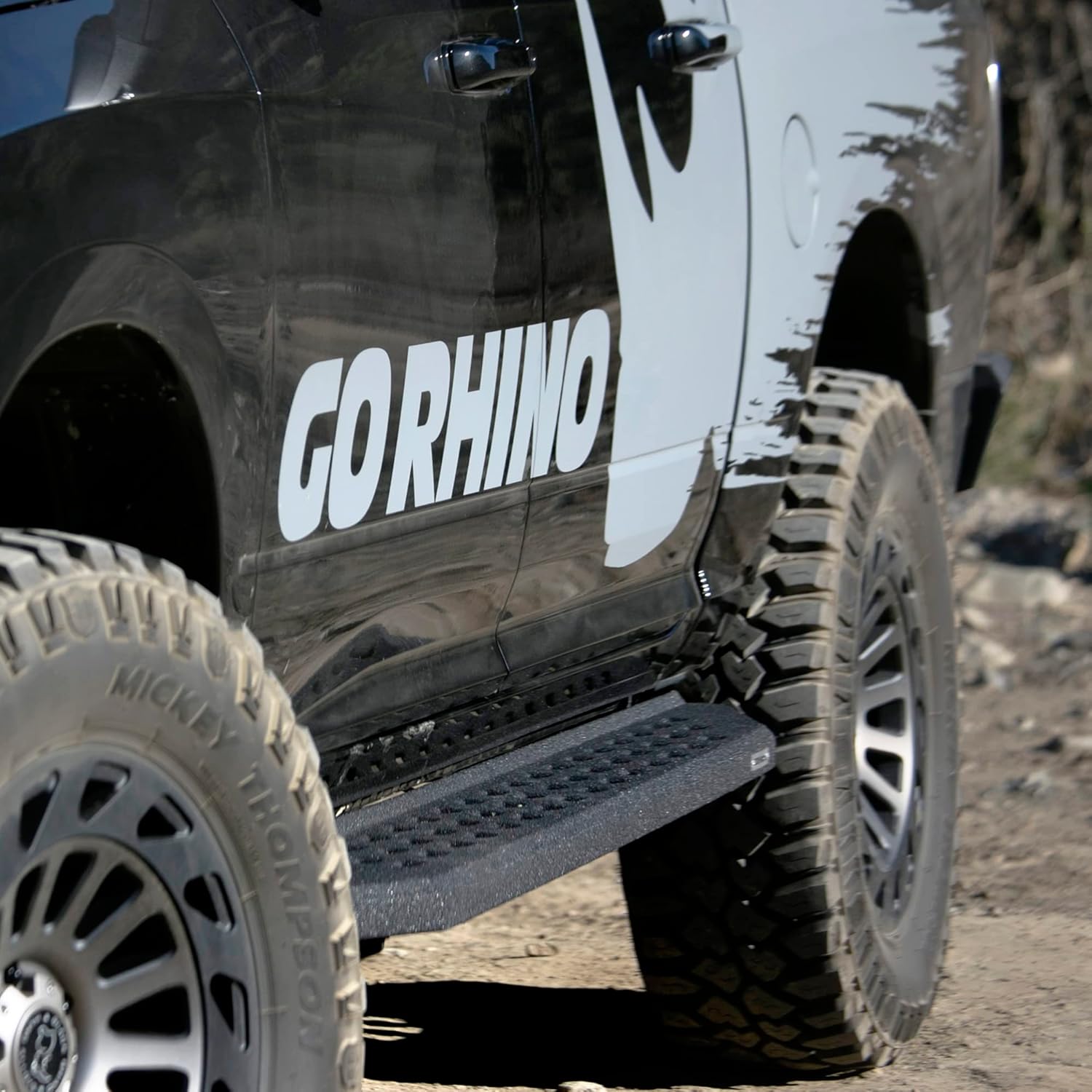
Image: Installed Go Rhino RB20 Running Boards on a Jeep Gladiator JT.
- Step 5: Final Adjustments and Tightening
Once all brackets and the running board are loosely installed, make any necessary final adjustments to ensure proper alignment and fit. Then, use a 1/2" socket to fully tighten the bolts securing the running board to the brackets. Finally, use a 17mm socket to tighten the bolts securing the brackets to the truck's frame. Repeat the entire process for the opposite side of the vehicle.
Operating Your Running Boards
Go Rhino RB20 Running Boards are designed to provide a secure and convenient step for easier entry and exit from your vehicle. Simply step onto the textured surface when entering or exiting. The protective bedliner coating offers enhanced grip, especially in wet conditions.
Maintenance
To ensure the longevity and appearance of your Go Rhino RB20 Running Boards, regular maintenance is recommended:
- Cleaning: Wash the running boards regularly with mild soap and water. Avoid harsh chemicals or abrasive cleaners that could damage the protective coating.
- Inspection: Periodically inspect all mounting bolts and hardware to ensure they remain tight. Re-tighten any loose bolts to prevent rattling or instability.
- Corrosion Check: Although made from galvanized steel with a protective coating, regularly check for any signs of rust, especially on mounting brackets or exposed areas. Address any rust promptly to prevent further spread.
Troubleshooting
Here are some common issues and their potential solutions:
- Running Boards Feel Loose or Rattle:
This is often due to loose mounting hardware. Re-check and tighten all bolts securing the running boards to the brackets and the brackets to the vehicle frame.
- Signs of Rust on Brackets:
While designed for durability, exposure to harsh elements can lead to rust over time. If rust appears on the mounting brackets, it is recommended to clean the affected area thoroughly, apply a rust-inhibiting primer, and then re-coat with a suitable protective paint to prevent further corrosion.
- Difficulty with Installation:
If you encounter difficulties during installation, double-check that all factory plugs have been removed from the threaded holes and that the correct brackets are being used for each position (front, center, rear). Ensure the U-channel nut plates are correctly oriented within the running board's channel before attempting to thread the bolts.
Product Specifications
| Attribute | Value |
|---|---|
| Brand | Go Rhino |
| Model Number | 69451687T |
| Color | Black |
| Material | Alloy Steel |
| Exterior Finish | Alloy Steel |
| Item Dimensions (L x W x H) | 78 x 12 x 10 inches |
| Item Weight | 73.9 Pounds |
| Vehicle Service Type | Sport Utility Vehicle, Truck |
| UPC | 887753618160 |

Image: Go Rhino RB Running Boards comparison, showing different models and their dimensions.

Image: Comparison of Textured Black Powder Coat and Bedliner Finish.
Warranty & Support
Go Rhino stands behind the quality of its products. For specific warranty details, please refer to the warranty information provided with your purchase or visit the official Go Rhino website.
- Returns: This product is eligible for 30-day easy returns.
- Customer Support: For assistance with installation, troubleshooting, or product inquiries, please contact Go Rhino customer support. You can also visit the Go Rhino Store on Amazon for more information.