
1. Introduction
This manual provides instructions for the safe and efficient operation of your RoMech 660lb (300kg) Digital Hanging Scale. Please read these instructions thoroughly before use and retain for future reference.
2. What's in the Box
- 1 x RoMech Digital Hanging Scale (Model RM-033)
- 1 x Top Shackle
- 1 x Bottom Hook
- 3 x AAA Batteries
3. Setup
3.1 Battery Installation
The scale requires 3 AAA batteries. To install or replace batteries:
- Locate the battery compartment on the back of the scale.
- Use a small screwdriver to open the battery cover.
- Insert 3 AAA batteries, ensuring correct polarity (+/-).
- Replace the battery cover and secure it with the screw.

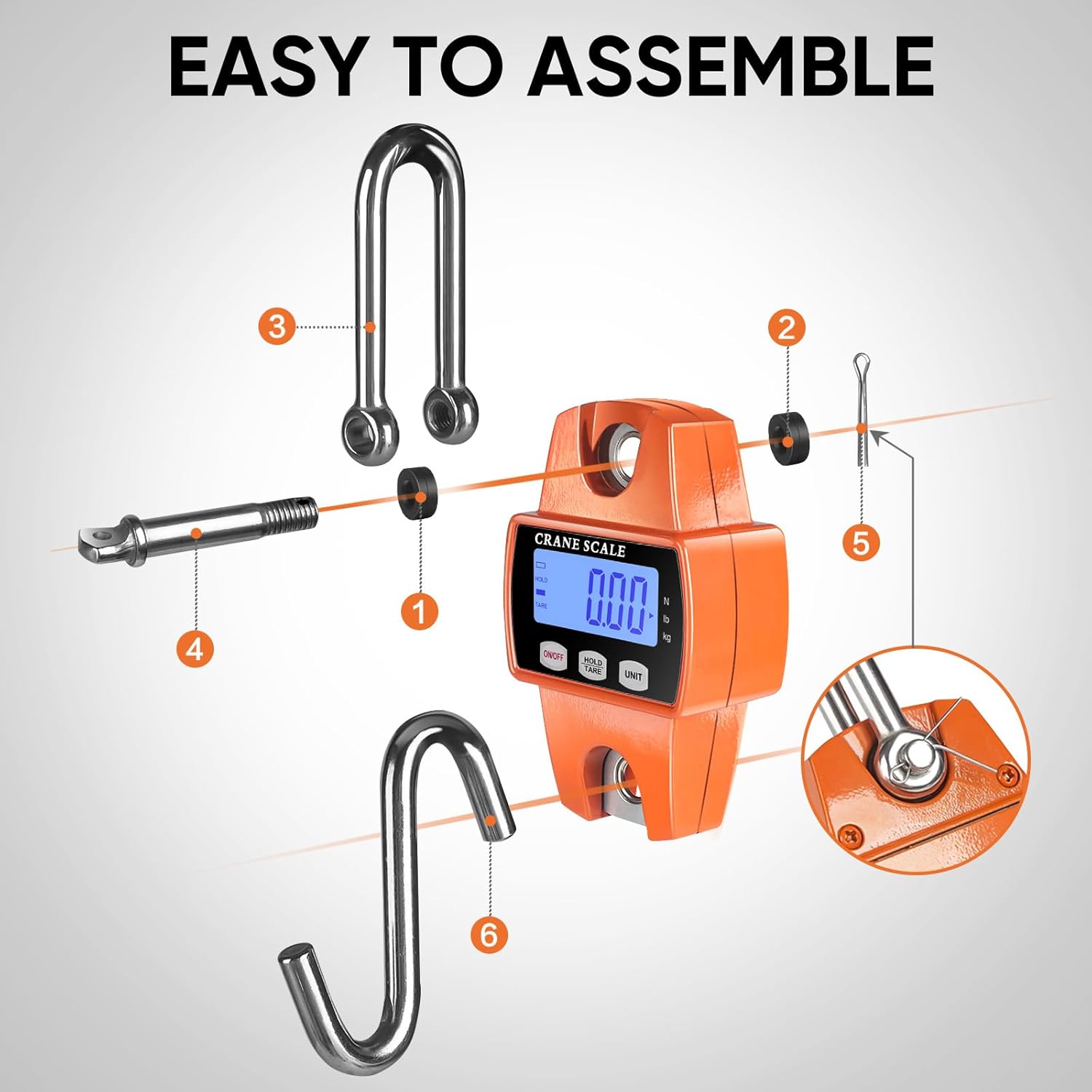
3.2 Hook and Shackle Assembly
Attach the top shackle and bottom hook to the scale as shown in the diagram below. Ensure all components are securely fastened before use.
4. Operating Instructions
4.1 Power On/Off
- Press the ON/OFF button to turn the scale on.
- Press and hold the ON/OFF button to turn the scale off.
4.2 Unit Conversion
- Press the UNIT button to cycle through measurement units: kilograms (kg), pounds (lb), and Newtons (N).
4.3 Hold/Tare Function
- Short press the HOLD/TARE button to tare the scale (zero out the current weight). This is useful for weighing items in a container.
- Long press the HOLD/TARE button to activate the data hold function, which locks the displayed weight.

5. Key Features
- Durable Construction: Features a cast aluminum case for robust performance in various environments.
- High Precision: Provides accurate measurements with a readout accuracy of ±0.1%.
- Clear Display: Equipped with an LED display for easy reading of measurements.
- Versatile Hooks: Includes an alloy steel hook for secure attachment of items to be weighed.


6. Applications
The RoMech Digital Hanging Scale is designed for a wide range of weighing tasks, including:
- Farm use (e.g., weighing livestock, feed)
- Hunting (e.g., weighing game)
- Fishing (e.g., weighing catches)
- Industrial operations (e.g., warehouse inventory)
- General household and outdoor activities


7. Maintenance
- Keep the scale clean and dry. Wipe with a soft, damp cloth. Do not use abrasive cleaners.
- Avoid exposing the scale to extreme temperatures or humidity.
- Remove batteries if the scale will not be used for an extended period to prevent leakage.
- Do not overload the scale beyond its maximum capacity of 660lbs (300kg).
8. Troubleshooting
| Problem | Possible Cause | Solution |
|---|---|---|
| Scale does not turn on | Dead or incorrectly installed batteries | Check battery polarity; replace batteries. |
| Inaccurate readings | Overload, unstable surface, or interference | Ensure load is within capacity, use on a stable surface, avoid strong electromagnetic fields. |
| Display shows "O-Ld" | Overload | Remove excess weight immediately to prevent damage. |
9. Specifications
- Brand: ROMECH
- Model: RM-033
- Maximum Capacity: 660 lbs / 300 kg
- Minimum Weighing Capacity: 0.11 lbs / 0.05 kg
- Increment: 0.11 lbs / 0.05 kg / 0.5 N
- Readout Accuracy: ±0.1%
- Display Type: LED
- Power Source: 3 x AAA Batteries (included)
- Material: Cast Aluminum Case
- Product Dimensions: 3.3 x 1.9 x 5.5 inches
- Item Weight: 1.5 pounds
10. Warranty and Support
RoMech is committed to product quality. If you encounter any issues or have questions regarding your digital hanging scale, please refer to the contact information provided with your purchase or visit the official RoMech website for support. Please retain your proof of purchase for warranty claims.