
Introduction
This manual provides instructions for the proper setup, operation, and maintenance of your Marea B54183/3 Analog Quartz Watch. Please read this manual thoroughly before using your watch to ensure optimal performance and longevity.
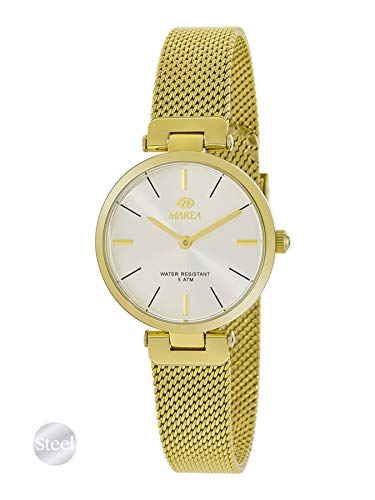
Image: Marea B54183/3 Analog Quartz Watch. This image displays the watch with its round white dial, gold-colored case, and matching gold-colored bracelet. The watch features an analog display with hour, minute, and second hands.
Setup
1. Setting the Time
- Pull out the crown: Gently pull the crown (the small knob on the side of the watch case) out to the first position.
- Adjust the time: Rotate the crown clockwise or counter-clockwise to move the hour and minute hands to the correct time.
- Push in the crown: Once the correct time is set, push the crown back into its original position against the watch case. This will start the watch movement.
2. Adjusting the Bracelet
The metal bracelet may require adjustment to fit your wrist comfortably. This typically involves removing or adding links. It is recommended to have this adjustment performed by a qualified jeweler or watch technician to prevent damage to the bracelet or watch.
Operating the Watch
The Marea B54183/3 is an analog quartz watch designed for reliable timekeeping. Once the time is set, the watch operates continuously, powered by its quartz movement and battery.
- Time Display: The watch displays hours, minutes, and seconds via three central hands on the dial.
- Accuracy: Quartz movements are known for their high accuracy, typically maintaining time within a few seconds per month.
Maintenance
1. Cleaning
To maintain the appearance of your watch, wipe the case and bracelet periodically with a soft, dry cloth. For more thorough cleaning, a slightly damp cloth can be used, followed by immediate drying. Avoid using harsh chemicals or abrasive materials.
2. Battery Replacement
The watch is powered by a small button-cell battery. When the watch stops or the second hand begins to skip (if applicable), the battery may need replacement. It is recommended to have the battery replaced by a professional watchmaker to ensure proper sealing and prevent damage to the movement.
3. Water Resistance
While many watches offer some level of water resistance, it is crucial to understand the specific rating of your Marea B54183/3. Unless explicitly stated otherwise on the watch or packaging, avoid exposing the watch to water, moisture, or high humidity. Water damage is typically not covered under warranty.
Troubleshooting
- Watch has stopped:
Check if the crown is pushed in completely. If it is, the battery may need replacement. Consult a professional watchmaker.
- Time is incorrect:
Reset the time as described in the "Setting the Time" section. If the time continues to be inaccurate after resetting, the watch may require servicing.
- Condensation under the crystal:
This indicates moisture has entered the watch. Immediately take the watch to a professional watchmaker for inspection and repair to prevent further damage to the movement.
Specifications
| Feature | Detail |
|---|---|
| Brand | Marea |
| Model Number | B54183/3 |
| Display Type | Analog |
| Movement Type | Quartz |
| Item Shape | Round |
| Dial Color | White |
| Band Color | Gold |
Warranty Information
Marea watches typically come with a manufacturer's warranty covering defects in materials and workmanship. The specific terms and duration of the warranty may vary. Please refer to the warranty card or documentation included with your purchase for detailed information. Keep your proof of purchase for warranty claims.
Support
For further assistance, service, or inquiries regarding your Marea B54183/3 watch, please contact the retailer where you purchased the product or refer to the official Marea website for customer support contact details. When contacting support, please have your watch model number (B54183/3) and proof of purchase readily available.