
Introduction
This manual provides comprehensive instructions for the safe and effective installation, operation, and maintenance of your UpStart Components D7824706Q Refrigerator Ice Maker. This replacement part is designed for compatibility with various refrigerator models, including Amana ARB2217CB (PARB2217CB1) and those using W10190978 icemakers. Please read this manual thoroughly before beginning installation or operation to ensure proper function and safety.
Safety Information
WARNING: Before attempting any installation or maintenance, always disconnect power to the refrigerator by unplugging it from the electrical outlet or turning off the circuit breaker. Failure to do so can result in electrical shock, personal injury, or death.
- Always wear appropriate personal protective equipment, such as gloves, during installation.
- Ensure all connections are secure and properly insulated to prevent electrical hazards.
- If you are unsure about any step, consult a qualified appliance technician.
- Keep children and pets away from the work area during installation.
- This product is an electrical component. Handle with care to avoid damage.
Package Contents
Verify that all components are present before beginning installation:
- 1 x D7824706Q Refrigerator Ice Maker Assembly
- 2 x Wiring Harnesses (for compatibility with different refrigerator models)
- 1 x Mounting Bracket
- 1 x Mounting Screw
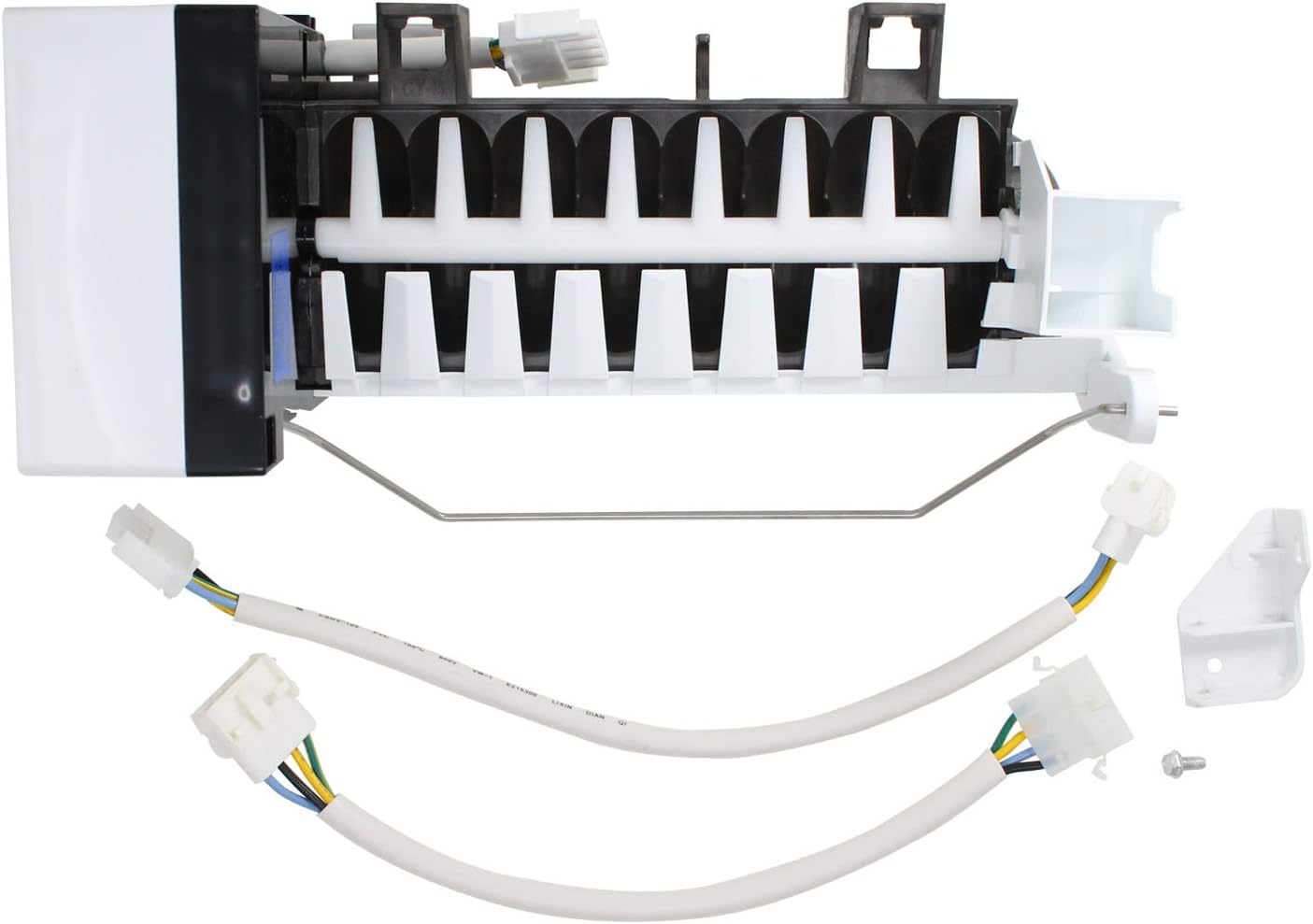
Image: The D7824706Q ice maker assembly shown with the two included wiring harnesses, a mounting bracket, and a single screw. These are the typical components found in the package.
Setup and Installation
This section outlines the general steps for replacing your refrigerator's ice maker. Specific steps may vary slightly depending on your refrigerator model. Refer to your refrigerator's service manual for detailed instructions if needed.
- Disconnect Power: Unplug the refrigerator from the wall outlet or turn off the circuit breaker supplying power to the refrigerator.
- Access the Ice Maker: Open the freezer door and locate the existing ice maker. It is typically mounted on the left wall of the freezer compartment.
- Remove the Old Ice Maker:
- Remove any ice bucket or tray.
- Disconnect the wiring harness from the old ice maker. This usually involves pressing a tab and pulling the connector apart.
- Unscrew any mounting screws holding the ice maker in place. There are typically 2-3 screws.
- Carefully slide or lift the old ice maker out of its mounting brackets.
- Prepare the New Ice Maker:
- Compare the new D7824706Q ice maker with the old one to ensure it is the correct replacement.
- Select the appropriate wiring harness from the two provided that matches the connector in your refrigerator.
- Attach the selected wiring harness to the new ice maker.

Image: Top-front view of the D7824706Q ice maker, showing the ice mold and the bail arm. This view helps in identifying the correct orientation for installation.
- Install the New Ice Maker:
- Slide the new ice maker into the mounting brackets in the freezer compartment.
- Secure it with the mounting screws previously removed, or use the new screw provided if necessary.
- Connect the wiring harness from the new ice maker to the refrigerator's electrical connector. Ensure it clicks into place securely.

Image: Bottom-back view of the D7824706Q ice maker, highlighting the motor and electrical connection points. This view is useful for understanding how the wiring harness connects.
- Restore Power: Plug the refrigerator back into the electrical outlet or turn on the circuit breaker.
- Initial Check: Listen for the ice maker to cycle. It may take several hours for the first batch of ice to be produced.
Operating Instructions
Once installed and power is restored, the ice maker will begin its operation cycle automatically, provided the freezer temperature is sufficiently low and the water supply is connected and turned on.
- First Ice Production: It can take 12 to 24 hours for the freezer to reach the optimal temperature and for the ice maker to produce its first full batch of ice. Discard the first few batches of ice to ensure cleanliness.
- Ice Level Control: The ice maker features a bail arm (metal shut-off arm). When the ice bucket fills and raises the bail arm, the ice maker will stop producing ice. Lowering the bail arm (by removing ice) will resume ice production.
- Turning Off Ice Production: To temporarily stop ice production, lift the bail arm into its upright, locked position. Ensure it is fully engaged to prevent water from filling the mold.
Maintenance
Regular maintenance helps ensure optimal performance and longevity of your ice maker.
- Cleaning: Periodically clean the ice bucket with mild soap and warm water. Rinse thoroughly and dry completely before returning it to the freezer. Do not use abrasive cleaners.
- Water Filter: If your refrigerator has a water filter, ensure it is replaced according to the manufacturer's recommendations to maintain water quality and ice production efficiency.
- Inspection: Occasionally inspect the ice maker for any signs of wear, leaks, or unusual ice formation.
Troubleshooting
If your ice maker is not functioning as expected, review the following common issues and solutions:
| Problem | Possible Cause | Solution |
|---|---|---|
| No ice production |
|
|
| Small or hollow ice cubes |
|
|
| Ice tastes bad or has odor |
|
|
If these solutions do not resolve the issue, it may indicate a more complex problem. Contact a qualified appliance technician for further assistance.
Specifications
| Feature | Detail |
|---|---|
| Model Number | D7824706Q |
| Brand | UpStart Components |
| Compatible Refrigerator Models | Amana ARB2217CB (PARB2217CB1) |
| Compatible Icemaker Part Numbers | W10190978, AP4135008, 68111-1, 68972-1, 68972-4, 8170937, 915772, 95091-1, 95098-1, 95109-1, AH2121513, D7767601, D7824701, D7824702, D7824703, D7824704, D7824705, D7824705Q, D7824706, D7824706QVP, EA2121513, PS2121513, R0154025, R0156629, R0161059, R0161061, R0183135, R0194462, R0194462A, R0194666, R0950064, W10122519, Y0056504, Y0056599, Y0056606, Y0312578, Y0312738, Y0312740, Y689724, YR0161061 |
| Material | Durable, high-quality components |
Warranty and Support
This UpStart Components replacement part is covered by a warranty provided solely by UpStart Components. For specific warranty details, claims, or technical support, please contact UpStart Components directly through their official customer service channels. Please retain your proof of purchase for warranty purposes.
Note: This product is not affiliated with any original equipment manufacturers (OEMs) and is not covered under any warranties offered by the original manufacturers.