
Introduction
Thank you for choosing the CREATE WINDCALM DC Ceiling Fan. This manual provides essential information for the safe and efficient installation, operation, and maintenance of your new ceiling fan. Please read this manual thoroughly before installation and keep it for future reference.

Figure 1: CREATE WINDCALM DC Ceiling Fan with natural wood blades and remote control.
Safety Instructions
Always follow basic safety precautions when installing and operating electrical appliances to reduce the risk of fire, electric shock, and personal injury.
- Ensure the power supply is disconnected before installation or maintenance.
- Installation must be performed by a qualified electrician in accordance with local electrical codes.
- The mounting structure must be capable of supporting the fan's weight (approximately 5.5 kg).
- Do not insert objects into the path of the rotating blades.
- Keep children and pets away from the fan during operation.
Package Contents
Verify that all components are present and undamaged before beginning installation. If any parts are missing or damaged, contact customer support.
- Motor housing assembly
- Fan blades (3x)
- Remote control
- Mounting bracket and hardware
- Instruction manual
Installation
1. Mounting the Bracket
Secure the mounting bracket to a ceiling joist or a suitable electrical junction box capable of supporting the fan's weight. Use the provided screws and washers, ensuring a firm and stable attachment.
2. Wiring Connections
Connect the fan's electrical wires to your household wiring according to the wiring diagram provided in the separate wiring guide. Ensure all connections are secure and insulated. This fan operates on 240 Volts DC power.
3. Attaching the Fan Body
Carefully lift the fan body and attach it to the mounting bracket. Ensure it is securely seated and all safety clips or screws are engaged.

Figure 2: The CREATE WINDCALM DC ceiling fan installed in a bedroom, highlighting its quiet operation suitable for sleeping environments.
4. Attaching the Blades
Attach the three natural wood blades to the motor housing using the provided screws. Ensure each blade is firmly secured. The fan has a diameter of 132 cm and blade length of 66 cm.

Figure 3: Diagram illustrating the dimensions of the CREATE WINDCALM DC ceiling fan, including blade length and overall diameter.

Figure 4: Close-up view of the natural wood blade, showcasing the quality and finish of the fan's components.
Operation
Your CREATE WINDCALM DC Ceiling Fan is controlled by the included remote control.
Remote Control Functions
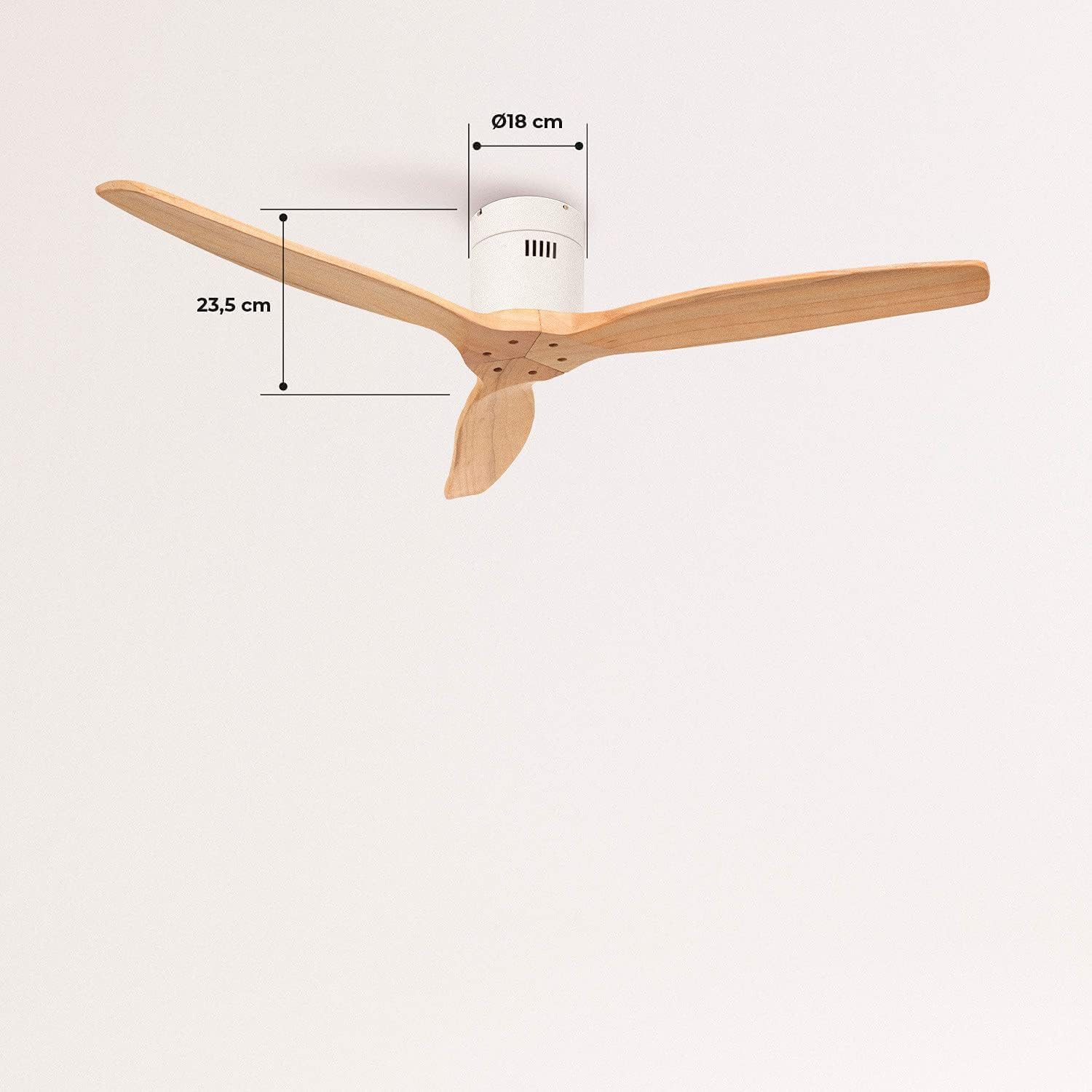
Figure 5: The remote control for the CREATE WINDCALM DC ceiling fan, showing buttons for speed, timer, and direction.
- Power Button: Turns the fan On/Off.
- Speed Control: Adjusts fan speed through 6 levels. The fan offers airflows from 85 to 210 CFM.
- Timer Function: Set the fan to turn off automatically after 1, 2, 4, or 8 hours.
- Summer/Winter Mode: Changes the direction of blade rotation.
Summer Mode
In summer mode, the blades rotate counter-clockwise, pushing cool air downwards to create a refreshing breeze. This is ideal for cooling a room.

Figure 6: Diagram explaining the summer mode operation, where the fan blades rotate counter-clockwise to push cool air downwards.
Winter Mode
In winter mode, the blades rotate clockwise, drawing warm air up towards the ceiling and circulating it gently throughout the room. This helps to distribute heat more evenly and can reduce heating costs.

Figure 7: Diagram explaining the winter mode operation, where the fan blades rotate clockwise to circulate warm air upwards.
Maintenance
Regular maintenance ensures optimal performance and longevity of your ceiling fan.
- Cleaning: Dust the fan blades and motor housing regularly with a soft, damp cloth. Do not use abrasive cleaners or solvents.
- Blade Balance: If the fan wobbles, check that all blade screws are tightened. A balancing kit may be used if necessary.
- Motor: The DC motor is designed for long-term, maintenance-free operation. No lubrication is required.
Troubleshooting
If you encounter issues with your fan, refer to the following common problems and solutions:
| Problem | Possible Cause | Solution |
|---|---|---|
| Fan does not start | No power supply; Remote control battery low; Incorrect wiring. | Check circuit breaker; Replace remote battery; Verify wiring connections. |
| Fan wobbles | Loose blade screws; Unbalanced blades; Loose mounting bracket. | Tighten all blade screws; Use a blade balancing kit; Ensure mounting bracket is secure. |
| No air movement | Fan running at lowest speed; Incorrect direction for season. | Increase fan speed; Switch to appropriate Summer/Winter mode. |
| Remote control not working | Battery low or incorrectly inserted; Remote not paired. | Replace battery; Refer to remote pairing instructions (if applicable). |
Specifications
| Feature | Specification |
|---|---|
| Model Number | 62301_134701 |
| Brand | CREATE |
| Motor Type | DC Motor (153*15 mm copper) |
| Power Consumption | 40 Watts |
| Voltage | 240 Volts |
| Fan Diameter | 132 cm |
| Blade Length | 66 cm |
| Number of Speeds | 6 |
| Airflow (Max) | 210 Cubic Meters per Minute (CFM) |
| Noise Level | 50 dB |
| Special Features | Timer (1-8h), Summer/Winter Function |
| Weight | 5.5 Kilograms |
Warranty and Support
CREATE products are manufactured to the highest quality standards. For warranty information or technical support, please refer to the contact details provided with your purchase documentation or visit the official CREATE website. Keep your proof of purchase for warranty claims.
For further assistance, you may visit the CREATE Store on Amazon.


