1. Introduction
Thank you for choosing the DEERC D10 Foldable Drone. This user manual provides essential information for the safe operation, setup, and maintenance of your drone. Please read this manual thoroughly before operating the drone to ensure proper use and to maximize your flying experience.
2. What's in the Box
The DEERC D10 package includes the following components:
- DEERC D10 Drone
- Remote Controller
- 2 x Lithium Polymer Batteries
- 4 x Propeller Guards
- USB Charging Cable
- Spare Propellers
- Screwdriver
- User Manual

Figure 2.1: Contents of the DEERC D10 package, showing the drone, remote controller, and two batteries.
3. Product Features
The DEERC D10 drone is equipped with several advanced features for an intuitive and enjoyable flight:
- User Friendly: One-key start/landing, Altitude Hold, Headless Mode, and Speed Adjustment functions make it suitable for all experience levels.
- Extended Flight Time: Two powerful batteries provide up to 24 minutes of flight. Modular battery design simplifies charging.
- Stable and Clear Views: Built-in 720P HD lens with FPV real-time transmission for clear footage up to 100m.
- Tap Fly: Draw a flight course on your smartphone, and the drone will follow the path automatically.
- Gesture Control: Show your palm or a 'V' sign to the front camera to automatically take photos or videos.
- Smart Control: Control the drone with voice commands (e.g., "take off", "landing") or by waving your smartphone using Gravity Control.
- Foldable and Portable: Compact design allows for easy transport and storage.
4. Setup Guide
4.1. Charging the Batteries
Before first use, fully charge both drone batteries and the remote controller (if applicable). Use the provided USB charging cable. The modular design of the drone batteries makes them easy to remove and charge.
4.2. Installing Propeller Guards
For enhanced flight safety, especially for beginners, attach the four propeller guards to the drone. These guards protect the propellers from damage during collisions.
4.3. Drone and Remote Controller Pairing
- Place the drone on a flat, level surface.
- Turn on the drone. The indicator lights will flash.
- Turn on the remote controller.
- Push the left joystick up and then pull it down. The drone lights will stop flashing and remain solid, indicating successful pairing.
4.4. App Installation and Connection
Download the "DE FPV" app from your smartphone's app store. Once installed:
- Ensure the drone is powered on.
- Go to your smartphone's Wi-Fi settings and connect to the drone's Wi-Fi network (usually named "DEERC-D10-XXXXXX").
- Open the "DE FPV" app. You should see the live video feed from the drone's camera.

Figure 4.1: The DEERC D10 drone's 720P HD FPV Wi-Fi camera for live video transmission.
5. Operating Instructions
5.1. Basic Flight Controls
- One-Key Takeoff/Landing: Press the dedicated button on the remote or in the app to automatically take off or land.
- Altitude Hold: The drone maintains a stable altitude, making it easier to control direction.
- Headless Mode: Eliminates the need to adjust the drone's position before flight, as the forward direction is relative to the pilot.
- Speed Adjustment: Toggle between different speed modes (low, medium, high) to suit your skill level and environment.
5.2. Advanced Flight Functions
- FPV Real-Time Transmission: View live video from the drone's camera directly on your smartphone via the app. This allows for immersive flying and easy capture of footage.
- Tap Fly: In the app, draw a desired flight path on the screen. The drone will then automatically fly along the specified route.
- Gesture Control: Position yourself in front of the drone's camera and make specific hand gestures (e.g., palm, 'V' sign) to trigger photo or video capture.
- Smart Voice Control: Control the drone using simple voice commands through the app, such as "take off" or "landing."
- Gravity Control: Tilt your smartphone to control the drone's flight direction, adding an interactive element to your flying experience.
- 3D Flips: Execute impressive aerial stunts with the press of a button.

Figure 5.1: FPV Real-Time Transmission allows sharing incredible views directly from the drone.

Figure 5.2: The Tap Fly feature enables the drone to follow a pre-drawn flight course on your smartphone.

Figure 5.3: Use hand gestures for convenient photo or video capture with Gesture Control.

Figure 5.4: Smart Voice Control allows hands-free operation using simple commands.

Figure 5.5: Gravity Control enables drone movement by tilting your smartphone.
5.3. Folding and Portability
The DEERC D10 drone features a foldable design for easy storage and transport. Gently fold the arms inward when not in use to reduce its size.
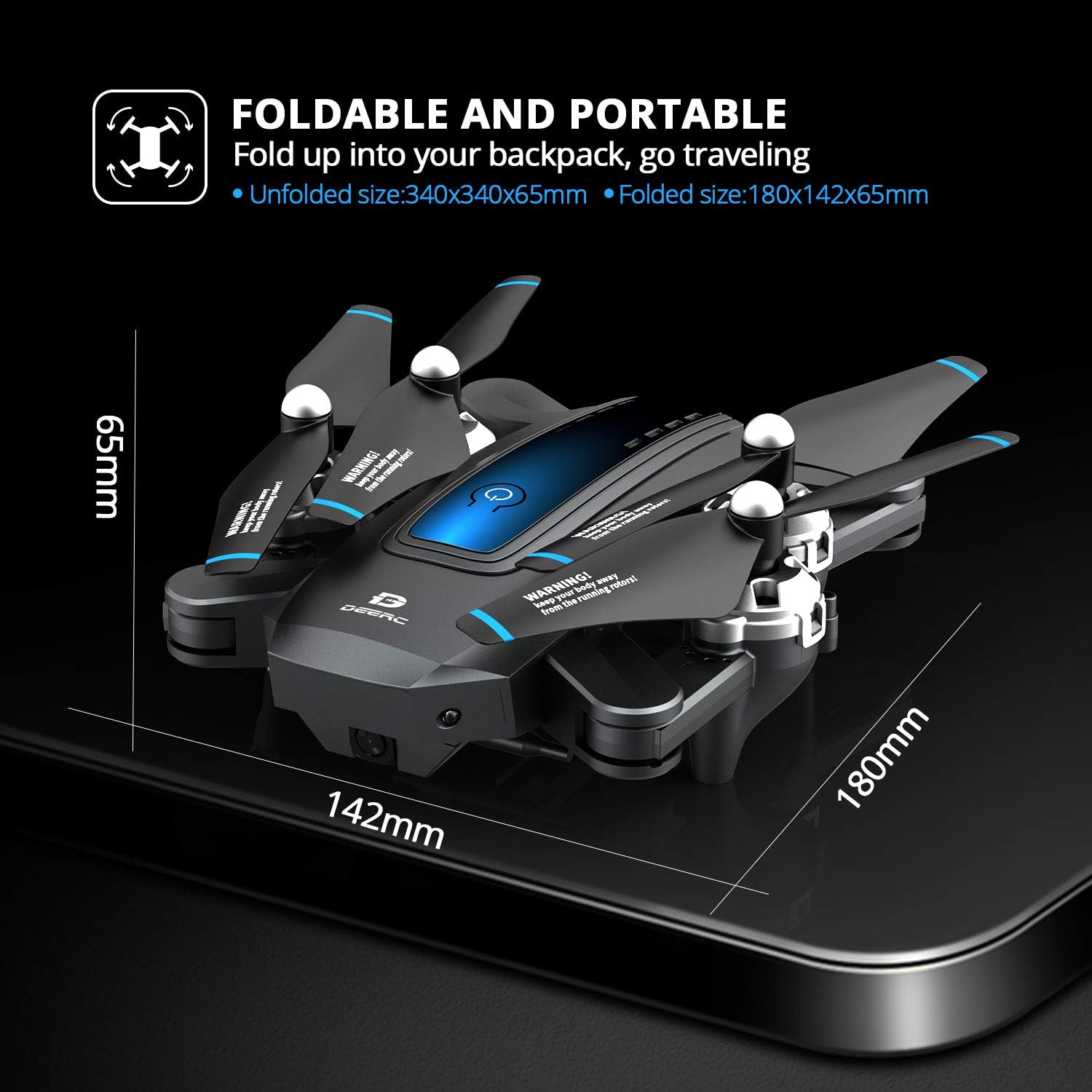
Figure 5.6: The DEERC D10 drone in its folded state, highlighting its compact dimensions for portability.
6. Maintenance
- Battery Care: Always fully charge batteries before use. Do not overcharge or completely drain them. Store batteries in a cool, dry place.
- Propeller Inspection: Regularly check propellers for any signs of damage (cracks, bends). Replace damaged propellers immediately using the provided spares.
- Cleaning: Use a soft, dry cloth to clean the drone body. Avoid using water or harsh chemicals.
- Storage: When not in use for extended periods, remove batteries from the drone and remote controller. Store the drone in its original packaging or a protective case.
7. Troubleshooting
| Problem | Possible Cause | Solution |
|---|---|---|
| Drone does not respond to remote. | Not paired; low battery; out of range. | Re-pair drone and remote; charge batteries; ensure drone is within operating range. |
| Drone drifts during flight. | Not calibrated; strong wind. | Perform gyroscope calibration; fly in calm conditions. |
| No FPV video feed. | Wi-Fi not connected; app issue. | Ensure phone is connected to drone's Wi-Fi; restart app/phone/drone. |
| Short flight time. | Battery not fully charged; old battery. | Fully charge battery; consider replacing old batteries. |
| Drone crashes frequently. | Pilot error; propeller damage. | Practice in open areas; install propeller guards; replace damaged propellers. |
For more detailed troubleshooting or specific issues, please refer to the DE FPV app's help section or contact DEERC customer support.
8. Specifications
| Feature | Detail |
|---|---|
| Brand | DEERC |
| Model Name | D10 |
| Video Capture Resolution | 720p (1280x720 pixels) |
| Connectivity Technology | Wi-Fi |
| Skill Level | Beginner |
| Max Range | 100 Meters |
| Battery Type | Lithium Polymer (2 included) |
| Item Weight | 1.43 pounds |
| Recommended Age | 14 years and up |
| Folded Size | 180mm x 142mm x 65mm (approx.) |
| Unfolded Size | 340mm x 340mm x 65mm (approx.) |
9. Warranty and Support
For warranty information, technical support, or any inquiries regarding your DEERC D10 drone, please visit the official DEERC website or contact their customer service directly. Retain your proof of purchase for warranty claims.


