
Introduction
This manual provides instructions for the CHOUBENBEN replacement remote control designed for various Panasonic Air Conditioner models. It covers setup, operation, maintenance, and troubleshooting to ensure proper use of your remote control.
This remote control is compatible with Panasonic Air Conditioner models including, but not limited to: CV6233198927, CV6233187136, CV6233187143, CV6233187044, CV6704000024, CV6233187020, CV6233187051, CV6704000023, CV6233187037, and CS-KE30NKU.
Setup
Battery Installation
- Open the battery compartment cover on the back of the remote control.
- Insert two (2) AAA 1.5V batteries, ensuring the positive (+) and negative (-) terminals align correctly with the markings inside the compartment.
- Close the battery compartment cover securely.
Note: Batteries are not included with the remote control. Please use new batteries for optimal performance.
Initial Use
This replacement remote control requires no programming. It is ready for use immediately after battery installation. Point the remote control directly at your Panasonic air conditioner unit to operate.
Operating Instructions
The remote control features a clear LCD display and intuitive buttons for various functions. The display can show temperature in both Fahrenheit and Celsius.
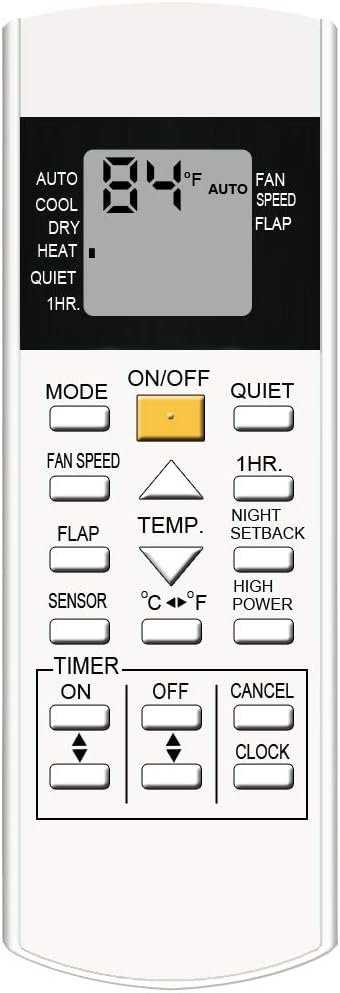
A detailed view of the CHOUBENBEN replacement remote control, highlighting the layout of its buttons and the LCD screen. Key buttons include ON/OFF, MODE, FAN SPEED, TEMP, TIMER, and various function buttons.
Button Functions
- ON/OFF: Powers the air conditioner unit on or off.
- MODE: Cycles through operating modes (e.g., Auto, Cool, Dry, Heat, Fan).
- FAN SPEED: Adjusts the fan speed (e.g., Auto, Low, Medium, High).
- TEMP ▲/▼: Increases or decreases the set temperature.
- QUIET: Activates or deactivates quiet operation mode.
- 1HR: Activates a 1-hour timer function.
- NIGHT SETBACK: Engages the night setback function for energy saving during sleep.
- FLAP: Controls the air conditioner's louver/flap direction.
- SENSOR: Activates or deactivates the sensor function (if available on your AC unit).
- °C/°F: Toggles the temperature display between Celsius and Fahrenheit.
- HIGH POWER: Activates a high-power mode for rapid cooling/heating.
- TIMER ON/OFF/CANCEL: Sets, cancels, or adjusts the ON/OFF timer functions.
- CLOCK: Sets the current time on the remote control's display.

This image illustrates the CHOUBENBEN replacement remote control. The display shows temperature in Fahrenheit, and the remote is compatible with various Panasonic air conditioner models, including CV6233187020, CV6233187037, CV6233187044, CV6233187051, CV6233187136, CV6233187143, CV6233198927, CV6704000023, and CV6704000024.
Maintenance
Battery Replacement
Replace batteries when the remote control's display becomes dim or the remote control becomes unresponsive. Always replace both batteries simultaneously with new AAA 1.5V batteries. Do not mix old and new batteries or different types of batteries.
Cleaning
Wipe the remote control with a soft, dry cloth. Do not use liquid cleaners, sprays, or abrasive materials, as these can damage the remote control's surface or internal components.
Troubleshooting
- Remote Control Not Responding:
- Check if the batteries are inserted correctly with the correct polarity.
- Replace the batteries with new ones.
- Ensure there are no obstructions between the remote control and the air conditioner unit's receiver.
- Confirm you are within the effective operating range of the air conditioner.
- Display is Dim or Blank:
- This usually indicates low battery power. Replace the batteries.
- Air Conditioner Not Responding to Specific Functions:
- Ensure your specific Panasonic air conditioner model supports the function you are trying to use. Not all functions may be available on all compatible units.
Specifications
| Brand | CHOUBENBEN |
| Model Number | 20200301801 |
| Connectivity Technology | Infrared |
| Controller Type | Button Control |
| Battery Type | 2 x AAA 1.5V (not included) |
| Special Feature | Ergonomic design, Fahrenheit and Celsius display |