
1. Introduction
Thank you for choosing the WSTER WS-1818 Hi-Fi Speaker Wireless Microphone. This device combines a high-quality wireless microphone with an integrated Hi-Fi speaker, designed for portable audio entertainment and karaoke. It offers excellent sound performance and versatile connectivity options.
Package Contents
- 1 x WSTER WS-1818 Wireless Microphone
- 1 x USB Charging Cable
- 1 x Audio Cable
- 1 x User Manual
2. Product Overview
The WSTER WS-1818 features a compact, handheld design with an intuitive control panel for easy operation.
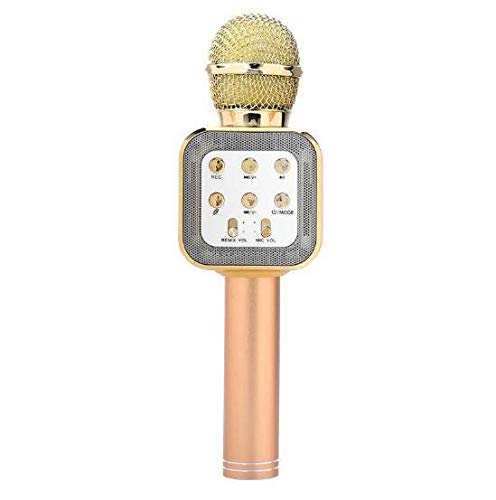
Figure 1: WSTER WS-1818 Hi-Fi Speaker Wireless Microphone and its packaging. The microphone features a control panel with buttons for various functions.
Controls and Indicators
- Power Button: Press and hold to turn on/off.
- Volume Controls: Adjust microphone and music volume.
- Echo Control: Adjust the echo effect level.
- Mode Button: Switch between Bluetooth, TF card, and U disk modes.
- Play/Pause Button: Control music playback.
- Previous/Next Track Buttons: Navigate through music tracks.
- Charging Port: USB port for charging the device.
- TF Card Slot: Insert a TF (MicroSD) card for music playback.
- U Disk Slot: Insert a USB flash drive for music playback.
- Audio Output Port: Connect to external audio devices.
3. Setup
3.1 Charging the Device
- Connect the provided USB charging cable to the charging port on the microphone.
- Connect the other end of the USB cable to a standard 5V USB power adapter (not included) or a computer's USB port.
- The charging indicator light will illuminate during charging and turn off when fully charged.
- A full charge typically takes approximately 2-3 hours.
3.2 Powering On/Off
- To power on, press and hold the Power button until the device activates.
- To power off, press and hold the Power button again until the device shuts down.
3.3 Bluetooth Pairing
- Ensure the microphone is powered on and in Bluetooth mode (indicated by a voice prompt or light).
- Enable Bluetooth on your mobile device (smartphone, tablet, etc.).
- Search for available Bluetooth devices and select "WS-1818" from the list.
- Once paired, the device will indicate a successful connection, and you can begin playing audio wirelessly.
4. Operating Instructions
4.1 Music Playback
- Bluetooth Mode: After successful pairing, play music from your connected device. Use the Play/Pause and Previous/Next Track buttons on the microphone to control playback.
- TF Card/U Disk Mode: Insert a TF card or U disk with MP3 audio files into the respective slot. The device will automatically switch to the corresponding mode and begin playback. Use the control buttons for navigation.
4.2 Microphone Use
- Speak directly into the microphone grille.
- Adjust the microphone volume using the dedicated control.
- Adjust the echo effect using the Echo control to enhance your vocals.
4.3 Karaoke Function
The WS-1818 is designed for a home karaoke experience. You can sing along to music played through the integrated speaker.
- Connect your mobile device via Bluetooth and open a karaoke application (e.g., K Song app).
- Play a karaoke track from the app.
- Adjust the music volume, microphone volume, and echo effect to your preference for an optimal singing experience.
5. Maintenance
5.1 Cleaning
- Wipe the device with a soft, dry cloth.
- Do not use abrasive cleaners, solvents, or harsh chemicals.
5.2 Storage
- Store the microphone in a cool, dry place away from direct sunlight and extreme temperatures.
- Avoid storing in dusty or humid environments.
5.3 Battery Care
- Charge the battery fully before first use.
- If the device will not be used for an extended period, charge it at least once every three months to maintain battery health.
- Do not attempt to replace the internal battery yourself.
6. Troubleshooting
| Problem | Possible Cause | Solution |
|---|---|---|
| Device does not power on. | Battery is depleted. | Charge the device fully. |
| Cannot connect via Bluetooth. | Bluetooth is not enabled on the device or microphone. Microphone is too far from the paired device. | Ensure both devices have Bluetooth enabled. Move the microphone closer to the paired device. Restart both devices and try pairing again. |
| No sound from speaker. | Volume is too low. Device is muted. | Increase the volume on both the microphone and the connected device. Check if the device is muted. |
| Microphone not picking up sound. | Microphone volume is too low. | Increase the microphone volume control. |
7. Specifications
| Feature | Detail |
|---|---|
| Brand | WSTER |
| Model | WS-1818 |
| Connectivity Technology | Bluetooth |
| Connector Type | USB |
| Special Feature | Wireless |
| Compatible Devices | Karaoke Machine, Speaker |
| Microphone Form Factor | Handheld |
| Power Source | Battery Powered |
| Output Power | 5W * 2 |
| Frequency Range | 100Hz-10kHz |
| Maximum SPL | > 115dB 1KHz THD <1% |
| Signal-to-Noise Ratio | 115 dB |
| Battery Type | External Polymer Battery |
| Battery Capacity | 2000mAh |
| Charging Voltage | 5V |
| Material | Aluminum Alloy |
| Impedance | 4 Ohm |
| Package Dimensions | 27.8 x 10.8 x 7.4 cm |
| Package Weight | 364 grams |
8. Warranty and Support
Specific warranty information and customer support details are typically provided with your purchase documentation or on the manufacturer's official website. Please refer to those resources for assistance.