
Eonon GA9453
Eonon GA9453 Android 10 Car Stereo User Manual
Model: GA9453 | Brand: Eonon
1. Product Overview
The Eonon GA9453 is an advanced Android 10 car stereo system designed for select Volkswagen, SEAT, and Skoda vehicles. It features an 8-inch HD touchscreen, a powerful Quad-Core processor, 2GB RAM, and 32GB ROM, providing a smooth and responsive user experience. Key functionalities include Bluetooth 5.0 for hands-free calling and audio streaming, GPS navigation, USB/SD card support, FM radio, and compatibility with various car features.

Front view of the Eonon GA9453 car stereo, showcasing its 8-inch HD touchscreen and physical buttons.
2. Setup and Installation
2.1 What's in the Box
Before beginning installation, please verify that all components are present in the package:

An illustration detailing the various components included in the Eonon GA9453 package.
- GPS Antenna *1
- Power Cable *1
- Wi-Fi Antenna *1
- CAN Bus *1
- USB Extension Harness *1
- USB Adapter Cable *1
- External Microphone *1
- Radio Adapter Cable *1
- 15A Fuse *1
- Disassembly Tool *1
- Regulator Relay *1
- 3M Adhesive Pad *1
- User Manual *1
2.2 Wiring Diagram
Refer to the following diagram for proper connection of all cables and accessories to the head unit.

Detailed wiring diagram showing all input and output connections on the rear of the Eonon GA9453 unit.
- 1. GPS Antenna
- 2. Wi-Fi Antenna
- 3. USB Input
- 4. USB Input
- 5. ANT
- 6. SW2
- 7. SW1
- 8. GND
- 9. CAN Bus Decoder
- 10. VW Radio Harness
- 11. Audio Input L
- 12. Audio Input R
- 13. A0580 Decoder Box Input
- 14. External Microphone
- 15. Radio Antenna Adapter Cable
- 16. Video Output 2
- 17. Video Output 1
- 18. Rear Camera Input
- 19. Video Input
- 20. Front Audio Output L
- 21. Rear Audio Output L
- 22. Subwoofer Output
- 23. Audio Input R
- 24. Front Audio Output R
- 25. Rear Audio Output R
- 26. Subwoofer Output
- 27. Audio Input L
- 28. USB Input
2.3 Applicable Vehicle Models
This unit is compatible with various Volkswagen, SEAT, and Skoda models. Please check the specific years and models listed below to ensure compatibility.
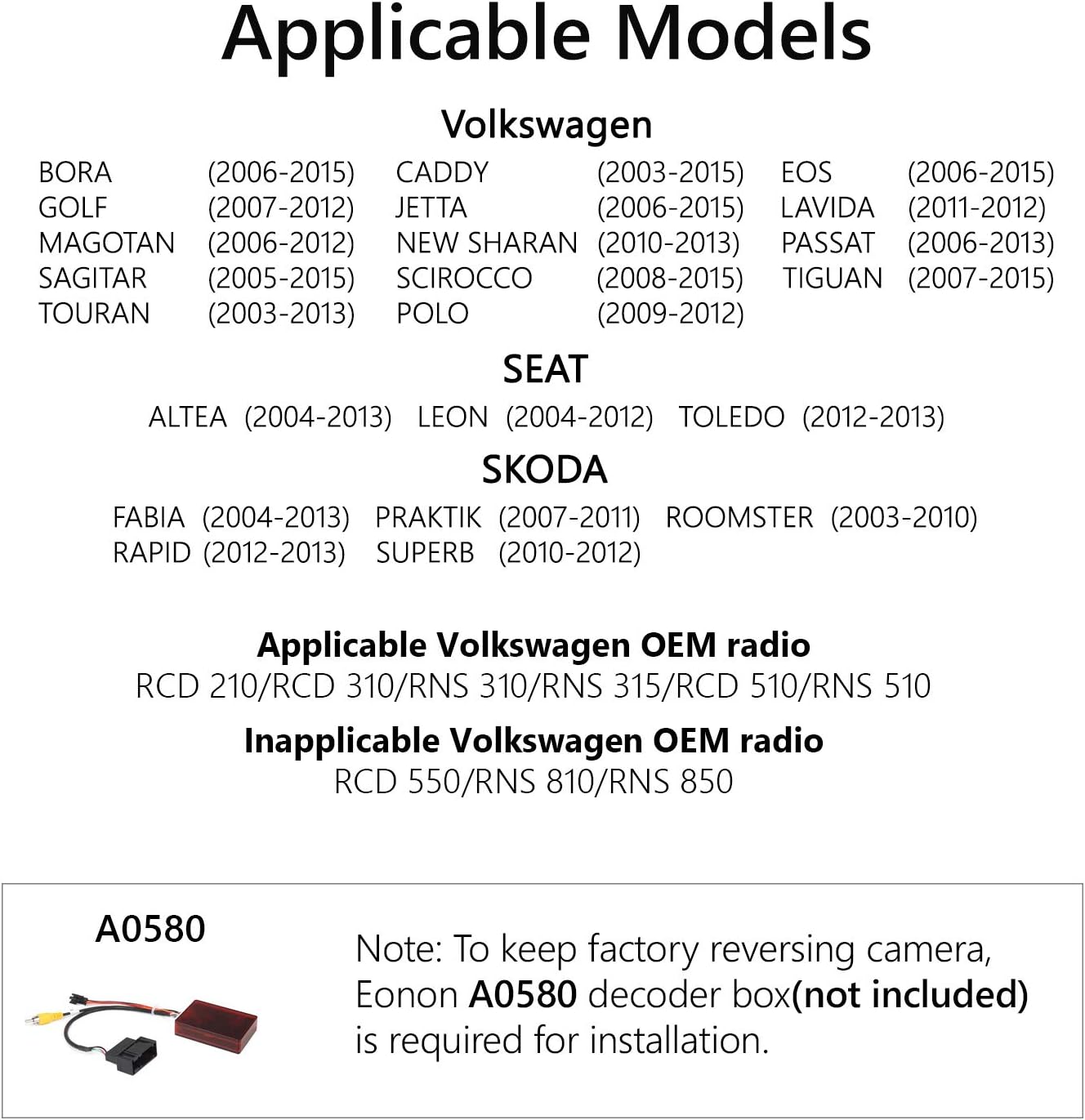
A visual guide to the Volkswagen, SEAT, and Skoda models compatible with the Eonon GA9453.
Volkswagen:
- BORA (2006-2015)
- GOLF (2007-2012)
- MAGOTAN (2006-2012)
- SAGITAR (2005-2015)
- TOURAN (2003-2013)
- CADDY (2003-2015)
- JETTA (2006-2015)
- NEW SHARAN (2010-2013)
- SCIROCCO (2008-2015)
- POLO (2009-2012)
- EOS (2006-2015)
- LAVIDA (2011-2012)
- PASSAT (2006-2013)
- TIGUAN (2007-2015)
SEAT:
- ALTEA (2004-2013)
- LEON (2004-2012)
- TOLEDO (2012-2013)
SKODA:
- FABIA (2004-2013)
- PRAKTIK (2007-2011)
- ROOMSTER (2003-2010)
- RAPID (2012-2013)
- SUPERB (2010-2012)
Applicable Volkswagen OEM radio: RCD 210/RCD 310/RNS 315/RCD 510/RNS 510
Inapplicable Volkswagen OEM radio: RCD 550/RNS 810/RNS 850
2.4 Important Installation Notes
To retain the factory reversing camera function, the Eonon A0580 decoder box (not included) is required for installation.
The A0580 decoder box, necessary for integrating with a factory reversing camera.
To use Android Auto and Apple CarPlay functions, you must purchase the A0585 dongle separately.

The A0585 USB dongle, required for enabling Android Auto and Apple CarPlay functionality.
3. Operating Instructions
3.1 Function Summary
The Eonon GA9453 offers a wide range of features for an enhanced in-car entertainment and navigation experience.

An overview of the key functions and capabilities of the Eonon GA9453 car stereo.
- Android 10: Latest Android operating system for smooth performance.
- Rockchip PX30 Quad-Core: Powerful processor for efficient multitasking.
- 2GB RAM & 32GB ROM: Ample memory for apps and storage.
- Bluetooth 5.0: Faster and more stable wireless connections.
- Split Screen Multitasking: Run two applications simultaneously on the screen.
- 8" HD Touchscreen: Clear and responsive display.
- 1s Boot Time: Quick startup for immediate use.
- Navigation: Integrated GPS for accurate route guidance.
- EasyConnection: Screen mirroring for compatible devices.
- Backup Camera Support: Connect an aftermarket backup camera for safer reversing.
- Full RCA Output: Connect external amplifiers and subwoofers.
- 4G & Wi-Fi: Internet connectivity via Wi-Fi or optional 4G dongle.
- USB/SD: Play media from USB drives and SD cards.
- DVR Support: Connect a compatible Dash Cam (DVR) for recording.
- EQ: Equalizer settings for customized audio output.
- App Installation: Download and install apps from the Google Play Store.
- AM/FM Radio: Built-in radio tuner with RDS support.
- OBDII Support: Connect an OBD2 scanner for vehicle diagnostics.
3.2 Key Features in Detail
Explore the core functionalities that enhance your driving experience.

A visual breakdown of the Eonon GA9453's primary features, including Android Auto, Bluetooth, and Wi-Fi.
- Android 10 with 2GB RAM, Quad-Core, 32GB ROM: Provides a robust platform for applications and system operations.
- Car Auto Play (Android Auto & Apple CarPlay): Requires the A0585 dongle (sold separately). Allows seamless integration of your smartphone for navigation, music, and calls.
- Bluetooth 5.0: Enables high-quality audio streaming from your phone and hands-free calling for safer driving.
- Compatible with Bose System: Designed to produce optimal sound quality when connected to vehicles equipped with a Bose audio system.
- Do More at the Same Time (Picture-in-Picture): View two applications simultaneously, such as navigation and music playback.
- Wi-Fi & 4G: Connect to Wi-Fi hotspots or use an optional 4G dongle for internet access, enabling online navigation, app downloads, and streaming.
- Fast Boot Up: The system boasts a rapid 1-second boot-up time, ensuring quick readiness after starting your vehicle.
- Backup Camera Supported: Automatically switches to the rear camera view when reversing, enhancing safety and parking ease.
- Bluetooth OBD2 Scanner Supported: Connect a Bluetooth OBD2 scanner (sold separately) to monitor vehicle diagnostics and performance data directly on the head unit.
3.3 Retain Original Car Features
The dual CAN Bus system allows the GA9453 to integrate with and retain many original car features, providing a seamless user experience.

An illustration demonstrating how the Eonon GA9453 retains and integrates with various original car functionalities.
- Dashboard Function: Displays relevant vehicle information on the unit's screen.
- Steering Wheel Control: Most original steering wheel control functions are retained, allowing you to manage audio and calls without taking your hands off the wheel.
- Automatic Reverse Mode: The head unit automatically switches to reverse camera view when the vehicle is put into reverse gear.
- Video Playback Safety: For your safety, video playback is disabled while driving. This feature can be enabled if desired.
- Headlight Button Illumination: The unit's buttons will illuminate automatically when your car headlights are turned on.
- Sound Prompt, Parking Trajectory & Parking Sensor: Provides audio prompts and visual parking trajectory lines (only available for vehicles with parking sensors).
- Fan Speed, Air Conditioner and Seat Temperature Display: Displays climate control information directly on the unit's screen for convenience.
4. Maintenance
To ensure the longevity and optimal performance of your Eonon GA9453 car stereo, follow these maintenance guidelines:
- Cleaning the Screen: Use a soft, lint-free cloth to gently wipe the touchscreen. For stubborn smudges, slightly dampen the cloth with water or a screen-specific cleaner. Avoid abrasive materials or harsh chemicals.
- General Cleaning: Periodically wipe down the unit's exterior with a soft, dry cloth to remove dust and dirt.
- Avoid Liquid Spills: Keep liquids away from the unit to prevent damage to internal components.
- Temperature Control: Avoid exposing the unit to extreme temperatures for prolonged periods.
- Software Updates: Check the official Eonon website periodically for available software updates to ensure the system runs efficiently and has the latest features.
5. Troubleshooting
If you encounter issues with your Eonon GA9453, try the following basic troubleshooting steps:
- No Power: Check all power cable connections. Ensure the vehicle's ignition is on. Verify the fuse (15A) is not blown.
- No Sound: Check speaker connections. Ensure the volume is not muted or set too low. Verify audio output settings.
- Touchscreen Unresponsive: Try restarting the unit. If the issue persists, a factory reset might be necessary (refer to the on-screen settings).
- GPS Signal Issues: Ensure the GPS antenna is properly connected and has a clear view of the sky (e.g., mounted on the dashboard or under the windshield).
- Bluetooth Connection Problems: Ensure Bluetooth is enabled on both the stereo and your device. Delete previous pairings and try reconnecting.
- CarPlay/Android Auto Not Working: Ensure the A0585 dongle is correctly connected. Check your phone's settings and cable connection.
- System Freezes/Slow Performance: Try restarting the unit. Close unnecessary background applications. Consider a factory reset if issues persist.
For more complex issues or if troubleshooting steps do not resolve the problem, please contact Eonon customer support.
6. Specifications
Below are the detailed specifications for the Eonon GA9453 car stereo.
| Feature | Specification |
|---|---|
| Product Dimensions | 17.8 x 14 x 10 cm; 3.13 Kilograms |
| ASIN | B08616XCMC |
| Model Number | GA9453 |
| Connectivity Technology | Bluetooth, Auxiliary, USB, WLAN |
| Controller Type | Push Button, Android |
| Compatible Devices | Smartphone |
| Connector Type | USB Type A |
| Audio Output Mode | Stereo |
| Number of Channels | 4 |
| Control Method | Touch |
| Screen Diagonal | 20.4 cm (8 inches) |
6.1 Model Comparison (GA9453 vs. GA9453B)
A comparison of key features between the GA9453 and GA9453B models.
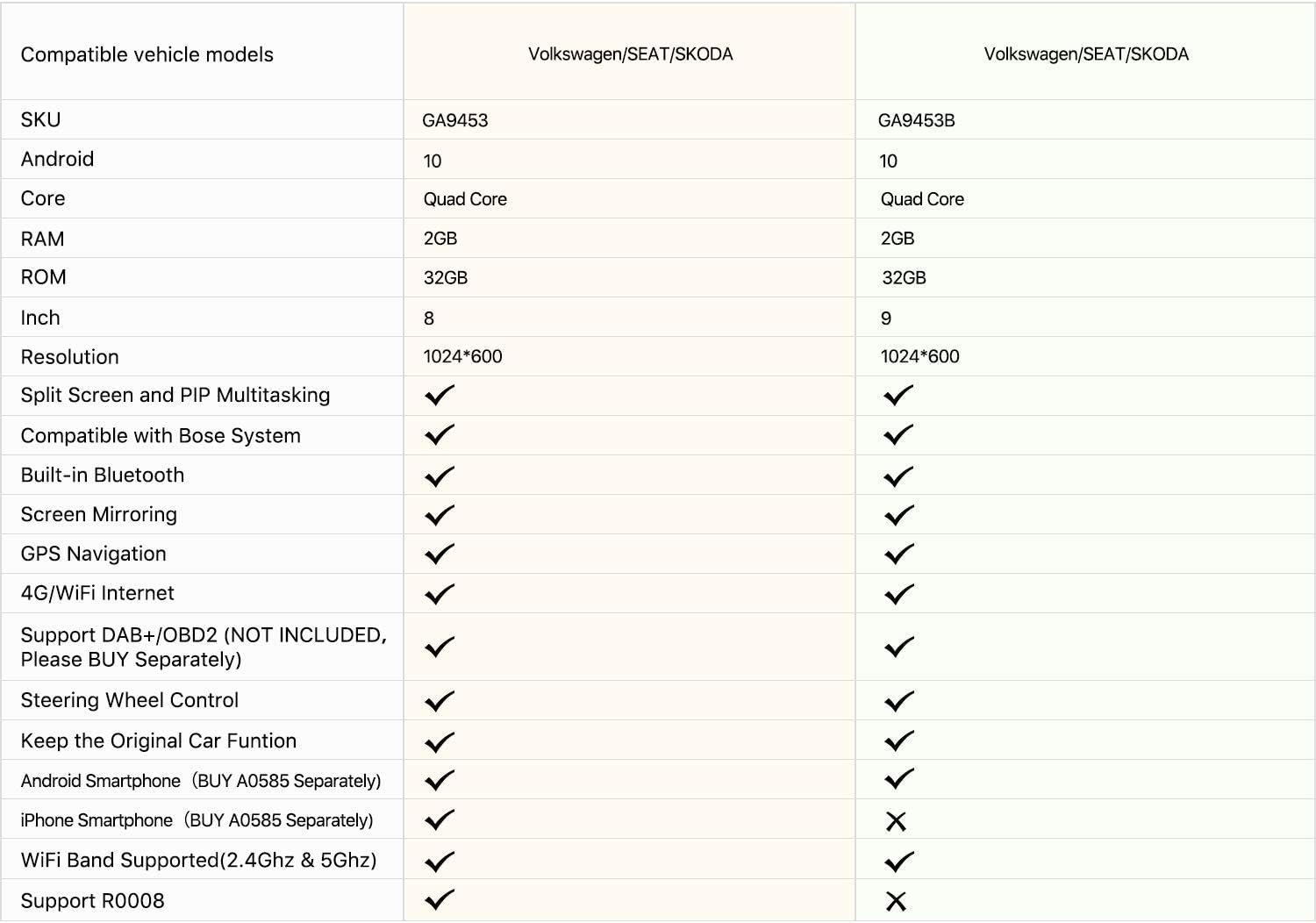
A table comparing the specifications and features of the Eonon GA9453 and GA9453B models.
| Feature | GA9453 | GA9453B |
|---|---|---|
| SKU | GA9453 | GA9453B |
| Android Version | 10 | 10 |
| Core | Quad Core | Quad Core |
| RAM | 2GB | 2GB |
| ROM | 32GB | 32GB |
| Screen Size | 8 Inch | 9 Inch |
| Resolution | 1024*600 | 1024*600 |
| Split Screen and PIP Multitasking | ✓ | ✓ |
| Compatible with Bose System | ✓ | ✓ |
| Built-in Bluetooth | ✓ | ✓ |
| Screen Mirroring | ✓ | ✓ |
| GPS Navigation | ✓ | ✓ |
| 4G/WiFi Internet | ✓ | ✓ |
| Support DAB+/OBD2 (NOT INCLUDED, Please BUY Separately) | ✓ | ✓ |
| Steering Wheel Control | ✓ | ✓ |
| Keep the Original Car Function | ✓ | ✓ |
| Android Smartphone (BUY A0585 Separately) | ✓ | ✓ |
| iPhone Smartphone (BUY A0585 Separately) | ✓ | ✗ |
| WiFi Band Supported (2.4Ghz & 5Ghz) | ✓ | ✗ |
| Support R0008 | ✓ | ✗ |
7. Warranty and Support
Eonon products typically come with a manufacturer's warranty. Please refer to the warranty card included in your product packaging or visit the official Eonon website for detailed warranty terms and conditions.
For technical assistance, troubleshooting beyond this manual, or warranty claims, please contact Eonon customer support through their official channels. Ensure you have your product model number (GA9453) and purchase details ready when contacting support.
Related documentsGA9453


Ask a question about this manual
Ask about setup, troubleshooting, compatibility, parts, safety, or missing instructions. Manuals+ will review the question and use this page’s manual context to help answer it.