
OPPO W31
OPPO Enco W31 True Wireless Headphones User Manual
Model: W31
Introduction
The OPPO Enco W31 True Wireless Headphones are designed to provide a high-quality audio experience with advanced features. These earbuds offer dual-microphone noise cancellation for clear calls, automatic wear detection for seamless music playback, and versatile sound modes including a powerful bass mode and a balanced mode. With their comfortable in-ear design and IP54 water and dust resistance, they are suitable for various activities, from daily commutes to fitness routines.
Setup
1. Charging the Headphones and Case
Before first use, ensure both the headphones and the charging case are fully charged. Place the earbuds into the charging case. Connect the charging case to a power source using a compatible USB-C cable. The indicator light on the case will show the charging status.
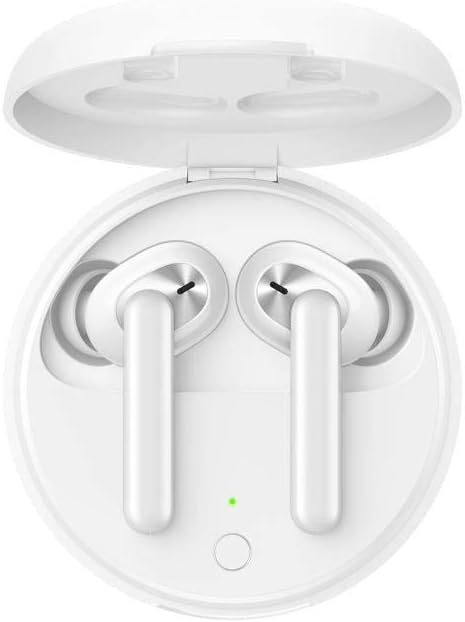
Image: OPPO Enco W31 earbuds placed inside their open charging case. A small green LED light indicates charging status or battery level. The case is white and has a smooth, rounded design.
2. Pairing with Your Device
- Open the charging case with the earbuds inside.
- Press and hold the function button on the charging case until the indicator light flashes white, indicating pairing mode.
- On your device (smartphone, tablet, etc.), enable Bluetooth and search for "OPPO Enco W31" in the list of available devices.
- Select "OPPO Enco W31" to complete the pairing process. The indicator light will turn solid white when connected.
3. Wearing the Earbuds
Gently insert the earbuds into your ears. Adjust them to ensure a comfortable and secure fit for optimal sound quality and noise cancellation. The earbuds are designed for an in-ear fit.
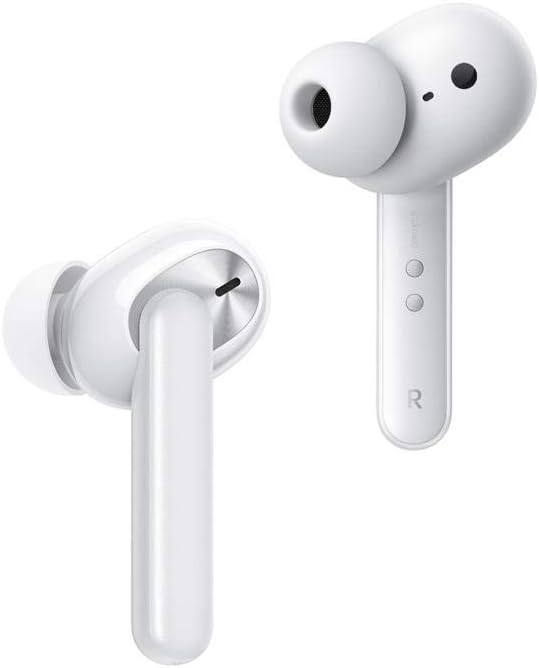
Image: Two individual OPPO Enco W31 earbuds, detached from the case. They are white with a stem design, showcasing the speaker grille and touch control areas. The 'R' for the right earbud is visible.
Operating Instructions
Touch Controls
The OPPO Enco W31 earbuds feature touch controls for easy management of music and calls.
- Double-tap Right Earbud: Skip to the next track.
- Double-tap Left Earbud: Switch between Balance Mode and Bass Mode.
- Double-tap Either Earbud (during call): Answer/End a call.
- Triple-tap Either Earbud: Activate voice assistant.
- Wearing Detection: Music automatically pauses when an earbud is removed and resumes when re-inserted.
Sound Modes
The Enco W31 offers two distinct sound modes:
- Balance Mode: Provides a balanced audio profile suitable for most music genres and general listening.
- Bass Mode: Enhances low frequencies for a more powerful and impactful bass experience.
Call Management
The earbuds utilize Dual-Microphone Noise Cancellation to ensure clear voice transmission during calls, even in noisy environments.
Maintenance
Cleaning
Regularly clean the earbuds and charging case to maintain optimal performance and hygiene. Use a soft, dry, lint-free cloth. For the ear tips, you may gently wipe them with a slightly damp cloth and allow them to dry completely before reattaching.
Storage
When not in use, store the earbuds in their charging case to protect them from dust and damage, and to keep them charged.

Image: A side profile view of the OPPO Enco W31 charging case, highlighting its sleek, rounded, and compact design. The case is white and appears smooth.
Water and Dust Resistance
The OPPO Enco W31 headphones are rated IP54 for water and dust resistance. This means they are protected against limited dust ingress and splashing water from any direction. They are suitable for workouts and light rain but should not be submerged in water.
Troubleshooting
- No Sound from One Earbud: Ensure both earbuds are charged. Try placing them back in the case and taking them out again. Re-pair the earbuds with your device.
- Pairing Issues: Make sure Bluetooth is enabled on your device and the earbuds are in pairing mode (flashing white light). Try forgetting the device in your Bluetooth settings and re-pairing.
- Charging Problems: Check the USB-C cable and power adapter. Ensure the charging contacts on the earbuds and inside the case are clean and free of debris.
- Low Volume: Adjust the volume on your connected device. Ensure the earbuds are properly seated in your ears.
- Resetting the Earbuds: If issues persist, you may need to reset the earbuds. Consult the official OPPO support website or the product's quick start guide for specific reset instructions, as this can vary.
Specifications
| Feature | Specification |
|---|---|
| Model Name | W31 |
| Model Number | 6670161 |
| Connectivity | Bluetooth 5.0 (Wireless) |
| Frequency Range | 20 Hz - 20,000 Hz |
| Battery Life (Earbuds + Case) | Up to 15 hours music playback, 12 hours talk time |
| Water Resistance | IP54 (Water-resistant) |
| Weight | 50 Grams (total item weight) |
| Control Type | Touch-control |
| Ear Placement | In-ear |
| Battery Composition | Lithium-ion |
| Included Components | Oppo Enco W31 True Wireless Headphones, Charging Case |
Warranty and Support
Warranty information for the OPPO Enco W31 True Wireless Headphones is typically provided with your purchase documentation or can be found on the official OPPO website. For detailed warranty terms, service, or technical support, please refer to the manufacturer's official resources.
You can visit the official OPPO support website for the most up-to-date information, FAQs, and contact options. Visit OPPO Support
Related documentsW31


Ask a question about this manual
Ask about setup, troubleshooting, compatibility, parts, safety, or missing instructions. Manuals+ will review the question and use this page’s manual context to help answer it.