
1. Introduction
This manual provides essential information for the proper setup, operation, and maintenance of your Stack-On GCM-1918-DX-DS 18 Gun Cabinet. Please read these instructions carefully before installation and use to ensure safe and effective operation. This cabinet is designed for the secure storage of firearms and ammunition, offering a reliable solution for responsible gun ownership.

Figure 1: Front view of the Stack-On GCM-1918-DX-DS 18 Gun Cabinet.
2. Safety Information
Adherence to the following safety guidelines is crucial for preventing accidents and ensuring the longevity of your gun cabinet.
- Secure Mounting: Always mount the cabinet to the floor or wall as instructed to prevent tipping.
- Key Security: Keep all keys in a secure location, inaccessible to unauthorized individuals, especially children.
- Firearm Safety: Always ensure firearms are unloaded before storing them in the cabinet. Follow all local and national firearm safety regulations.
- Weight Distribution: Distribute the weight of contents evenly within the cabinet to maintain stability.
- Inspection: Regularly inspect the cabinet for any signs of damage or tampering.
3. Package Contents
Verify that all components are present and undamaged upon unpacking.
- Stack-On GCM-1918-DX-DS 18 Gun Cabinet (1 unit)
- Keys for the cabinet lock (2 units)
- Mounting Hardware (bolts, washers, etc.)
- Instruction Manual (this document)
4. Setup and Installation
Proper installation is critical for the security and stability of your gun cabinet.
4.1 Unpacking
- Carefully remove the cabinet from its packaging.
- Inspect the cabinet for any shipping damage. Report any damage to the retailer immediately.
- Locate the keys and mounting hardware.
4.2 Choosing a Location
Select a discreet, dry, and level location for the cabinet. Ensure there is sufficient space to open the door fully.
4.3 Mounting the Cabinet
The cabinet must be securely mounted to a solid surface to prevent unauthorized removal or tipping.
- Position the cabinet in the desired location.
- Mark the locations for drilling through the pre-drilled holes in the back or bottom of the cabinet.
- Drill pilot holes into the floor or wall using an appropriate drill bit for your surface material (wood, concrete, etc.).
- Align the cabinet with the drilled holes.
- Secure the cabinet using the provided mounting hardware. Tighten all fasteners firmly.
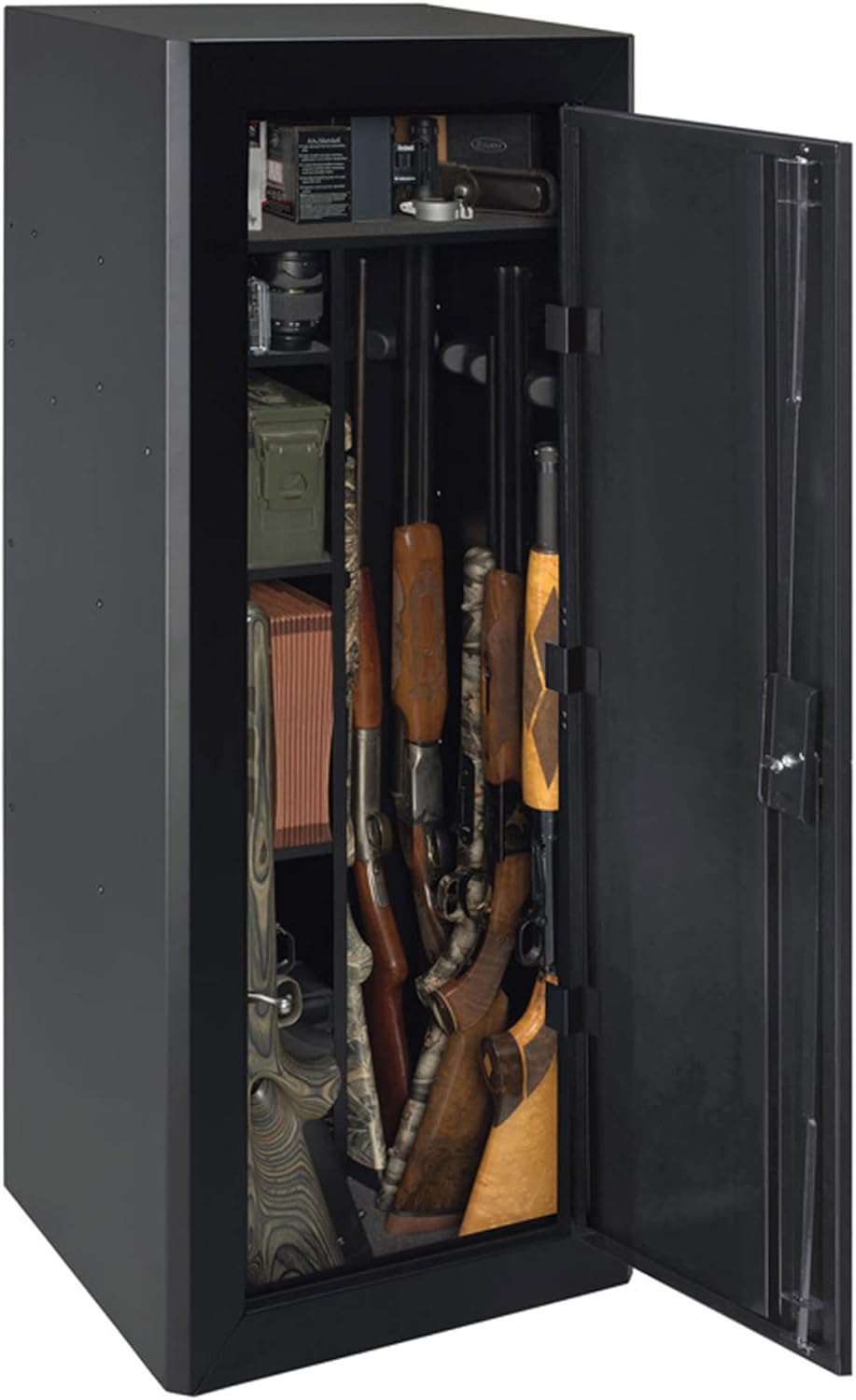
Figure 2: Interior view of the cabinet, showing storage capacity and shelving options.
5. Operating Instructions
5.1 Locking the Cabinet
- Close the cabinet door completely.
- Insert the key into the lock cylinder.
- Turn the key clockwise until the locking mechanism engages.
- Remove the key and store it in a secure, hidden location.
5.2 Unlocking the Cabinet
- Insert the correct key into the lock cylinder.
- Turn the key counter-clockwise until the locking mechanism disengages.
- Open the cabinet door.

Figure 3: Detail of the key lock mechanism on the cabinet door.
6. Maintenance
Regular maintenance ensures optimal performance and security.
- Cleaning: Wipe the exterior and interior surfaces with a soft, damp cloth. Avoid abrasive cleaners.
- Lock Mechanism: Periodically apply a small amount of graphite lubricant to the keyhole to ensure smooth operation. Do not use oil-based lubricants.
- Hinges: Check hinges for proper alignment and tightness.
- Mounting: Verify that all mounting bolts remain tight and secure.
7. Troubleshooting
This section addresses common issues you might encounter.
7.1 Cabinet Door Does Not Close Properly
- Check for any obstructions inside the cabinet or along the door frame.
- Ensure the cabinet is on a level surface. Adjust shims if necessary.
- Verify that the cabinet is securely mounted and not warped.
7.2 Key is Stiff or Difficult to Turn
- Ensure the correct key is being used.
- Apply a small amount of graphite lubricant into the keyhole.
- Do not force the key, as this may damage the lock or key.
8. Specifications
| Feature | Detail |
|---|---|
| Model Name | GCM-1918-DX-DS |
| Brand | Stack-On |
| Lock Type | Key |
| Material | Alloy Steel |
| Mounting Type | Floor Mount |
| Color | Multi (typically Black) |
| Water Resistance Level | Not Water Resistant |
| UPC | 085529190180 |
| Item Package Dimensions (L x W x H) | 55 x 21 x 18.5 inches |
| Package Weight | 88 Pounds |
| Manufacturer | Alpha Guardian |
| Date First Available | September 13, 2017 |
9. Warranty and Support
For information regarding warranty coverage, technical support, or replacement parts, please refer to the official Stack-On website or contact their customer service department directly. Contact details are typically available on the manufacturer's official product page or within the packaging materials.
