
1. Introduction
Thank you for choosing the uvBeast New V3 365nm MINI UV Flashlight. This compact, professional-grade ultraviolet flashlight is designed for high-definition pure UV output, offering superior performance for various applications. This manual provides essential information for the safe and effective use of your device.

Image 1: The uvBeast New V3 365nm MINI UV Flashlight.
2. Safety Information
- Eye Protection: Always wear appropriate UV protective eyewear when operating the flashlight to prevent eye damage. Direct exposure to UV light can be harmful.
- Skin Exposure: Avoid prolonged direct exposure of skin to UV light.
- Children: Keep out of reach of children. This is not a toy.
- Battery Safety: Use only the specified rechargeable 18650 Lithium-Ion battery. Do not attempt to disassemble or short-circuit the battery.
3. What's in the Box
- uvBeast New V3 365nm MINI UV Flashlight
- 18650 Rechargeable Lithium-Ion Battery (pre-installed)
- USB-C Charging Cable
- US Mains Adapter
- Wrist Lanyard
- Spare O-rings

Image 2: The uvBeast New V3 365nm MINI UV Flashlight and its included accessories.
4. Setup
4.1. Battery Installation and Preparation
- Unscrew the tail cap of the flashlight.
- Remove the small plastic insulating disc located between the battery and the contact point. This disc prevents accidental activation during shipping.
- Ensure the 18650 rechargeable Lithium-Ion battery is correctly oriented with the positive (+) end facing towards the flashlight head.
- Screw the tail cap back on securely.
4.2. Charging
The uvBeast MINI features convenient on-board USB-C charging. No need to remove the battery for charging.
- Locate the USB-C charging port on the flashlight body. It is protected by a rubber cover.
- Connect the supplied USB-C cable to the flashlight.
- Plug the other end of the USB-C cable into the provided US mains adapter or any compatible USB power source.
- The LED indicator near the charging port will illuminate red during charging and turn green when fully charged.

Image 3: USB-C charging port on the uvBeast MINI.
5. Operating Instructions
5.1. Turning On/Off
To prevent accidental activation, the uvBeast MINI requires a double-click to turn on or off.
- To Turn On: Quickly press the power button twice.
- To Turn Off: Quickly press the power button twice.
5.2. Usage Applications
The 365nm pure UV output is ideal for various professional and personal uses:
- Pet Stain Detection: Effectively reveals hidden pet urine stains on carpets and other surfaces.
- Mineral and Rock Hunting: Ideal for identifying fluorescent minerals that glow under 365nm UV light.
- Authenticity Verification: Can be used to check for counterfeit currency, passports, and other documents with UV security features.
- Charging Glow-in-the-Dark Items: Quickly charges glow-in-the-dark materials for enhanced luminescence.
- Scorpion Detection: Scorpions are known to fluoresce under UV light, making them easier to spot in dark environments.
Video 1: An overview of the uvBeast V3 365nm MINI UV Flashlight, demonstrating its features and applications.
Video 2: Demonstrates the portability and ease of use of the uvBeast MINI, highlighting its suitability for travel, home, and business applications.

Image 4: Comparison of UV quality using a £20 note, showing vivid fluorescence with the uvBeast V3 365nm MINI.

Image 5: Demonstrates how different UV wavelengths affect rock fluorescence, highlighting the effectiveness of 365nm UV.
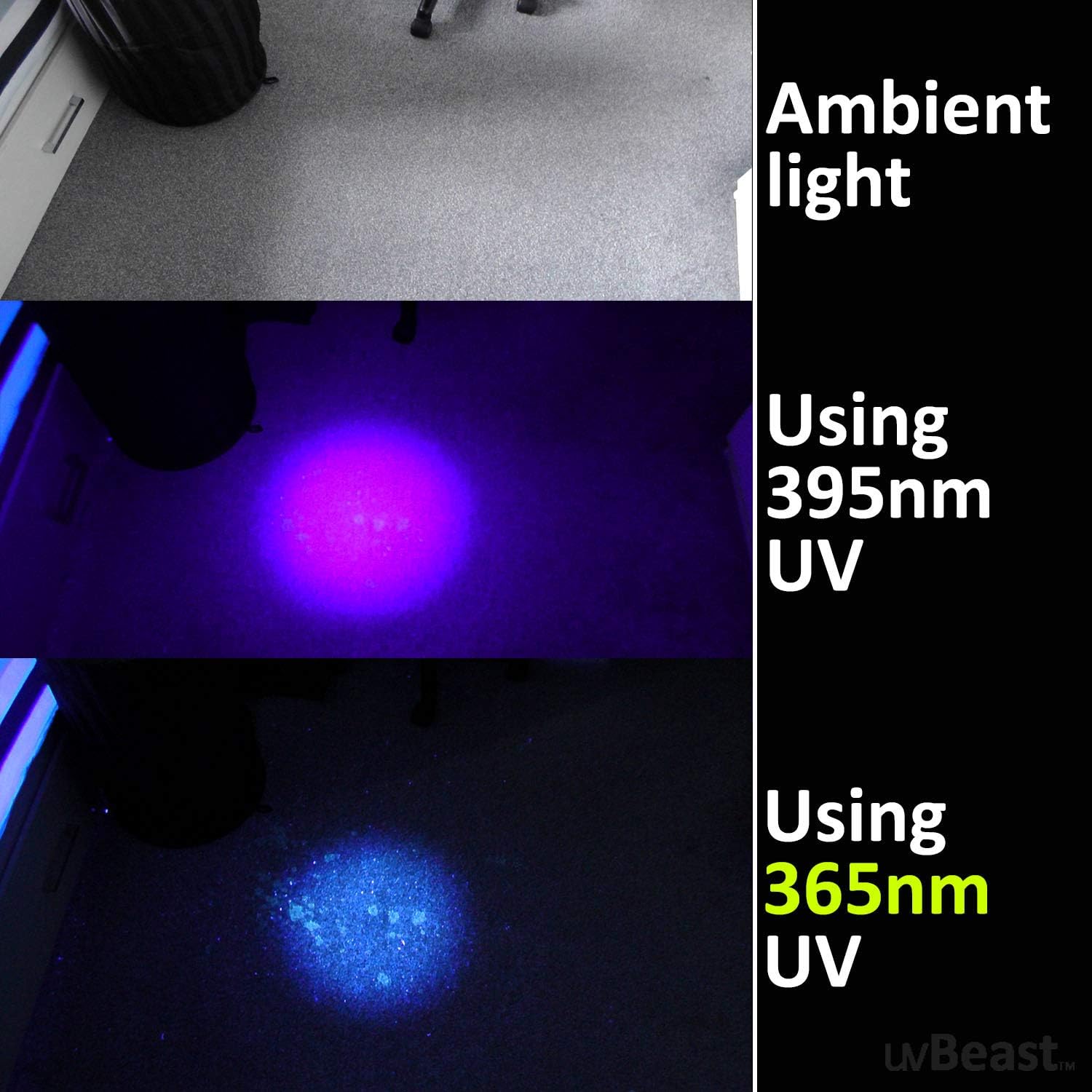
Image 6: Illustrates the difference in stain detection on carpet under ambient light, 395nm UV, and 365nm UV, showing superior clarity with 365nm.
6. Maintenance
- Cleaning: Wipe the flashlight body with a soft, damp cloth. Do not use abrasive cleaners or immerse the flashlight in water.
- Battery Care: For optimal battery life, charge the flashlight regularly and avoid completely draining the battery. If storing for extended periods, charge the battery to approximately 50% and recharge every 3-6 months.
- O-rings: The flashlight is water-resistant. Periodically inspect the O-rings for wear and tear. Replace them with the provided spare O-rings if necessary to maintain water resistance.
7. Troubleshooting
- Flashlight not turning on:
- Ensure the battery insulating disc has been removed (see Setup).
- Confirm the battery is charged. Connect to the charger and check the LED indicator.
- Remember to double-click the power button to activate the flashlight.
- Light appears dim or inconsistent:
- Ensure the battery is fully charged.
- The uvBeast MINI is designed not to dim after a few minutes of use, unlike typical 365nm UV lights. If persistent dimming occurs, contact support.
8. Specifications
| Feature | Detail |
|---|---|
| Brand | uvBeast |
| Model Number | uvB-V3-365-MINI |
| Light Source Type | UV LED 365nm |
| Power Source | Battery Powered |
| Battery Type | 1 Lithium Ion (18650) (included) |
| Charging | USB-C On-board Charging |
| Material | Aluminum |
| Color | Anodized Black |
| Item Weight | 3.17 ounces (90 Grams) |
| Product Dimensions | 2.02"D x 0.64"W x 0.64"H |
| Water Resistance Level | Water Resistant |
| Brightness | 450 milliwatts |
9. Warranty
The uvBeast New V3 365nm MINI UV Flashlight comes with a 1-year manufacturer's warranty. Please retain your proof of purchase for warranty claims.
10. Support
For further assistance, technical support, or warranty inquiries, please visit the official uvBeast store or contact their customer service through the platform where you purchased the product.
Visit the uvBeast Store: uvBeast Store
