
1. Introduction
This manual provides detailed instructions for the installation, operation, and maintenance of your VANBAR Separated Dash Cam Rear Camera (Model A163). Please read this manual thoroughly before using the product to ensure proper functionality and longevity. Keep this manual for future reference.
2. Product Overview
The VANBAR A163 is a dedicated rear camera designed to be used with compatible dash cam systems. It features a compact design and a 5.5-meter cable for flexible installation in various vehicle types.
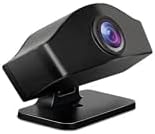
Figure 1: VANBAR A163 Separated Dash Cam Rear Camera. This image shows the compact black camera unit with its lens visible at the front, mounted on a small, flat base.
2.1 Package Contents
- VANBAR A163 Rear Camera Unit
- 5.5m Connection Cable
- Mounting Accessories (e.g., screws, adhesive pad - specific items may vary)
- User Manual (this document)
3. Setup and Installation
Proper installation is crucial for optimal performance. It is recommended to have this camera installed by a professional if you are unfamiliar with vehicle wiring.
3.1 Before Installation
- Ensure your dash cam system is compatible with the VANBAR A163 rear camera.
- Turn off your vehicle's engine and disconnect the power to your dash cam.
- Clean the mounting surface thoroughly to ensure strong adhesion.
3.2 Installation Steps
- Choose Mounting Location: Select a suitable location on your vehicle's rear window or bumper that provides a clear view and does not obstruct the driver's vision. Common locations include above the license plate or inside the rear window.
- Secure the Camera: Use the provided adhesive pad or screws to securely attach the camera unit to the chosen location. Ensure the camera is oriented correctly (usually with the lens facing outwards and slightly downwards).
- Route the Cable: Carefully route the 5.5-meter connection cable from the rear camera to your main dash cam unit. Hide the cable along the vehicle's headliner, door trims, and floor mats to prevent interference and maintain a tidy interior.
- Connect to Dash Cam: Plug the rear camera's connection cable into the designated rear camera input port on your main dash cam unit.
- Test Functionality: Reconnect power to your dash cam and start your vehicle. Check the dash cam's display to confirm that the rear camera feed is visible and functioning correctly. Adjust the camera angle if necessary.
4. Operating Instructions
Once installed, the VANBAR A163 rear camera typically operates in conjunction with your main dash cam unit. Refer to your dash cam's manual for specific settings and features related to the rear camera.
4.1 Automatic Recording
When connected and powered, the rear camera will automatically begin recording simultaneously with the front dash cam, capturing footage of the rear view of your vehicle.
4.2 Display Modes
Your dash cam may offer various display modes, allowing you to view the front camera feed, rear camera feed, or both simultaneously (picture-in-picture). Consult your dash cam's manual for instructions on switching display modes.
4.3 Parking Monitor (if supported by dash cam)
If your main dash cam supports a parking monitor function, the rear camera will also contribute to recording events when the vehicle is parked and the parking monitor is active.
5. Maintenance
Regular maintenance ensures clear footage and extends the life of your rear camera.
- Lens Cleaning: Periodically clean the camera lens with a soft, lint-free cloth. For stubborn dirt, use a small amount of lens cleaning solution. Avoid abrasive materials that could scratch the lens.
- Cable Inspection: Regularly check the connection cable for any signs of wear, damage, or loose connections.
- Mounting Security: Ensure the camera remains securely mounted. Re-secure or re-apply adhesive if it becomes loose.
- Environmental Care: Avoid exposing the camera to extreme temperatures or direct, prolonged sunlight when not in use, if possible.
6. Troubleshooting
If you encounter issues with your VANBAR A163 rear camera, refer to the following common problems and solutions:
| Problem | Possible Cause | Solution |
|---|---|---|
| No rear camera display on dash cam. |
|
|
| Rear camera footage is blurry or unclear. |
|
|
| Rear camera disconnects intermittently. |
|
|
7. Specifications
Key technical specifications for the VANBAR A163 Rear Camera:
- Model: A163
- Brand: VANBAR
- Cable Length: 5.5 meters
- Optical Sensor Technology: CCD
- Display Type: LCD (Note: This refers to the compatible dash cam's display, not the rear camera itself)
- Package Dimensions: 5 x 4 x 3 cm
- Weight: 50 g
- UPC: 738628314468
- ASIN: B085VS2CNM
Note: Specifications are subject to change without prior notice.
8. Warranty and Support
For warranty information and customer support, please refer to the documentation provided with your main VANBAR dash cam unit or visit the official VANBAR website. If you have any questions or require assistance with your VANBAR A163 rear camera, please contact VANBAR customer service directly.
Contact Information: Please refer to your product packaging or the official VANBAR website for the most current customer support contact details.