
AOPUTTRIVER AOPUTTRIVER-770HC
AOPUTTRIVER AP-770HC Digital Multimeter User Manual
Model: AP-770HC
Product Overview
The AOPUTTRIVER AP-770HC is a versatile auto/manual ranging digital multimeter designed for accurate measurements in various electrical applications. It features a 6000 count display and can measure AC/DC voltage, AC/DC current, resistance, temperature, capacitance, frequency, diode, hFE, continuity, and duty cycle. Key functionalities include True RMS, Data Hold, Relative Value, Max/Min value, automatic shutdown, and Non-Contact Voltage (NCV) detection.
Key Features:
- High Precision Multimeter: Accurately measures AC Voltage (400mV ~ 750V), DC Voltage (400mV ~ 1000V), AC/DC Current (400µA ~ 20A), Resistance (400Ω ~ 40MΩ), Temperature (-20℃ ~ 1000℃), Frequency, Continuity, Diode Test, hFE Test, Relative Value, and MAX/MIN.
- Non-Contact Voltage (NCV) Test: Detects voltage greater than 90V (RMS) without direct contact. The instrument's sensor will light up and buzz.
- Practical Functions: Data Hold, automatic backlight, automatic power-off, function switch indicator, ℃/°F selection, MAX/MIN, True RMS. Includes 600A AC/DC clamp.
- Mechanical Blocking System: Prevents short circuits by requiring the dial to be rotated before inserting test leads and allowing rotation only after leads are removed.
- Overload Protection: Ensures safety during operation.
- Low Battery Indication: Alerts the user when the battery needs replacement.
Package Contents
Upon opening the package, please verify that all items listed below are present and in good condition:
- 1 x AP-770HC Multimeter
- 2 x Test Leads (red and black)
- 1 x Carrying Bag
- 1 x 9V Battery (6F22)
- 1 x Small Screwdriver
- 1 x Temperature Sensor
- 1 x User Manual (English)

Image: The AP-770HC multimeter, test leads, carrying bag, and 9V battery included in the package.
Setup
1. Battery Installation:
- Locate the battery compartment on the back of the multimeter.
- Use the provided small screwdriver to open the battery compartment cover.
- Insert the 9V (6F22) battery, ensuring correct polarity (+ and -).
- Close the battery compartment cover and secure it with the screw.
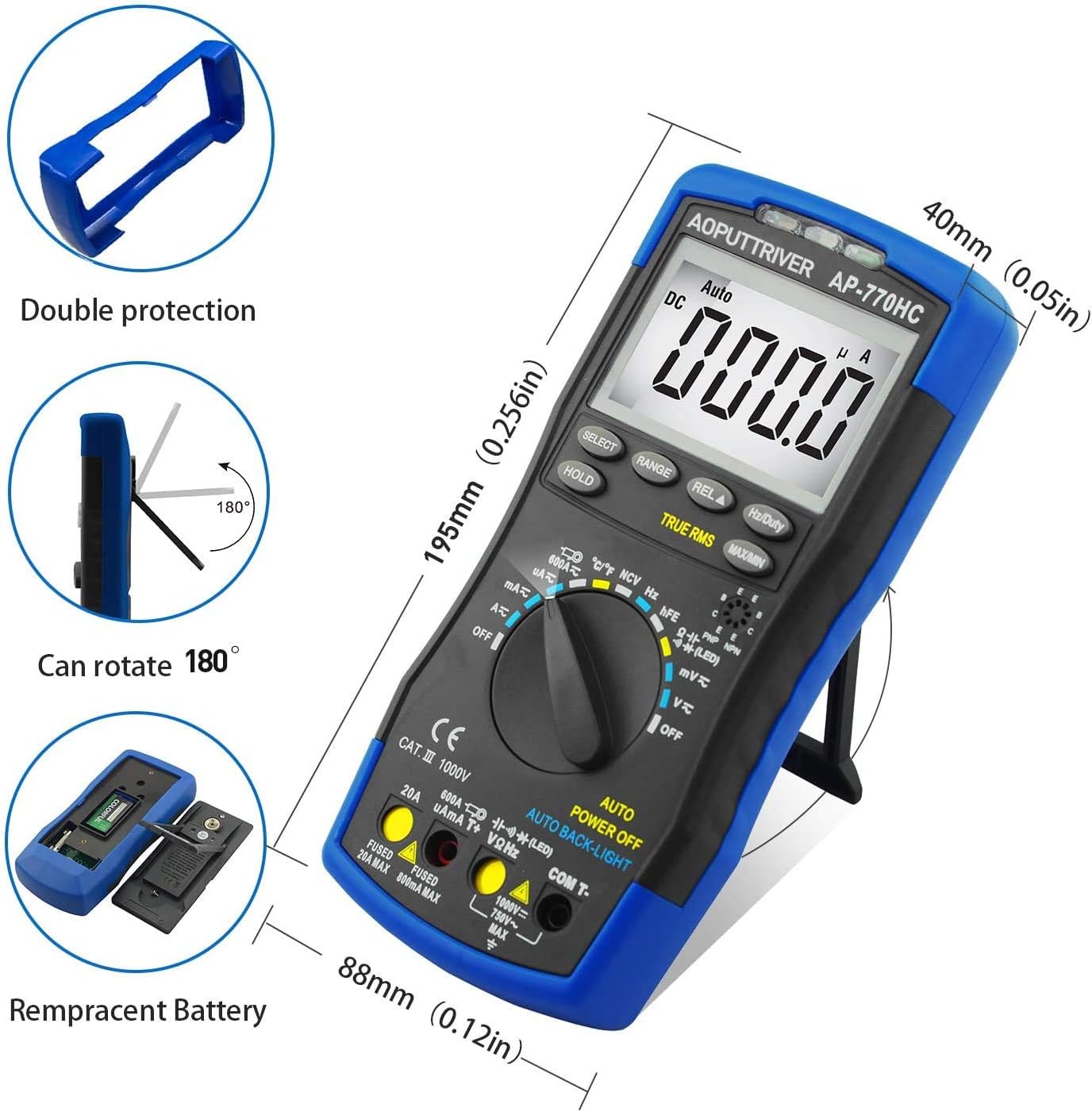
Image: Rear view of the multimeter illustrating the battery compartment and its cover. The image also shows the kickstand and double protection casing.
2. Initial Inspection:
Before first use, inspect the multimeter and test leads for any signs of damage. Ensure the test leads are securely connected to the appropriate input jacks for the desired measurement.
Operating Instructions
Panel Layout and Function Keys:

Image: Detailed diagram of the AP-770HC multimeter's front panel, labeling key components and buttons.
- NCV Detection Area: Area for non-contact voltage detection.
- NCV Red Light: Illuminates when NCV detects voltage.
- CDS Sensor: Light sensor for automatic backlight control.
- NCV Green Light: Illuminates when NCV detects voltage.
- LCD Display: Shows measurement readings and indicators.
- RANGE Key: Switches between auto-ranging and manual ranging.
- SELECT Key: Toggles between different measurement modes within a single rotary switch position (e.g., AC/DC, Diode/Continuity).
- REL▲ Key: Activates relative measurement mode.
- Hz/Duty Key: Selects frequency or duty cycle measurement.
- HOLD Key: Freezes the current display reading.
- MAX/MIN Key: Displays the maximum or minimum measured value.
- Rotary Switch: Selects the primary measurement function (e.g., Voltage, Current, Resistance).
- 20A Input Jack: Input for high current measurements (up to 20A).
- µAmA600AT+ Input Jack: Input for microampere and milliampere current measurements.
- COM and Temperature "-" Input Jack: Common (negative) input for all measurements and negative input for temperature.
- VΩHz Input Jack: Input for voltage, resistance, frequency, capacitance, diode, and hFE measurements.
General Measurement Procedures:
- Power On: Rotate the Rotary Switch (12) from "OFF" to the desired measurement function. The meter will power on.
- Connect Test Leads: Insert the black test lead into the COM jack (15). Insert the red test lead into the appropriate input jack based on the measurement:
- For Voltage, Resistance, Frequency, Capacitance, Diode, hFE: VΩHz (16)
- For µA/mA Current: µAmA600AT+ (14)
- For 20A Current: 20A (13)
- Select Range (if manual): If the meter is in auto-ranging mode, it will automatically select the appropriate range. To switch to manual ranging, press the RANGE key (6).
- Perform Measurement: Connect the test leads to the circuit or component to be measured. Read the value on the LCD Display (5).
- Data Hold: Press the HOLD key (10) to freeze the current reading on the display. Press again to release.
- MAX/MIN: Press the MAX/MIN key (11) to cycle through maximum, minimum, and current readings.
- Power Off: Rotate the Rotary Switch (12) back to "OFF" when finished. The meter also features automatic power-off after a period of inactivity.
Specific Measurement Functions:
Non-Contact Voltage (NCV) Measurement:
To use the NCV function, rotate the rotary switch to the NCV position. Hold the NCV detection area (1) near the conductor. If AC voltage above 90V (RMS) is detected, the NCV red (2) and green (4) lights will illuminate, and the buzzer will sound.

Image: The multimeter demonstrating its Non-Contact Voltage (NCV) function by detecting live and null wires near an electrical outlet without direct contact.
Temperature Measurement:
Connect the temperature sensor to the COM (15) and VΩHz (16) input jacks. Rotate the rotary switch to the temperature position (℃/°F). Place the sensor tip on or in the object whose temperature you wish to measure. The temperature range is -20℃ to 1000℃ (-4°F to 1832°F). Press the SELECT key (7) to switch between Celsius and Fahrenheit.
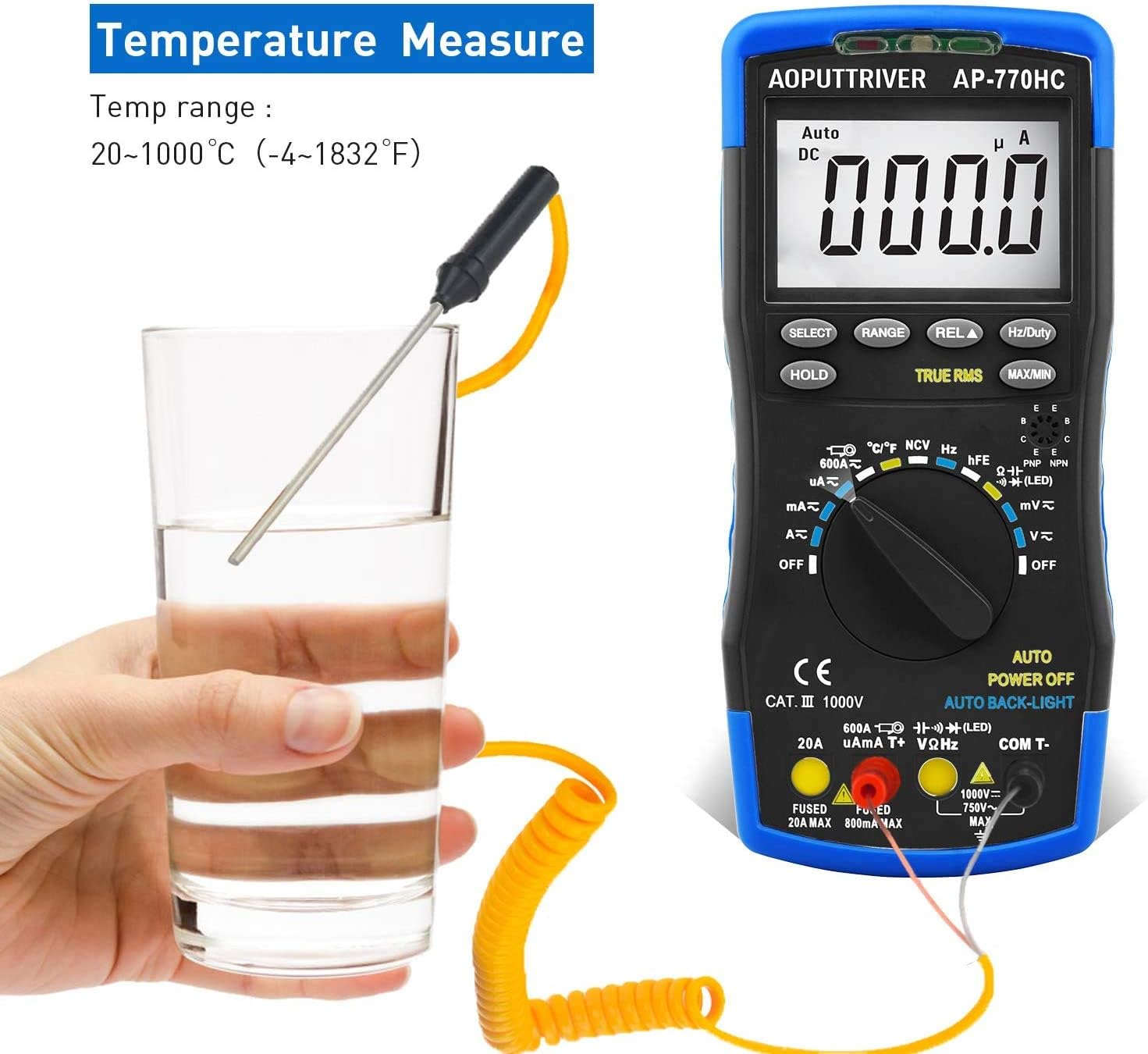
Image: The multimeter connected to a temperature probe, measuring the temperature of a liquid in a glass.
Current Measurement (AC/DC):
For current measurements, ensure the test leads are connected to the correct current input jacks (13 or 14) and the rotary switch is set to the appropriate current range (µA, mA, or A). Always connect the meter in series with the circuit. The maximum current is 20A.

Image: An electrician using the AP-770HC multimeter to measure current within an electrical panel, demonstrating a typical application.
Maintenance
Cleaning:
Wipe the multimeter's casing with a damp cloth and mild detergent. Do not use abrasive cleaners or solvents. Ensure the device is powered off and test leads are disconnected before cleaning.
Battery Replacement:
When the low battery indicator appears on the display, replace the 9V battery as described in the "Setup" section. Prompt battery replacement ensures accurate readings and proper device operation.
Storage:
When not in use for extended periods, remove the battery to prevent leakage. Store the multimeter in its carrying bag in a cool, dry place, away from direct sunlight and extreme temperatures.
Troubleshooting
| Problem | Possible Cause | Solution |
|---|---|---|
| Meter does not power on or powers on and off repeatedly. | Low or dead battery. | Replace the 9V battery. Ensure correct polarity. |
| No reading or "OL" (Overload) displayed. | Incorrect range selected (in manual mode), open circuit, or measurement exceeds meter's maximum capacity. | Switch to auto-ranging or a higher manual range. Check circuit continuity. Ensure measurement is within specifications. |
| Inaccurate readings. | Low battery, incorrect test lead connection, or environmental interference. | Replace battery. Verify test lead connections. Perform measurement in a stable environment. |
| NCV function not working. | Voltage too low, or not in NCV mode. | Ensure voltage is above 90V RMS. Confirm rotary switch is set to NCV. |
Specifications
| Parameter | Value |
|---|---|
| Range Selection | Automatic Range |
| Maximum Display | 6000 Counts |
| Duty Cycle | 0.1% ~ 99.9% |
| Capacitance | 9.999nF ~ 99.99mF |
| Frequency | 5.12Hz ~ 5.12MHz (0.1% + 5dgt) |
| Temperature | -20℃ ~ 1000℃ (-4°F ~ 1832°F) |
| DC Voltage | 60mV / 600mV / 60V / 600V ± (0.5% + 2dgt) / 1000V ± (0.8% + 2dgt) |
| AC Voltage | 60mV / 600mV / 60V / 600V ± (1.0% + 10dgt) / 750V ± (1.5% + 3dgt) |
| DC Current | 600µA / 6000µA / 60mA / 600mA ± (1.5% + 2dgt); 6A/20A (± 2.5% + 5dgt); 600A (± 3.0% + 5dgt) |
| AC Current | 600µA / 6000µA / 60mA / 600mA ± (1.5% + 3dgt); 6A/20A (± 2.5% + 5dgt); 600A (± 3.0% + 5dgt) |
| Resistance | 600Ω ~ 60MΩ |
| Dimensions | 23.4 x 13.4 x 6.4 cm |
| Weight | 580 grams |
| Power Source | Battery powered (9V) |
Warranty and Support
Warranty Information:
AOPUTTRIVER provides a 2-year warranty for the AP-770HC Digital Multimeter from the date of purchase. This warranty covers manufacturing defects and ensures the product functions as described under normal use.
Technical Support:
AOPUTTRIVER offers lifetime technical support for this product. If you encounter any issues or have questions regarding the operation, maintenance, or troubleshooting of your AP-770HC multimeter, please do not hesitate to contact AOPUTTRIVER customer service. They are committed to resolving issues within 24 hours.
For support, please refer to the contact information provided on the product packaging or the official AOPUTTRIVER website.
Related documentsAOPUTTRIVER-770HC

Ask a question about this manual
Ask about setup, troubleshooting, compatibility, parts, safety, or missing instructions. Manuals+ will review the question and use this page’s manual context to help answer it.