
1. Introduction
Thank you for choosing the Deerma DX700 Cordless Stick Vacuum Cleaner. This manual provides essential information for the safe and efficient operation, maintenance, and troubleshooting of your new vacuum cleaner. Please read this manual thoroughly before first use and keep it for future reference.
The Deerma DX700 is designed for versatile cleaning across various surfaces, offering powerful suction and convenient cordless operation for a cleaner home environment.
2. Product Overview
2.1 Key Features
- 240W Brushless Motor: Provides strong suction for effective cleaning on various surfaces.
- Anti-Tangle Design: Specialized floor and hair tools prevent hair from wrapping, ensuring continuous cleaning.
- All-Terrain Floor Tool: Features soft bristles for wood floors and stiff bristles for deep carpet cleaning.
- Adjustable Suction Port: Allows for smooth gliding on carpets and easy pickup of large debris.
- Advanced Filtration System: HEPA filter captures 99.9% of particles as small as 3µm, combined with a five-layer filtration and 9-cone cyclone design to prevent dust clouds.
- Extended Runtime: Up to 45 minutes of cleaning on a single charge in Eco mode with the crevice tool.
- Versatile Cleaning: Includes multiple tools for cleaning carpets, hardwood floors, tiles, stairs, beds, couches, and cars.
2.2 Components
Familiarize yourself with the main components of your Deerma DX700 vacuum cleaner:

Image 2.2.1: The Deerma DX700 vacuum cleaner shown in its full stick configuration and as a compact handheld unit.
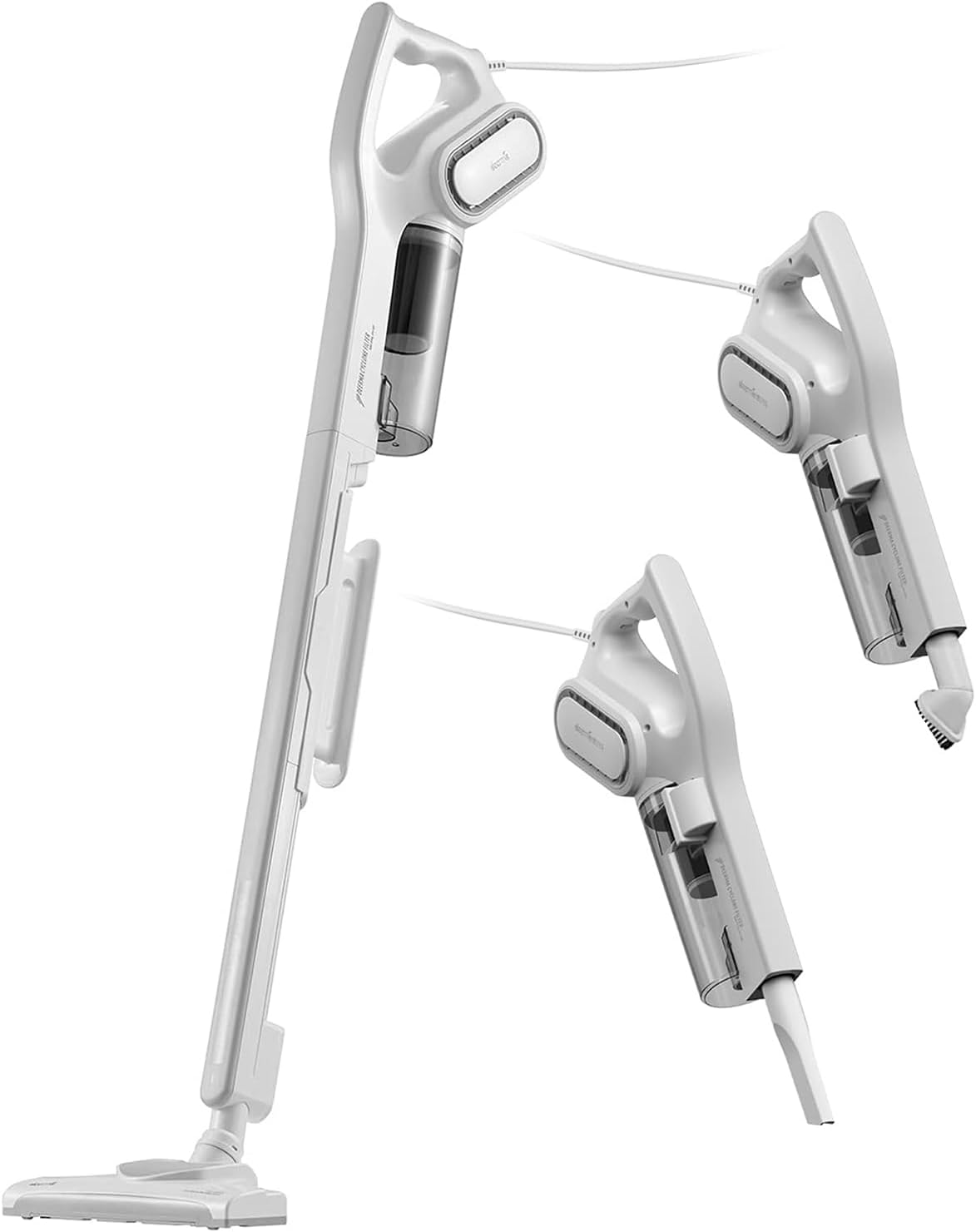
Image 2.2.2: The Deerma DX700 vacuum cleaner demonstrating its versatility with different attachments for various cleaning tasks.
- Main Motor Unit (with dust cup)
- Extension Wand
- Floor Brush Head
- Crevice Tool
- Brush Tool
- Charging Adapter
- Wall Mount (optional, if included)
3. Setup and Assembly
3.1 Unpacking
Carefully remove all components from the packaging. Check the contents against the component list to ensure everything is present and undamaged.
3.2 Assembly
- Attach the Extension Wand: Insert the extension wand into the main motor unit until it clicks securely into place.
- Attach the Floor Brush Head: Connect the floor brush head to the other end of the extension wand. Ensure it is firmly attached.
- Alternative Handheld Assembly: For handheld use, attach the crevice tool or brush tool directly to the main motor unit.

Image 3.2.1: The Deerma DX700 being used in various cleaning scenarios, demonstrating its adaptability for different surfaces and areas.
3.3 Initial Charging
Before first use, fully charge the vacuum cleaner. Connect the charging adapter to the charging port on the main motor unit and plug it into a power outlet. The indicator light will show charging status and turn off or change color when fully charged. A full charge can take several hours.
4. Operating Instructions
4.1 Powering On/Off
Press the power button located on the main motor unit to turn the vacuum cleaner on. Press it again to turn it off.
4.2 Suction Modes
The Deerma DX700 typically features multiple suction modes (e.g., Eco and Max). Use the mode selection button to switch between them:
- Eco Mode: Suitable for light cleaning and extends battery runtime (up to 45 minutes).
- Max Mode: Provides maximum suction for stubborn dirt and deep cleaning.
4.3 Cleaning Different Surfaces

Image 4.3.1: The Deerma DX700 effectively cleaning different floor types, including hardwood and carpet.
- Hard Floors (Wood, Tile): Use the floor brush head. The soft bristles protect delicate surfaces.
- Carpets and Rugs: The floor brush head's stiff bristles are designed for deep cleaning carpets. Adjust the suction port for easier gliding on carpets.
- Upholstery and Pet Hair: Use the brush tool or the electric pet hair tool (if included) directly on the main unit for effective removal of pet hair from couches and beds.
- Tight Spaces and Corners: Attach the crevice tool for reaching narrow gaps, corners, and edges.
- High Areas: Use the extension wand with the crevice or brush tool to clean ceilings, curtains, or high shelves.

Image 4.3.2: The floor brush head of the Deerma DX700 demonstrating its 90-degree swivel capability for easy maneuverability around furniture and corners.

Image 4.3.3: The Deerma DX700 demonstrating its powerful suction, effectively picking up various types of debris including dust, crumbs, hair, cat litter, and pet food.
5. Maintenance
Regular maintenance ensures optimal performance and extends the lifespan of your vacuum cleaner.
5.1 Emptying the Dust Cup
Empty the dust cup after each use or when the MAX fill line is reached. To empty:
- Ensure the vacuum is turned off.
- Press the dust cup release button and detach the dust cup from the main motor unit.
- Open the dust cup lid and empty the contents into a trash bin.
- Close the lid and reattach the dust cup to the main unit until it clicks.
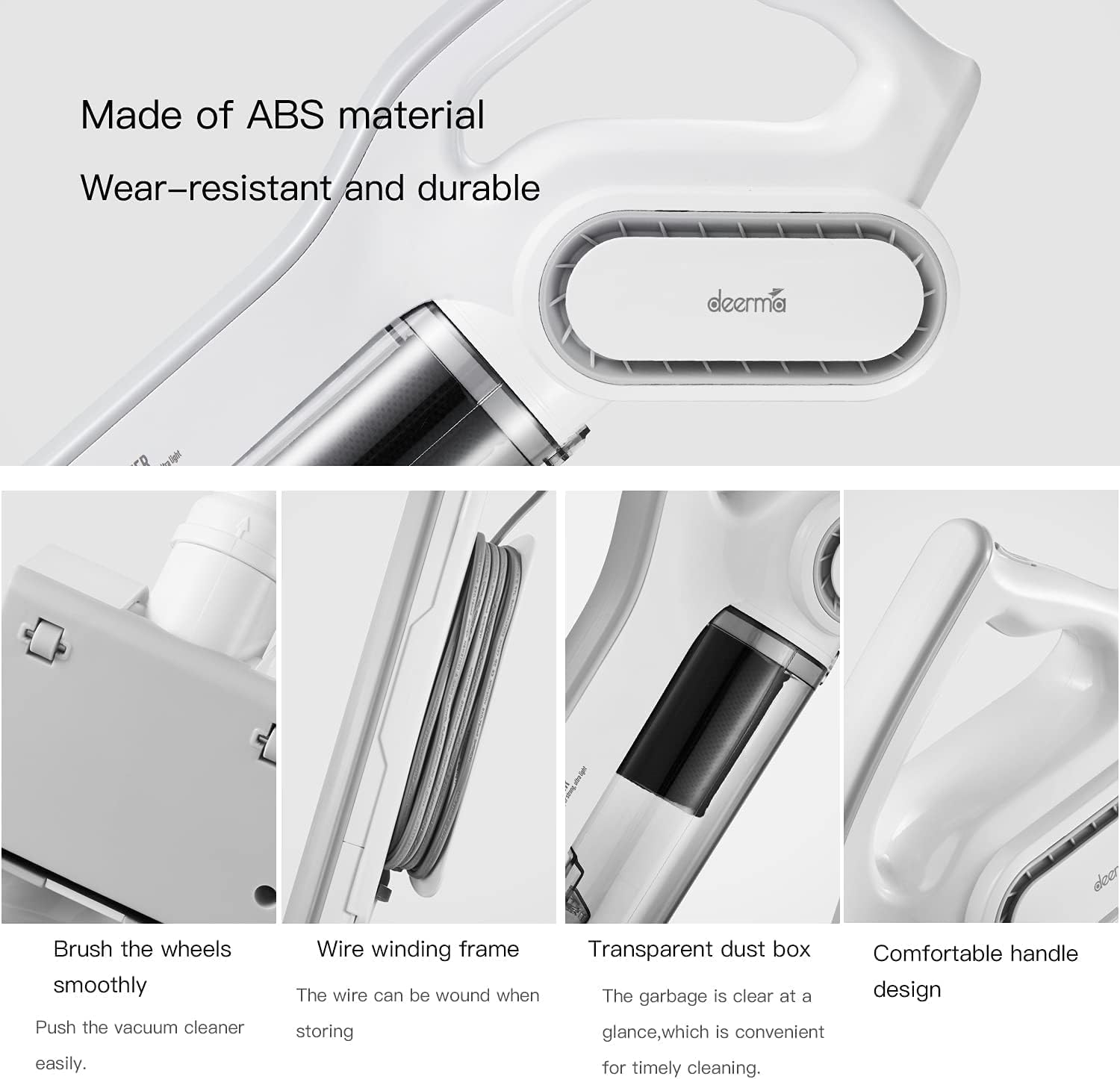
Image 5.1.1: Design features of the Deerma DX700, highlighting the transparent dust box for easy monitoring of debris levels.
5.2 Cleaning the Filters
The Deerma DX700 features a multi-layer filtration system including a HEPA filter and filter cotton. Clean these regularly to maintain suction power.

Image 5.2.1: Diagram illustrating the Deerma DX700's triple filtration system, including the HEPA filter, filter cotton, and side cyclone for effective dust separation.
- Remove Filters: Twist and pull to remove the filter assembly from the dust cup. Separate the HEPA filter and filter cotton.
- Clean: Tap the HEPA filter gently to remove loose dust. Rinse the filter cotton under running water until clean. Do not wash the HEPA filter unless specified by the manufacturer.
- Dry: Allow all washable parts to air dry completely for at least 24 hours before reassembling. Ensure they are completely dry to prevent mold or damage.
- Reassemble: Place the dry filters back into the dust cup and reattach the dust cup to the main unit.
Note: The HEPA filter should be replaced every 6-12 months, depending on usage. Contact Deerma support for replacement parts.

Image 5.2.2: Comparison showing the Deerma DX700's side rotary filtration technology preventing filter clogging and hair tangling, unlike conventional designs.
5.3 Cleaning the Brush Roll
Periodically check the brush roll for tangled hair or debris. Use scissors to cut away any wrapped hair and remove it. Ensure the brush roll spins freely.
6. Troubleshooting
If you encounter issues with your Deerma DX700, refer to the following table for common problems and solutions.
| Problem | Possible Cause | Solution |
|---|---|---|
| Vacuum does not turn on. | Battery is depleted. Power button not pressed correctly. | Charge the vacuum fully. Ensure the power button is pressed firmly. |
| Low suction power. | Dust cup is full. Filters are clogged. Obstruction in the nozzle or hose. Brush roll is tangled. | Empty the dust cup. Clean or replace the filters. Check and remove any blockages. Clean the brush roll. |
| Short battery runtime. | Battery not fully charged. Operating in Max mode continuously. Battery degradation over time. | Ensure the vacuum is fully charged. Use Eco mode for longer runtime. Contact customer support if battery life significantly decreases. |
| Unusual noise during operation. | Obstruction in the brush roll or air path. Loose component. | Turn off and inspect the brush roll and air path for debris. Check all connections for secure fit. |
If the problem persists after trying these solutions, please contact Deerma customer support.
7. Specifications
| Feature | Detail |
|---|---|
| Brand | Deerma |
| Model Name | DX700-WHITE-A |
| Special Feature | Volts |
| Filter Type | HEPA, Foam or Cloth |
| Included Components | Stick Vacuum Cleaner, various attachments |
| Dust Cup Capacity | 0.8 Kilograms (approximate) |
| Wattage | 600 watts (Motor: 240W Brushless) |
| Recommended Uses | Bare Floor, Carpet, Furniture, Hard Floor, Home, Sofa |
| Form Factor | Stick |
| Color | White |
| Product Dimensions | 11.93"L x 22.43"W x 16.76"H |
| Noise Level | 80 Decibels |
| Amperage | 2.5 Amps |
| Manufacturer | Deerma |
| Number of Items | 1 |
| Controller Type | Push Button |
| Control Method | Touch |
| Style | Mission |
| Connectivity Technology | Auxiliary |
| Portable | Yes |
| Number of Power Levels | 2 |
| Indoor/Outdoor Usage | Indoor |
| Finish Type | Glossy |
| Item Weight | 5.73 pounds |
| Batteries Required | 1 C batteries required (for remote, if applicable, or internal) |
8. Warranty and Support
Deerma products are manufactured to high-quality standards. For warranty information, please refer to the warranty card included with your purchase or visit the official Deerma website. Keep your proof of purchase for warranty claims.
For technical support, replacement parts (such as HEPA filters), or service inquiries, please contact Deerma customer service through their official channels. You can often find contact information on the manufacturer's website or through the retailer where you purchased the product.
Deerma Official Store: Visit the Deerma Store on Amazon


