
1. Introduction
This manual provides detailed instructions for the setup, operation, maintenance, and troubleshooting of your BYHUBYENG Wireless Call System, Model CS-200E. This system is designed to enhance communication efficiency and service quality in various professional environments.

Figure 1: BYHUBYENG Wireless Call System CS-200E components, including a wrist receiver and five call buttons.
The BYHUBYENG Wireless Call System is a versatile communication solution suitable for a wide range of applications, including restaurants, cafes, hospitals, clinics, nursing facilities, banks, and parking lots. It helps reduce labor costs and improve overall service quality by enabling quick and efficient communication between staff and customers or patients.

Figure 2: Examples of environments where the BYHUBYENG Wireless Call System can be effectively used, such as restaurants, parking facilities, and healthcare settings.
2. Product Overview and Features
2.1 Key Features
- Large Capacity: The wireless wrist receiver can support a large number of call buttons, from 001-ZZZ up to 200 units, allowing for extensive coverage.
- Waterproof Design: Both the receiver and call buttons feature an IPX67 waterproof rating, ensuring durability and reliability in various conditions.
- Multiple Notification Methods: Calls are indicated by a displayed number and vibration.
- Flexible Display Options: Choose between two display types: a 3-digit number with call type, or a 2-digit 4-number display.
- Language Support: The receiver supports both Japanese and English languages.
- Data Copy Function: Receiver data can be easily copied for convenient setup and management.
- Extended Range: Offers a maximum reception distance of approximately 60 meters in open areas. This range can be further extended by adding a signal repeater.
- Strong Anti-Interference: Designed with robust anti-interference capabilities, supporting simultaneous calls from multiple buttons without signal degradation.

Figure 3: Overview of the multi-functional capabilities of the system, highlighting features like waterproofing, stable signal, and language options.
2.2 System Components
- Wrist Receiver: A wearable device that displays call numbers and vibrates upon receiving a signal.
- Call Buttons (Transmitters): Waterproof buttons placed at service points for customers or patients to initiate a call.
- USB Charging Cable: For recharging the wrist receiver.
- Instruction Manual: This document.
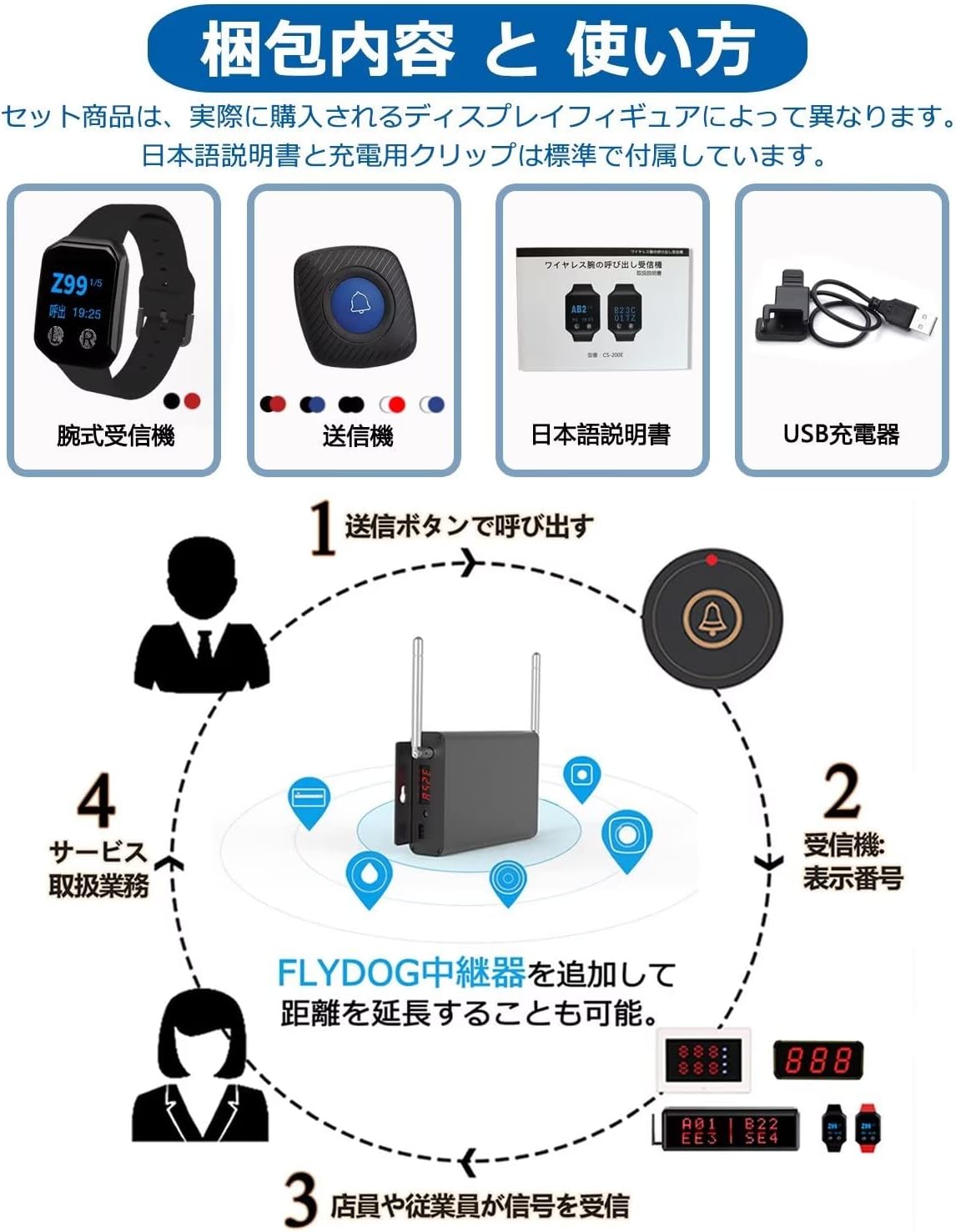
Figure 4: Packaging contents and a simplified diagram of the system's operational flow.

Figure 5: Examples of system expandability and compatibility with various BYHUBYENG receiver and transmitter types.
3. Setup Instructions
3.1 Initial Charging of the Wrist Receiver
- Locate the USB charging cable provided in the package.
- Connect the charging clip to the charging contacts on the back of the wrist receiver.
- Plug the USB end of the cable into a standard USB power adapter (not included) or a computer's USB port.
- Charge the receiver for approximately 1 hour for a full charge. A full charge provides about 24 hours of daily use or 7 days of standby time.

Figure 6: Wrist receiver dimensions and charging details.
3.2 Call Button Placement
Place the call buttons in easily accessible locations for users. Ensure they are within the signal range of the wrist receiver or any installed signal repeaters.
- Use the double-sided adhesive provided to securely attach the call buttons to desired surfaces.
- Ensure the buttons are not obstructed by large metal objects, which can interfere with signal transmission.

Figure 7: Call button details, including its waterproof rating and battery type.
3.3 Pairing (If Required)
Your system typically comes pre-paired. If you need to add new call buttons or re-pair existing ones, refer to the specific pairing instructions in the full manual (if provided separately) or contact customer support. The receiver supports pairing with up to 200 call buttons (IDs 001-ZZZ).
4. Operating Instructions
4.1 Making a Call
To make a call, simply press the call button. The button's signal light will illuminate briefly to confirm transmission.
4.2 Receiving a Call
When a call button is pressed, the wrist receiver will:
- Vibrate to alert the wearer.
- Display the call number on its screen. The display format can be configured (e.g., 3-digit number + call type, or 2-digit 4-number).
4.3 Language and Display Settings
The wrist receiver allows switching between Japanese and English languages. It also offers two types of call display. Refer to the on-screen menu or the full manual for detailed instructions on how to adjust these settings.

Figure 8: Receiver features table, including language and display options.
5. Maintenance
5.1 Cleaning
Wipe the receiver and call buttons with a soft, damp cloth. Do not use abrasive cleaners or solvents. Ensure the devices are dry before use or charging.
5.2 Call Button Battery Replacement
The call buttons use CR2025 coin cell batteries. When the signal light on a call button becomes dim or fails to illuminate upon pressing, it's time to replace the battery.
- Carefully open the back cover of the call button.
- Remove the old CR2025 battery.
- Insert a new CR2025 battery, ensuring correct polarity.
- Close the back cover securely to maintain the waterproof seal.
Figure 9: Battery replacement procedure for the call button.
5.3 Receiver Charging
Recharge the wrist receiver as described in Section 3.1 when the battery indicator shows low power.
6. Troubleshooting
- No Signal Received:
- Ensure the call button battery is not depleted (refer to Section 5.2).
- Check if the call button is within the maximum reception range (approx. 60m).
- Verify there are no significant obstructions (e.g., thick walls, large metal structures) between the call button and the receiver.
- Consider adding a signal repeater to extend the range in larger areas or areas with many obstacles.
- Interference Issues:
- The system has strong anti-interference capabilities. However, if issues persist, try relocating the receiver or call buttons away from other electronic devices that might emit strong radio signals.
- Receiver Not Turning On/Holding Charge:
- Ensure the receiver is fully charged (refer to Section 3.1).
- Check the charging cable and USB power source for proper function.

Figure 10: Extending signal range with a repeater.
7. Specifications
| Feature | Specification |
|---|---|
| Model Number | CS-200E |
| Brand | BYHUBYENG |
| Mounting Type | Wall Mount (for call buttons, using adhesive) |
| Max Range | Approx. 60 meters (extendable with repeater) |
| UPC | 194998946560 |
| Package Contents | 1 Wrist Receiver + 5 Call Buttons |
| Manufacturer | BYHUBYENG Call Button |
| Product Dimensions (Package) | 15 x 7 x 13 cm |
| Product Weight (Package) | 220 g |
| Included Accessories | Transmitter, Receiver, USB Charging Cable, Instruction Manual |
| Batteries Included | Yes (Lithium Polymer for receiver, CR2025 for buttons) |
| Battery Type | Lithium Polymer (Receiver), CR2025 (Call Buttons) |
| Waterproof Rating | IPX67 |
| Receiver Operating Voltage | AC 100-240V |
| Operating Temperature | -10 to 50°C |
8. Warranty and Support
Your BYHUBYENG Wireless Call System comes with a 1-year warranty from the date of purchase. This warranty covers manufacturing defects and ensures reliable operation of your device.
We also provide lifetime technical support for this product. If you encounter any issues or have questions regarding the setup, operation, or maintenance of your system, please do not hesitate to contact our customer support team. Our dedicated team is ready to assist you.
For support, please refer to the contact information provided on the product packaging or the official BYHUBYENG website.


