
Evolution Xpresso Zero (Tall)
Evolution Xpresso Zero Lightweight Medical Walker Rollator User Manual
Model: Xpresso Zero (Tall)
1. Introduction
The Evolution Xpresso Zero is a state-of-the-art lightweight medical walker rollator designed for enhanced mobility and comfort. It combines stylish design with sophisticated features, making it an ideal solution for users seeking a high-performing mobility aid. This manual provides essential information for the safe and effective use, maintenance, and troubleshooting of your Xpresso Zero rollator.
2. Important Safety Information
Please read all instructions carefully before using the rollator. Failure to follow these instructions may result in injury or damage to the product.
- Ensure all locking mechanisms are engaged before use.
- Always engage brakes when sitting on the seat or when the rollator is stationary.
- Use on stable, level surfaces. Avoid steep inclines or uneven terrain.
- Regularly inspect the rollator for wear and tear, especially brakes and wheels.
Legal Disclaimer: Statements regarding dietary supplements have not been evaluated by the FDA and are not intended to diagnose, treat, cure, or prevent any disease or health condition.
3. Product Components
Your Evolution Xpresso Zero rollator includes the following key components:
- Ergonomic Handlebars (height adjustable)
- Comfortable Padded Seat
- Wide Supportive Backrest
- Large 8-inch Wheels with PU Tires
- Hidden No-Snag Brake Cables
- Pivoting Front Casters
- Convenient Storage Basket with Zipper Closure
- One-Hand Single Handle Center Folding Cross Frame

Figure 3.1: Front-side view of the Evolution Xpresso Zero Rollator, showcasing its ergonomic handlebars, padded seat, and storage basket.
4. Setup and Assembly
The Xpresso Zero rollator is designed for easy, tool-free setup.
- Unfolding the Rollator:
Place the rollator on a flat, stable surface. Gently pull the handlebars outwards until the frame fully extends and locks into place. Ensure the seat is flat and secure.
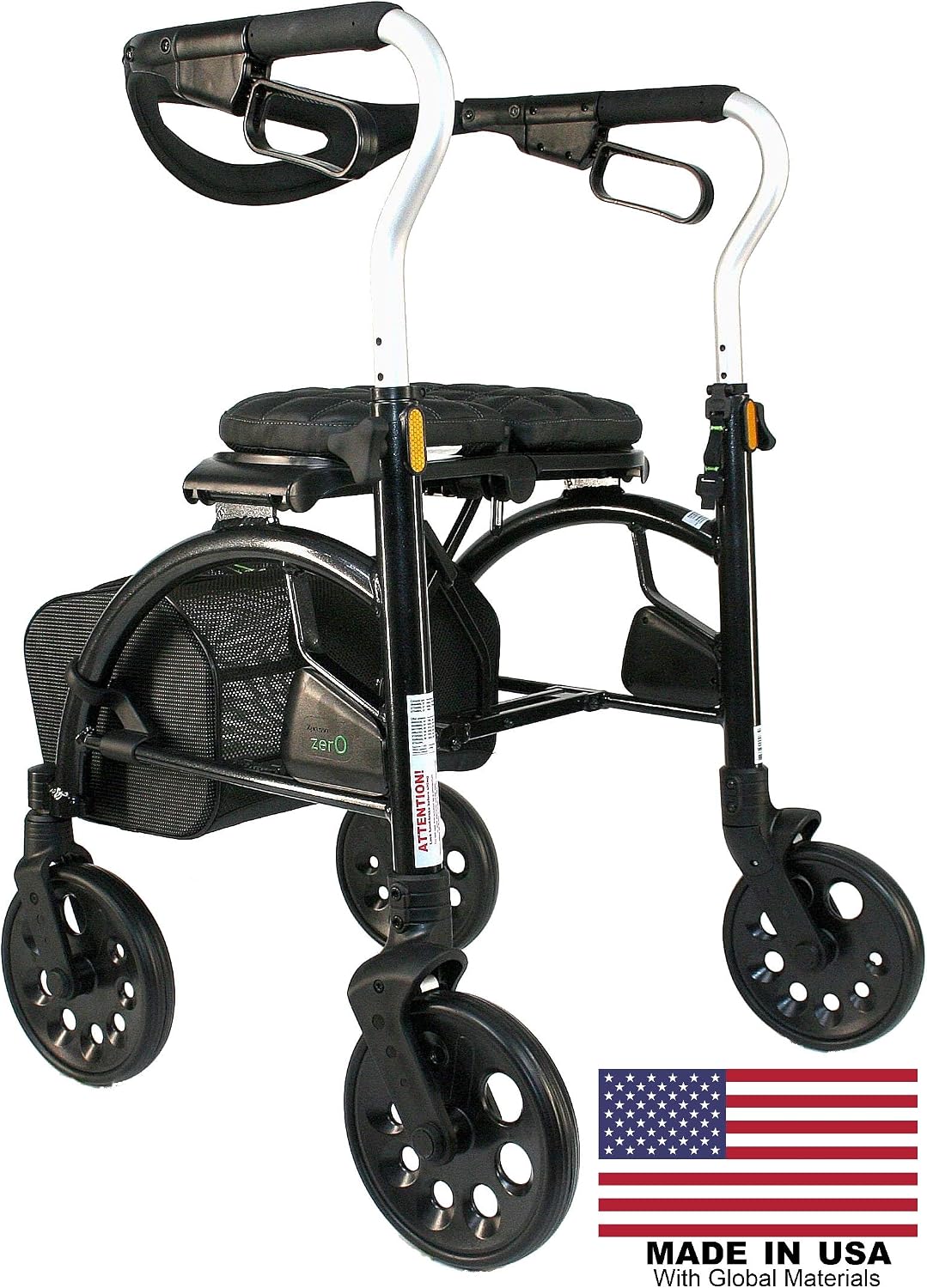
Figure 4.1: The rollator in its fully unfolded position, ready for use.
- Adjusting Handlebar Height:
Locate the height adjustment levers on the side of the handlebar uprights. Press the button or flip the lever to release the lock, then slide the handlebars up or down to your desired height. Ensure the handles are at wrist level when standing upright with arms relaxed. Release the button/lever to lock the handlebars securely in place. Verify both handlebars are at the same height.
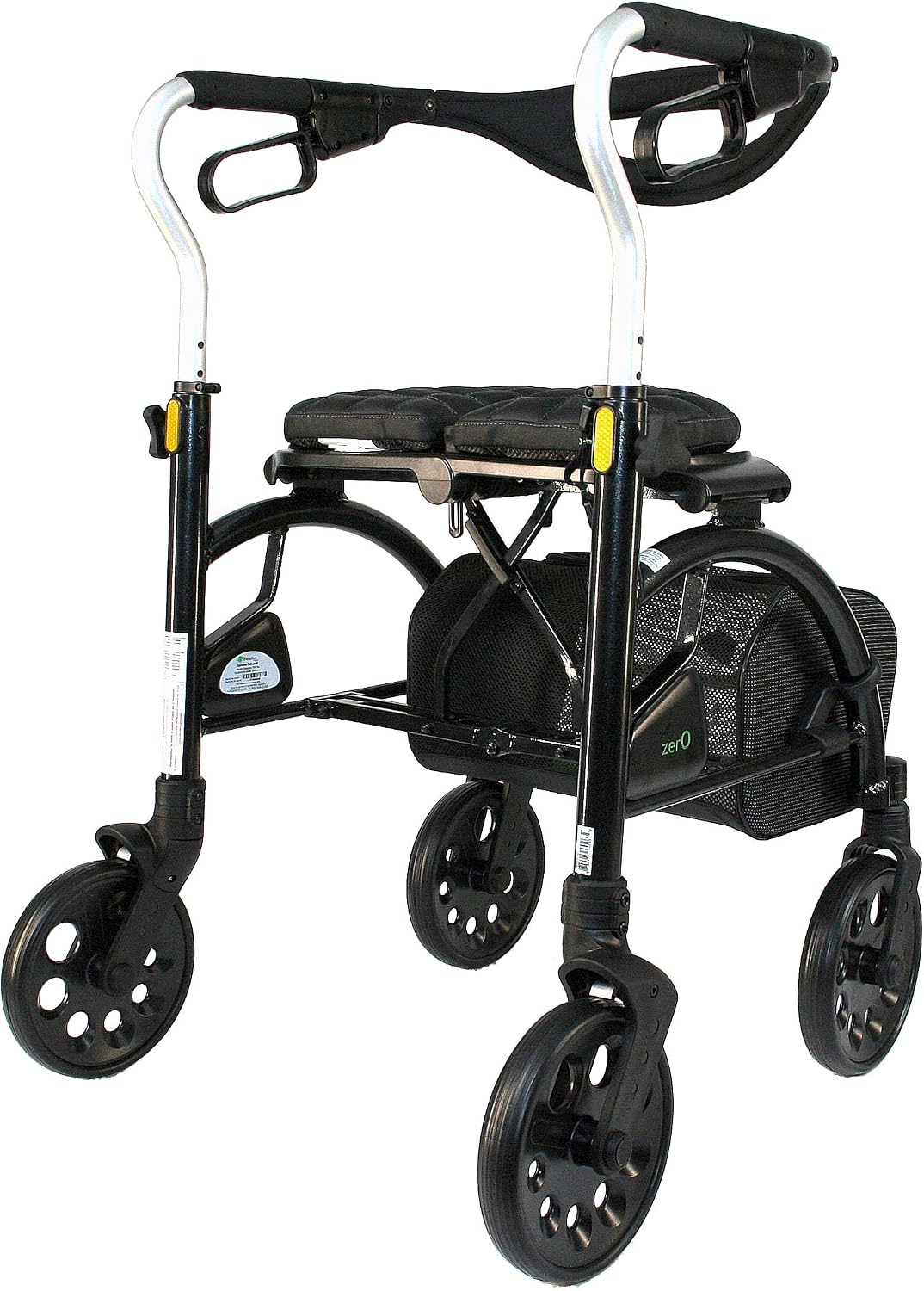
Figure 4.2: Side view illustrating the handlebar height adjustment mechanism.
- Attaching the Backrest:
The wide supportive backrest should be securely attached to the frame. Ensure it is properly aligned and fastened according to the design, providing comfortable support when seated.
5. Operating Instructions
- Walking with the Rollator:
Push the rollator slightly ahead of you, maintaining a comfortable distance. Walk within the frame of the rollator, keeping your body upright. The nimble maneuverability from the pivoting front casters allows for easy steering.
- Using the Brakes:
The rollator features hidden no-snag brake cables. To slow down or stop, gently squeeze the brake levers located on the handlebars. To engage the parking brake (for sitting or prolonged stops), push the brake levers down until they click into the locked position. Pull them up to release.
- Using the Seat:
Before sitting, ensure the parking brakes are fully engaged. Sit down slowly and carefully on the comfortable plushy cushioned seat. Use the wide supportive backrest for comfort. Always disengage parking brakes before resuming walking.
- Folding for Transport/Storage:
The rollator features a one-hand single handle center folding cross frame. Locate the folding mechanism (usually a strap or handle on the seat or frame). Pull upwards on this mechanism to collapse the rollator. It will fold compactly for easy lifting and transport.

Figure 5.1: The rollator in its folded position, ideal for storage or transport.

Figure 5.2: Side view of the rollator when folded, demonstrating its compact design.
- Using the Storage Basket:
The convenient storage basket with zipper closure is located beneath the seat. It provides worry-free storage for personal items. Ensure items are securely placed and do not interfere with the rollator's operation.

Figure 5.3: Front view of the rollator, showing the integrated storage basket.
6. Maintenance and Care
- Cleaning: Wipe down the frame and components with a damp cloth and mild detergent. Avoid abrasive cleaners.
- Wheel Inspection: Regularly check wheels for debris and ensure they spin freely.
- Brake Check: Periodically test the brakes to ensure they engage effectively. If brakes feel loose or do not hold, consult a qualified technician.
- Fastener Check: Ensure all screws, bolts, and fasteners are tight. Do not overtighten.
- Storage: Store the rollator in a dry place, away from extreme temperatures.
7. Troubleshooting
| Problem | Possible Cause | Solution |
|---|---|---|
| Rollator does not fold/unfold smoothly. | Mechanism obstructed or not fully engaged. | Check for obstructions. Ensure the folding mechanism is fully pulled/pushed. |
| Brakes are not holding or feel loose. | Brake cables need adjustment or are worn. | Consult a qualified technician for brake adjustment or replacement. Do not attempt to repair yourself if unsure. |
| Wheels are not rolling freely. | Debris caught in wheels or bearings. | Inspect wheels and remove any hair, lint, or debris. |
| Handlebars slip after adjustment. | Locking mechanism not fully engaged. | Ensure the height adjustment lever/button is fully locked after setting the height. |
8. Specifications
| Feature | Detail |
|---|---|
| Model | Xpresso Zero (Tall) |
| Brand | Evolution |
| Item Weight | 16 Pounds |
| Material | Aluminum, Metal |
| Color | Carbon Black |
| Wheel Size | 8 inches (PU tires) |
| Seat Width | 18 inches |
| Folded Dimensions (Approx.) | 25" Wide X 23.5" Long (Compact) |
| ASIN | B085S73YDV |
9. Warranty and Support
For warranty information or technical support, please contact Evolution Walker USA, the manufacturer. Refer to your purchase documentation for specific warranty terms and contact details.
Manufacturer: Evolution Walker
Seller: Evolution Walker USA
Return Policy: 30-day refund/replacement policy through the seller.
Ask a question about this manual
Ask about setup, troubleshooting, compatibility, parts, safety, or missing instructions. Manuals+ will review the question and use this page’s manual context to help answer it.