
Wallbox WBX-RFID-22kw
Wallbox Copper SB Electric Vehicle Charger User Manual
Model: WBX-RFID-22kw
1. Product Overview
The Wallbox Copper SB is a compact and intelligent electric vehicle charging station designed for home or office parking. It offers adjustable power output from 1.4 kW to 22 kW, supporting both single-phase and three-phase installations. Equipped with Bluetooth, Wi-Fi, and RFID capabilities, it provides flexible and secure charging solutions.

Figure 1: Front view of the Wallbox Copper SB charger, showcasing its compact design.
Key Features:
- Adjustable Power: Instantly adjustable charging current from 6A to 32A (1.4 kW to 22 kW) via the Wallbox app.
- Connectivity: Bluetooth and Wi-Fi for remote management and control.
- Access Control: Supports both Plug & Play and RFID card activation for secure charging.
- Compact Design: Dimensions of L191 x H259 x P88.5 mm, making it one of the smallest chargers on the market.
- Durability: Robust construction with IK08 impact resistance and IP55 weather protection, suitable for outdoor installation.
- Included Components: Electric cable, RFID cards, lockable T2S front handle.
2. Setup and Installation
The Wallbox Copper SB charger should be installed by a qualified electrician to ensure compliance with local electrical codes and safety standards. Its compact size and robust design allow for flexible installation options, including outdoor environments without additional rain protection.
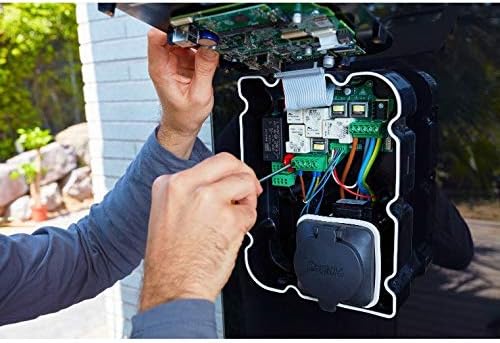
Figure 2: Internal view of the Wallbox Copper SB, showing wiring during professional installation.
Installation Considerations:
- Location: Choose a location that is convenient for vehicle parking and has access to the electrical supply.
- Mounting: Securely mount the charger to a solid surface using appropriate fasteners.
- Electrical Connection: Ensure proper wiring for single-phase or three-phase power, adhering to the charger's specifications and local regulations.
- Grounding: Verify that the charger is properly grounded for safety.
3. Operating Instructions
Charging Modes:
- Plug & Play: Once activated, simply connect the charging cable to your vehicle and the Wallbox charger to initiate charging.
- RFID Card Activation: If the RFID mode is enabled via the Wallbox Web portal, only the RFID cards included with your Wallbox can activate charging. Present an authorized RFID card to the charger to begin.
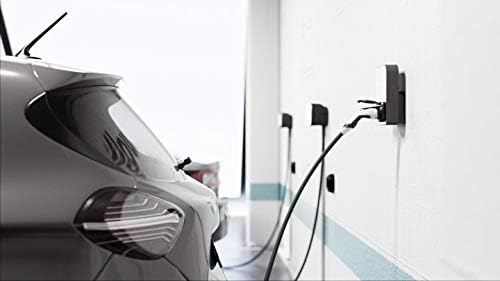
Figure 3: An electric vehicle connected to a Wallbox charger for charging.
Using the Wallbox Application:
The Wallbox app allows you to connect to your charger via Bluetooth or Wi-Fi, providing comprehensive control and monitoring features.
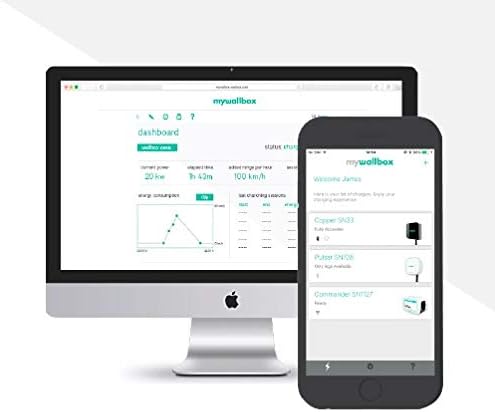
Figure 4: Wallbox app interface displayed on both desktop and mobile, showing charging statistics and controls.
- Remote Control: Activate or deactivate charging remotely.
- Power Adjustment: Adjust the charging power between 1.4 kW and 22 kW to suit your home's available power.
- Scheduling: Program charging sessions for specific times, such as off-peak hours, to optimize energy costs.
- Consumption History: Review your charging history and the total cost of electricity consumed.
- Statistics: Access detailed statistics about your charging sessions.

Figure 5: Detailed view of the Wallbox mobile application, displaying real-time charging status and energy consumption graphs.
4. Maintenance
The Wallbox Copper SB is designed for minimal maintenance. Regular care will help ensure its longevity and optimal performance.
- Cleaning: Periodically wipe the exterior of the charger with a soft, damp cloth. Avoid using abrasive cleaners or solvents.
- Cable Inspection: Regularly inspect the charging cable and connector for any signs of wear, damage, or fraying. Do not use if damaged.
- Environmental Protection: While designed for outdoor use, ensure the charger is not exposed to extreme conditions beyond its specified operating range.
- Firmware Updates: Keep the charger's firmware updated through the Wallbox app to benefit from the latest features and improvements.
5. Troubleshooting
If you encounter issues with your Wallbox Copper SB charger, refer to the following common troubleshooting steps. For more complex problems, contact Wallbox customer support.
- Charger Not Responding:
- Check the power supply to the charger.
- Ensure the charger is properly connected to the electrical circuit.
- Restart the charger by cycling its power.
- Charging Not Starting:
- Verify that the charging cable is securely connected to both the vehicle and the charger.
- If using RFID, ensure you are using an authorized card and it is properly scanned.
- Check the Wallbox app for any error messages or charging schedule conflicts.
- Ensure your vehicle is ready to accept a charge.
- Connectivity Issues (Bluetooth/Wi-Fi):
- Ensure your mobile device's Bluetooth is enabled and within range.
- For Wi-Fi, check your home network's signal strength and ensure the charger is connected to the correct network.
- Restart your Wi-Fi router if necessary.
6. Technical Specifications
| Specification | Value |
|---|---|
| Model Number | WBX-RFID-22kw |
| Manufacturer Serial Number | CPB1-W-2-4-4-002-A |
| Dimensions (L x H x P) | 191 x 259 x 88.5 mm |
| Weight | 4.8 Kilograms |
| Amperage | 32 A |
| Power Output | 1.4 kW to 22 kW |
| Connectivity Technology | Bluetooth, Wi-Fi |
| Connector Type | Type 2 |
| Ingress Protection (IP) Rating | IP55 |
| Impact Protection (IK) Rating | IK08 |
| Color | Black |
| Compatible Devices | Mobile phones (e.g., Apple iPhone SE) |
7. Warranty and Support
The Wallbox Copper SB charger comes with a manufacturer's warranty. For detailed information regarding warranty terms, coverage, and duration, please refer to the warranty card included with your product or visit the official Wallbox website.
For technical assistance, troubleshooting beyond the scope of this manual, or to report any issues, please contact Wallbox customer support. Ensure you have your product's model number and serial number ready when contacting support.
Included in the Box:
- Wallbox Copper SB Charger Unit
- Electric Cable
- RFID Cards
- Lockable T2S Front Handle
Related documentsWBX-RFID-22kw


Ask a question about this manual
Ask about setup, troubleshooting, compatibility, parts, safety, or missing instructions. Manuals+ will review the question and use this page’s manual context to help answer it.