
1. Introduction
Thank you for choosing the WONNIE 17.9" Portable DVD/CD Player. This device is designed to provide a versatile and enjoyable media experience on the go, featuring a large 15.4-inch HD swivel screen, long-lasting rechargeable battery, and support for various media formats. This manual will guide you through the setup, operation, and maintenance of your new portable DVD player.

2. Product Features
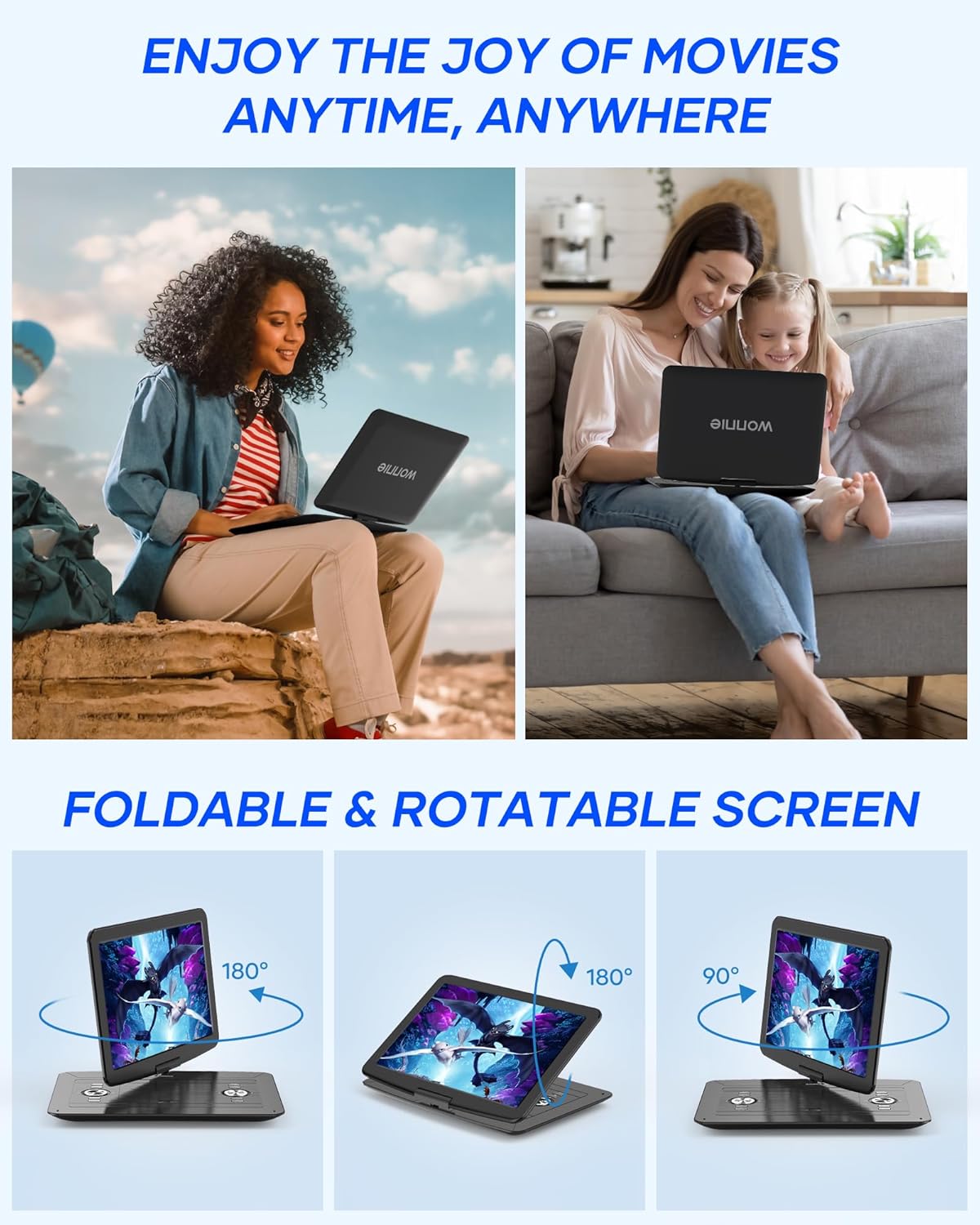
- Swivelable HD Screen: Features a 17.9-inch full-size unit with a 15.4-inch widescreen display (1366x768 TFT LCD) that can rotate 270° and flip 180° for optimal viewing angles.
- Long-lasting Rechargeable Battery: Equipped with a built-in 5000mAH Li-polymer battery providing approximately 6 hours of playback. Includes an AC adapter and car charger for flexible power options.
- Dual Powerful Stereo Speakers: Integrated stereo speakers deliver clear audio. A headphone jack is also available for private listening.
- Sync Screen & Last Memory Function: Connect to a TV or projector using the provided RCA cable for a larger viewing experience. The last memory function resumes playback from where you left off.
- Region Free & Multi-formats Support: Plays DVDs from all regions and supports various disc formats (DVD, DVD+R/-R, DVD+RW/-RW, CD, CD+R/-R, CD+RW/-RW, VCD, SVCD). Also supports media playback via USB/SD card (max 32GB FAT32, 720*576 pixels) for JPG, JPEG, MP3, WMA, VOB, AVI, MPEG 1, MPEG 2, XVID files. Note: Does not support Blu-ray discs or MP4 format.
- Upgraded Operating Technologies: Incorporates new chip technology and reading technologies like breakpoint resume, anti-shock, and pre-reading for smooth and stable disc playback.


3. Package Contents
Please check the package contents upon unboxing to ensure all items are present:

- 17.9" Portable DVD Player
- Remote Control
- 5 ft RCA Cable
- 6 ft Car Charger
- 5 ft AC Adapter
- User Manual
4. Setup
4.1 Charging the Battery
Before first use, fully charge the portable DVD player. Connect the AC adapter to the DC IN port on the player and plug it into a wall outlet. The charging indicator light will illuminate. Once fully charged, the light may change color or turn off, depending on the model. A full charge provides approximately 6 hours of playback.

4.2 Initial Power On
Press the POWER ON/OFF button to turn on the device. The screen will light up, and the WONNIE logo will appear. You can adjust the screen angle using the swivel and flip features for comfortable viewing.
5. Operating Instructions
5.1 Playing Discs (DVD/CD)
- Open the disc cover gently.
- Place a DVD or CD onto the disc spindle with the label side facing up.
- Close the disc cover securely.
- The player will automatically detect the disc and begin playback. If not, press the PLAY button on the player or remote.
5.2 Using USB/SD Card
- Insert a USB flash drive into the USB port or an SD card into the SD CARD slot.
- Use the MODE button on the player or remote to select USB or SD mode.
- Navigate through your files using the arrow keys and press ENTER to select and play.

5.3 Connecting to External Displays (TV/Projector)
To view content on a larger screen, use the provided RCA cable:
- Connect one end of the RCA cable to the AV OUT port on the portable DVD player.
- Connect the other end of the RCA cable to the corresponding AV IN ports on your TV or projector.
- Select the correct AV input source on your TV or projector.
- The player's screen content will now be mirrored on the external display.


5.4 Swivel Screen Functionality
The screen can be rotated 270 degrees clockwise and flipped 180 degrees. This allows for various viewing positions, including folding the screen flat against the base to resemble a tablet.

5.5 Last Memory Function
The player features a built-in Last Memory function. To enable it, navigate to the SETUP page in the player's menu and set the "Last Memory" function to "ON". This will allow the player to resume playback from the exact point where it was last turned off.

6. Maintenance
6.1 Cleaning the Device
- Use a soft, dry cloth to clean the exterior of the player.
- For the screen, use a soft, lint-free cloth specifically designed for electronics. Do not use abrasive cleaners or solvents.
- To clean the disc lens, use a specialized DVD/CD lens cleaning disc.
6.2 Battery Care
- Avoid fully discharging the battery frequently.
- If storing the player for an extended period, charge the battery to about 50% and store it in a cool, dry place.
- Do not expose the battery to extreme temperatures.
7. Troubleshooting
If you encounter issues with your WONNIE Portable DVD Player, please refer to the following common problems and solutions:
| Problem | Possible Cause / Solution |
|---|---|
| Player does not power on. | Battery is depleted. Connect the AC adapter or car charger. Ensure the power switch is in the ON position. |
| Disc not reading / "No Disc" error. | Disc is dirty or scratched. Clean the disc. Disc is inserted incorrectly. Reinsert the disc with the label side up. Disc format is not supported (e.g., Blu-ray, MP4). Ensure the disc format is compatible. |
| No sound. | Volume is too low. Increase the volume. Headphones are connected. Disconnect headphones if you want sound from speakers. Audio settings are incorrect. Check audio settings in the player's menu. |
| No picture / Distorted picture. | Screen brightness/contrast settings are incorrect. Adjust display settings. If connected to TV, ensure correct AV input is selected and cables are securely connected. |
| Remote control not working. | Batteries are depleted or inserted incorrectly. Replace batteries. Obstruction between remote and player. Ensure clear line of sight. |
If the problem persists after trying these solutions, please contact customer support.
8. Specifications
| Feature | Detail |
|---|---|
| Brand | WONNIE |
| Model | W-1458 |
| Screen Size | 15.4 Inches (inner), 17.9 Inches (full unit) |
| Display Type | LCD |
| Display Resolution | 1366x768 |
| Battery Type | Lithium Polymer |
| Battery Capacity | 5000mAH (approx. 6 hours playback) |
| Power Source | AC Adapter, Car Charger, Battery |
| Supported Disc Formats | DVD, DVD+R, DVD-R, DVD+RW, DVD-RW, CD, CD+R, CD-R, CD+RW, CD-RW, VCD, SVCD (Not Blu-ray or MP4) |
| Supported Media Formats (USB/SD) | Pictures: JPG, JPEG; Audio: MP3, WMA; Videos: VOB, AVI, MPEG 1, MPEG 2, XVID |
| Max USB/SD Capacity | 32GB (FAT32), 720*576 pixels |
| Connectivity | RCA (AV In/Out), USB, SD Card, Headphone Jack |
| Product Dimensions | 14.1 x 16.5 x 8.1 cm |
| Item Weight | 2.5 Kilograms |
9. Warranty and Support
WONNIE is committed to providing high-quality products and excellent customer service. Your portable DVD player comes with comprehensive support:
- 365-Day Replacement or Full Refund: We offer a new replacement or full refund within 365 days of purchase.
- 12-Month Replacement: Replacement available within 12 months for product defects.
- 60-Day No Worry Return: Easy returns within 60 days.
- 24/7 Professional Customer Service: Our support team is available around the clock to assist you with any questions or issues.
- Lifetime After-Sales Consult and Technical Support: We provide ongoing support for the lifetime of your product.

If you have any questions or require assistance, please do not hesitate to contact us. We are here to help.