
VirtuFit VFLEB1.2i
VirtuFit Low Entry Bike 1.2i
User Manual
Model: VFLEB1.2i | Brand: VirtuFit
1. Introduction
Thank you for choosing the VirtuFit Low Entry Bike 1.2i. This ergonomic hometrainer is designed for a comfortable and effective fitness experience, ideal for users seeking easy access, including seniors, individuals undergoing rehabilitation, or those with limited mobility. This manual provides essential information for the safe assembly, operation, and maintenance of your new fitness equipment. Please read it thoroughly before first use and keep it for future reference.

Image: The VirtuFit Low Entry Bike 1.2i, a black hometrainer with a low step-through frame, adjustable seat, and handlebars, designed for easy access and comfortable use.
2. Safety Information
Before using the VirtuFit Low Entry Bike 1.2i, please observe the following safety precautions:
- Consult your physician before starting any new exercise program.
- Ensure all parts are correctly assembled and tightened before each use.
- Place the hometrainer on a flat, stable surface. Use a protective mat if necessary.
- Keep children and pets away from the equipment during operation.
- Do not exceed the maximum user weight capacity of 140 kg.
- Wear appropriate athletic footwear and clothing.
- If you experience pain, dizziness, or shortness of breath, stop exercising immediately.
- Keep hands and feet clear of all moving parts.
3. Assembly and Setup
The VirtuFit Low Entry Bike 1.2i is designed for straightforward assembly. Follow the instructions provided in the separate assembly guide for detailed steps. Key setup considerations include:
3.1 Low Entry Design
The low step-through frame allows for easy mounting and dismounting, enhancing accessibility for all users.
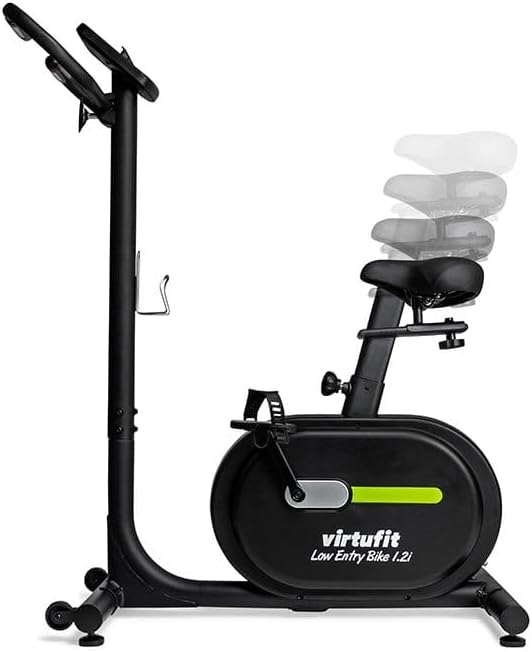
Image: Illustrates the vertical and horizontal adjustment range of the hometrainer's seat, showing multiple possible seat positions.

Image: A close-up of the adjustment knob on the hometrainer, labeled "TO ADJUST LOOSEN THEN PULL", indicating how to release and secure adjustable components.
3.3 Handlebar and Tablet Holder
The multigrip handlebar provides various hand positions for comfort. An integrated tablet holder allows you to place your smart device for entertainment or app integration during your workout.

Image: The hometrainer's console with a tablet securely placed in the integrated holder, displaying the Fitshow app interface.

Image: The hometrainer's console with a tablet in the holder, showing a video playing, demonstrating the entertainment possibilities during a workout.
4. Operating Instructions
4.1 Console Display
The illuminated LCD screen features "positive reflection technology" for clear readability of your training data. The display shows:
- Time
- Distance
- Heart Rate (Pulse)
- Calories Burned
- Speed
- RPM (Revolutions Per Minute)

Image: A close-up of the hometrainer's LCD display, showing various workout metrics such as time, speed, distance, pulse, calories, and watt.

Image: A close-up of the control panel buttons on the hometrainer, including "RESET", "RECOVERY", arrow keys, "ENTER", "DISPLAY-ALT", and "START/STOP".
4.2 Resistance Levels
The hometrainer offers 16 resistance levels, allowing you to easily adjust the intensity of your workout to match your fitness goals and preferences.
4.3 Training Programs
Choose from 21 versatile program options to diversify your training:
- 9 Pre-programmed training units
- 1 Wattage program
- 4 Heart rate programs
- 4 User-defined programs
- Body fat test
- Heart rate recovery test
4.4 Fitshow App Integration
Connect your smartphone or tablet to the VirtuFit Low Entry Bike 1.2i and use the Fitshow app. This app allows you to save your training results, track progress, and enhance your workout with interactive features.
5. Maintenance
Regular maintenance ensures the longevity and optimal performance of your hometrainer:
- Wipe down the equipment with a damp cloth after each use to remove sweat and dust.
- Periodically check all bolts and nuts for tightness and re-tighten if necessary.
- Inspect moving parts for any signs of wear or damage.
- Keep the area around the hometrainer clean and free of obstructions.
- Store the hometrainer in a dry, cool place away from direct sunlight and extreme temperatures.
6. Troubleshooting
If you encounter any issues with your VirtuFit Low Entry Bike 1.2i, refer to the following common solutions:
| Problem | Possible Cause | Solution |
|---|---|---|
| Display not turning on | Batteries are dead or incorrectly installed. | Replace batteries (not included) or ensure they are inserted with correct polarity. |
| Unusual noises during operation | Loose components or lack of lubrication. | Check all bolts and nuts for tightness. Apply a small amount of lubricant to moving parts if necessary (refer to assembly guide for specific points). |
| Resistance not changing | Internal mechanism issue or console malfunction. | Ensure console connections are secure. If problem persists, contact customer support. |
For issues not listed here, or if solutions do not resolve the problem, please contact VirtuFit customer support.
7. Specifications
Key technical specifications for the VirtuFit Low Entry Bike 1.2i:
| Feature | Detail |
|---|---|
| Model Number | VFLEB1.2i |
| Color | Black (Low Entry 1.2i) |
| Drive System | Belt |
| Material Type | Plastic, Metal |
| Power Source | Battery operated |
| Batteries Included? | No |
| Features | Speed monitor, Calorie monitor, Distance monitor, Water bottle holder |
| Product Dimensions (L x W x H) | 99 x 63 x 133 cm |
| Item Weight | 19 kg |
| Max. User Weight | 140 kg |

Image: Diagram showing the dimensions of the VirtuFit Low Entry Bike 1.2i: 133cm height, 99cm length, and 63cm width.
8. Warranty and Support
For warranty information, please refer to the documentation included with your purchase or visit the official VirtuFit website. If you require technical assistance, have questions about assembly, operation, or maintenance, or need to report a defect, please contact VirtuFit customer support. Provide your model number (VFLEB1.2i) and purchase details for faster service.
You can find more information and contact details on the official VirtuFit store page: VirtuFit Store on Amazon.nl
Related documentsVFLEB1.2i


Ask a question about this manual
Ask about setup, troubleshooting, compatibility, parts, safety, or missing instructions. Manuals+ will review the question and use this page’s manual context to help answer it.