
7artisans 6028M43
7artisans 60mm F2.8 Macro APS-C Manual Focus Lens
Instruction Manual
Model: 6028M43
1. Introduction
Thank you for purchasing the 7artisans 60mm F2.8 Macro APS-C Manual Focus Lens. This manual provides detailed instructions on how to set up, operate, and maintain your lens to ensure optimal performance and longevity. Please read this manual thoroughly before using the product.
2. Product Overview
The 7artisans 60mm F2.8 Macro APS-C Manual Focus Lens is designed for mirrorless cameras with Micro Four Thirds mounts, offering excellent macro capabilities with a 1:1 magnification ratio. Its robust full-metal construction ensures durability, while multi-layer coatings enhance image quality by reducing glare and ghosting.

Figure 2.1: The 7artisans 60mm F2.8 Macro Lens, shown with its included carrying pouch.
Key Features:
- Focal Length: 60mm
- Frame Type: APS-C
- Lens Material: Full-metal construction (Aviation aluminum)
- Weight: Approximately 550g
- Aperture Ring: De-clicked for smooth adjustments
- Filter Size: 39mm
- Maximum Aperture: F2.8
- Lens Construction: 8 elements in 7 groups
- Blades Number: 10pcs
- Focusing Method: Manual focusing
- Closest Focus: 26cm (10.2 inches)
- Coating: Multi-layer coating to reduce ghosting and glare

Figure 2.2: The lens is designed for APS-C 1:1 magnification, suitable for both macro and portrait photography, and is compatible with E/Z/FX/M43/EOS-M mounts.

Figure 2.3: The lens features an additional detachable front barrel, which can be submerged for shooting, helping to avoid water reflection on imaging.
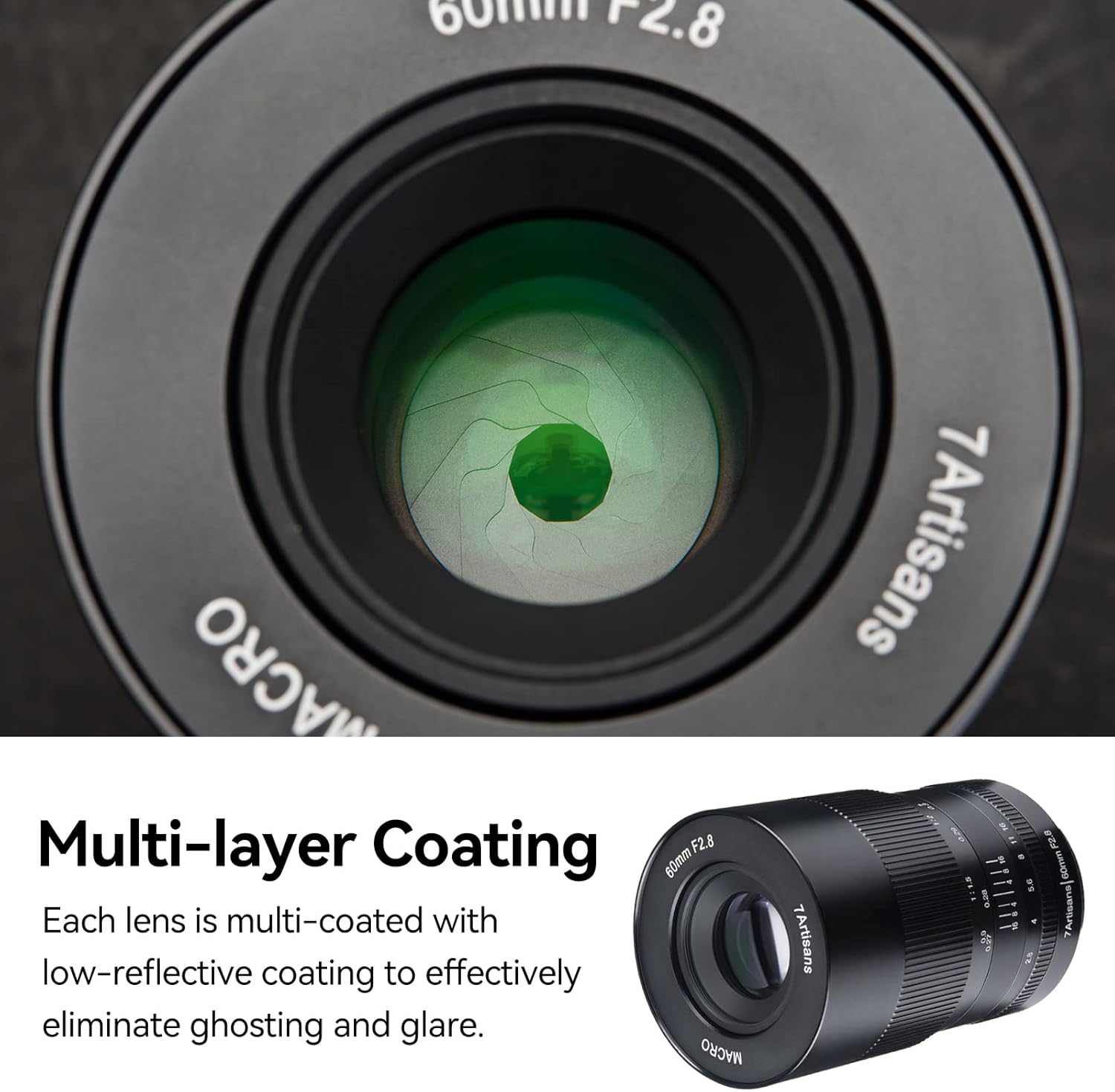
Figure 2.4: Each lens element is multi-coated with a low-reflective coating to effectively eliminate ghosting and glare, ensuring clear image quality.

Figure 2.5: The lens boasts a full-metal design, utilizing an anodizing process for wear-resistance, anti-oil, anti-corrosion, and static properties, making it durable and easy to clean. The wide focus ring allows for precise manual adjustment.
3. Setup
3.1 Attaching the Lens to Your Camera
- Ensure your camera is turned off.
- Align the mounting index on the lens with the corresponding index on your camera body (typically a white dot or line).
- Gently insert the lens into the camera mount and rotate it clockwise until it clicks into place.
- To detach, press the lens release button on your camera body and rotate the lens counter-clockwise.
3.2 Camera Settings for APS-C Mode
This lens is an APS-C frame lens. When used on full-frame camera models, it may cause vignetting (darkening at the corners of the image). To avoid vignetting, it is recommended to switch your camera to APS-C format mode (also known as crop mode or DX mode).
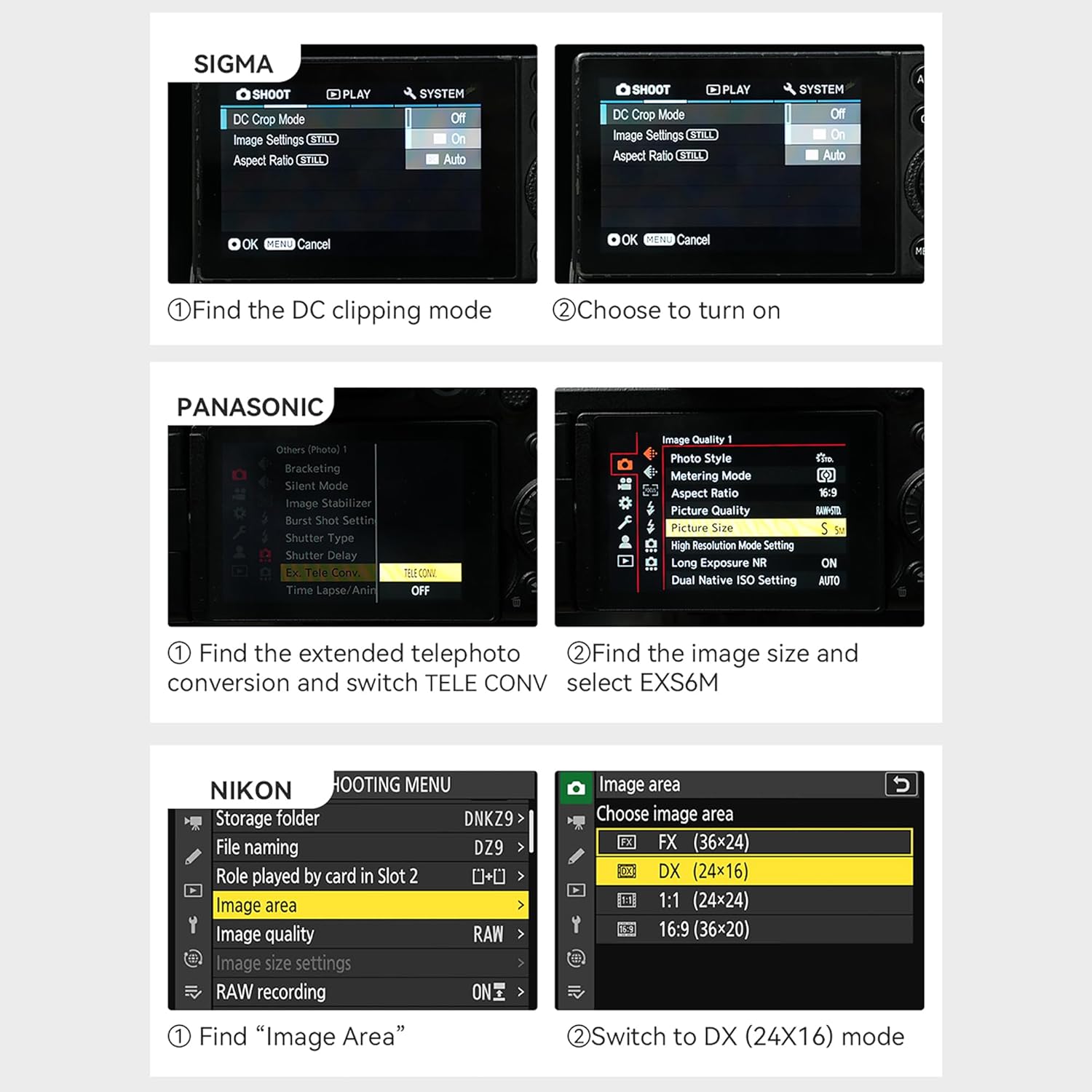
Figure 3.1: Illustration of vignetting in Full Frame Mode versus clear image in APS-C Frame Mode.

Figure 3.2: Examples of camera settings for different brands to enable crop mode: (1) Sigma: Find DC clipping mode and turn on. (2) Panasonic: Find extended telephoto conversion and switch TELE CONV, then find image size and select EXS6M. (3) Nikon: Find Image Area and switch to DX (24X16) mode.
4. Operating Instructions
4.1 Manual Focusing
This is a manual focus lens. To focus, rotate the focus ring on the lens barrel until your subject appears sharp in the viewfinder or on your camera's LCD screen. For critical focus, especially in macro photography, use your camera's focus peaking or magnification assist features.
4.2 Aperture Control
The lens features a de-clicked aperture ring, allowing for smooth and silent aperture adjustments. Rotate the aperture ring to select your desired f-stop (F2.8 to F22). The de-clicked design is particularly beneficial for video recording, preventing audible clicks during aperture changes.
4.3 Macro Photography Tips
- Working Distance: The closest focus distance of 26cm (10.2 inches) provides ample space between the lens and your subject, allowing for better lighting and easier manipulation of the subject.
- Detachable Front Barrel: For specific shooting scenarios, such as underwater photography, the front barrel of the lens can be detached. This feature helps to avoid disturbances and reflections from the water surface.
- Shutter Speed: Macro photography often requires faster shutter speeds to freeze motion and compensate for camera shake. Using a tripod is highly recommended to achieve sharp images, especially at high magnifications.
- Depth of Field: At macro magnifications, the depth of field is very shallow. Adjust your aperture carefully to control the area of sharpness.

Figure 4.1: Example macro photograph taken with the 7artisans 60mm F2.8 lens, showcasing its ability to capture fine details and achieve excellent image quality at 1:1 macro state.
5. Maintenance
5.1 Cleaning the Lens
- Use a soft, lint-free cloth or a lens brush to remove dust from the lens surfaces.
- For smudges or fingerprints, apply a small amount of lens cleaning solution to a microfiber cloth and gently wipe the lens in a circular motion from the center outwards.
- Avoid using abrasive materials or harsh chemicals, as they can damage the multi-layer coatings.
5.2 General Care
- Always attach the front and rear lens caps when the lens is not in use to protect the glass elements.
- Store the lens in a dry, cool place, away from direct sunlight and extreme temperatures.
- Avoid exposing the lens to excessive moisture or dust.
- The full-metal design is wear-resistant and anti-corrosion, but proper care will extend its lifespan.
6. Troubleshooting
6.1 Vignetting in Images
If you observe dark corners or edges in your images (vignetting), especially when using a full-frame camera, ensure that your camera is set to APS-C (crop) mode. Refer to Section 3.2 for instructions on adjusting camera settings.
6.2 Difficulty Achieving Focus
As a manual focus lens, precise focusing requires practice. If you are struggling to achieve sharp focus:
- Utilize your camera's focus peaking feature, which highlights in-focus areas.
- Use the magnification assist feature on your camera's LCD screen or electronic viewfinder for a magnified view of your subject.
- Ensure adequate lighting for your subject, especially in macro photography.
7. Specifications
| Feature | Specification |
|---|---|
| Focal Length | 60mm |
| Frame Type | APS-C |
| Lens Material | Metal (Aviation Aluminum) |
| Item Weight | 550 Grams |
| Product Dimensions (L x W x H) | 10 x 6.6 x 6.6 centimetres |
| Aperture Ring | De-Clicked |
| Filter Size | 39mm |
| Maximum Aperture | F2.8 |
| Angle of View | 25° |
| Lens Construction | 8 elements in 7 groups |
| Blades Number | 10pcs |
| Focusing Method | Manual focusing |
| Closest Focus | 26cm |
| Lens Anti-shake | Without anti-shake |
| Compatible Mountings | Micro Four Thirds |
| Part Number | 6028M43 |
| Date First Available | 10 Mar. 2020 |

Figure 7.1: The lens package typically includes the 7artisans 60mm F2.8 Macro Lens, front and rear lens caps, and a user manual.
8. Warranty and Support
Specific warranty information for the 7artisans 60mm F2.8 Macro APS-C Manual Focus Lens is not provided in this manual. For details regarding warranty coverage, service, or technical support, please refer to the documentation included with your purchase or visit the official 7artisans website or their store on Amazon:
7artisans Official Store on Amazon
Please retain your proof of purchase for any warranty claims.
Ask a question about this manual
Ask about setup, troubleshooting, compatibility, parts, safety, or missing instructions. Manuals+ will review the question and use this page’s manual context to help answer it.