
Product Overview
The Globber Explorer 4-in-1 Toddler Trike and Balance Bike is a versatile ride-on toy designed to adapt to your child's developmental stages from 10 months to 5 years. This innovative product transforms effortlessly between four different modes: Infant Trike, Guided Trike, Training Trike, and Balance Bike, providing a safe and enjoyable experience as your child grows.

Image: The Globber Explorer 4-in-1 Toddler Trike in its Infant Trike configuration, featuring a parent handle, canopy, and safety harness.

Image: Infographic highlighting 5 benefits for your child: Coordination and balance, Independence and self-confidence, Spatial orientation, Outdoor active play, and Fun.

Image: Visual representation of the four modes: Infant Trike (10-36M), Guided Trike (18-36M), Training Trike (24-36M), and Balance Bike (2-5Y).
Safety Information
Always ensure your child's safety by following these guidelines:
- Age and Weight Limits: The trike is suitable for children aged 10 months to 5 years, with specific weight limits for each mode. Refer to the 'Specifications' section for details.
- Supervision: Constant adult supervision is required when the child is using the trike in any mode.
- Protective Gear: Always ensure your child wears a helmet and appropriate protective gear, especially when using the Training Trike and Balance Bike modes.
- Harness and Safety Bar: In Infant Trike mode, always secure your child with the 5-point safety harness and ensure the safety bar is properly latched.
- Footrest: Ensure the footrest is correctly positioned for the child's comfort and safety in Infant and Guided Trike modes.
- Not for Stunts: This product is not designed for stunts, jumps, or aggressive riding.
- Surface Use: Use on smooth, flat, and dry surfaces away from traffic. Avoid slopes, stairs, and uneven terrain.
Setup & Assembly: Tool-Less Design
The Globber Explorer Trike features a patented tool-less design, making conversions between modes simple and quick. No extra tools are required for assembly or transformation.

Image: The trike highlighting its adjustable and removable parent handle, adjustable seat height, footrest, and the easily transformable rear wheels, all part of its 100% tool-less design.
Mode 1: Infant Trike (10-36 Months)
This mode is designed for the youngest users, offering maximum parental control and child safety.
- Parent Handle: Attach the adjustable and removable parent handle to the rear of the trike.
- Canopy: Secure the UPF 50+ anti-UV canopy for sun protection.
- Safety Bar & Harness: Ensure the 5-point safety harness is correctly fastened and the safety bar is in place around the child.
- Footrest: Extend the footrest for the child's comfort.
Mode 2: Guided Trike (18-36 Months)
As your child grows, they can begin to practice pedaling while you maintain control.
- Remove Canopy & Safety Bar: Detach the canopy and safety bar using the quick-release buttons.
- Parent Handle: The parent handle remains attached for steering assistance.
- Pedals: Ensure pedals are engaged for the child to practice.
- Footrest: The footrest can be retracted or removed if the child is actively pedaling.
Mode 3: Training Trike (24-36 Months)
This mode allows your child to ride independently on a tricycle.
- Remove Parent Handle: Detach the parent handle.
- Pedals: Ensure pedals are engaged.
- Footrest: The footrest should be retracted or removed.
Mode 4: Balance Bike (2-5 Years)
Convert the trike into a two-wheeled balance bike to help develop balance and coordination.
- Remove Pedals: Detach the pedals from the front wheel.
- Convert Rear Wheels: Easily transform the two rear wheels into a single, wider wheel by pressing the red button and sliding them together.
- Adjust Seat Height: Lower the seat height to allow the child's feet to comfortably touch the ground.

Image: A visual demonstrating the 100% tool-less design for easy transformation between modes.
Operating Instructions
Parent Steering System
In Infant and Guided Trike modes, the parent handle features a built-in steering system allowing adults to control the direction of the trike. This ensures a smooth and safe ride for younger children.
Free Wheel System
The front wheel includes a built-in free wheel system. This allows the child to rest their feet on the pedals without them rotating when the parent is pushing the trike, preventing accidental foot injuries.
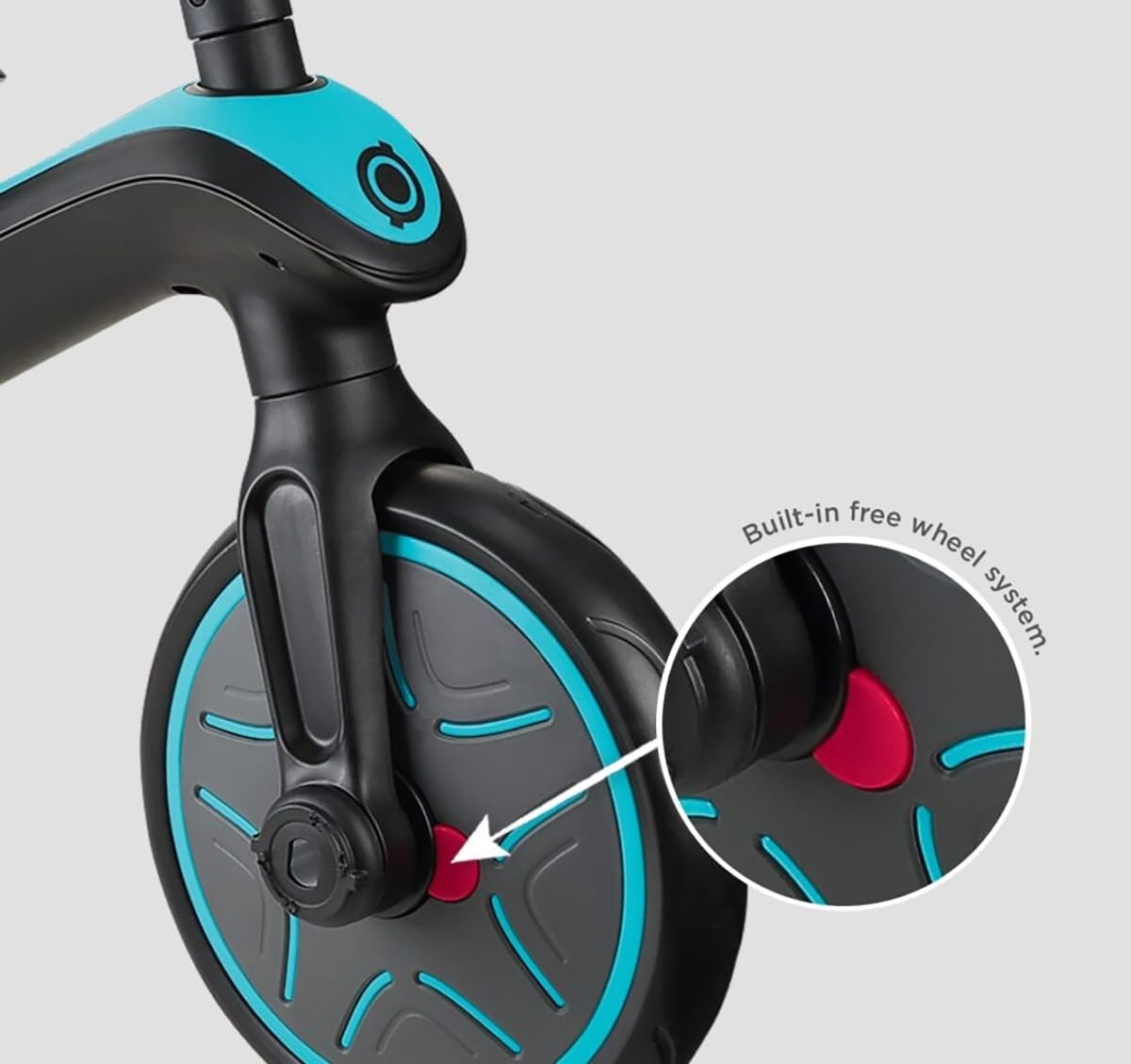
Image: A close-up view of the front wheel, highlighting the red button for engaging or disengaging the built-in free wheel system.
Rear Parking Device
The trike is equipped with a rear parking device (brakes) for seamless navigation and secure stops. Engage the brakes when parking or when you need the trike to remain stationary.
Adjustable Seat Height
The seat height is adjustable to accommodate your child's growth and ensure proper leg extension for pedaling or balancing in different modes.
Video: A demonstration of the Globber Explorer Trike's features and transformations, including the parent handle, safety harness, footrest, and conversion to different modes. This video is provided by Globber US.
Maintenance
Regular maintenance ensures the longevity and safe operation of your Globber Explorer Trike.
- Cleaning: Wipe down the trike with a damp cloth and mild soap. Avoid harsh chemicals.
- Inspection: Periodically check all screws, bolts, and quick-release mechanisms to ensure they are secure. Inspect wheels and tires for wear and tear.
- Lubrication: Apply a small amount of lubricant to moving parts like wheel axles if they become stiff.
- Storage: Store the trike in a dry place away from direct sunlight and extreme temperatures. The foldable design allows for compact storage.
Video: A short demonstration of the Globber Explorer Trike's features, including its foldable design for easy transport and storage. This video is provided by Globber US.
Troubleshooting
If you encounter any issues with your Globber Explorer Trike, please refer to the following common solutions:
- Difficulty Converting Modes: Ensure all quick-release buttons are fully pressed and components are aligned correctly before attempting to convert. Do not force parts.
- Loose Parts: Regularly check all connections. If any part feels loose, re-secure it according to the assembly instructions. If a part is damaged, discontinue use and contact customer support.
- Steering Issues: In parent-controlled modes, ensure the parent handle is securely attached and the steering mechanism is engaged. For child-controlled modes, check for any obstructions in the steering column.
- Pedal Malfunction: If pedals are not rotating smoothly, check for debris or obstructions. Ensure they are correctly installed for the chosen mode.
Specifications
| Feature | Detail |
|---|---|
| Brand Name | Globber |
| Model Number | 632-105 |
| Age Range | 10 Months - 5 Years |
| Maximum Weight Capacity | Infant Trike: 15 kg (33 lbs) Guided Trike, Training Trike, Balance Bike: 20 kg (44 lbs) |
| Item Weight | 6.8 Kilograms |
| Item Dimensions (L x W x H) | 96"L x 95"W x 47"H (Note: These dimensions seem unusually large for a trike and might be incorrect in the source data. Please verify with product packaging.) |
| Material Type | Foam Plastic |
| Assembly Required | No (Tool-less design for conversion) |
| Included Components | Tricycle, 5-point safety harness with soft pads, footrest, high back seat, safety bar. |
Warranty & Support
Globber stands behind the durability of its products. The Explorer 4-in-1 Toddler Trike comes with a 2-Year Golden Guarantee.
For warranty claims, technical support, or any questions regarding your product, please visit the official Globber website or contact their customer service department. Keep your proof of purchase for warranty validation.