
Introduction
This manual provides instructions for the Beyution AKB73215304 7-in-1 Replacement Remote Control. This remote is designed to be compatible with a wide range of LG Blu-ray Disc DVD Players and select LG TV models. It functions as an infrared replacement remote, requiring no programming.

Setup
Battery Installation
The remote control requires two (2) AAA batteries (not included).
- Locate the battery compartment on the back of the remote control.
- Slide the battery cover downwards to open.
- Insert two AAA batteries, ensuring correct polarity (+ and - ) as indicated inside the compartment.
- Slide the battery cover back into place until it clicks securely.

Note: For optimal performance, use new alkaline batteries. Rechargeable batteries may not provide sufficient power for consistent operation.
Operating Instructions
General Operation
This replacement remote control operates via infrared (IR) signals. Once batteries are correctly installed, the remote is ready for use with compatible devices. Ensure there are no obstructions between the remote control and the device's IR receiver.
Compatible Devices
This remote is compatible with numerous LG Blu-ray Disc DVD Player models, including but not limited to:
- HX551, HX561, HX771, HX721, HX751
- BX585, BD565, BD570, BD560, BD590, BD670, BD690
- BX580, BD572, BX582, BP420, BP520, BP620
- BD600, BD620, BD650, BD610, BD530, BD630, BD640
- LHB976, HLX56S, HLX55W, LHB536, LHB336
- And many more listed in the product description.
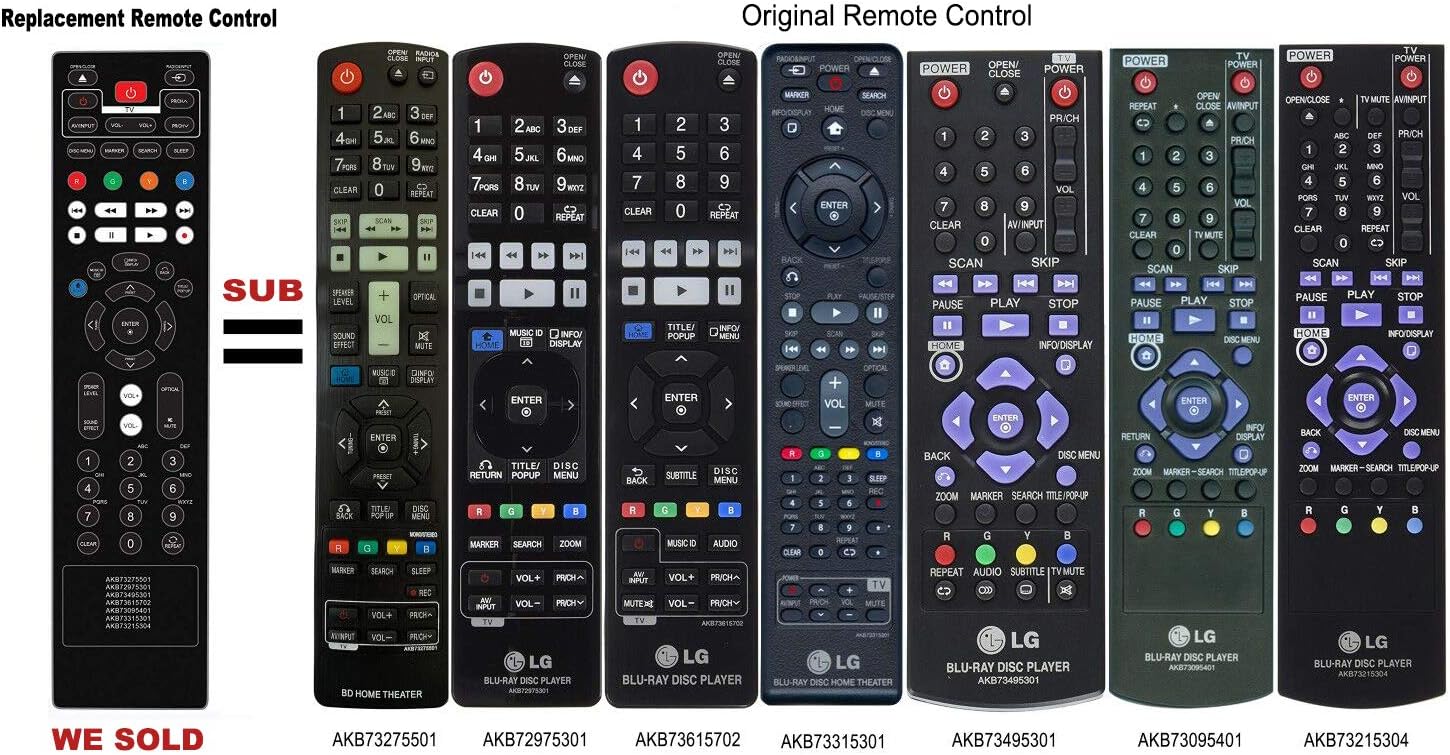
It also supports partial functions for certain LG TV models. Please refer to the product listing for a comprehensive list of compatible models.
Button Functions
The remote features standard controls for your LG Blu-ray Disc DVD Player and compatible LG TVs. Refer to Figure 1 for button layout.
- POWER: Turns the device on or off.
- OPEN/CLOSE: Opens or closes the disc tray.
- AV/INPUT: Selects input source.
- VOL+/-: Adjusts volume.
- PR/CH+/-: Changes channels or navigates menus.
- DISC MENU: Accesses the disc menu.
- MARKER / SEARCH / SLEEP: Specific functions for disc navigation or sleep timer.
- Color Buttons (R, G, Y, B): Used for specific functions as indicated on screen or in device manual.
- Playback Controls (Play, Pause, Stop, Fast Forward, Rewind, Skip): Standard media playback functions.
- INFO/DISPLAY: Displays information about the current content.
- BACK: Returns to the previous screen or menu.
- POP UP/TITLE: Accesses pop-up menu or title menu.
- Navigation Pad (Up, Down, Left, Right, ENTER): Navigates menus and confirms selections.
- PRESET / TUNE+/-: For radio or channel tuning.
- SPEAKER LEVEL / SOUND EFFECT / OPTICAL / MUTE: Audio control functions.
- Number Pad (0-9): For direct input of channels or track numbers.
- CLEAR / REPEAT: Clears input or repeats playback.
Maintenance
Cleaning
To clean the remote control, gently wipe its surface with a soft, dry cloth. Do not use liquid cleaners, sprays, or abrasive materials, as these can damage the remote.
Battery Care
If the remote control will not be used for an extended period, remove the batteries to prevent leakage and potential damage. Dispose of used batteries responsibly according to local regulations.
Troubleshooting
Remote Not Responding
- Check Batteries: Ensure new alkaline batteries are installed correctly with the proper polarity. Replace old or weak batteries with fresh ones. Rechargeable batteries are not recommended for this device.
- Line of Sight: Make sure there are no obstructions between the remote control and the infrared sensor on your LG device. The remote requires a clear line of sight to function.
- Device Power: Confirm that your LG Blu-ray Disc DVD Player or TV is powered on and functioning correctly.
Partial Functionality with LG TV
While this remote is primarily designed for LG Blu-ray Disc DVD Players, it may offer partial compatibility with certain LG TV models. If some functions do not work with your TV, it is likely due to specific TV model requirements or differences from the original TV remote.
Specifications
Product Details
- Model Number: BE-LG7IN1-AKB73215304
- Compatible Remote Models: AKB73275501, AKB72975301, AKB73615702, AKB73315301, AKB73495301, AKB73095401, AKB73215304
- Dimensions: 7 x 2 x 0.65 inches
- Weight: 2 ounces
- Batteries Required: 2 x AAA (not included)
- Connectivity Technology: Infrared (IR)
- Max Number of Supported Devices: 1 (per remote)
- Special Feature: Ergonomic design
Warranty and Support
Warranty Information
This product does not come with an explicit manufacturer's warranty statement in the provided information. Please refer to your point of purchase or the seller for any applicable warranty details.
Customer Support
If your specific LG device model number is not listed in the product compatibility list, or if you encounter any issues not covered in this manual, please contact the seller directly for assistance.