
Important Safety Information
Please read all safety warnings and instructions carefully before using this appliance. Failure to follow these instructions may result in electric shock, fire, and/or serious injury. Keep this manual for future reference.
- Ensure the power supply voltage matches the appliance's requirements (12/24V DC or 110-240V AC).
- Do not operate the appliance with a damaged cord or plug.
- Avoid placing the appliance in direct sunlight or near heat sources.
- Ensure adequate ventilation around the appliance. Do not block ventilation openings.
- Do not immerse the appliance in water or expose it to heavy rain.
- Keep children away from the appliance.
- Disconnect power before cleaning or performing maintenance.
Product Overview
The Alpicool T50 is a portable car refrigerator and freezer designed for versatile use. It features dual temperature control, allowing it to function as both a refrigerator and a freezer simultaneously or as a single-zone unit. Its robust design includes a compressor refrigeration system, low voltage protection, and anti-shaking capabilities, making it suitable for various environments, including vehicles.

Image: The Alpicool T50 portable car refrigerator, showcasing its compressor refrigeration, low voltage protection, mute low noise operation, built-in LED light, wide temperature range, and anti-shaking design.
Key Features:
- 53 Quart (50 Liter) Capacity: Ample storage space for food and beverages.
- Dual Temperature Control: Allows for independent temperature settings in two zones with a detachable sensor divider.
- Wide Temperature Range: Capable of chilling from -4°F (-20°C) to 50°F (10°C).
- Car Battery Protection: Features three levels (Low, Med, High) to prevent vehicle battery drain.
- Portability: Equipped with foldable handles and wheels for easy transport.
- Convenience: Includes a built-in LED light and an internal basket for organization.
Setup
Unpacking and Initial Inspection:
- Carefully remove the refrigerator from its packaging.
- Inspect the unit for any signs of damage during transit. If damage is found, do not operate and contact customer support.
- Clean the interior and exterior of the unit with a damp cloth before first use.
Power Connection:
- DC Power (12/24V): Connect the DC power cord to the refrigerator's DC input port and then to your vehicle's 12V or 24V power outlet (cigarette lighter socket).
- AC Power (110-240V): Connect the AC power adapter to the refrigerator's AC input port, then plug the adapter into a standard wall outlet.
- Ensure the power connection is secure.
Placement:
- Place the refrigerator on a flat, stable surface.
- Allow at least 4 inches (10 cm) of space around the unit for proper ventilation.
- Avoid placing it in direct sunlight or near heat-emitting appliances.
Operating Instructions
Control Panel Overview:

Image: Close-up of the Alpicool T50 control panel, featuring temperature displays for both zones and control buttons.
The control panel typically includes a power button, temperature adjustment buttons (+/-), and a settings button. The display shows the current temperature of each zone.
Powering On/Off:
- Press the Power Button (usually a circle with a vertical line) to turn the unit on or off.
Temperature Adjustment (Dual Zone):
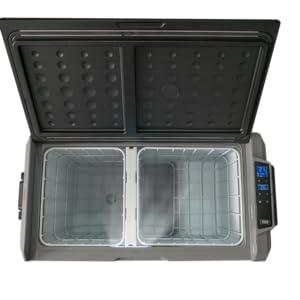
Image: Illustration demonstrating the Alpicool T50's ability to function as a dual-zone unit with a divider or a single-zone unit when the divider is removed.
- The T50 features a detachable sensor divider to switch between single and dual temperature zones.
- When the divider is in place, the control panel will show two temperature displays, typically for the Left Zone (indicated by a square icon) and Right Zone (indicated by a 'P' icon).
- To adjust temperature for a specific zone, select the zone using the appropriate button (if available) or by pressing the Settings Button to cycle through zones. Then use the + or - buttons to set the desired temperature.
- To switch the Left Zone on/off, press the + and - buttons simultaneously for three seconds.
- If the divider is removed, the lower screen will turn off, and temperature control will be managed solely by the upper screen, operating the entire unit as a single zone.
Recommended Temperatures:
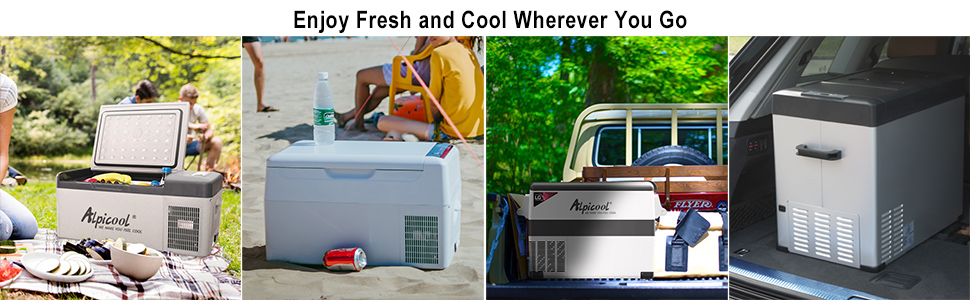
Image: Visual guide for various items and their ideal storage temperatures within the Alpicool T50, such as fruit at 50°F, seafood at -4°F, beer at 42°F, ice cream at 0°F, skin care at 42°F, and beef at -4°F.
The Alpicool T50 can maintain a wide range of temperatures suitable for various items. Here are some common examples:
- Fruit: Approximately 50°F (10°C)
- Beer/Drinks: Approximately 42°F (5.5°C)
- Skin Care Products: Approximately 42°F (5.5°C)
- Seafood/Meat (Freezer): Approximately -4°F (-20°C)
- Ice Cream: Approximately 0°F (-18°C)
Adjust temperatures according to your specific needs and the items being stored.
Battery Protection Settings:
The unit includes a car battery protection system with three levels: Low, Med (Medium), and High. This feature prevents the refrigerator from draining your vehicle's battery completely.
- To change the battery protection level, press the Settings Button (often a gear icon) repeatedly until the battery icon or voltage setting appears.
- Use the + or - buttons to select between Low, Med, or High.
- High: Provides maximum battery protection, shutting off the unit at a higher voltage. Recommended for starting batteries.
- Med: Standard protection.
- Low: Allows the unit to run longer, shutting off at a lower voltage. Use with caution, especially with vehicle starting batteries. Recommended for deep cycle auxiliary batteries.
Maintenance
Cleaning:
- Always disconnect the power supply before cleaning.
- Clean the interior with a soft cloth dampened with mild detergent and warm water. Rinse thoroughly and dry.
- For stubborn stains, use a non-abrasive cleaner.
- Clean the exterior with a soft, damp cloth.
- Ensure the drain plug (if present) is clean and free of debris.
- Do not use abrasive cleaners, harsh chemicals, or sharp objects to clean the unit.
Storage:
- Before storing, ensure the unit is completely clean and dry.
- Leave the lid slightly ajar to prevent odors and mold growth.
- Store the refrigerator in a dry, well-ventilated area, away from direct sunlight and extreme temperatures.
Troubleshooting
| Problem | Possible Cause | Solution |
|---|---|---|
| Unit does not power on. | No power supply; loose connection; blown fuse; low battery voltage. | Check power cord connection; ensure power outlet is functional; check vehicle fuse; adjust battery protection setting to 'Low' or charge battery. |
| Unit not cooling effectively. | Temperature setting too high; blocked ventilation; excessive ambient temperature; door not sealed properly. | Lower temperature setting; ensure adequate ventilation; avoid direct sunlight; check door seal for obstructions. |
| Display shows an error code. | Internal fault; sensor issue. | Refer to specific error code in a more detailed manual (if available) or contact customer support. Try restarting the unit. |
| Excessive noise. | Unit not on a flat surface; fan obstruction. | Place on a stable, flat surface; check for any objects obstructing the fan. |
Specifications
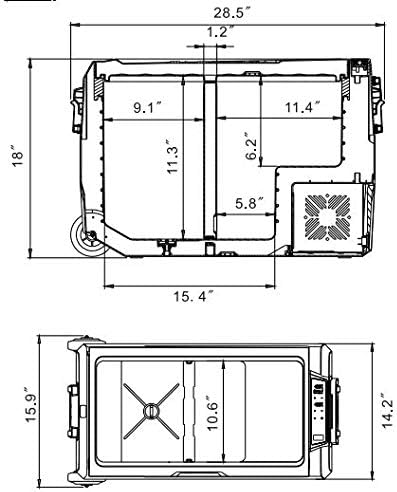
Image: Technical drawing illustrating the external and internal dimensions of the Alpicool T50 portable car refrigerator.
| Feature | Detail |
|---|---|
| Model | T50 |
| Capacity | 53 Quarts (50 Liters) |
| Exterior Dimensions (L x W x H) | 28.5" x 14.2" x 18" (723mm x 360mm x 458mm) |
| Temperature Range | -4°F to 50°F (-20°C to 10°C) |
| Power Input | 12V/24V DC, 110-240V AC |
| Cooling Method | Compressor |
| Refrigerant | R-600A |
| Defrost System | Automatic |
| Configuration | Compact Internal Freezer, Dual Zone Capable |
| Portability Features | Wheels, Foldable Handle |
| Additional Features | Built-in LED Light, Car Battery Protection (3 levels) |
Warranty and Support
Warranty Information:
Alpicool products typically come with a manufacturer's warranty covering defects in materials and workmanship. Please refer to the warranty card included with your purchase or visit the official Alpicool website for detailed warranty terms and conditions specific to your region and model. Keep your proof of purchase for warranty claims.
Customer Support:
For technical assistance, troubleshooting not covered in this manual, or warranty service, please contact Alpicool customer support. Contact information can usually be found on the product packaging, the official Alpicool website, or through your retailer.
When contacting support, please have your product model (T50) and purchase date available.


