
1. Introduction
This manual provides essential information for the proper installation, operation, and maintenance of your JVC CS-DF6920 DRVN Series 6x9 inch 2-Way Coaxial Car Speakers. Please read this manual thoroughly before installation and retain it for future reference.

Figure 1.1: JVC CS-DF6920 DRVN Series 6x9 inch Coaxial Car Speakers.
This image displays two JVC CS-DF6920 speakers. The speaker on the left is shown with its protective grille, highlighting the robust design. The speaker on the right is shown without the grille, revealing the woofer cone and the central tweeter.
2. Safety Information
Observe the following safety precautions to prevent injury or damage to the product and vehicle:
- Professional Installation Recommended: If you are unsure about any part of the installation process, consult a qualified car audio technician.
- Disconnect Battery: Always disconnect the vehicle's negative battery terminal before beginning any electrical work to prevent short circuits.
- Wiring: Ensure all wiring is correctly connected and insulated to prevent electrical shorts and potential fire hazards. Do not allow wires to be pinched or cut by sharp edges.
- Mounting: Securely mount speakers to prevent them from becoming loose during vehicle operation, which could cause injury or damage.
- Volume Levels: Prolonged exposure to high volume levels can cause hearing damage. Adjust volume to a safe and comfortable level.
3. Package Contents
Verify that all items are present in the package:
- JVC CS-DF6920 6x9 inch Coaxial Speakers (2 units)
- Speaker Grilles (2 units)
- Wiring Harnesses (2 units)
- Mounting Hardware (screws, clips)
- Instruction Manual (this document)
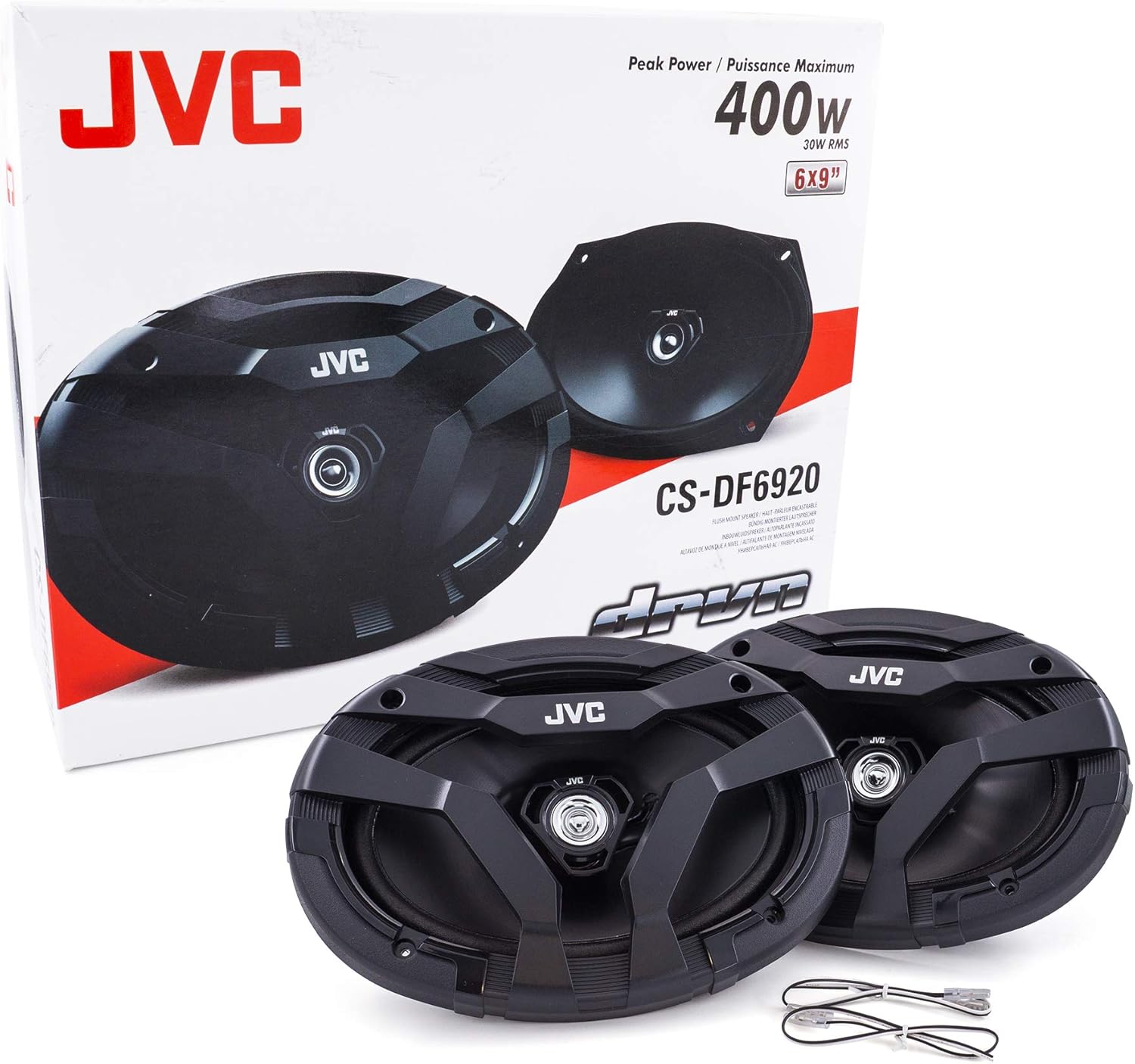
Figure 3.1: JVC CS-DF6920 Package Contents.
This image shows the retail packaging for the JVC CS-DF6920 speakers, with the two speakers and their associated wiring harnesses displayed outside the box, indicating the typical contents.
4. Setup & Installation
Follow these steps for proper installation of your JVC CS-DF6920 speakers:
4.1 Pre-Installation Checks
- Confirm speaker compatibility with your vehicle's existing speaker openings and audio system.
- Gather necessary tools: screwdriver set, wire strippers, crimping tool, electrical tape, drill (if new holes are required).
- Disconnect the vehicle's negative battery terminal.
4.2 Removing Existing Speakers
- Carefully remove the vehicle's interior panels or grilles to access the factory speakers.
- Unscrew and remove the old speakers. Disconnect their wiring harnesses.
4.3 Wiring Connections
The CS-DF6920 speakers come with wiring harnesses. Connect these to your vehicle's speaker wires, ensuring correct polarity (positive to positive, negative to negative). Refer to your vehicle's wiring diagram if unsure.

Figure 4.1: Speaker Rear View with Terminals.
This image provides a clear view of the rear of the JVC CS-DF6920 speaker, highlighting the wiring terminals for connection to the vehicle's audio system.
4.4 Mounting the Speakers
Place the new JVC speakers into the openings. Use the provided mounting hardware to secure them. Ensure they are flush and stable.

Figure 4.2: Speaker Mounting Depth Diagram.
This diagram illustrates the critical dimensions for mounting the JVC CS-DF6920 speaker, specifically highlighting the 12.3mm tweeter protrusion and the 65.5mm reduced-depth basket, which facilitates installation in various vehicle types.
- The speaker features a zero tweeter protrusion (12.3mm from mounting surface) to prevent interference with factory grilles.
- The reduced-depth basket (65.5mm) allows for installation in a wide range of vehicle applications.
4.5 Reassembly
- Replace any removed interior panels or grilles.
- Reconnect the vehicle's negative battery terminal.
5. Operating Instructions
Once installed, your JVC CS-DF6920 speakers will operate as part of your vehicle's audio system. No specific controls are on the speakers themselves.
- Turn on your car stereo.
- Adjust volume, balance, fader, and equalizer settings on your car stereo to achieve desired sound.
- The speakers are designed to deliver clear audio and deep bass even when connected to a factory radio.
6. Maintenance
The JVC CS-DF6920 speakers require minimal maintenance:
- Cleaning: Use a soft, dry cloth to gently wipe dust from the speaker grilles and cones. Avoid using harsh chemicals or abrasive cleaners.
- Inspection: Periodically check speaker mounts and wiring connections to ensure they remain secure.
- Environmental Conditions: These speakers are built to withstand typical automotive environments. Avoid exposing them to excessive moisture or extreme temperatures beyond normal vehicle operating conditions.
7. Troubleshooting
If you experience issues with your speakers, refer to the following common problems and solutions:
| Problem | Possible Cause | Solution |
|---|---|---|
| No sound from speakers | Loose or incorrect wiring connections; Stereo not powered on; Fader/balance settings incorrect. | Check all wiring connections for proper polarity and secure fit. Ensure car stereo is on and functioning. Adjust fader/balance settings on your stereo. |
| Distorted sound | Volume too high; Incorrect equalizer settings; Damaged speaker. | Reduce volume. Adjust equalizer settings on your stereo. If distortion persists at moderate volumes, the speaker may be damaged and require replacement. |
| Weak bass | Incorrect wiring polarity; Bass settings too low on stereo. | Verify correct wiring polarity (positive to positive, negative to negative). Increase bass settings on your car stereo. |
If problems persist after attempting these solutions, consult a qualified car audio technician.
8. Specifications
| Feature | Specification |
|---|---|
| Model Name | CS-DF6920 |
| Speaker Type | 6x9 inch 2-Way Coaxial |
| Peak Power Handling | 400 Watts |
| RMS Power Handling | 30 Watts |
| Impedance | 4 Ohm |
| Sound Pressure Level (SPL) | 82 dB |
| Frequency Response | 17000 Hz (Upper Limit) |
| Woofer Material | Rubber Coated Cloth Surround |
| Mounting Depth | 65.5 mm (2-9/16 inches) |
| Tweeter Protrusion | 12.3 mm (1/2 inch) |
| Product Dimensions (each) | 2.94"D x 14.57"W x 18.11"H |
| Item Weight (pair) | 4.29 pounds |
| Included Components | Wiring, mounting hardware |
| UPC | 046838081590 |
9. Warranty & Support
JVC provides a limited warranty for this product. For specific warranty terms and conditions, please refer to the warranty card included with your purchase or visit the official JVC website. For technical support or service inquiries, please contact JVC customer service through their official channels.


