
1. Introduction
Thank you for choosing the TOZO NC9 Hybrid Active Noise Cancelling Wireless Earbuds. These earbuds are designed to provide an immersive audio experience with advanced noise cancellation, clear call quality, and comfortable all-day wear. This manual will guide you through the setup, operation, and maintenance of your new earbuds.
2. What's in the Box
- TOZO Hybrid Active Noise Cancelling Wireless Earbuds
- Charging Case
- USB-C (A to C) cable (20cm)
- Eartips (multiple sizes)
- User Manual

Figure 2.1: Contents of the TOZO NC9 package.
3. Product Overview
The TOZO NC9 earbuds feature a compact design with advanced audio technology. Key components include:
- Hybrid Active Noise Cancelling: Up to 45dB noise reduction for an immersive listening experience.
- 6-Microphone ENC Clear Call: Enhanced environmental noise cancellation for clear voice transmission during calls.
- Transparency Mode: Allows you to hear your surroundings without removing the earbuds.
- Stereo Bass Sound: Built-in 10mm drivers with OrigX Acoustic 2.0 technology for rich bass and clear audio.
- Ergonomic Design: Comfortable fit with six replaceable ear tip sizes.
- TOZO App Integration: Customize sound with 32 EQ options and noise cancellation modes.
- Extended Playtime: Up to 59 hours total playtime with the charging case (ANC off).
- IPX8 Water Resistance: Protection against sweat, rain, and splashes.
- Bluetooth 5.3 Technology: Stable connection and low latency.
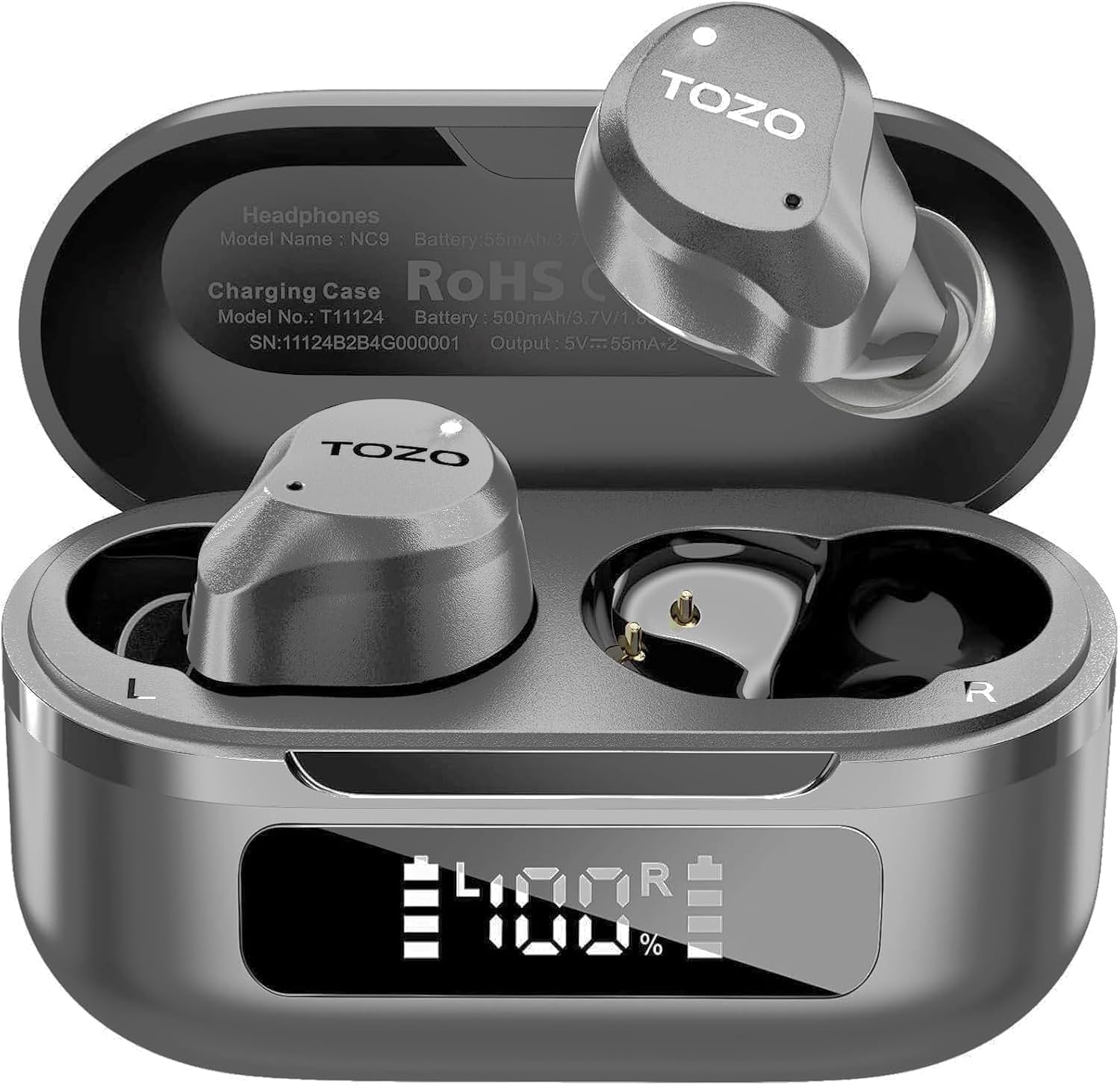
Figure 3.1: TOZO NC9 Earbuds and Charging Case.

Figure 3.2: TOZO OrigX Acoustics Technology for enhanced sound.
4. Setup
4.1. Initial Pairing
- Open the charging case. The earbuds will automatically enter pairing mode.
- On your device (smartphone, tablet, etc.), enable Bluetooth.
- Search for "TOZO NC9" in the list of available Bluetooth devices and select it to connect.
- Once connected, you will hear an audio prompt confirming successful pairing.
4.2. Wearing the Earbuds
For optimal sound quality and comfort, ensure a proper fit:
- Choose the ear tips that best fit your ear canal from the provided sizes.
- Insert the earbuds into your ears with the sound hole pointing downwards.
- Gently rotate the earbuds backward to secure them snugly in your ear.

Figure 4.1: Proper wearing of the TOZO NC9 Earbuds.
5. Operating Instructions
5.1. Touch Controls
The TOZO NC9 earbuds feature intuitive touch controls on each earbud:
- Single Tap (Left/Right): Play/Pause music, Answer/End call.
- Double Tap (Left): Previous track.
- Double Tap (Right): Next track.
- Triple Tap (Left): Activate/Deactivate Noise Cancellation or Transparency Mode.
- Triple Tap (Right): Activate Voice Assistant (Siri, Google Assistant).
- Long Press (Left/Right): Reject call.
5.2. Active Noise Cancellation (ANC) & Transparency Mode
The earbuds offer three sound modes:
- Active Noise Cancellation (ANC): Reduces external noise for an immersive audio experience.
- Transparency Mode: Allows ambient sounds to pass through, keeping you aware of your surroundings.
- Normal Mode: Standard audio with no active noise processing.
Switch between modes by triple-tapping the left earbud.
Figure 5.1: Active Noise Cancellation in action.
5.3. TOZO App Features
Download the TOZO App to unlock advanced customization options:
- 32 EQ Options: Tailor your audio experience with various preset equalizers or create custom sound profiles.
- Noise Cancellation Modes: Fine-tune ANC and Transparency settings.
- EQ Zone: Share and discover custom EQ settings from other users.

Figure 5.2: TOZO App for sound customization.
6. Charging & Battery Life
6.1. Charging the Case and Earbuds
The charging case can be charged via the included USB-C cable. The earbuds charge automatically when placed inside the case.
- Charging Time: Approximately 1.5 hours for a full charge.
- Battery Indicator: The charging case features an LED display to show the remaining battery percentage.

Figure 6.1: Charging case with LED display.
6.2. Battery Performance
- Total Playtime (with charging case): Up to 59 hours (ANC off), 42 hours (ANC on).
- Single Use Playback: Up to 14 hours (ANC off), 10 hours (ANC on).

Figure 6.2: Extended playtime capabilities.
7. Maintenance & Care
7.1. Water Resistance
The TOZO NC9 earbuds are IPX8 water-resistant, meaning they can withstand sweat, rain, and accidental splashes. However, they are not designed for swimming or prolonged submersion. Ensure earbuds are dry before placing them back in the charging case.
7.2. Cleaning
Regularly clean your earbuds and charging case to maintain optimal performance:
- Use a soft, dry, lint-free cloth to wipe the earbuds and charging case.
- Remove ear tips and clean them with mild soap and water, then dry thoroughly before reattaching.
- Avoid using abrasive materials or harsh chemicals.
8. Troubleshooting
- Earbuds not pairing: Ensure both earbuds are in the charging case, then open the lid to initiate pairing mode. Check your device's Bluetooth settings.
- Only one earbud working: Place both earbuds back in the charging case, close the lid, then open it again. Re-pair if necessary.
- Poor sound quality: Ensure ear tips provide a secure seal. Clean earbuds to remove any debris. Check audio source quality.
- Charging issues: Ensure the charging cable is securely connected and the charging case is clean. Check the LED display for battery status.
- Resetting Earbuds: Refer to the full user manual for specific reset instructions if persistent issues occur.
9. Specifications
| Feature | Specification |
|---|---|
| Model Name | TOZO NC9 |
| Noise Control | Hybrid Active Noise Cancellation |
| Bluetooth Version | 5.3 |
| Bluetooth Range | 10 Meters |
| Battery Life (Earbuds) | 14 Hours (ANC off), 10 Hours (ANC on) |
| Total Playtime (with Case) | 59 Hours (ANC off), 42 Hours (ANC on) |
| Charging Time | 1.5 Hours |
| Water Resistance Level | IPX8 |
| Audio Driver Size | 10 Millimeters |
| Control Type | Touch Control / APP |
| Included Components | Earbuds, Charging Case, USB-C Cable, Eartips, User Manual |
10. Warranty & Support
Your TOZO NC9 earbuds come with an 18-Month Extended Warranty. For warranty activation and support, please visit the official TOZO website or contact customer service.
For further assistance, please visit the TOZO Store on Amazon.
Video 10.1: An overview of the TOZO NC9 earbuds, including unboxing and features.
Video 10.2: A review highlighting the sound quality, fit, and value of the TOZO NC9 earbuds.
Video 10.3: A demonstration of the noise cancelling capabilities of the TOZO NC9 earbuds.


