
BOMAZ LT-40164, WD-60737, WD-65734, WD-65733, WD-65735, WD-73640, WD-82742, 290P137030, 290P187020
User Manual: Replacement Remote Control for Mitsubishi TV
Model Compatibility: LT-40164, WD-60737, WD-65734, WD-65733, WD-65735, WD-73640, WD-82742, 290P137030, 290P187020
1. Introduction
This manual provides essential information for the proper use and maintenance of your new replacement remote control for Mitsubishi TVs. This remote is designed to be a direct replacement, requiring no programming or setup. Simply insert batteries, and it is ready for use.
Key Features:
- No programming required; ready to use out of the box.
- Operable distance: More than 8 meters.
- Constructed from durable ABS Material.
- Slim and sleek design for comfortable handling.
2. Setup
2.1 Battery Installation
The remote control requires two (2) AA 1.5V alkaline batteries (not included). Follow these steps to install the batteries:
- Locate the battery compartment on the back of the remote control.
- Press down on the tab and slide the battery cover off.
- Insert two AA batteries, ensuring the positive (+) and negative (-) ends align with the markings inside the compartment.
- Slide the battery cover back into place until it clicks securely.

Figure 2.1: Rear view of the remote control with the battery cover removed, illustrating the battery insertion process. It indicates the need for 2x 1.5V AA Alkaline Batteries.
3. Operating Instructions
This remote control is designed for intuitive use with your compatible Mitsubishi TV. All buttons are pre-programmed for their respective functions.
3.1 Basic Functions
- POWER: Turns the TV on or off.
- TV/AUDIO/DVD/CAB/SAT/VCR: Selects the input source.
- VOL +/-: Adjusts the volume level.
- CH PAGE +/-: Changes the channel.
- MUTE: Mutes or unmutes the TV audio.
- Number Buttons (0-9): Directly enters channel numbers.
- GUIDE/MENU/INFO/EXIT: Navigates TV menus and information displays.
- Directional Pad (Up/Down/Left/Right) & ENTER: Navigates menus and confirms selections.

Figure 3.1: Front view of the remote control, displaying its full button layout and design.
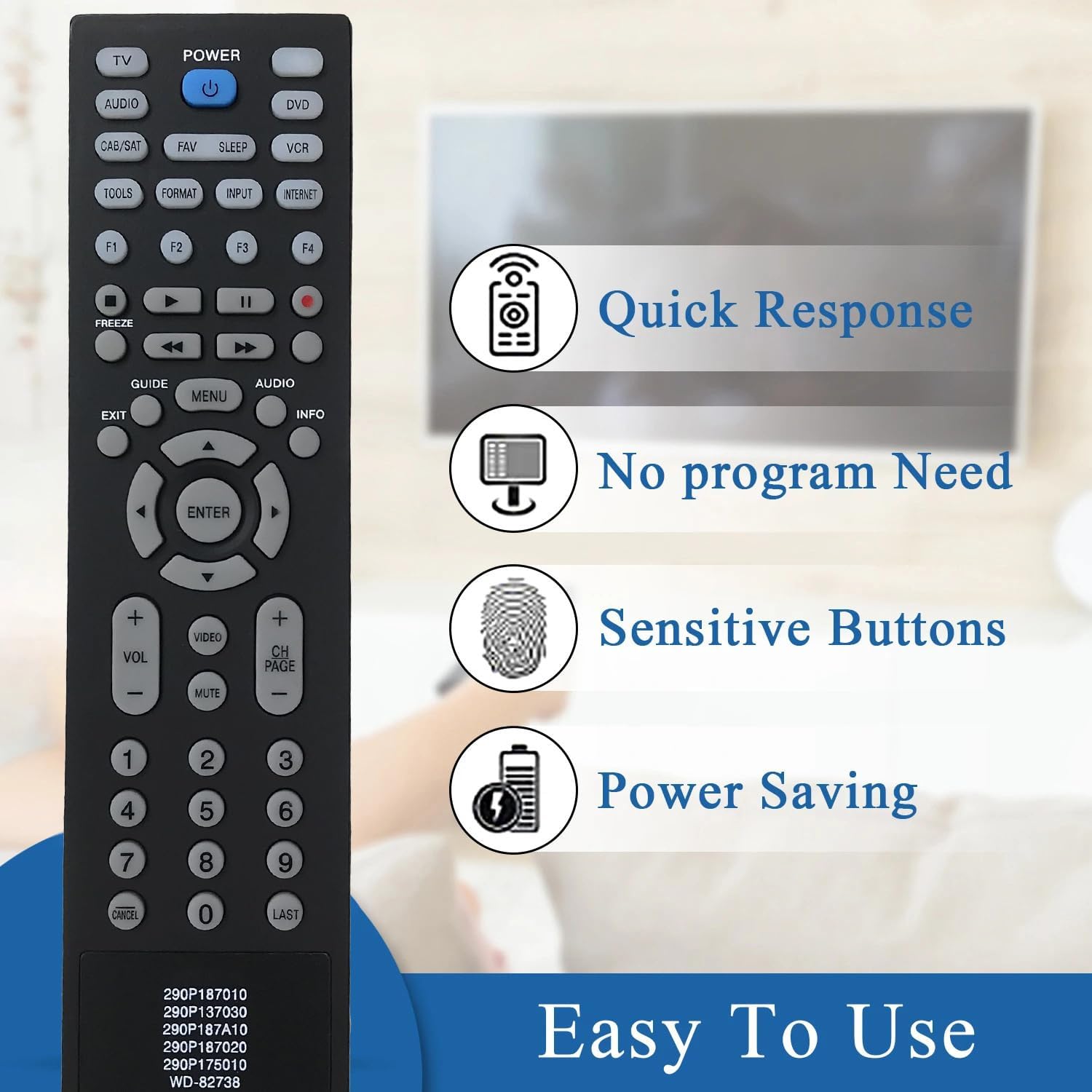
Figure 3.2: Features of the remote control, emphasizing quick response, no programming requirement, sensitive buttons, and power-saving capabilities.

Figure 3.3: Illustration of the remote's IR3.0* Technology, highlighting its upgraded chip, higher matching capability, and improved stability for reliable performance.
4. Maintenance
To ensure the longevity and optimal performance of your remote control, follow these simple maintenance guidelines:
- Cleaning: Use a soft, dry cloth to clean the remote's surface. Avoid using liquid cleaners or abrasive materials.
- Battery Care: If the remote will not be used for an extended period, remove the batteries to prevent leakage and potential damage.
- Storage: Store the remote in a cool, dry place away from direct sunlight and extreme temperatures.
- Avoid Drops: Protect the remote from physical impact, as drops can damage internal components.
5. Troubleshooting
If you encounter any issues with your remote control, please refer to the following common solutions:
- Remote not responding: Ensure batteries are correctly inserted with the correct polarity (+/-). Replace old or depleted batteries with new ones.
- Limited range: Ensure there are no obstructions between the remote and the TV's infrared receiver. The operable distance is more than 8 meters.
- Specific buttons not working: Check for any debris or stickiness around the button. If the issue persists, it may indicate a fault with the remote.
This remote control is tested before shipment. If you receive a remote with a problem that cannot be resolved by the above steps, please contact customer support.
6. Specifications
| Feature | Detail |
|---|---|
| Compatible Devices | Television (Mitsubishi TV models: LT-40164, WD-60737, WD-65734, WD-65733, WD-65735, WD-73640, WD-82742, 290P137030, 290P187020) |
| Connectivity Technology | Infrared |
| Power Supply | 2 x AA 1.5V Alkaline Batteries (not included) |
| Operable Distance | More than 8 meters |
| Material | ABS Material |
| Item Weight | 3.98 ounces |
| Package Dimensions | 9.61 x 4.37 x 1.38 inches |
7. Warranty and Support
7.1 Warranty Information
This product comes with a 30-day warranty from the date of purchase. This warranty covers manufacturing defects. Please retain your proof of purchase for warranty claims.
7.2 Customer Support
If you have any questions, concerns, or require assistance with your remote control, please do not hesitate to contact us. We are committed to ensuring your satisfaction.
For support, please refer to the contact information provided by your retailer or on the product packaging.
Related documentsLT-40164, WD-60737, WD-65734, WD-65733, WD-65735, WD-73640, WD-82742, 290P137030, 290P187020

Ask a question about this manual
Ask about setup, troubleshooting, compatibility, parts, safety, or missing instructions. Manuals+ will review the question and use this page’s manual context to help answer it.